
1. Продукт бүтүп калдыview
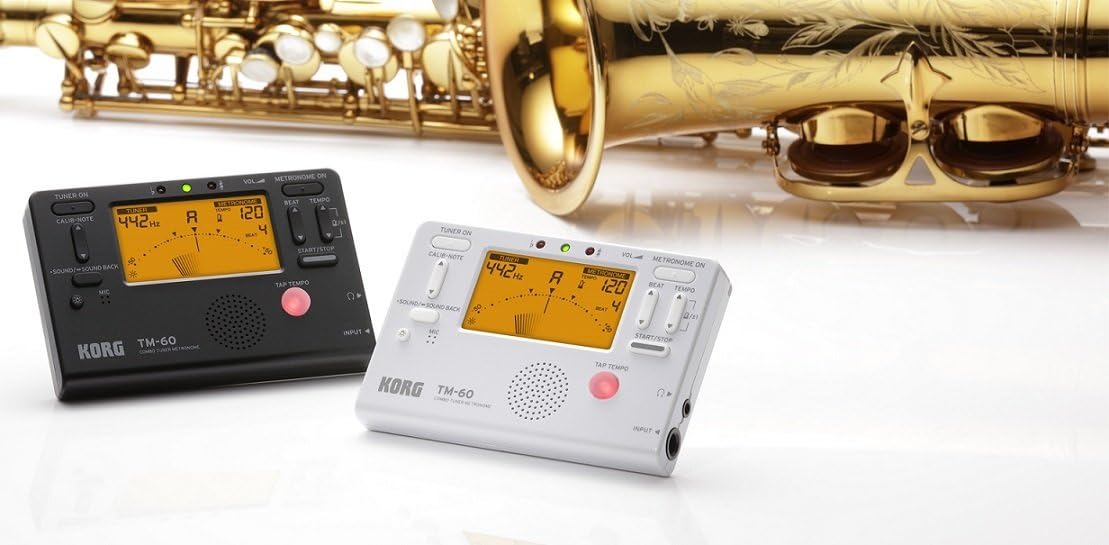
The KORG TM60CBK is a versatile combo tuner and metronome designed for musicians. It features a high-precision tuner function and a metronome function that can be used simultaneously. This model includes a CM-200 Contact Clip-on Microphone for enhanced tuning accuracy, especially in noisy environments. The large screen displays both tuner and metronome functions clearly, making it an essential tool for practicing.
- Кош функционалдык: High-precision tuner and metronome functions can be used concurrently.
- Камтылган микрофон: Comes with a CM-200 Contact Clip-on Microphone for direct instrument tuning.
- Таза дисплей: Features a new, larger screen for simultaneous display of tuner and metronome.
- Түсү: Кара.
2. Орнотуу
2.1 Батареяны орнотуу
The KORG TM60CBK operates on AAA batteries. To install or replace batteries:
- Аппараттын арт жагында жайгашкан батарея бөлүкчөсүнүн капкагын ачыңыз.
- Insert the AAA batteries, ensuring correct polarity (+/-).
- Батарея уясынын капкагын бекем жабыңыз.
2.2 Connecting the CM-200 Contact Clip-on Microphone
For precise tuning, especially with acoustic instruments or in loud settings, connect the included clip-on microphone:
- Plug the microphone's 1/4-inch (6.35mm) jack into the INPUT jack on the side of the TM60CBK unit.
- Attach the clip to the headstock or bell of your instrument. Ensure the clip is securely fastened and the microphone is positioned to pick up vibrations effectively.
3. Иштөө нускамалары
3.1 Тюнер режими
To use the tuner function:
- Press the 'TUNER ON' button to activate the tuner.
- Select the desired instrument mode (Chromatic, Guitar, Bass, Violin, Ukulele) using the 'ITEM' button.
- Adjust the A4 calibration pitch (default 440Hz) using the 'CALIB./NOTE' buttons if needed.
- Play a single note on your instrument. The display will show the detected note and indicate if it is sharp, flat, or in tune using the needle-style meter and LED indicators.
3.2 Метроном режими
To use the metronome function:
- Press the 'METRONOME ON' button to activate the metronome.
- Set the desired tempo (BPM) using the 'TEMPO' buttons.
- Adjust the beat (time signature) using the 'BEAT' buttons.
- Select different rhythm patterns using the 'RHYTHM' button.
- Press 'START/STOP' to begin or pause the metronome.
- Adjust the volume using the 'VOL' slider on the side of the unit.
- For private practice, plug headphones into the 3.5mm headphone jack.
- Use the 'TAP TEMPO' button to set the tempo by tapping along to a desired rhythm.
3.3 Тон генератору
The TM60CBK can also generate reference tones:
- In Tuner Mode, press the 'SOUND/SOUND BACK' button to activate the tone generator.
- Use the 'CALIB./NOTE' buttons to select the desired reference note.
- Listen to the generated tone and tune your instrument by ear.
4. Продукциянын сүрөттөрү



5. Техникалык шарттар
| Өзгөчөлүк | Деталь |
|---|---|
| Модель аты | TM60 |
| Модель номери | TM60C-BK |
| Түс | Кара |
| Элементтин өлчөмдөрү (L x W x Y) | 4.37 x 2.91 x 0.71 дюйм |
| Элемент Салмагы | 0.16 грамм |
| Камтылган компоненттер | Сумка |
| Туташтыргыч түрү | USB (for power, not data) |
6. Техникалык тейлөө
To ensure the longevity and optimal performance of your KORG TM60CBK:
- Тазалоо: Аппаратты жумшак, кургак чүпүрөк менен сүртүңүз. Абразивдүү тазалоочу каражаттарды же эриткичтерди колдонбоңуз.
- Батареяга кам көрүү: Агып кетүүнүн алдын алуу үчүн бирдик узак убакыт бою колдонулбай турган болсо, батарейкаларды алып салыңыз.
- Сактагыч: Аппаратты күн нурунан жана экстремалдык температурадан алыс салкын, кургак жерде сактаңыз.
7. Кыйынчылыктарды
- Түзмөк күйбөйт: Батареянын орнотулушун текшерип, батарейкалары түгөнүп калбагандыгын текшериңиз.
- Tuner is inaccurate: Ensure the CM-200 microphone is securely attached to the instrument. Verify the correct instrument mode is selected. Check the A4 calibration pitch.
- No sound from metronome: Check the volume level. Ensure headphones are not plugged in if you intend to use the internal speaker.
8. Кепилдик жана колдоо
For warranty information, technical support, or service inquiries, please refer to the official KORG website or contact KORG customer service directly. Keep your purchase receipt as proof of purchase for warranty claims.