
1. Киришүү
Бул колдонуучунун колдонмосунда Secukey SK4-W автономдуу кирүүнү башкаруу системасын орнотуу, иштетүү жана техникалык тейлөө боюнча кеңири көрсөтмөлөр берилген. Туура иштешин жана коопсуздугун камсыз кылуу үчүн орнотуудан жана колдонуудан мурун бул колдонмону кылдаттык менен окуп чыгыңыз.
Secukey SK4-W – бул сыртта колдонуу үчүн иштелип чыккан, RFID картасы жана PIN код аркылуу кирүү мүмкүнчүлүгүнө ээ, бекем, IP66 рейтингине ээ кирүүнү көзөмөлдөөчү түзүлүш. Ал эшиктерди, дарбазаларды жана башка кирүүчү жерлерди бекитүү үчүн идеалдуу чечим.
2. Продукт бүтүп калдыview
2.1 Негизги өзгөчөлүктөрү
- IP66 суу өткөрбөй турган жана вандалга каршы дизайн: Катаал сырткы чөйрөгө ылайыктуу.
- Бир нече кирүү режимдери: Коопсуздукту жогорулатуу үчүн RFID картасын гана, PIN кодун гана же Card + PIN кодун гана колдойт.
- Жогорку колдонуучу кубаттуулугу: 1000ге чейин колдонуучуну башкарат.
- Интеграцияланган реле: Эшиктин кулпусун түз башкаруу үчүн орнотулган NO, NC, Com релеси.
- Жөнгө салынуучу чыгаруу убактысы: Программалануучу кулпу чыгаруу убактысы (1-99 секунд) жана сигнал чыгаруу убактысы (1-3 мүнөт).
- Wiegand 26-биттик интерфейси: Тышкы Wiegand окугучтарын, чыгуу баскычтарын жана ойготкучтарды колдойт.
- Кулпу режими: Эшиктин же дарбазанын ачык калышына мүмкүндүк берет.
- Wide Voltage диапазону: 12~28V AC/DC менен иштейт.
- Арткы жарык баскычтоп: Жарык аз шарттарда көрүнүүнү камсыз кылат.
- Туруктуу курулуш: Цинк эритмеси casinг порошок менен капталган.
2.2 Компоненттер камтылган
- 1 x Secukey SK4-W Өзүнчө кирүүнү башкаруу түзмөгү (RFID/PIN)
- 1 x Master Add картасы
- 1 x Негизги өчүрүү картасы
- 1 x User Manual
2.3 Продукт Views

Сүрөт 1: Алдыңкы view SK4-W блогунун клавиатурасын жана Secukey брендин баса белгилеп.

2-сүрөт: Бурчтуу view SK4-W моделинин сымбаттуулугунун көз карашын камсыз кылатfile.

3-сүрөт: Каптал view SK4-W блогунун.
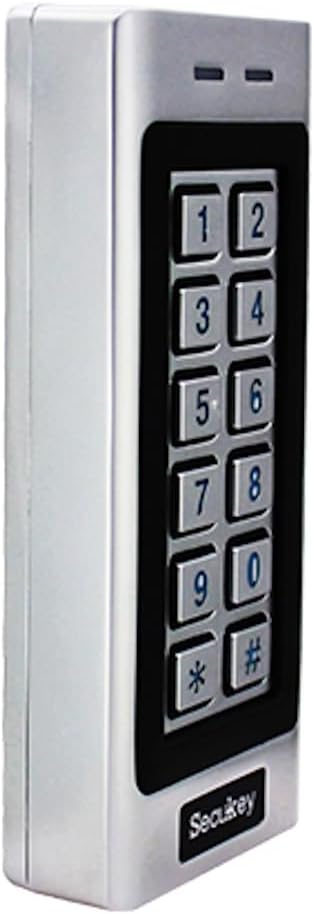
4-сүрөт: Башка тарап view SK4-W блогунун.

5-сүрөт: Артка view SK4-W блогунун орнотуу үчүн интеграцияланган зымдары көрсөтүлүүдө.
3. Орнотуу жана орнотуу
3.1 Аппаратты орнотуу
SK4-W бетке орнотуу үчүн иштелип чыккан. Эшиктин же дарбазанын жанындагы коопсуз жерди тандап, анын колдонуучулар үчүн жеткиликтүү жана түз соккудан корголгонун текшериңиз. Орнотуу бети үчүн тиешелүү бурамаларды жана дубал тыгындарын колдонуңуз.
3.2 Электр өткөргүч схемасы
Түзмөккө 12~28V AC/DC кубат булагы керек (кошулмага кирбейт). Зымдарды толук колдонмодо берилген схемага ылайык туташтырыңыз. Кыска туташуулардын алдын алуу үчүн бардык туташуулардын бекем жана изоляцияланганын текшериңиз.
- Кубат киргизүү: 12~28V AC/DC кубат булагына туташтырыңыз.
- Кулпулоочу чыгуу (NO/NC/COM): Электр кулпуңузга туташтырыңыз.
- Ойготкуч Output: Тышкы сигнализация системасына туташтырыңыз (эгер бар болсо).
- Wiegand кирүү/чыгуу: Тышкы Wiegand окугучтарын же башка Wiegand түзмөктөрүн туташтыруу үчүн.
- Чыгуу баскычы: Ыңгайлуу чыгуу үчүн чыгуу баскычын туташтырыңыз.
Зымдардын толук схемалары үчүн, продукттун таңгагында камтылган толук зым схемасын караңыз.
4. Иштөө нускамалары
4.1 Баштапкы орнотуу жана MasterCard карталары
Биринчи жолу күйгүзүлгөндө, түзмөк заводдук демейки режимде болот. Колдонуучунун кирүүсүн башкаруу үчүн камтылган Master Add Card жана Master Delete Card колдонуңуз.
- Колдонуучуларды кошуу: Master Add картасын көрсөтүңүз, андан кийин жаңы колдонуучунун RFID картасын көрсөтүңүз же анын PIN кодун киргизиңиз.
- Колдонуучуларды жок кылуу: Master Delete картасын көрсөтүңүз, андан кийин колдонуучунун RFID картасын көрсөтүңүз же өчүрүлө турган PIN кодун киргизиңиз.
4.2 Кирүү режимдери
SK4-W үч негизги кирүү режимин колдойт:
- Карта гана режими: Колдонуучулар жарактуу RFID картасын көрсөтүү менен мүмкүнчүлүк алышат.
- PIN гана режими: Колдонуучулар жарактуу 4-6 орундуу PIN кодун киргизүү менен кирүү мүмкүнчүлүгүнө ээ болушат.
- Карта + PIN режими: Колдонуучулар жарактуу RFID картасын көрсөтүп, андан кийин кирүү үчүн тиешелүү PIN кодун киргизиши керек. Бул режим эң жогорку коопсуздукту камсыз кылат.
Кирүү режимдеринин ортосунда которулуу жана колдонуучунун PIN-коддорун башкаруу боюнча нускамаларды алуу үчүн толук программалоо көрсөтмөсүн караңыз.
4.3 Коноктун PIN коддору
SK4-W 10го чейин коноктун PIN-кодун колдойт, аларды 1ден 10го чейин колдонууга жарактуу кылып коюуга болот. Бул функция коноктор же тейлөө персоналы үчүн убактылуу кирүү үчүн пайдалуу.

6-сүрөт: SK4-W коноктордун PIN-коддорун колдойт жана IP66 суу өткөрбөйт, сыртка орнотууга ылайыктуу.
4.4 Кулпу режими
Кулпу режими эшиктин же дарбазанын узак убакыт бою кулпусу ачык бойдон калышына мүмкүндүк берет, бул чукул жумуш учурунда же техникалык тейлөө үчүн пайдалуу болушу мүмкүн. Иштетүү жана өчүрүү жол-жоболору үчүн программалоо колдонмосун караңыз.
5. Техникалык тейлөө
Secukey SK4-W бекем конструкциясы жана IP66 рейтингинен улам минималдуу тейлөө үчүн иштелип чыккан. Бирок, үзгүлтүксүз текшерүүлөр анын иштөө мөөнөтүн узартып, оптималдуу иштешин камсыздай алат.
- Тазалоо: Баскычтопту аарчыңыз жана casing жумшак менен, гamp кездеме. Абразивдүү тазалагычтардан же эриткичтерден качыңыз.
- Туташуу текшерүү: Зымдардын туташууларында эскирүүнүн, дат басуунун же бошоп кетүүнүн белгилерин мезгил-мезгили менен текшерип туруңуз.
- Программалык камсыздоонун жаңыртуулары: Өндүрүүчүнү текшериңиз webжеткиликтүү болгон программалык камсыздоо жаңыртуулары үчүн сайт.

7-сүрөт: SK4-W -40°Cден 60°Cге чейинки экстремалдык иштөө температурасына туруштук берүү үчүн иштелип чыккан.
6. Кыйынчылыктарды
| Көйгөй | Мүмкүн себеп | Чечим |
|---|---|---|
| Түзмөк күйбөй жатат. | Электр энергиясы жок; туура эмес томtagд; зымдардын бошоп калышы. | Электр кубатына туташууларды текшерип, 12~28V AC/DC булагынын туура экенин текшериңиз. Зымдарды текшериңиз. |
| RFID картасы таанылган жок. | Карта катталган эмес; картанын түрү туура эмес (125 кГц электромагниттик жыштык эмес); карта бузулган. | Карта туура катталганын текшериңиз. Анын 125 кГц EM картасы экенин текшериңиз. Башка картаны колдонуп көрүңүз. |
| PIN код иштебей жатат. | Туура эмес PIN; PIN код катталган эмес; түзмөк карта менен гана иштөө режиминде. | PIN кодду эки жолу текшериңиз. PIN код катталганын текшериңиз. Кирүү режиминин жөндөөсүн текшериңиз. |
| Эшиктин кулпусу иштетилбей жатат. | Туура эмес кулпу зымдары (NO/NC); кулпу кубатындагы көйгөй; реле чыгуу убактысы өтө кыска. | Зымдарды жана кубаттуулукту текшериңиз. Жөндөөлөрдөн кулпунун чыгуу убактысын тууралаңыз. |
| Wiegand чыгаруу көйгөйлөрү. | Туура эмес Wiegand зымдары; шайкеш келбеген Wiegand түзмөгү. | Wiegand 26-биттик зымдарын текшериңиз. Тышкы түзмөктүн шайкештигин текшериңиз. |
Эгер көйгөй чечилбесе, жардам алуу үчүн Secukey техникалык колдоо кызматына кайрылыңыз.

8-сүрөт: Wiegand 26-биттик киргизүү жана чыгаруу сигналдарынын убакыт диаграммасы.
7. Техникалык шарттар
| Атрибут | Нарк |
|---|---|
| Модель номери | SK4-W |
| Бренд | Secukey |
| Өлчөмдөрү (L x W x Y) | 13.0 x 5.6 x 2.3 см |
| Салмагы | 500 грамм |
| Түс | Silver |
| Электр камсыздоо | 12 ~ 28V AC / DC |
| Кирүү коргоо (IP) рейтинги | IP66 (Суу өткөрбөйт, Вандалга каршы) |
| Колдонуучунун кубаттуулугу | 1000 колдонуучуга чейин |
| PIN коддун узундугу | 4ден 6го чейин цифралар |
| Карта түрү | 125 кГц EM картасы |
| Wiegand Interface | Wiegand 26-биттик киргизүү жана чыгаруу |
| Output Load жүктөө | 3А Макс |
| Ойготкучтун чыгышы | 3А Макс |
| Иштөө температурасы | -40 °Cден 60 °Cге чейин (-40 °Cден 140 °Cге чейин) |
| Иштөө нымдуулугу | 10% - 90% (конденсацияланбаган) |
| Casing Материал | Порошок менен капталган цинк эритмеси |
8. Кепилдик жана колдоо
Secukey өнүмдөрү жогорку сапат стандарттарына ылайык өндүрүлөт. Кепилдик жөнүндө маалымат жана техникалык колдоо алуу үчүн, өнүмүңүз менен кошо берилген кепилдик картасын караңыз же расмий Secukey дүкөнүнө баш багыңыз. webсайт.
Байланыш маалыматы:
- Өндүрүүчү: Secukey
- Webсайт: www.secukey.com (Чыгampшилтеме, чыныгы шилтеме ар кандай болушу мүмкүн)
- Кардарларды тейлөө: Продукциянын таңгагын караңыз же webаймактык колдоо байланыштары үчүн сайт.
Кепилдик дооматтары үчүн сатып алганыңыздын далилин сактап коюңуз.