
Introduction
Thank you for choosing the BONTEC MWS02 Mobile Standing Desk. This versatile and ergonomic workstation is designed to enhance your productivity and comfort, whether you are sitting or standing. Its adjustable height, multiple shelves, and mobile design make it an ideal solution for various environments, including home offices, classrooms, and professional settings.
This manual provides essential information for the safe assembly, operation, and maintenance of your new desk. Please read these instructions carefully before use and retain them for future reference.

Image: The BONTEC MWS02 Mobile Standing Desk, showcasing its multi-level design and mobility.
Коопсуздук маалыматы
- Колдонуудан мурун бардык компоненттердин бекем бекитилгенин текшериңиз. Бош бөлүктөрү туруксуздукка жана жаракат алууга алып келиши мүмкүн.
- Do not exceed the maximum load capacity for each shelf as specified in the 'Specifications' section. Overloading can lead to structural failure.
- Keep children and pets away from the desk during assembly and adjustment to prevent accidents.
- Use the desk on a flat, stable surface. Uneven surfaces can compromise stability.
- When moving the desk, ensure the path is clear and all items on the shelves are secure to prevent them from falling. Lock the wheels once the desk is in its desired position.
- Avoid placing hot items directly on the desk surfaces without protective padding.
- Do not attempt to modify the desk structure. Unauthorized modifications may void the warranty and pose safety risks.
Пакеттин мазмуну
Before beginning assembly, please verify that all parts listed below are present and undamaged. If any parts are missing or damaged, contact customer support immediately.
- Desk Shelves (4 units: 2 large, 2 small)
- Main Support Columns (Vertical poles)
- Base Frame with Wheels (4 universal wheels, 2 with locking mechanism)
- Бийиктикти жөндөө баскычтары
- Assembly Hardware (Screws, bolts, tools if provided)
- Instruction Manual
Монтаждоо көрсөтмөлөрү
The BONTEC MWS02 Mobile Standing Desk is designed for easy assembly. Follow these steps to set up your desk.
- Attach the Base Frame: Secure the main support columns to the base frame using the provided hardware. Ensure the wheels are properly oriented.
- Текчелерди орнотуу: Slide the shelves onto the support columns. The two larger shelves are typically for the monitor/laptop and keyboard, while the two smaller shelves are for accessories.
- Secure Height Adjustment Knobs: Insert and tighten the height adjustment knobs into the designated holes on the support columns to fix the shelves at your desired initial height.
- Акыркы текшерүү: Once all components are assembled, gently shake the desk to ensure stability. Tighten any loose screws or connections.
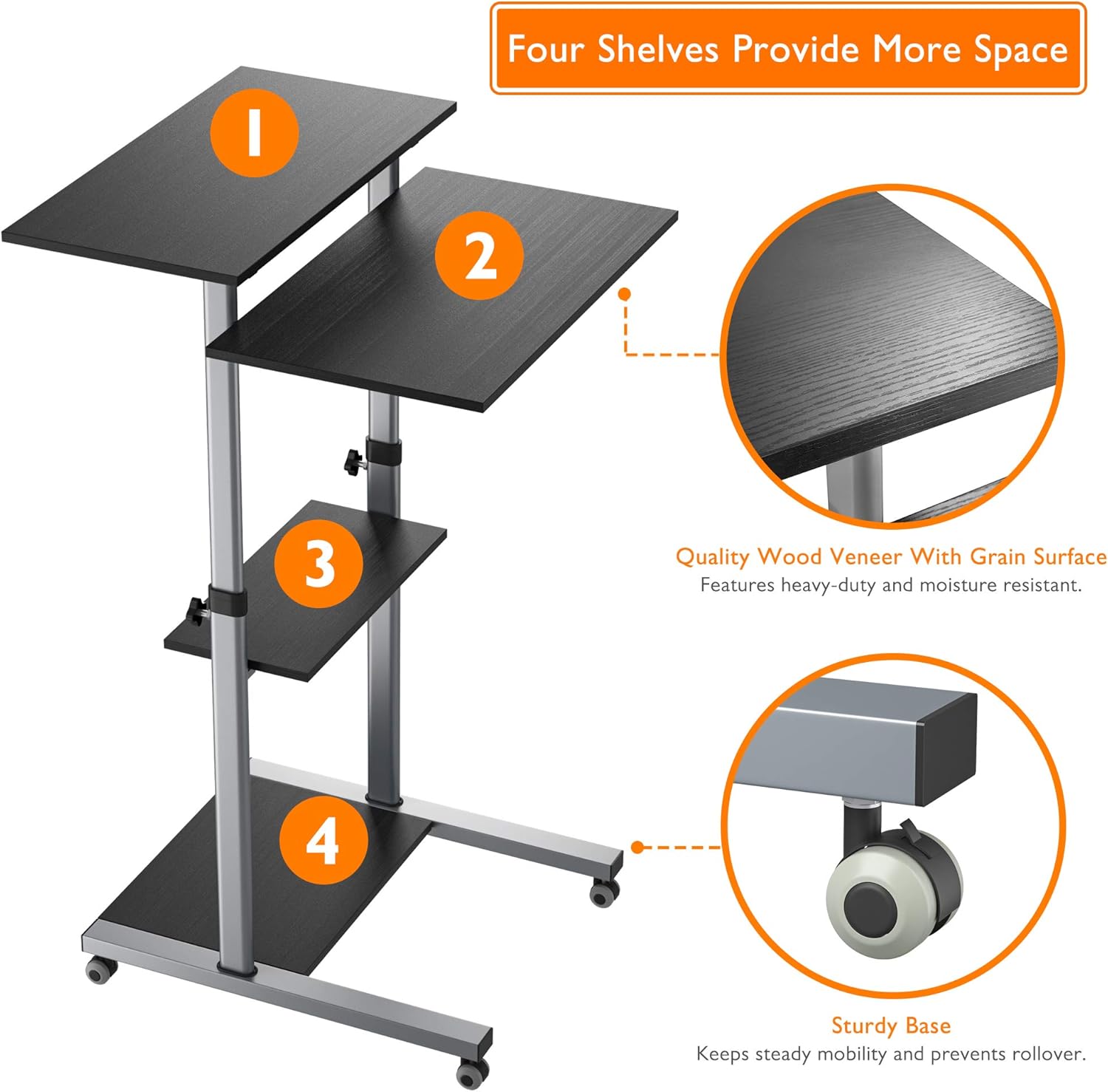
Image: Illustration of the four shelves and the sturdy base with lockable wheels.
Иштөө нускамалары
Бийиктигин тууралоо
The BONTEC MWS02 desk features stepless height adjustment, allowing you to easily switch between sitting and standing positions. The desk can be adjusted from a minimum height of 950 mm to a maximum height of 1390 mm.
- Кулпуну ачуу: Loosen the height adjustment knobs located on the main support columns for the desired shelf.
- Тууралоо: Carefully slide the shelf up or down to your preferred ergonomic height.
- Кулпу: Once the desired height is reached, firmly tighten the adjustment knobs to secure the shelf in place. Ensure all knobs are fully tightened before placing items on the desk.

Image: Diagram showing the minimum (950mm) and maximum (1390mm) height adjustment range.
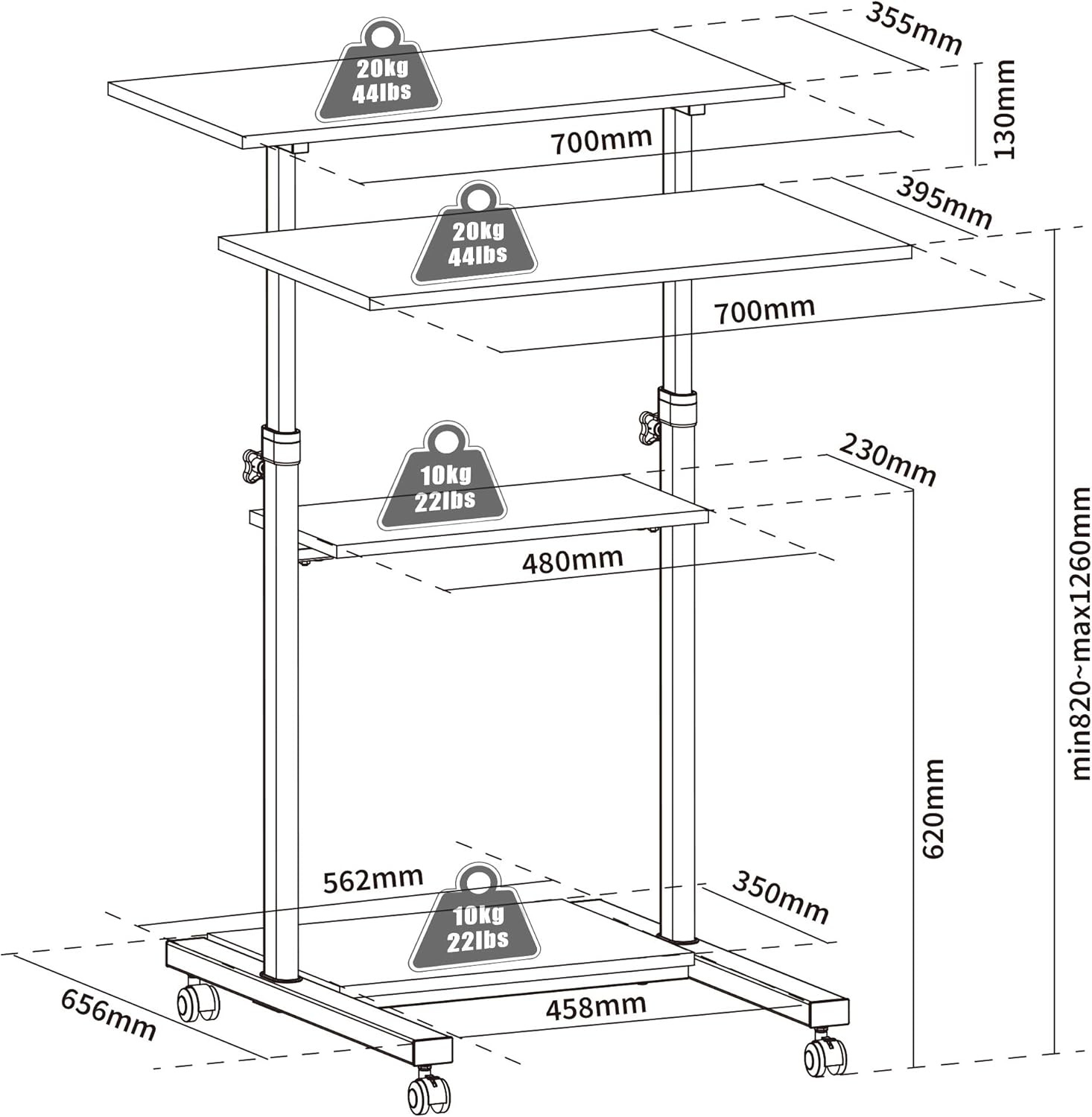
Image: Visual representation of comfortable sitting (950mm) and standing (1390mm) positions.
Мобилдүүлүк жана кулпулоо
The desk is equipped with four universal wheels for easy movement. Two of these wheels include a locking mechanism to keep the desk stationary.
- Жылдыруу үчүн: Ensure the wheel locks are disengaged. Gently push the desk to your desired location.
- Бекитүү: Once the desk is in position, press down on the levers of the two locking wheels until they click into place. This will prevent unintended movement.
- Кулпуну ачуу үчүн: Lift the levers on the locking wheels to disengage the lock.
Shelf Usage and Load Capacity
The desk features four spacious platforms designed to accommodate various equipment. Adhere to the specified load capacities to ensure stability and longevity of the product.
- Top Shelf (Monitor/Laptop): Maximum load capacity of 20 kg (44 lbs).
- Second Shelf (Keyboard/Documents): Maximum load capacity of 20 kg (44 lbs).
- Middle Shelf (Accessories): Maximum load capacity of 10 kg (22 lbs). Suitable for books, small speakers, or personal items.
- Base Shelf (PC Tower/Printer): Maximum load capacity of 10 kg (22 lbs). Ideal for larger equipment.
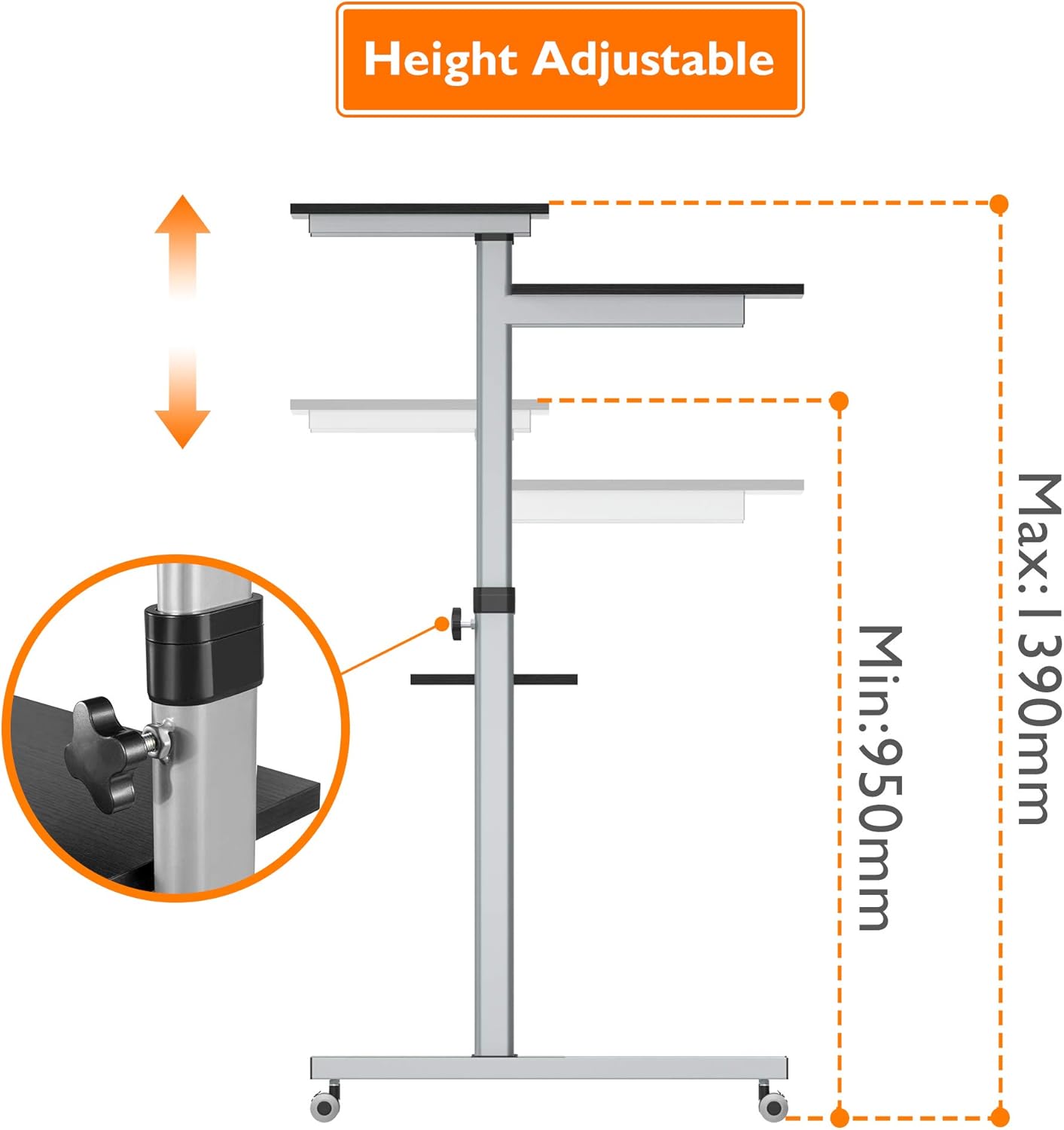
Image: The BONTEC MWS02 desk configured for a complete workstation, demonstrating practical use of its multiple shelves.
Техникалык тейлөө
- Тазалоо: Беттерди жумшак менен сүртүңүз, гamp кездеме. Абразивдүү тазалагычтардан же финишке зыян келтирүүчү катаал химиялык заттардан алыс болуңуз.
- Текшерүү: Мезгил-мезгили менен бардык бурамалар менен байланыштарды текшерип туруңуз, алар бекем бойдон калууда. Зарылчылыкка жараша кайра тартыңыз.
- Дөңгөлөккө кам көрүү: Keep the wheels free of debris to ensure smooth movement. Lubricate if necessary.
- Сактагыч: If storing the desk for an extended period, ensure it is clean, dry, and stored in a stable environment.
Проблемаларды чечүү
| Көйгөй | Мүмкүн себеп | Чечим |
|---|---|---|
| Desk is unstable/wobbly. | Бошогон бурамалар же тегиз эмес бет. | Check and tighten all assembly screws. Move the desk to a flat, level surface. |
| Бийиктикти тууралоо кыйынчылыгы. | Adjustment knobs are too tight or mechanism is stiff. | Loosen knobs sufficiently before adjusting. Apply a small amount of silicone lubricant to the sliding mechanism if needed. |
| Wheels not rolling smoothly or locking. | Debris in wheels or faulty locking mechanism. | Clean any debris from the wheels. Ensure the locking lever is fully engaged/disengaged. If issue persists, contact support. |
| Items sliding off shelves. | Desk is tilted or items are not placed securely. | Ensure the desk is on a level surface. Distribute weight evenly. Consider using non-slip mats for items. |
Техникалык шарттар
| Өзгөчөлүк | Деталь |
|---|---|
| Бренд | BONTEC |
| Модель номери | MWS02 |
| Түс | Кара |
| Материал | Steel frame, Wood Veneer (Grain Surface) shelves |
| Жалпы өлчөмдөрү (L x W x Y) | 65.6 x 70 x 95-139 см (25.8 x 27.6 x 37.4-54.7 дюйм) |
| Жөнгө салынуучу бийиктик диапазону | 950 мм - 1390 мм (37.4 - 54.7 дюйм) |
| Элемент Салмагы | 19.46 кг (42.9 фунт) |
| Үстүнкү текчедеги жүк көтөрүмдүүлүгү | 20 кг (44 фунт) |
| Second Shelf Load Capacity | 20 кг (44 фунт) |
| Орто текче жүктөө сыйымдуулугу | 10 кг (22 фунт) |
| Base Shelf Load Capacity | 10 кг (22 фунт) |
| Өзгөчөлүктөрү | Compact, Ergonomic, Portable, Adjustable Height, Lockable Wheels |
| Сунушталган колдонуу | Office, Home Office, Multimedia Station |

Image: Technical diagram showing detailed dimensions and individual shelf load capacities.
Кепилдик жана колдоо
For warranty information or technical support, please refer to the product packaging or contact BONTEC customer service directly. Keep your purchase receipt as proof of purchase.
For further assistance, please visit the official BONTEC website or contact their support team through the contact details provided with your product.