
1. Киришүү
The Vonyx VMM-F701 is a versatile 7-channel mixer designed for various audio applications, including live performances and studio recording. It features multiple input options, an integrated effect processor, USB playback, and +48V phantom power for condenser microphones. This manual provides essential information for the safe and effective use of your VMM-F701 mixer.
2. Коопсуздук нускамалары
- Always read these instructions carefully before using the device. Keep this manual for future reference.
- кубат менен камсыз кылуу Voltage түзмөктө көрсөтүлгөн.
- Аппаратты жамгырга же нымга тийгизбеңиз.
- Чагылгандуу жаан учурунда же көпкө чейин колдонулбаган учурда электр шнурун сууруп коюңуз.
- Электр тогуна урунуу коркунучун азайтуу үчүн капкакты ачпаңыз. Ичинде колдонуучу тейлей турган тетиктер жок. Бардык тейлөө иштерин квалификациялуу тейлөө кызматкерлерине тапшырыңыз.
3. Продукт бүтүп калдыview
The Vonyx VMM-F701 mixer offers a comprehensive set of features for audio mixing. It includes 5 mono microphone/line inputs (XLR/6.3mm Jack combo), 1 stereo line input (6.3mm Jack), and an integrated USB player. Each channel provides Hi, Mid, and Low equalization controls, along with FX, Pan, and AUX adjustments. The mixer also features a built-in effect processor with delay and repeat functions, +48V phantom power for condenser microphones, a balanced stereo main output, and a headphone output.
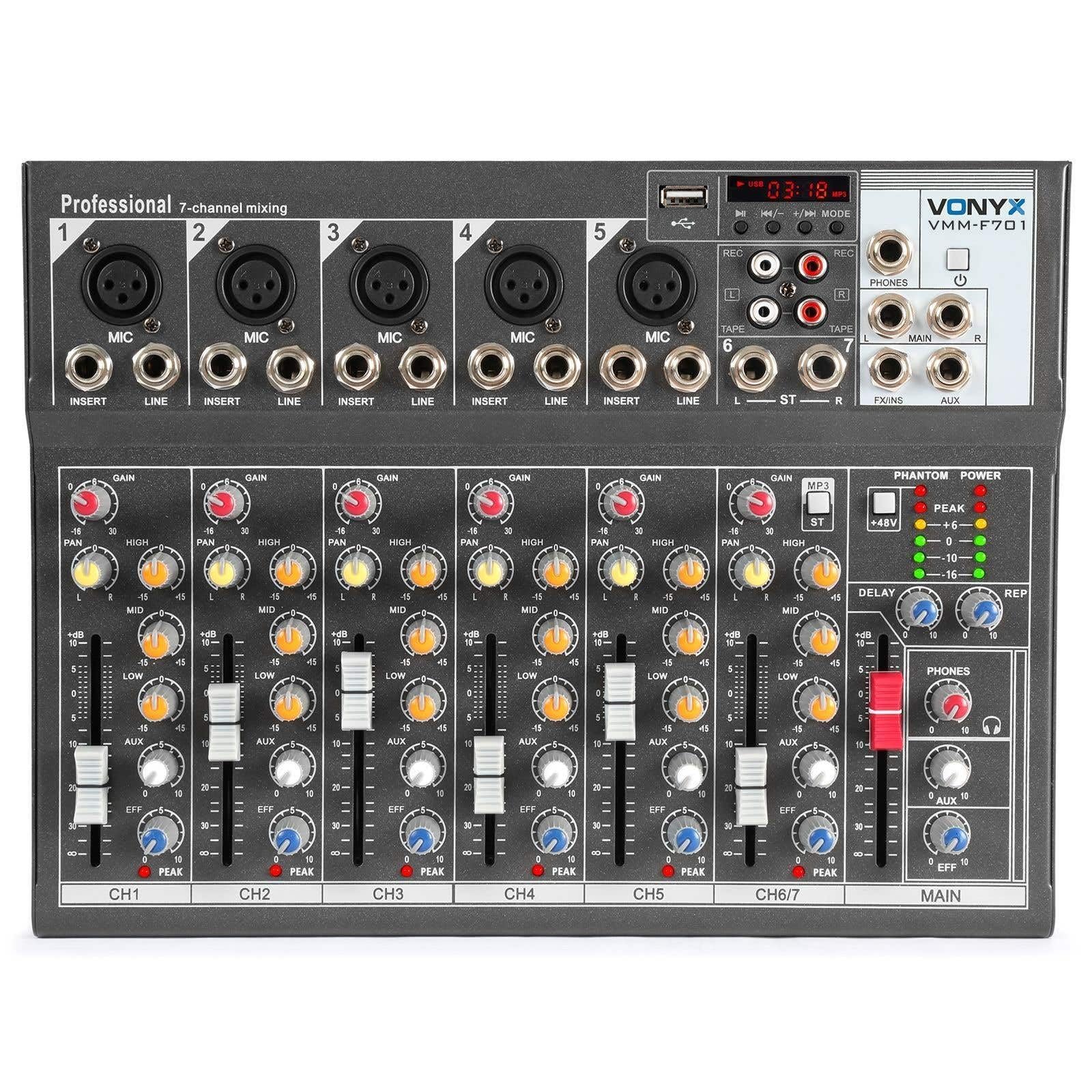
Жалпысынан view of the Vonyx VMM-F701 7-channel mixer, showcasinанын компакттуу дизайны жана башкаруу схемасы.

Жогорудан төмөн view of the Vonyx VMM-F701 mixer, highlighting the input channels, faders, and equalization knobs.

Close-up of the USB input and media player controls on the Vonyx VMM-F701 mixer, with a USB drive inserted.

Rear panel of the Vonyx VMM-F701 mixer, showing the power input and USB port for external power.
4. Орнотуу
- Кубат туташуу: Connect the mixer to a 230Vac/50Hz power source using the provided power cable. The mixer can also be powered via USB (5V/1A) for certain functions.
- Киргизүү байланыштары:
- For microphones, use XLR or 6.3mm jack cables to connect to channels 1-5. Activate +48V phantom power for condenser microphones.
- For line-level instruments or devices, use 6.3mm jack cables to connect to channels 1-5 (line inputs) or the stereo line input (channels 6/7).
- Чыгуу туташуулары: Негизги динамиктерди туташтыруу же amplifier to the balanced stereo main output (6.3mm Jack).
- Наушник: Connect headphones to the dedicated headphone output for monitoring.

Деталдаштырылган view of the mains power input and a wiring diagram for microphone/line inputs on the Vonyx VMM-F701 mixer.
5. Иштөө нускамалары
- Көзөмөлдү алуу: Adjust the input sensitivity for each channel using the GAIN knob.
- Теңдөө (EQ): Use the HI, MID, and LOW knobs to adjust the treble, midrange, and bass frequencies for each channel.
- Пан Control: Adjust the stereo positioning of each channel using the PAN knob.
- FX жөнөтүү: Use the FX knob to send a portion of the channel's signal to the internal effect processor.
- AUX жөнөтүү: Use the AUX knob to send a portion of the channel's signal to an external effect unit or monitor mix (via FX Send/Return).
- Канал Faders: Adjust the volume level for each individual channel.
- Main Fader: Миксердин жалпы чыгаруу көлөмүн көзөмөлдөө.
- Effect Processor: Adjust the DELAY and REP (Repeat) knobs to control the characteristics of the built-in delay effect.
- USB ойноткуч: Аудиону ойнотуу үчүн USB портуна USB дискти салыңыз files. Use the media player controls (play/pause, skip, mode) to navigate and control playback.
- Phantom Power: Press the +48V PHANTOM POWER button to supply power to condenser microphones. Ensure microphones are connected before activating.
6. Техникалык тейлөө
- Тазалоо: Use a soft, dry cloth to clean the mixer's surface. Avoid liquid cleaners or solvents.
- Сактагыч: Миксерди күн нурунан жана экстремалдык температурадан алыс салкын, кургак жерде сактаңыз.
- Вентиляция: Ашыкча ысып кетүүнүн алдын алуу үчүн аралаштыргычтын айланасында туура желдетүүнү камсыз кылыңыз.
7. Кыйынчылыктарды
| Көйгөй | Мүмкүн себеп | Чечим |
|---|---|---|
| Үн чыгышы жок | Power off; cables disconnected; faders down; incorrect input selection. | Check power connection; ensure all cables are securely connected; raise channel and main faders; verify correct input source. |
| Бурмаланган үн | Киргизүү кирешеси өтө жогору; өндүрүштүн деңгээли өтө жогору; бузулган кабель. | Reduce GAIN knob; lower main fader; try a different cable. |
| Микрофон иштебей жатат | Phantom power off (for condenser mics); mic not connected; faulty mic. | Activate +48V PHANTOM POWER; check mic connection; test with another microphone. |
| USB ойноткуч иштебей жатат | USB drive not recognized; unsupported file формат. | Ensure USB drive is properly inserted; try a different USB drive; check file форматтар (мисалы, MP3). |
8. Техникалык шарттар
| Өзгөчөлүк | Спецификация |
|---|---|
| Модель номери | VMM-F701 |
| Каналдардын саны | 7 |
| Жыштык диапазону | 20 Гц - 20 кГц |
| THD (Толук гармоникалык бурмалоо) | <0.01% |
| Ызы-чуунун катышы | >110дБ |
| Чыгуу деңгээли | ±1V |
| Сап киргизүү сезгичтиги | ±150мВ |
| Микрофон киргизүү сезгичтиги | ±1.5мВ |
| Connection Voltage | 230Vac / 50Hz (USB 5V/1A) |
| Өлчөмдөрү (L x W x Y) | 230 x 312 x 45 мм (9.06 x 12.28 x 1.77 дюйм) |
| Салмагы | 2.25 кг (4.96 фунт) |
| Байланыш технологиясы | USB |
| Аудио киргизүү | XLR, 1/4 inch (6.3 mm) jack |
| Output Connector Type | TRS 1/4" (balanced) |
9. Кепилдик жана колдоо
Кепилдик: This product comes with a 2-year warranty on spare parts. For warranty claims, please retain your proof of purchase.
Колдоо: For technical assistance, troubleshooting, or service inquiries, please contact your local Vonyx dealer or visit the official Vonyx webколдоо булактары үчүн сайт.