
1. Киришүү
Сатып алганыңыз үчүн рахматasing the Sharp HT-SB140MT 2.0 150W Soundbar. This soundbar is designed to enhance your audio experience, providing clear and powerful sound for your television, music, and other media. With its sleek design and versatile connectivity options, including Bluetooth, HDMI ARC/CEC, Optical, and Auxiliary inputs, it integrates seamlessly into any home entertainment setup. This manual provides essential information for safe and effective use, including setup, operation, maintenance, and troubleshooting.
2. Коопсуздук маалыматы
- Кубат булагы: электр менен жабдууну камсыз кылуу voltage matches the requirements specified on the soundbar. Use only the provided power cable.
- Вентиляция: Do not block any ventilation openings. Maintain adequate space around the soundbar for proper airflow.
- Суу жана ным: Do not expose the soundbar to dripping or splashing water. Do not place objects filled with liquids, such as vases, on the apparatus.
- Жылуулук: Do not place the soundbar near heat sources such as radiators, heat registers, stoves, or other apparatus (including ampкөтөргүчтөр) жылуулукту пайда кылуучу.
- Тазалоо: Unplug the soundbar from the power outlet before cleaning. Use a dry, soft cloth for cleaning. Do not use liquid cleaners or aerosol cleaners.
- Тейлөө: Бул продуктту өзүңүз тейлөөгө аракет кылбаңыз. Бардык тейлөөнү квалификациялуу тейлөө кызматкерлерине тапшырыңыз.
- Батареялар: The remote control uses a CR2 battery. Ensure correct polarity when inserting batteries. Do not mix old and new batteries.
3. Пакеттин мазмуну
Пакетте бардык буюмдар бар экенин текшериңиз:
- Sharp HT-SB140MT Soundbar
- Алыстан башкаруу
- Электр кабели
- Колдонуучунун Колдонмосу (бул документ)
4. Продукт бүтүп калдыview

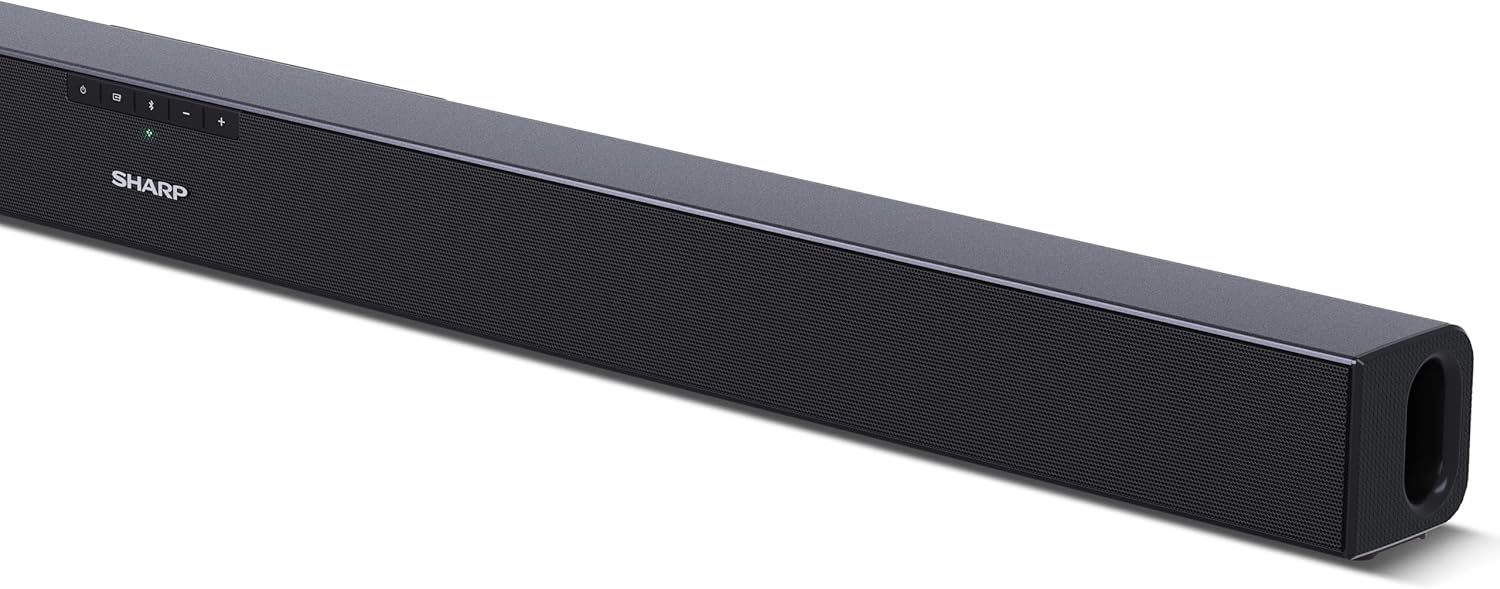
Сүрөт 4.1: Алдыңкы View
The front of the soundbar features the Sharp logo and LED indicators for source selection and status. Control buttons for power, input, and volume are located on the top panel.
4.2-сүрөт: Арткы View (Connections)
The rear panel provides all necessary connection ports: HDMI ARC, Optical (S/PDIF), and Auxiliary (3.5mm) input, along with the power input.

4.3-сүрөт: Алыстан башкаруу
The included remote control allows for convenient operation of the soundbar, including power, input selection, volume, bass, and treble adjustments.
5. Орнотуу
5.1 Орнотуу
The Sharp HT-SB140MT Soundbar can be placed on a flat surface, such as a TV stand, or wall-mounted. Its slim profile of 6 cm allows it to fit easily under most TV screens without obstructing the view.

Figure 5.1: Soundbar Placement
The soundbar is ideally positioned directly in front of your television for optimal sound projection.
5.2 Телевизоруңузга туташуу
Төмөнкү туташуу ыкмаларынын бирин тандаңыз:
- HDMI ARC/CEC (Сунушталат): Connect an HDMI cable (not included) from the HDMI ARC port on your TV to the HDMI ARC port on the soundbar. This allows your TV remote to control the soundbar's volume and power. Ensure HDMI ARC/CEC is enabled in your TV's settings.
- Digital Optical Audio (S/PDIF): Connect an optical cable (not included) from the Optical Out port on your TV to the OPTICAL IN port on the soundbar. Select the Optical input on the soundbar.
- Auxiliary (AUX): Connect a 3.5mm audio cable (not included) from the headphone jack or AUX Out port on your TV to the AUX IN port on the soundbar. Select the AUX input on the soundbar.
5.3 Кубат туташтыруу
After connecting the audio cable, plug the power cable into the soundbar's power input and then into a wall outlet (220-240V / 50Hz).
6. Иштөө нускамалары
6.1 Күйгүзүү/өчүрүү
Түзмөктү күйгүзүү же өчүрүү үчүн саундбардагы же пульттагы Кубат баскычын басыңыз.
6.2 Булакты тандоо
Press the Input button on the soundbar or the remote control repeatedly to cycle through the available input sources: HDMI ARC, Optical, AUX, and Bluetooth. The LED indicator on the soundbar will change to reflect the selected source.
6.3 Үндү тууралоо
Use the Volume Up (+) and Volume Down (-) buttons on the soundbar or the remote control to adjust the sound level.
6.4 Bluetooth жупташтыруу
Bluetooth түзмөгүн туташтыруу үчүн:
- Select Bluetooth input on the soundbar. The Bluetooth LED indicator will flash, indicating pairing mode.
- Акылдуу түзмөгүңүздө (смартфон, планшет ж.б.) Bluetooth иштетип, жеткиликтүү түзмөктөрдү издеңиз.
- Select "SHARP HT-SB140MT" from the list of devices.
- Once connected, the Bluetooth LED indicator will stop flashing and remain solid. You can now stream audio wirelessly to the soundbar.
6.5 Үн режимдери (Эквалайзер)
The soundbar features an equalizer with different sound modes to optimize audio for various content types. Use the EQ button on the remote control to cycle through these modes (e.g., Movie, Music, News). You can also adjust Bass and Treble levels using dedicated buttons on the remote.
7. Техникалык тейлөө
7.1 Тазалоо
To clean the soundbar, unplug it from the power outlet. Use a soft, dry, lint-free cloth to wipe down the surfaces. Do not use abrasive cleaners, waxes, or solvents as they may damage the finish.
7.2 Сактоо
If you plan to store the soundbar for an extended period, disconnect it from the power supply and store it in a cool, dry place, away from direct sunlight and extreme temperatures.
8. Кыйынчылыктарды
Саундбарыңызда көйгөйлөргө туш болсоңуз, төмөнкү жалпы көйгөйлөрдү жана чечимдерди караңыз:
| Көйгөй | Мүмкүн себеп | Чечим |
|---|---|---|
| Саундбардан үн жок. | Үн тактасы өчүк же үнсүз режимде. Туура эмес киргизүү булагы тандалды. Кабелдер туура туташтырылган эмес. Телевизордун аудио чыгаруу жөндөөлөрү туура эмес. | Ensure the soundbar is powered on and not muted. Select the correct input source (HDMI ARC, Optical, AUX). Check all cable connections (HDMI, Optical, AUX). Verify your TV's audio output settings are set to external speakers or the correct digital output. |
| Bluetooth түзмөгү туташа албайт. | Soundbar is not in pairing mode. Түзмөк диапазондон тышкары. Башка аппараттардын кийлигишүүсү. | Ensure the soundbar is in Bluetooth input mode and the LED is flashing. Move your Bluetooth device closer to the soundbar (within 10 meters). Жакын жердеги башка Bluetooth түзмөктөрүн өчүрүңүз. Туташтырууну ажыратып, кайра жупташтырып көрүңүз. |
| Пульт иштебей жатат. | Battery is low or inserted incorrectly. Пульт менен саундбардын ортосундагы тоскоолдук. Remote control is faulty. | Replace the CR2 battery and ensure correct polarity. Remove any obstructions between the remote and the soundbar's sensor. Эгер көйгөйлөр чечилбесе, кардарларды колдоо кызматына кайрылыңыз. |
9. Техникалык шарттар
| Модель аты | HT-SB140(MT) |
| Динамик түрү | Саундбар |
| Көлөмдүү үн каналынын конфигурациясы | 2.0 |
| Динамиктердин максималдуу чыгаруу күчү | 150 Ватт |
| Frequency Response | 60 Гц |
| Байланыш технологиясы | Bluetooth, HDMI ARC/CEC, Digital Optical Audio (S/PDIF), 3.5mm Auxiliary (AUX) |
| Зымсыз байланыш технологиясы | Bluetooth |
| Максималдуу диапазон (Bluetooth) | 10 метр |
| Башкаруу ыкмасы | Алыстан башкаруу |
| Power Source | AC (Mains) |
| Киргизүү көлөмүtage | 220-240 Вольт |
| Түс | Кара |
| Материал | Пластик, металл |
| Монтаж түрү | Дубалга монтаждоо, стол |
| Продукциянын өлчөмдөрү (L x W x Y) | 95 x 6 x 6 см |
| Элемент Салмагы | 1.5 килограмм |
| Камтылган компоненттер | Алыстан башкаруу |
| Батарея талап кылынат | 1 CR2 батарейкасы |
| Суу өткөрбөйт | Жок |
| Запастык бөлүктөрдүн болушу | 5 жыл |
| Программалык камсыздоонун жаңыртууларына кепилдик берилет | Маалымат жеткиликтүү эмес |
10. Кепилдик жана колдоо
The Sharp HT-SB140MT Soundbar comes with a Limited Warranty. Please refer to the warranty card included in your package for specific terms and conditions. Spare parts are available for up to 5 years from the date of purchase.
For technical support, service, or warranty claims, please contact Sharp customer service through their official website or the contact information provided in your product documentation. When contacting support, please have your product model number (HT-SB140(MT)) and purchase details ready.