
1. Продукт бүтүп калдыview
This manual provides instructions for the NB POWER 48V-72V 60A Brushless DC Sine Wave Ebike Controller and the accompanying VM960 Color Display. This system is designed for electric bicycles, scooters, and similar electric vehicles, supporting motors up to 3000W.
Негизги өзгөчөлүктөрү:
- High-efficiency 48V-72V 60A Brushless DC Sine Wave Controller.
- Compatible with 3000W brushless motors and electric bike kits.
- Advanced VM960 Color Display for comprehensive ride data.
- Suitable for various electric vehicle applications.
2. Техникалык шарттар
Контроллердин параметрлери:
| Параметр | Нарк |
|---|---|
| Максималдуу ток | 60±1A |
| Rated Voltage | DC 48V-72V |
| Номиналдуу ток | 30A |
| Номиналдуу кубаттуулук | 3000 Вт |
| Ылдамдык орнотуу | 1-4.2V |
| Тормоз киргизүү | LOW-LEVEL |
| Low Voltage Коргоо | DC40±0.5V |
| Иштөө шарттары | -40~80 °C |
| Сертификация | CE |
VM960 Display Features:
- Көрсөтүү функциялары: Speed, Motor Power Ratio, Battery Level, Error Indication, Total Mileage, Single Mileage, Cruise Control, Single Running Time, Light Signal.
- Башкаруу жана Орнотуулар: Power Switch, Front Light Control, 6km/h Inching Control, Wheel Diameter Setting, Top Speed Setting, Idleness Time Setting for Auto-Hibernation, Backlight Brightness Setting, Voltage Level Setting.
- Байланыш протоколу: UART.
Физикалык өлчөмдөрү:
The controller measures approximately 18.5 cm in length, 11 cm in width, and 5.2 cm in height.
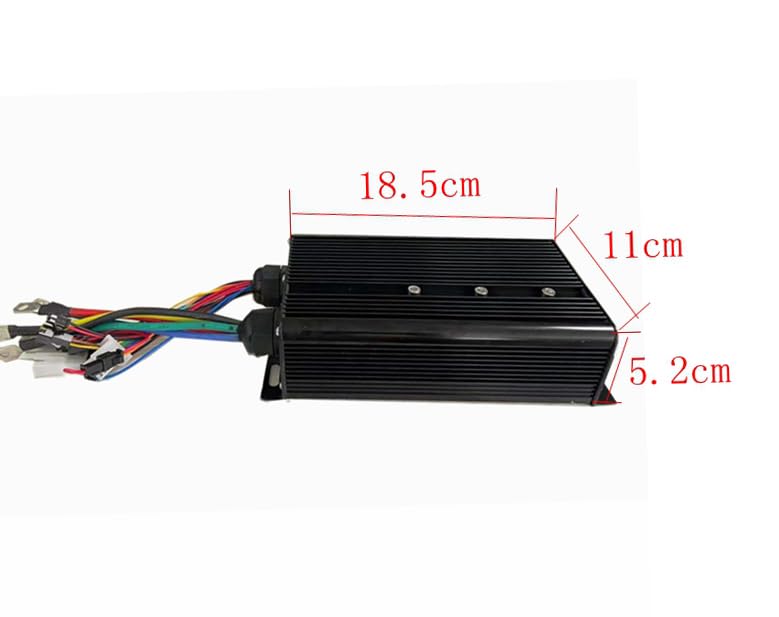
Image: Dimensions of the NB POWER 60A Brushless DC Sine Wave Ebike Controller.
The VM960 display measures approximately 87mm in width, 111mm in height, and 15mm in depth. The control buttons are approximately 39.35mm by 44mm.

Image: Dimensions of the VM960 Color Display and its control unit.
3. Орнотуу боюнча колдонмо
Careful installation is crucial for optimal performance and safety. Refer to the wiring diagram below for correct connections.
Зымдар диаграммасы:
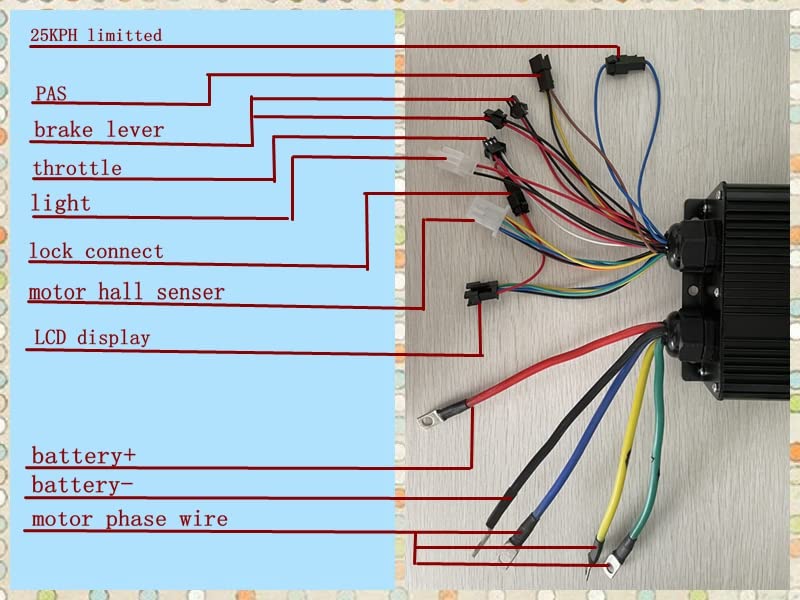
Image: Detailed wiring diagram for the NB POWER Ebike Controller.
Туташуу пункттары:
- 25KPH Limited: Connect this wire if speed limiting to 25 km/h is required.
- PAS (Pedal Assist System): Connect to your ebike's PAS sensor for pedal assistance.
- Тормоз рычагы: Connect to the ebike's brake levers. This typically cuts motor power when brakes are applied.
- Муунткуч: Connect to the ebike's throttle for speed control.
- Жарык: Output for connecting an ebike light.
- Lock Connect: Connect to the ignition lock or power switch.
- Motor Hall Sensor: Connect to the motor's Hall sensors for proper motor commutation.
- LCD дисплей: Connect to the VM960 Color Display.
- Battery+: Positive terminal for battery connection.
- Battery-: Negative terminal for battery connection.
- Motor Phase Wire: Connect the three thick wires to the corresponding motor phase wires (usually Green, Blue, Yellow).
Терминал блогу:
A terminal block is provided for secure and organized connection of the motor phase wires and battery connections. Ensure all connections are tight and insulated.

Сүрөт: Мисample of a terminal block for robust electrical connections.
4. Иштөө нускамалары
The VM960 Color Display provides essential information and control over your ebike system.
VM960 Display Interface:

Image: Labeled interface of the VM960 Color Display.
Display Functions Explained:
- Фара индикатору: Shows if the ebike's headlight is on.
- Ылдамдык маалыматтары: Displays current real-time speed (RT SPEED) in km/h.
- Батарея көрсөткүчү: Shows the current battery charge level and voltage (мисалы, 48.5V).
- Мүчүлүштүктүн көрсөткүчү: Alerts to system errors or malfunctions.
- Power Display: Shows current motor power output in Watts (e.g., 368W).
- Сапардын маалыматы: Displays total mileage (TRIP/KM) and other trip-specific information.
- USB: Indicates USB connection status or availability.
- Brake Display: Shows when brakes are engaged.
- Жардам деңгээли: Indicates the current level of pedal assist (e.g., Level 2).
- Саат дисплей: Учурдагы убакытты көрсөтөт.
- Logo and Error Code: Displays brand logo and specific error codes if a fault occurs.
Башкаруу жана Орнотуулар:
- Кубат которгучу: Press and hold to turn the display and system on/off.
- Front Light Control: Short press the light button to toggle the front light.
- 6km/h Inching Control: Activates a low-speed assist mode for walking alongside the bike.
- Дөңгөлөктүн диаметри: Adjust for accurate speed and distance readings.
- Top Speed Setting: Configure the maximum assisted speed.
- Idleness Time Setting for Auto-Hibernation: Sets the time before the display automatically turns off due to inactivity.
- Backlight Brightness Setting: Adjust the display's backlight intensity.
- Тtage Level Setting: Configure the battery voltage параметрлери.
Refer to the display's specific sub-menu navigation for detailed adjustments of these settings.
5. Техникалык тейлөө
Regular maintenance ensures the longevity and reliable operation of your controller and display system.
- Тазалоо: Keep the controller and display clean and free from dust and debris. Use a soft, dry cloth. Avoid using harsh chemicals or excessive moisture.
- Текшерүү: Periodically check all wiring connections for tightness and signs of wear or damage. Ensure no wires are pinched or exposed.
- Курчап турган чөйрөнү коргоо: While the controller is designed for outdoor use, avoid prolonged exposure to extreme weather conditions (heavy rain, direct sunlight, extreme temperatures) when possible.
- Батареяга кам көрүү: Follow your battery manufacturer's guidelines for charging and storage to ensure optimal system performance.
6. Кыйынчылыктарды
Бул бөлүм сиз кабылышы мүмкүн болгон жалпы көйгөйлөрдү карайт. Бул жерде көрсөтүлбөгөн көйгөйлөр үчүн кардарларды колдоо бөлүмүнө кайрылыңыз.
| Көйгөй | Мүмкүн себеп | Чечим |
|---|---|---|
| Система күйбөйт | Loose battery connection, faulty power switch, low battery voltage. | Check battery connections. Ensure battery is charged. Verify power switch functionality. |
| Motor not responding to throttle | Loose throttle connection, faulty throttle, motor hall sensor issue, controller fault. | Check throttle wiring. Inspect motor hall sensor connections. Consult wiring diagram. |
| Дисплей ката кодун көрсөтөт | Specific system malfunction (e.g., motor, controller, sensor). | Note the error code and refer to the display's specific error code list (if available) or contact support with the code. |
| Туура эмес ылдамдык/аралык көрсөткүчтөрү | Incorrect wheel diameter setting on the display. | Adjust the wheel diameter setting in the VM960 display menu. |
7. Кепилдик жана колдоо
Бул продукт материалдардын жана жасалгасынын кемчиликтерине каршы стандарттык өндүрүүчүнүн кепилдик менен жабылат. Кепилдик мөөнөтү, адатта, сатып алган күндөн тартып башталат. Кепилдик дооматтары үчүн сатып алганыңыздын далилин сактап коюңуз.
For technical assistance, warranty claims, or further inquiries, please contact your retailer or the manufacturer directly. Provide your product model number and a detailed description of the issue to facilitate support.