
1. Киришүү
The Transcell TI-500 SL is a robust and reliable digital weighing indicator designed for industrial applications. This NTEP and Canadian certified device features a durable NEMA 4X stainless steel enclosure, ensuring protection in harsh environments. It is equipped with a large 0.8-inch backlit LCD screen for clear readability of up to 50,000 display divisions. The TI-500 SL supports up to four 350 Ohm load cells and offers full duplex RS-232 serial communication for integration with various support equipment. Power is supplied via an AC adapter or a rechargeable lead-acid battery, providing flexibility for continuous operation.
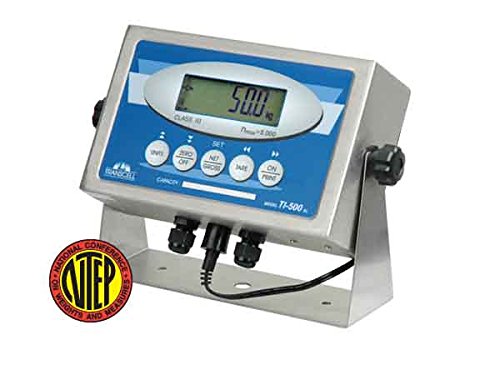
Алдыңкы бети view of the Transcell TI-500 SL Weighing Indicator. The device features a stainless steel enclosure with a blue and white control panel. A large digital LCD screen displays '50.0 kg'. Below the screen are several circular buttons for functions like 'UNITS', 'ZERO OFF', 'SET', 'NET GROSS', 'TARE', and 'ON PRINT'. A black cable extends from the bottom of the unit, and an NTEP certification seal is visible in the lower left corner.
2. Коопсуздук маалыматы
Please read all safety instructions carefully before operating the TI-500 SL indicator. Failure to comply with these instructions may result in injury or damage to the device.
Жалпы коопсуздук
- Operate the device only in environments suitable for its NEMA 4X / IP65 rating.
- Do not attempt to open or repair the indicator yourself. Refer all servicing to qualified personnel.
- Keep the device away from excessive heat, moisture, and corrosive substances.
Электр коопсуздугу
- Use only the provided AC adapter for power and battery charging.
- Электр розеткасынын туура жерге туташтырылганын текшериңиз.
- Тазалоодон же тейлөөдөн мурун электр энергиясын өчүрүңүз.
3. Пакеттин мазмуну
Пакетте бардык буюмдар бар экенин текшериңиз:
- Transcell TI-500 SL Weighing Indicator
- Stainless Steel Swivel Stand (pre-attached or separate)
- AC кубат адаптери
- Колдонуучунун Колдонмосу (бул документ)
4. Орнотуу
Физикалык орнотуу
- Place the TI-500 SL indicator on a stable, level surface. The integrated stainless steel swivel stand allows for adjustable viewбурчтар.
- Агрегаттын айланасында жетиштүү желдетүүнү камсыз кылыңыз.
Power Connection
- Connect the AC power adapter to the power input port on the indicator.
- Plug the AC adapter into a suitable power outlet. The internal rechargeable lead-acid battery will begin charging automatically.
Load Connection
The TI-500 SL is designed to drive up to four 350 Ohm load cells.
- Locate the load cell input terminals on the indicator. These are typically sealed connections to maintain the NEMA 4X rating.
- Carefully connect the load cell cables to the corresponding terminals, ensuring correct polarity and wiring as per the load cell manufacturer's instructions.
- Secure all connections to maintain the enclosure's integrity.
Баштапкы күйгүзүү
басыңыз КҮЙГҮЗҮҮ/ӨЧҮРҮҮ button to power on the indicator. The display will perform a self-test and then show the current weight reading.
5. Иштөө нускамалары
The TI-500 SL features a user-friendly front panel with dedicated function keys.
Негизги тараза
Once powered on, the indicator will display the weight detected by the connected load cells. Ensure the scale platform is clear before taking a measurement.
Дисплейди нөлгө түшүрүү
To set the display to zero when there is no load on the platform:
- басыңыз ZERO OFF button. The display will reset to 0.00.
Taring (Net/Gross Weight)
To measure the net weight of an item by subtracting the weight of a container:
- Бош контейнерди тараза платформасына коюңуз.
- басыңыз идиштер button. The display will show 0.00 and the 'NET' indicator will illuminate.
- Add the item to be weighed into the container. The display will now show the net weight of the item.
- To return to gross weight, press the NET GROSS баскычы.
Unit Conversion
To switch between available weighing units (e.g., kg, lb):
- басыңыз БИРДИКТЕР button. The display will cycle through the configured units.
Printing Weight Data
If connected to a compatible printer via the RS-232 port:
- басыңыз ON PRINT button to send the current weight reading to the connected device.
Калибрлөө
Calibration procedures are typically performed by qualified technicians. Refer to the detailed technical manual or contact Transcell Technology support for calibration instructions. All setup parameters can be entered via the front panel keys during calibration mode.
6. Техникалык тейлөө
Тазалоо
The NEMA 4X stainless steel enclosure allows for easy cleaning.
- Тазалоодон мурун кубат адаптерин ажыратыңыз.
- Wipe the indicator with a damp кездеме жана жумшак жуугуч.
- Do not use abrasive cleaners or solvents that could damage the display or enclosure.
- Ensure all connections are sealed after cleaning.
Батареяга кам көрүү
The TI-500 SL is equipped with a rechargeable lead-acid battery.
- Баштапкы колдонуудан мурун батареяны толук заряддаңыз.
- Recharge the battery when the low battery indicator appears or when the display dims.
- For long-term storage, ensure the battery is fully charged and store the unit in a cool, dry place. Recharge periodically if stored for extended periods.
7. Кыйынчылыктарды
This section addresses common issues you might encounter with your TI-500 SL indicator.
| Көйгөй | Мүмкүн себеп | Чечим |
|---|---|---|
| Indicator does not power on. | No power from AC adapter; discharged battery; faulty power button. | Check AC adapter connection and power outlet. Charge battery for several hours. If problem persists, contact support. |
| Display shows 'OVERLOAD' or '-----'. | Load cell overload; faulty load cell connection. | Remove excess weight from the scale. Check load cell wiring and connections. |
| Туура эмес салмак көрсөткүчтөрү. | Scale not level; calibration required; damaged load cell. | Ensure scale is on a level surface. Perform calibration (if qualified) or contact service. Inspect load cells for damage. |
| RS-232 communication failure. | Incorrect cable; wrong baud rate/settings; faulty port. | Verify cable type and connection. Check communication settings on both indicator and connected device. |
For issues not listed here or if solutions do not resolve the problem, please contact Transcell Technology customer support.
8. Техникалык шарттар
| Өзгөчөлүк | Description |
|---|---|
| Модел | TI-500 SL |
| Курулуш | Stainless Steel NEMA 4X / IP65 |
| Дисплей | 0.8 inch, 6 Digit LCD with LED backlight |
| Load Cells | Drives up to four 350 Ohm Load Cells |
| Сериялык порт | Толук дуплекстүү RS-232C |
| Күч | AC Adapter or Rechargeable Lead Acid Battery |
| Өзгөчөлүктөр | Backlit Display, High Weight Capacity (up to 50,000 display divisions), Large Display |
| Түс | Silver |
| Продукциянын өлчөмдөрү | 2.9 x 5.5 x 8.9 дюйм |
| Салмагы | 3 фунт |
9. Кепилдик маалыматы
Transcell Technology products are manufactured to high quality standards. For specific warranty terms and conditions, please refer to the warranty card included with your product or visit the official Transcell Technology webсайт. Сатып алуу квитанциясын кепилдик дооматтары үчүн сатып алуунун далили катары сактаңыз.
10. Колдоо маалыматы
For technical assistance, troubleshooting beyond this manual, or service inquiries, please contact Transcell Technology customer support. Contact details can typically be found on the manufacturer's official webсайтында же продуктунун таңгагында.
Manufacturer: Transcell Technology