
Introduction
Thank you for choosing the Kalorik TKG AP 2000 Air Purifier. This manual provides essential information for the safe and efficient operation of your new appliance. Please read it thoroughly before use and keep it for future reference.
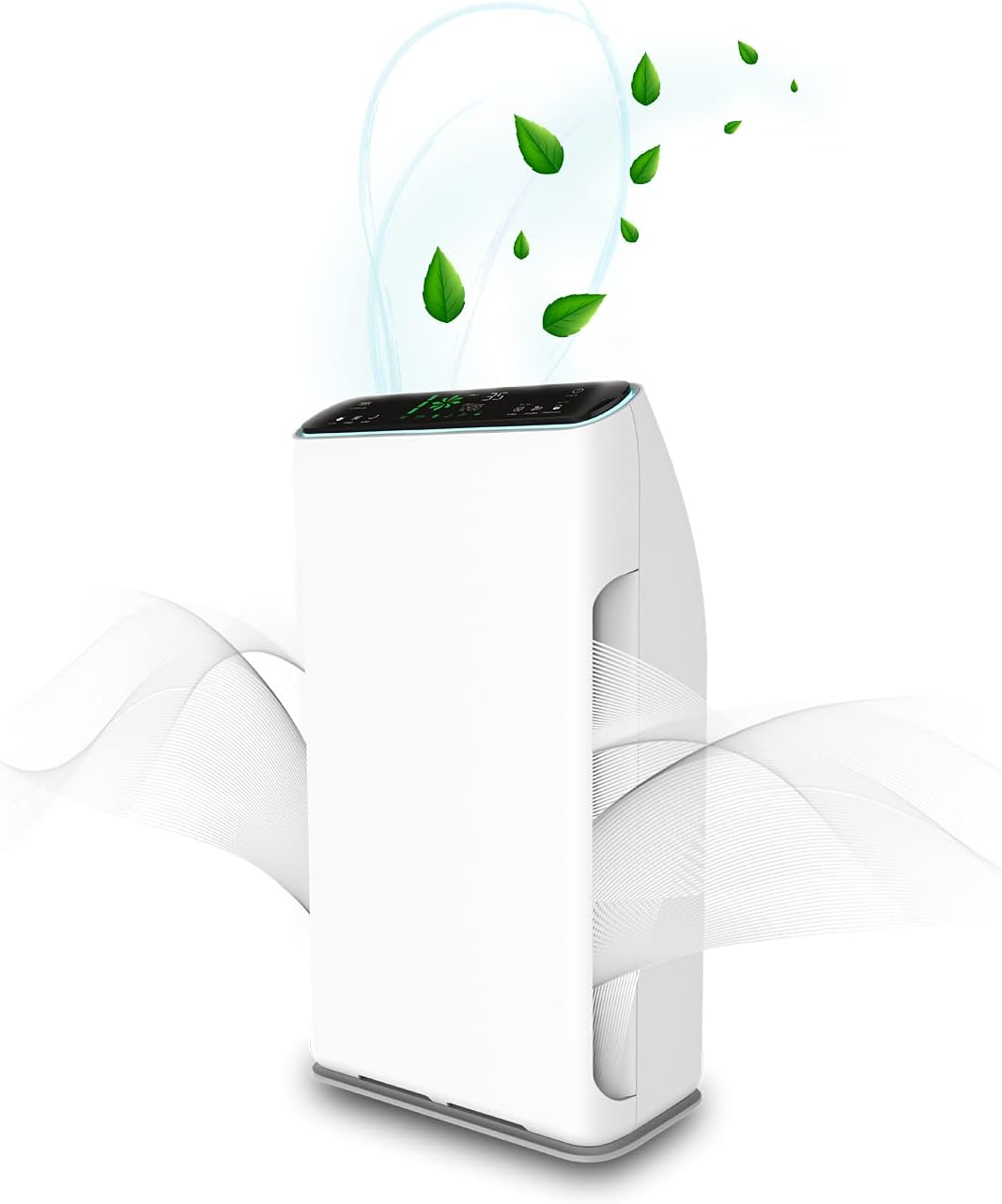
Сүрөт: алдыңкы view of the Kalorik TKG AP 2000 Air Purifier, illustrating air circulation and its sleek white design.
Маанилүү коопсуздук нускамалары
Өрт, электр шок же жаракат алуу коркунучун азайтуу үчүн ар дайым төмөнкү негизги сактык чараларын аткарыңыз:
- Шайманды иштетүүдөн мурун бардык көрсөтмөлөрдү окуп чыгыңыз.
- кубат менен камсыз кылуу Voltage рейтинг белгисинде көрсөтүлгөн.
- Шайманды шнур же сайгыч бузулуп иштетпеңиз.
- Электр шнурын ысытылган беттерден алыс кармаңыз.
- Шайманды, шнурду же сууга же башка суюктуктарга батырбаңыз.
- Аба тазалагычты тазалоодон же кандайдыр бир техникалык тейлөөдөн мурун розеткадан сууруп коюңуз.
- Бул шайман үй ичинде гана колдонуу үчүн.
- Аба кирүүчү же чыгуучу жерлерди жаап албаңыз.
- Keep children away from the appliance. The child lock feature should be used when children are present.
- Do not use the appliance in areas with flammable or combustible vapors.
Продукт бүттүview
The Kalorik TKG AP 2000 Air Purifier features a modern design and a 7-stage purification process to ensure cleaner, healthier indoor air. It includes a touch control panel and a remote control for convenient operation.
Башкаруу панелинин функциялары
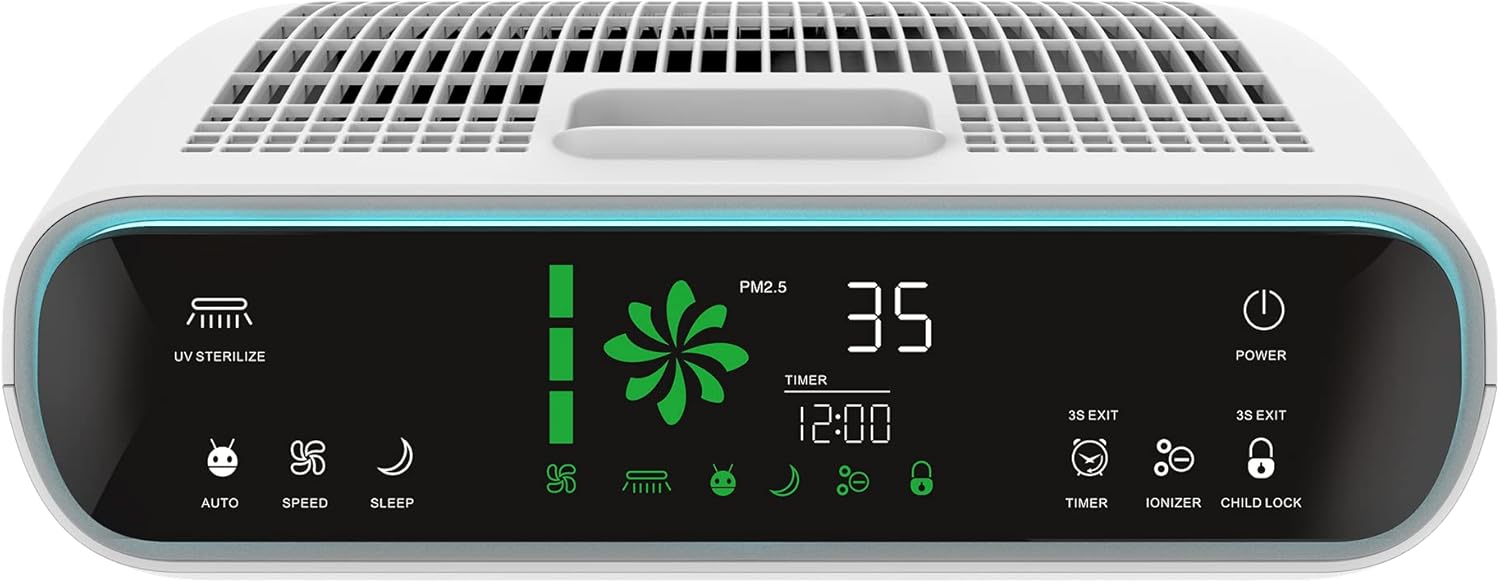
Сүрөт: деталдуу view of the air purifier's top control panel, showing the LED display and various touch-sensitive buttons for operation.
- UV Sterilize: Activates/deactivates the UV lamp for sterilization.
- Авто режим: Automatically adjusts purification intensity based on detected particle levels.
- Ылдамдыгы: Manually adjusts fan speed (3 levels).
- Уйку режими: Reduces fan speed and dims display for quiet operation.
- Күч: Агрегатты күйгүзөт же өчүрөт.
- Таймер: Sets an operating time (up to 12 hours) after which the unit will automatically shut off.
- Ионизатор: Activates/deactivates the ion release function.
- Балдар кулпусу: Кокус өзгөрүүлөрдү болтурбоо үчүн башкаруу панелин бекитет.
- PM2.5 дисплейи: Shows the current particulate matter level in the air.
- Чыпкалоо мөөнөтү индикатору: Displays the remaining lifespan of the filters.
Жайгашуу
Before first use, ensure all packaging materials are removed and filters are correctly installed.
Фильтр орнотуу
The Kalorik TKG AP 2000 utilizes a 7-stage filtration system. The filters are typically pre-installed but may require removal of protective plastic packaging before use. Refer to the diagram below for the correct order of filter layers.

Сүрөт: жарылды view diagram illustrating the seven distinct filter layers and their sequence within the air purifier.
- Aluminum Alloy Filter: Captures large particles like dust and pet dander.
- Муздак катализатор чыпкасы: Бөлмө температурасында зыяндуу газдарды жана жыттарды ажыратат.
- Formaldehyde Removal Filter: Specifically targets and removes formaldehyde.
- Антибактериалдык чыпка: Inhibits the growth of bacteria and other microorganisms.
- HEPA чыпкасы: Traps 99.97% of airborne particles 0.3 microns or larger, including pollen, dust mites, and mold spores.
- UV Sterilizer Lamp: Uses ultraviolet light to kill bacteria, viruses, and germs.
- Anion Release (Ionizer): Releases negative ions to freshen the air and help airborne particles settle.
After installing the filters, close the filter compartment cover securely. Place the air purifier on a flat, stable surface, ensuring adequate space around the air inlets and outlets.
Иштөө нускамалары
The air purifier can be operated using the touch control panel on the top of the unit or the included remote control.
Күйгүзүү/өчүрүү
- Электр шнурын ылайыктуу электр розеткасына сайыңыз.
- басыңыз Күч аппаратты күйгүзүү же өчүрүү үчүн баскыч.
Режим тандоо
- Авто режим: басыңыз Авто button. The unit will automatically adjust fan speed based on air quality detected by the particle sensor.
- Кол менен ылдамдыкты көзөмөлдөө: басыңыз Ылдамдык button repeatedly to cycle through 3 fan speed levels (Low, Medium, High).
- Уйку режими: басыңыз Уйку button. The fan speed will reduce, and the display lights will dim for quiet operation during sleep.
UV Sterilization & Ionizer
- басыңыз UV стерилизациясы button to activate or deactivate the UV lamp.
- басыңыз Ионизатор button to activate or deactivate the anion release function.
Таймер функциясы
- басыңыз Таймер button repeatedly to set the desired operating time (from 1 to 12 hours). The unit will automatically turn off after the set time.
Child Lock
- басып, кармап туруңуз Child Lock button for 3 seconds to activate or deactivate the child lock. When activated, the control panel buttons will not respond to touch.
Техникалык тейлөө
Үзгүлтүксүз тейлөө оптималдуу иштешин камсыз кылат жана аба тазалагычыңыздын иштөө мөөнөтүн узартат.
Сырты тазалоо
- Тазалоодон мурун ар дайым розеткадан ажыратыңыз.
- Сырткы беттерин жумшак менен сүртүңүз, гamp кездеме. Абразивдүү тазалагычтарды же эриткичтерди колдонбоңуз.
Фильтрди алмаштыруу
The filter life indicator on the control panel will alert you when filters need replacement. Filter lifespan varies depending on air quality and usage.
- Аба тазалагычты розеткадан ажыратыңыз.
- Чыпка бөлүмүнүн капкагын ачыңыз.
- Эски чыпкаларды алып салыңыз жана аларды туура жок кылыңыз.
- Install new filters in the correct sequence (refer to the 'Filter Installation' section).
- Чыпка бөлүмүнүн капкагын жабыңыз.
- Plug in the unit and reset the filter life indicator (refer to specific instructions in the full manual if available, typically by pressing and holding a button).
Проблемаларды чечүү
Аба тазалагычыңызда көйгөйлөргө туш болсоңуз, төмөнкү жалпы көйгөйлөрдү жана чечимдерди караңыз:
| Көйгөй | Мүмкүн себеп | Чечим |
|---|---|---|
| Түзмөк күйбөйт | No power supply; Power cord not properly plugged in; Unit is damaged. | Check power outlet; Ensure cord is securely plugged in; Contact customer support if damaged. |
| Алсыз аба агымы | Filters are dirty or clogged; Air inlets/outlets are blocked. | Replace filters; Clear any obstructions. |
| Адаттан тышкаркы ызы -чуу | Foreign object inside; Unit not on a stable surface; Filters not installed correctly. | Unplug and check for obstructions; Place on a flat surface; Reinstall filters. |
| Бөлүктөн чыккан жыт | New filters (initial odor); Filters are dirty. | Initial odor will dissipate with use; Replace filters. |
Техникалык шарттар
Below are the technical specifications for the Kalorik TKG AP 2000 Air Purifier:

Сүрөт: Side profile of the air purifier, indicating its height (64.6cm), width (36cm), and depth (20cm).
- Модель номери: TKG AP 2000
- Бренд: Калорик
- Түсү: Ак
- Кубат булагы: Электр зымдары
- Күч: 80 Ватт
- Продукт Салмагы: 8.2 килограмм
- Башкаруу ыкмасы: Алыстан башкаруу, сенсордук башкаруу
- Чыпка түрү: Antibacterial (part of 7-stage system including HEPA, Cold Catalyst, Formaldehyde Removal, Aluminum Alloy)
- Натыйжалуу аймак: 22 - 38 square meters
- Ызы-чуу деңгээли: 45 децибел
- Өзгөчөлүктөр: Quiet operation, Timer, Child Lock, UV Sterilization, Ionizer
- Шайкештик: CE Certified
- Өлчөмдөрү (болжол менен): 65 см (бийиктик) x 37 см (туурасы) x 19.5 см (тереңдик)
- Cleaning Capacity: approx. 320 m³/h
Кепилдик жана колдоо
This product comes with a two-year manufacturer's warranty. For warranty claims, technical support, or replacement parts, please contact your retailer or the manufacturer directly. Keep your proof of purchase for warranty validation.