
1. Киришүү
Thank you for choosing the Dareu EH722 Lightweight Gaming Headset. This headset is designed to provide a high-quality audio experience with exceptional comfort for professional gamers. It features precise sound quality and powerful sound drivers, allowing you to clearly hear explosions and gunfire, enhancing your gaming immersion. Its lightweight design ensures comfort during extended use, and its flexible structure provides an excellent fit.

Image 1.1: Dareu EH722 Gaming Headset. This image shows the headset from a front-side angle, highlighting its black earcups with ice blue diamond-like light accents and the attached microphone.
2. Продукциянын өзгөчөлүктөрү
- Иммерсивдүү 7.1 көлөмдүү үн: Experience a 360-degree sound field that allows you to detect sounds you might not visually perceive, providing a competitive edge.
- Комфорт үчүн иштелип чыккан: Features lightweight, soft fabric earcups with 90-degree rotation for maximum comfort and a personalized fit during long gaming sessions.
- Foldable, Noise-Cancelling Microphone: Reduces background noise for clear voice pickup. The microphone can be folded up and out of the way when not in use.
- Convenient On-Cable Controls: Volume adjustment and mute switch are easily accessible on the cable for quick audio setting changes.
- Кеңири шайкештик: Works with PS4 and Windows 10, Windows 8, Windows 7, or Windows Vista computers.
3. Орнотуу колдонмосу
Follow these steps to set up your Dareu EH722 Gaming Headset:
- Түзмөккө туташуу: Plug the headset's USB connector into an available USB port on your PS4 or Windows PC (Windows 10, 8, 7, or Vista).
- Driver Installation (PC): For Windows PCs, the necessary drivers should install automatically. If not, check your operating system's sound settings.
- Аудио чыгууну тандоо:
- PC үчүн: Navigate to your sound settings (usually right-click the speaker icon in the taskbar). Select the Dareu EH722 as your default playback and recording device.
- PS4 үчүн: Go to Settings > Devices > Audio Devices. Select "Dareu EH722" for both Input Device and Output Device. Ensure "Output to Headphones" is set to "All Audio".
- Үндү тууралоо: Use the on-cable volume control to set your desired listening level.
- Микрофондун орду: Adjust the flexible microphone boom to a comfortable position near your mouth for optimal voice clarity.

Image 3.1: Headset with Microphone Extended. This image shows the Dareu EH722 headset with its flexible microphone boom positioned forward, ready for use.
4. Иштөө нускамалары
The Dareu EH722 headset features intuitive controls for easy operation during gameplay.
- Үндү көзөмөлдөө: Locate the inline control unit on the headset cable. Use the scroll wheel or buttons (depending on model variation) to increase or decrease the audio volume.
- Микрофондун үнүн өчүрүү: The inline control unit also features a switch to mute or unmute the microphone. Slide the switch to the "Mute" position to prevent your voice from being transmitted. Slide it back to "Unmute" to enable the microphone.
- Микрофонду жайгаштыруу: For optimal voice clarity, ensure the noise-cancelling microphone is positioned approximately 2-3 cm from your mouth. When not in use, the microphone can be folded upwards and out of your line of sight.
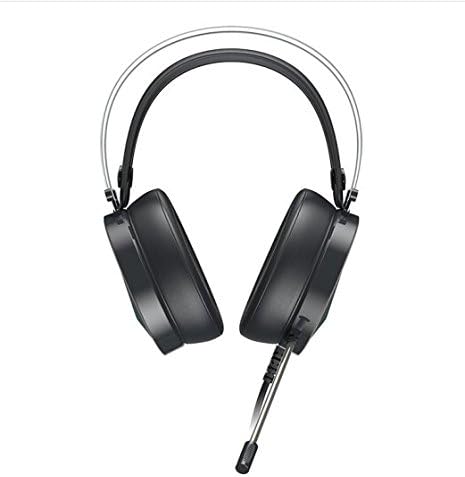
Image 4.1: Headset with Microphone Folded. This image displays the Dareu EH722 headset from a top-down perspective, showing the microphone folded upwards and away from the user's face.
5. Техникалык тейлөө жана кам көрүү
Proper maintenance ensures the longevity and optimal performance of your Dareu EH722 Gaming Headset.
- Кулакчындарды тазалоо: Gently wipe the earcup cushions with a soft, damp cloth. Avoid using harsh chemicals or abrasive cleaners. Ensure the earcups are completely dry before use.
- Чачты тазалоо: Баш боону жумшак, кургак чүпүрөк менен сүртүңүз.
- Кабельге кам көрүү: Avoid sharp bends or excessive pulling on the cable to prevent damage. Store the headset in a way that the cable is not tangled or stressed.
- Сактагыч: When not in use, store the headset in a clean, dry place away from direct sunlight and extreme temperatures.
- Нымдуулуктан качыңыз: Гарнитураны сууга же ашыкча нымдуулукка дуушар кылбаңыз.
6. Кыйынчылыктарды
If you encounter issues with your Dareu EH722 Gaming Headset, refer to the following common problems and solutions:
| Көйгөй | Мүмкүн болгон себеп / Чечим |
|---|---|
| Гарнитурадан үн чыкпай жатат |
|
| Микрофон иштебейт |
|
| Sound Quality is Poor or Distorted |
|
| Headset is Uncomfortable |
|
7. Техникалык шарттар
| Өзгөчөлүк | Деталь |
|---|---|
| Бренд | Дареу |
| Модел | EH722 |
| Форма фактору | Circum-Aural (Over-Ear) |
| Материал | Жасалма булгаарыдан жасалган кулакчындар (кулакчындар) |
| Байланыш | USB |
| Үн өзгөчөлүктөрү | 7.1 Айлана үн |
| Микрофон | Foldable, Noise-Cancelling |
| Controls | On-cable volume and mute switch |
| Шайкештик | PS4, Windows 10, Windows 8, Windows 7, Windows Vista |
| GTIN / UPC | 680465965344 |

Image 7.1: Headset Dimensions. This image provides a visual representation of the Dareu EH722 headset with its key dimensions in millimeters.
8. Кепилдик жана колдоо
Dareu products are manufactured to high quality standards. For information regarding warranty coverage, please refer to the warranty card included with your product or visit the official Dareu webсайт.
For technical support, troubleshooting assistance beyond this manual, or to inquire about replacement parts, please contact Dareu customer service through their official channels. Keep your purchase receipt as proof of purchase for warranty claims.
Онлайн ресурстар: For the most up-to-date information, drivers, and FAQs, please visit the official Dareu support webсайт.