
Introduction
Thank you for choosing the Awei B923BL Wireless Magnetic Sports Bluetooth Earphones. This manual provides essential information for setting up, operating, maintaining, and troubleshooting your new earphones. Please read it carefully before use to ensure optimal performance and longevity of your device.
Пакеттин мазмуну
Сураныч, пакетте төмөнкү нерселерди текшериңиз:
- Awei B923BL Wireless Magnetic Sports Bluetooth Earphones
- USB заряддоо кабели
- Кулак учтарынын бир нече өлчөмү
- User Manual
Продукт бүттүview
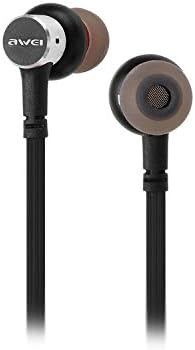
The Awei B923BL earphones are designed for active lifestyles, featuring a wireless Bluetooth connection and a magnetic design for convenient storage around your neck when not in use. They include an integrated microphone for hands-free calling.

Жайгашуу
1. Наушниктерди заряддоо
Before first use, fully charge your earphones. Connect the provided USB charging cable to the charging port on the earphones and the other end to a USB power source (e.g., computer USB port, wall adapter). The indicator light will show charging status and turn off or change color when fully charged.
2. Bluetooth Жупташтыруу
- Наушниктердин өчүрүлгөнүн текшериңиз.
- Press and hold the multi-function button (usually the power button) until the indicator light flashes red and blue alternately, indicating pairing mode.
- Уюлдук телефонуңузда же Bluetooth иштетилген түзмөгүңүздө Bluetooth жөндөөлөрүнө өтүп, Bluetooth'ту иштетиңиз.
- Издөө available devices. You should see "Awei B923BL" or a similar name in the list.
- Select "Awei B923BL" to connect. Once connected, the indicator light will usually flash blue slowly or turn off, and you may hear a confirmation tone.
- Эгер сырсөз суралса, "0000" киргизиңиз.
Once paired, the earphones will automatically connect to the last paired device when turned on, if the device's Bluetooth is active and within range.
Иштөө нускамалары
Күйгүзүү/өчүрүү
- Күйгүзүү: Press and hold the multi-function button for approximately 3 seconds until the blue indicator light flashes.
- Өчүрүү: Press and hold the multi-function button for approximately 5 seconds until the red indicator light flashes and then turns off.
Музыканы ойнотуу
- Ойнотуу/тындыруу: Көп функциялуу баскычты бир жолу басыңыз.
- Кийинки трек: Көлөмү + баскычын басып, кармап туруңуз.
- Мурунку трек: Үн көлөмү - баскычын басып, кармап туруңуз.
Чалууларды башкаруу
- Чалууга жооп берүү/аяктоо: Көп функциялуу баскычты бир жолу басыңыз.
- Чакырууну четке кагуу: Көп функциялуу баскычты болжол менен 2 секунд басып туруңуз.
- Акыркы номерди кайра терүү: Көп функциялуу баскычты эки жолу басыңыз.
Үндү көзөмөлдөө
- Көлөмүн жогорулатуу: Көлөм + баскычын басыңыз.
- Көлөмдү азайтуу: Үн көлөмү - баскычын басыңыз.
Техникалык тейлөө
- Clean the earphones regularly with a soft, dry cloth. Do not use harsh chemicals or abrasive materials.
- Зарыл болсо, кулактын учун алып салып, жумшак самын жана суу менен тазалаңыз, кайра орнотуудан мурун толугу менен кургаганын текшериңиз.
- Наушниктерди салкын, кургак жерде, күндүн тике тийген нурунан жана экстремалдык температурадан алыс сактаңыз.
- Avoid exposing the earphones to water or excessive moisture.
- Do not attempt to disassemble or modify the earphones, as this will void the warranty.
Проблемаларды чечүү
- Кулакчындар күйбөй жатат: Наушниктердин толук заряддалганын текшериңиз.
- Түзмөк менен жупташтыруу мүмкүн эмес:
- Make sure the earphones are in pairing mode (flashing red and blue).
- Түзмөгүңүздө Bluetooth иштетилгенин текшериңиз.
- Кулакчындарды түзмөгүңүзгө жакыныраак жылдырыңыз.
- Try restarting both the earphones and your device.
- Эгер түзмөгүңүздөгү мурунку Bluetooth байланыштары өтө көп болсо, аларды тазалаңыз.
- Үн жок же үнү төмөн:
- Наушниктердин жана туташкан түзмөгүңүздүн үнүнүн деңгээлин текшериңиз.
- Наушниктердин түзмөгүңүзгө туура туташтырылганын текшериңиз.
- Ар кандай аудио булактарын ойнотуп көрүңүз.
- Чалуулардын сапатындагы көйгөйлөр:
- Микрофондун тоскоол болбогонун текшериңиз.
- Азыраак кийлигишүүсү бар аймакка жылыңыз.
Техникалык шарттар
| Өзгөчөлүк | Деталь |
|---|---|
| Бренд аты | Awei |
| Модель номери | B923BL |
| Түс | Кара |
| Наушник форма фактору | Кулакта |
| Байланыш технологиясы | Зымсыз |
| Зымсыз байланыш технологиясы | Зымсыз |
| Жаш диапазонунун сүрөттөлүшү | бойго жеткен |
| Материал | Каучук |
| Шайкеш түзмөктөр | Мобилдик телефондор |
| Кабель өзгөчөлүгү | Кабельсиз |
| Башкаруу ыкмасы | тийүү |
| Элементтердин саны | 1 |
| Өндүрүүчү | Awei |
| Өзгөчөлүктөр | Microphone Included (Note: This model does not feature active noise cancellation as per product description.) |
Кепилдик жана колдоо
Кепилдик маалымат
This product comes with a 1-year manufacturer's warranty from the date of purchase. For warranty claims or service, please contact the manufacturer or their authorized service agent. For further details, you may also contact the retailer where the product was purchased.
Кардарларды колдоо
If you encounter any issues not covered in this manual or require further assistance, please refer to the contact information provided with your product packaging or visit the official Awei webколдоо булактары үчүн сайт.