
1. Киришүү
Thank you for choosing the ASAKUKI Smart Wi-Fi Essential Oil Diffuser. This device combines aromatherapy with smart technology, allowing you to control it via a mobile application or voice commands. It is designed to humidify and purify the air, creating a relaxing atmosphere in your home or office.
This manual provides detailed instructions for the safe and efficient use of your diffuser. Please read it thoroughly before operation and retain it for future reference.

Image: The ASAKUKI Smart Wi-Fi Essential Oil Diffuser is versatile for various environments, including nurseries, family rooms, bedrooms, yoga studios, and workspaces.
2. Коопсуздук чаралары
Коопсуз иштөөнү камсыз кылуу жана зыяндын алдын алуу үчүн төмөнкүлөрдү сактаңыз:
- Always place the diffuser on a flat, stable surface.
- Do not exceed the maximum water fill line (500ml).
- Use only clean tap water or distilled water. Avoid using hot water.
- Add essential oils carefully to avoid spilling on the exterior of the unit.
- Диффузорду балдар жана үй жаныбарлары жетпеген жерде сактаңыз.
- Do not cover the mist outlet during operation.
- Unplug the device from the power outlet before cleaning or refilling.
- Аспапты сууга же башка суюктуктарга батырбаңыз.
- If the unit is damaged, do not attempt to repair it yourself. Contact customer support.
- The diffuser features an automatic shut-off when water runs out, but it is recommended to monitor water levels.
3. Пакеттин мазмуну
Пакетиңизде бардык буюмдар бар экенин текшериңиз:
- ASAKUKI Smart Wi-Fi Essential Oil Diffuser (Model DF010)
- Кубаттуу адаптер
- User Manual
- Өлчөөчү чөйчөк (кошулушу мүмкүн)
4. Продукт бүтүп калдыview
Familiarize yourself with the main components of your diffuser:

Image: The ASAKUKI Smart Wi-Fi Essential Oil Diffuser, showing its sleek design and the accompanying mobile app for control.
- Капкак: Top cover of the diffuser.
- Mist Outlet: Туман чыккан жер.
- Суу багы: Holds up to 500ml of water.
- Max Water Line: Indicates the maximum fill level.
- Ultrasonic Plate: Located at the bottom of the water tank, responsible for mist generation.
- Аба чыгаруу: Located on the base.
- Drain Side: Indicated for proper water drainage.
- Жарык баскычы: Controls the LED light functions.
- Mist/Wi-Fi Button: Controls mist output and initiates Wi-Fi pairing.
- Power Jack: Кубат адаптерин туташтыруу үчүн.
5. Орнотуу нускамалары
Баштапкы орнотуу үчүн бул кадамдарды аткарыңыз:
- Диффузорду жайгаштырыңыз: Диффузорду тегиз, туруктуу жана суу өткөрбөй турган бетке коюңуз.
- Капкакты алып салуу: Gently lift the top lid off the diffuser.
- Суу кошуу: Using a measuring cup, fill the water tank with clean tap water or distilled water up to the maximum water line (500ml). Do not overfill.
- Эфир майларын кошуу: Add 3-5 drops of your preferred essential oil directly into the water tank. Adjust the amount based on personal preference and room size.
- Капкакты алмаштыруу: Securely place the lid back onto the diffuser.
- Туташуу кубаты: Plug the power adapter into the power jack at the base of the diffuser, then plug the adapter into a wall outlet.
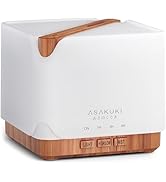
Image: Simple setup guide illustrating connecting power, app pairing, and wireless control.
6. Иштөө нускамалары
6.1 Кол менен башкаруу
- Туманды көзөмөлдөө: басыңыз Mist/Wi-Fi button once for continuous mist. Press again for intermittent mist (30 seconds on, 30 seconds off). Press a third time to turn off the mist.
- Жарыкты башкаруу: басыңыз Жарык button once to turn on the LED light with automatic color cycling. Press again to fix the light to a specific color. Continue pressing to cycle through colors. Press and hold the Light button to turn off the light.
6.2 Smart Wi-Fi and App Control
The diffuser can be controlled remotely using the TuyaSmart app.
- Колдонмону жүктөп алыңыз: Издөө "TuyaSmart" in your smartphone's app store (iOS or Android) and download it.
- Катталуу/Кирүү: Колдонмону ачып, жаңы каттоо эсебин каттаңыз же сизде мурунтан эле бар болсо кириңиз.
- Жупташтыруу режимине кирүү: With the diffuser plugged in, press and hold the Mist/Wi-Fi button for 5 seconds until the indicator light flashes rapidly. This indicates the diffuser is in pairing mode.
- Түзмөк кошуу: In the TuyaSmart app, tap "Add Device" or the "+" icon. Select "Small Home Appliance" > "Diffuser" (Wi-Fi).
- Wi-Fi'га туташуу: Follow the in-app instructions to connect the diffuser to your 2.4GHz Wi-Fi network. Ensure your phone is also connected to the same 2.4GHz network during setup.
- Контролдоо: Once successfully paired, you can control the mist, light, set timers, and create schedules directly from the TuyaSmart app.

Image: The mobile app allows for convenient control of the diffuser's functions.
6.3 Alexa менен үн менен башкаруу
The diffuser is compatible with Amazon Alexa for voice control.
- Көндүмдөрдү иштетүү: In the Alexa app, search for and enable the "TuyaSmart" skill.
- Каттоо эсебин байланыштыруу: Link your TuyaSmart account to your Alexa account.
- Түзмөктөрдү табуу: Alexaдан "Түзмөктөрдү табуу" же аларды Alexa колдонмосунан кол менен табуусун сураныңыз.
- Үн буйруктары: Аны тапкандан кийин, сиз төмөнкү буйруктарды колдоно аласыз:
- "Alexa, turn on the diffuser."
- "Alexa, turn off the diffuser."
- "Alexa, set the diffuser to red."
- "Alexa, set diffuser brightness to 50%."

Image: Voice control with Alexa allows hands-free operation of the diffuser.
7. Техникалык тейлөө
Үзгүлтүксүз тазалоо оптималдуу иштөөнү сактоого жана диффузоруңуздун иштөө мөөнөтүн узартууга жардам берет.
7.1 Тазалоо
Диффузорду ар бир 5-6 жолу колдонгондон кийин же ар бир 3-5 күндө, айрыкча эфир майларын алмаштырганда тазалап туруңуз.
- Ажыратыңыз: Disconnect the diffuser from the power outlet.
- Бош суу: Remove the lid and carefully pour out any remaining water from the drain side of the water tank.
- тазалоо: Use a soft cloth or cotton swab with a small amount of mild dish soap to gently wipe the inside of the water tank and the ultrasonic plate.
- Чайкоо: Rinse the water tank with clean water, being careful not to get water into the air outlet.
- Кургак: Wipe all parts dry with a clean, soft cloth.
- Deep Clean (Optional): For stubborn residue, add a small amount of white vinegar to the water tank and let it sit for 10-15 minutes before wiping and rinsing.
7.2 Сактоо
When not in use for an extended period, ensure the diffuser is clean and completely dry. Store it in a cool, dry place away from direct sunlight.
8. Кыйынчылыктарды
Эгер көйгөйлөргө туш болсоңуз, төмөнкү жалпы көйгөйлөрдү жана чечимдерди караңыз:
| Көйгөй | Мүмкүн себеп | Чечим |
|---|---|---|
| Туман жок же аз туман чыгаруу |
|
|
| Diffuser does not power on |
|
|
| Wi-Fi/Колдонмого туташуу мүмкүн эмес |
|
|
| Суунун агып чыгышы |
|
|
9. Техникалык шарттар
| Өзгөчөлүк | Деталь |
|---|---|
| Бренд | АСАКУКИ |
| Модель номери | DF010 |
| Кубаттуулугу | 500 миллилитр |
| Өлчөмдөр | 6"L x 6"W x 7"H |
| Материал | Acrylonitrile Butadiene Styrene (ABS), Polypropylene (PP) |
| Power Source | Электр зымдары |
| Ватtage | 10 ватт |
| Камтуу аймагы | 323 чарчы футка чейин |
| Өзгөчөлүктөр | App Control, Automatic Shut-Off, Multiple Light Settings, Multiple Mist Settings, Voice Control (Alexa) |
| Ызы-чуу деңгээли | 35 дБден төмөн |
| Runtime (Full Capacity) | Up to 16 hours (on weak mist setting) |
10. Кепилдик жана колдоо
The ASAKUKI Smart Wi-Fi Essential Oil Diffuser comes with a 1-year technical support warranty. This warranty covers manufacturing defects and issues arising from normal use.
For technical assistance, troubleshooting, or warranty claims, please contact ASAKUKI customer support through the retailer where you purchased the product or visit the official ASAKUKI webбайланыш маалыматы үчүн сайт.
Please have your model number (DF010) and proof of purchase ready when contacting support.