
Introduction
This manual provides detailed instructions for the proper use and care of your Vivitar DVR917HD 4K Action Camera. Please read this manual thoroughly before operating the device to ensure safe and effective use. The Vivitar DVR917HD is designed to capture high-quality video and photos in various environments, including underwater, thanks to its durable waterproof casing and versatile mounting options.
Продукт өзгөчөлүктөрү
- 2-inch Color LCD Display: For precise image capture, video playback, and photo viewing.
- 4K видео жаздыруу: Capture stunning video at 4640 x 3480 resolution, along with 1080p and 720p options.
- 16 Megapixel CMOS Sensor: For high-resolution still photographs.
- Сууга чыдамдуу корпус: Enables use in wet conditions and underwater adventures.
- Камтылган Wi-Fi: Allows direct streaming of content to compatible smartphones or tablets.
- Кең бурчтуу объектив: Designed for capturing expansive scenes.
- Бир нече интерфейстер: Supports microSD, microSDHC, HDMI, and USB 2.0.
- Компакт дизайн: Dimensions of 2.6 inches x 2.5 inches x 1.5 inches and a weight of 0.5 pounds.
Пакеттин мазмуну
Төмөндө тизмеленген нерселердин баары пакетиңизге камтылганын текшериңиз:
- Vivitar DVR917HD 4K экшн-камера
- Суу өткөрбөй турган турак жай
- Зымсыз алыстан башкаруу
- AC кубат адаптери
- USB кабели
- HDMI кабели
- Helmet Mounting Kit
- Велосипед орнотуу

Image: The Vivitar DVR917HD camera shown with its full set of accessories, including the waterproof case, remote, various mounts, and cables.
Жайгашуу
1. MicroSD картасын салуу
- Камераңыздын капталынан microSD карта уячасын табыңыз.
- Gently insert a compatible microSD or microSDHC card (Class 4 or higher recommended) into the slot until it clicks into place. Ensure the card is oriented correctly.
2. Батареяны заряддоо
- Connect the camera to the AC power adapter using the provided USB cable.
- AC кубат адаптерин дубалдагы розеткага сайыңыз.
- Кубаттоо көрсөткүчү күйөт. Жарык түсү өзгөргөндө же өчкөндө кубаттоо аяктайт.
3. Using the Waterproof Housing
- Open the latch on the waterproof housing.
- Carefully place the camera inside the housing, ensuring it fits snugly.
- Close the latch securely. Before first use in water, perform a leak test without the camera inside.
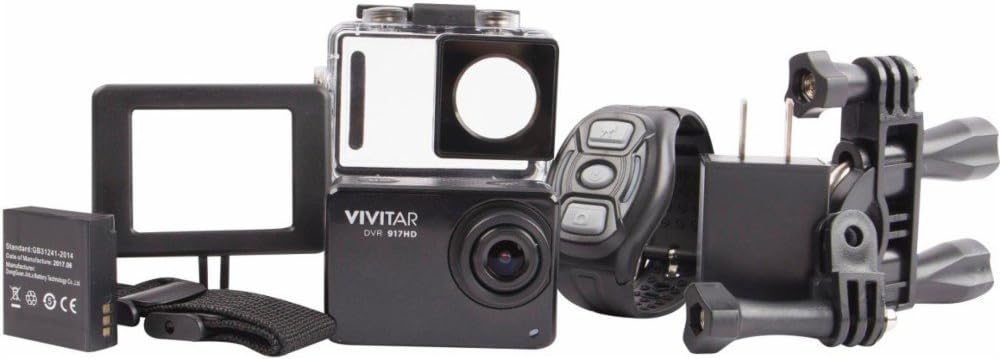
Image: The Vivitar DVR917HD camera positioned within its clear waterproof housing, with the back cover open.
4. Тактоо
The camera comes with a helmet mounting kit and a bicycle mount. Follow the instructions provided with each mount to securely attach the camera for your desired activity.

Image: The Vivitar DVR917HD camera enclosed in its waterproof case, securely attached to a mounting accessory.

Image: A person wearing a ski helmet with the Vivitar DVR917HD action camera visibly mounted on the top, against a snowy mountain backdrop.
Иштөө нускамалары
1. Күйгүзүү / Өчүрүү
- To power on, press and hold the Power/Mode button (usually labeled 'MODE') until the screen illuminates.
- Өчүрүү үчүн, экран өчкөнгө чейин Күйгүзүү/Режим баскычын кайра басып туруңуз.

Сүрөт: жакын план view of the Vivitar DVR917HD action camera, highlighting its front lens and top control buttons.
2. Видео жаздыруу
- Ensure the camera is in video recording mode. Use the Mode button to cycle through modes if necessary.
- Press the 'OK' button to start recording. A red indicator light or on-screen icon will typically show recording is active.
- Press the 'OK' button again to stop recording.
3. Сүрөт тартуу
- Switch the camera to photo mode using the Mode button.
- Кадрыңызды 2 дюймдук LCD дисплейди колдонуп кадр.
- Press the 'OK' button to capture a photo.

Image: The Vivitar DVR917HD camera's rear screen displaying a live view from a first-person perspective of someone riding a bicycle.
4. Wi-Fi байланышы
- Enable Wi-Fi on the camera through the settings menu.
- On your smartphone or tablet, search for the camera's Wi-Fi network and connect to it.
- Open the Vivitar app (if available) or a compatible action camera app to stream content or control the camera remotely.
5. Зымсыз алыстан башкарууну колдонуу
The included wireless remote control allows for convenient operation of the camera from a distance. Refer to the remote control's specific instructions for pairing and function details.
Техникалык тейлөө
Cleaning the Camera and Housing
- Use a soft, lint-free cloth to clean the camera body and lens. Avoid abrasive materials.
- For the waterproof housing, rinse with fresh water after use in saltwater and allow to air dry. Ensure the O-ring seal is free of debris.
Батареяга кам көрүү
- Ар бир колдонуудан мурун батареяны толук заряддаңыз.
- Батареяны экстремалдуу температурага калтырбаңыз.
- Эгер камераны көпкө сактасаңыз, батарейкасын алып салыңыз.
Сактагыч
Store the camera in a cool, dry place away from direct sunlight and excessive humidity. Keep it protected from dust and impacts.
Проблемаларды чечүү
- Камера күйбөй жатат: Батарея заряддалганын жана туура салынганын текшериңиз.
- Жаздыруу маселелери: Check if a microSD card is inserted and has sufficient free space. Ensure the card is not corrupted.
- Үн сапаты начар: The waterproof housing can significantly muffle sound. For better audio, use the camera outside the housing in dry conditions.
- Wi-Fi туташуу көйгөйлөрү: Ensure Wi-Fi is enabled on the camera and your smart device. Try restarting both devices.
- Камеранын тоңуп калышы: Камераны баштапкы абалга келтирүү үчүн батареяны чыгарып, кайра салыңыз.
Техникалык шарттар
| Өзгөчөлүк | Спецификация |
|---|---|
| Модель аты | DVR917HD |
| Элемент моделинин номери | 3216565590 |
| Натыйжалуу дагы эле чечим | 16 депутат |
| Видео тартуунун резолюциясы | 4K, 1080p, 720p |
| Видео тартуу форматы | MP4 |
| Фото сенсор технологиясы | CMOS |
| Screen Size | 2 дюйм |
| Байланыш технологиясы | Wi-Fi |
| Flash эс тутум түрү | Микро SD |
| Өзгөчө өзгөчөлүк | Суу өткөрбөйт |
| Линзанын түрү | Wide Angle |
| Фокус түрү | Автофокус |
| Экспозицияны көзөмөлдөө | Автоматтык |
| Элемент Салмагы | 717 г |
| Өлчөмдөр | 2.6 x 2.5 x 1.5 дюйм (болжол менен) |
Кепилдик маалымат
For detailed warranty information regarding your Vivitar DVR917HD 4K Action Camera, please refer to the warranty card included in your product packaging or visit the official Vivitar webсайт. Кепилдиктин шарттары жана шарттары аймакка жана сатып алуу күнүнө жараша өзгөрүшү мүмкүн.
Кардарларды колдоо
If you require further assistance, have questions not covered in this manual, or need technical support, please contact Vivitar customer service. Contact details can typically be found on the Vivitar official webсайтында же продуктунун таңгагында.