
1. Киришүү
This manual provides comprehensive instructions for the installation, operation, and maintenance of your BlueBird A1390 Automatic Irrigation Tap Programmer. This device is designed to automate your garden watering schedule, ensuring efficient and consistent irrigation. Please read this manual thoroughly before using the product to ensure correct operation and to prevent damage.
2. Коопсуздук маалыматы
- Do not immerse the unit in water. The unit is designed to be weather-resistant, but not submersible.
- 1.5 В AA щелочтуу батареяларды гана колдонуңуз. Эски жана жаңы батареяларды, же ар кандай типтеги батареяларды аралаштырбаңыз.
- Агып кетүүнүн алдын алуу үчүн бирдик узак убакыт бою колдонулбай турган болсо, батарейкаларды алып салыңыз.
- Балдар жетпеген жерде сактаңыз.
- Түзмөктү өз алдынча бөлүктөргө бөлүүгө же оңдоого аракет кылбаңыз. Тейлөө үчүн квалификациялуу адистерге кайрылыңыз.
- Суу агып кетпеши үчүн бардык туташуулардын коопсуз экенин текшериңиз.
3. Пакеттин мазмуну
Сураныч, пакетте төмөнкү нерселерди текшериңиз:
- 1x BlueBird A1390 Automatic Irrigation Tap Programmer
- 1x Колдонуучунун колдонмосу (бул документ)
Note: 2 AA 1.5V batteries are required for operation and are not included in the package.
4. Продукт бүтүп калдыview
The BlueBird A1390 features two main rotary dials for setting irrigation frequency and duration, along with a battery indicator and an ON/OFF switch.
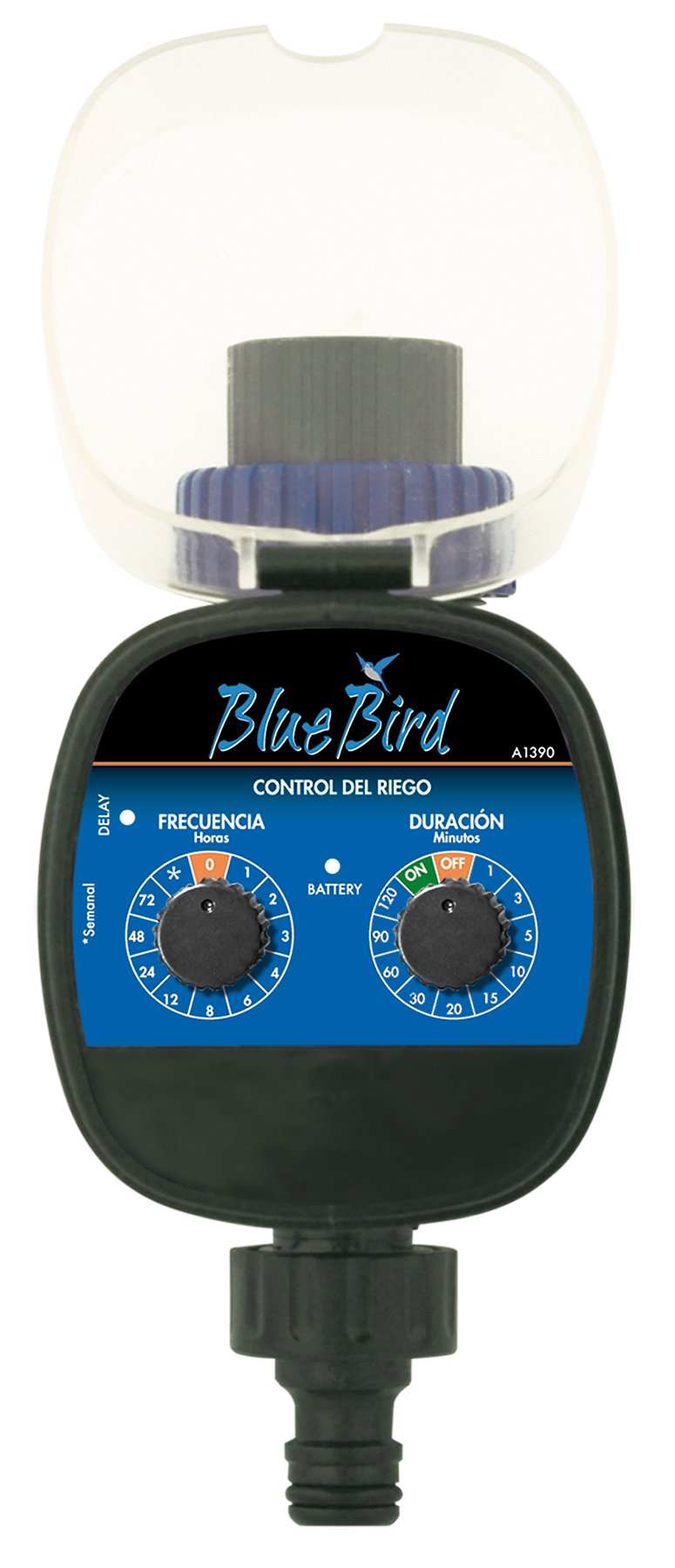
1-сүрөт: Фронт view of the BlueBird A1390 Irrigation Programmer. The left dial controls irrigation frequency, and the right dial controls irrigation duration. A battery indicator light is located between the dials.
Компоненттери:
- Frequency Dial (Frecuencia): Sets how often the irrigation occurs. Options include 0 (off), 1, 2, 3, 4, 6, 8, 12, 24, 48, 72 hours, and a '*' setting for manual or weekly operation.
- Duration Dial (Duración): Sets how long each irrigation cycle lasts. Options include 0 (off), 1, 3, 5, 10, 15, 20, 30, 60, 90, 120 minutes.
- ON/OFF которуу: Located on the Duration Dial, allows for manual override or turning the unit off.
- Батарея көрсөткүчү: A light that indicates battery status.
- Батарея бөлүмү: Located at the rear of the unit (not visible in Figure 1).
- Суу кирүү/чыгаруу: Standard tap and hose connections.
5. Орнотуу
5.1 Батареяны орнотуу
- Аппараттын артындагы батарея бөлүкчөсүнүн капкагын табыңыз.
- Remove the cover by twisting or sliding it open.
- Туура полярдуулукту (+/-) камсыз кылып, эки (2) жаңы 1.5V AA щелочтуу батареяны салыңыз.
- Суу өткөрбөөчүлүгүн сактоо үчүн батарея бөлүмүнүн капкагын бекем жабыңыз.
5.2 Кранга туташуу
- Ensure your outdoor tap is turned off.
- Screw the BlueBird A1390 programmer onto your tap. Hand-tighten only to prevent damage.
- Connect your garden hose or irrigation system to the outlet of the programmer. Ensure a tight connection to prevent leaks.
- Slowly turn on your outdoor tap. Check for any leaks at the connections.
6. Иштөө нускамалары
The BlueBird A1390 is designed for simple, intuitive programming using its two rotary dials.
6.1 Setting Irrigation Frequency
- айлантыңыз Frequency Dial (left dial) to your desired irrigation interval.
- Жеткиликтүү орнотуулар:
- 0: No irrigation (off).
- 1, 2, 3, 4, 6, 8, 12, 24, 48, 72: Irrigation every X hours.
- *: This setting typically indicates a manual mode or a weekly cycle, depending on the specific model's internal logic. Refer to the example below for common usage.
6.2 Setting Irrigation Duration
- айлантыңыз Duration Dial (right dial) to your desired watering time per cycle.
- Жеткиликтүү орнотуулар:
- ӨЧҮК: No irrigation.
- КҮЙҮК: Continuous irrigation (use with caution).
- 1, 3, 5, 10, 15, 20, 30, 60, 90, 120: Irrigation for X minutes.
6.3 Чыгample Programming
To water every 6 hours for 10 minutes:
- коюңуз Frequency Dial чейин 6 (саат).
- коюңуз Duration Dial чейин 10 (minutes).
The programmer will automatically begin the cycle based on these settings. The first cycle will typically start shortly after programming, or after a short delay.
6.4 Manual ON/OFF
To manually turn on the water, rotate the Duration Dial to the ON position. To stop manual watering, rotate the dial back to ӨЧҮРҮҮ or a timed setting.
7. Техникалык тейлөө
7.1 Батареяны алмаштыруу
When the battery indicator light dims or the unit stops functioning, it's time to replace the batteries. Follow the steps in Section 5.1 for battery installation.
7.2 Тазалоо
Clean the exterior of the programmer with a damp cloth. Do not use abrasive cleaners or solvents. Ensure no water enters the battery compartment or internal electronics.
7.3 Кышкы сактоо
Before the first frost, disconnect the programmer from the tap and hose. Remove the batteries. Store the unit indoors in a dry, frost-free location to prevent damage from freezing water.
8. Кыйынчылыктарды
| Көйгөй | Мүмкүн себеп | Чечим |
|---|---|---|
| Unit does not turn on/display. | Өлүк же туура эмес орнотулган батарейкалар. | Туура полярдуулукту камсыз кылуу менен батарейкаларды алмаштырыңыз. |
| Суу акпайт. | Tap is off; programmer set to '0' or 'OFF'; low water pressure; clogged filter. | Ensure tap is fully open. Check frequency/duration settings. Verify water pressure. Clean any filters. |
| Unit leaks at connections. | Loose connections; missing or damaged washer. | Tighten connections. Check and replace washers if necessary. |
| Irrigation schedule is incorrect. | Incorrect frequency or duration settings. | Re-check and adjust the Frequency and Duration Dials according to your desired schedule. |
9. Техникалык шарттар
- Модел: A1390
- Бренд: BlueBird
- Өндүрүүчү: Altadex
- Кубат булагы: 2 x AA 1.5V щелочтуу батарейкалар (кошулган эмес)
- Сугаруу жыштыгы: 0, 1, 2, 3, 4, 6, 8, 12, 24, 48, 72 hours, or '*' (manual/weekly)
- Сугаттын узактыгы: OFF, ON, 1, 3, 5, 10, 15, 20, 30, 60, 90, 120 minutes
- Продукциянын өлчөмдөрү: Болжол менен 19.4 x 10.6 x 10 см
- Продукт Салмагы: Болжол менен 280 г
- GTIN (UPC): 8426375113909
10. Кепилдик жана колдоо
This product is covered by a standard manufacturer's warranty. For specific warranty details, please refer to the documentation provided at the time of purchase or contact your retailer. For technical support or inquiries, please contact the seller or manufacturer directly.