
1. Киришүү
This manual provides essential instructions for the proper use and maintenance of your KECHAODA K115 basic mobile phone. Please read this guide thoroughly before operating your device to ensure optimal performance and longevity.
2. Пакеттин мазмуну
Продукцияңыздын таңгагында бардык элементтер бар экенин текшериңиз:
- KECHAODA K115 Handset
- USB кабели
- Lithium-ion Battery (800mAh)
3. Түзмөк бүттүview
Familiarize yourself with the physical components of your KECHAODA K115 phone.

Сүрөт 3.1: Алдыңкы View. This image displays the front of the KECHAODA K115 phone, highlighting its 1.44-inch display and the well-spaced numeric keypad.
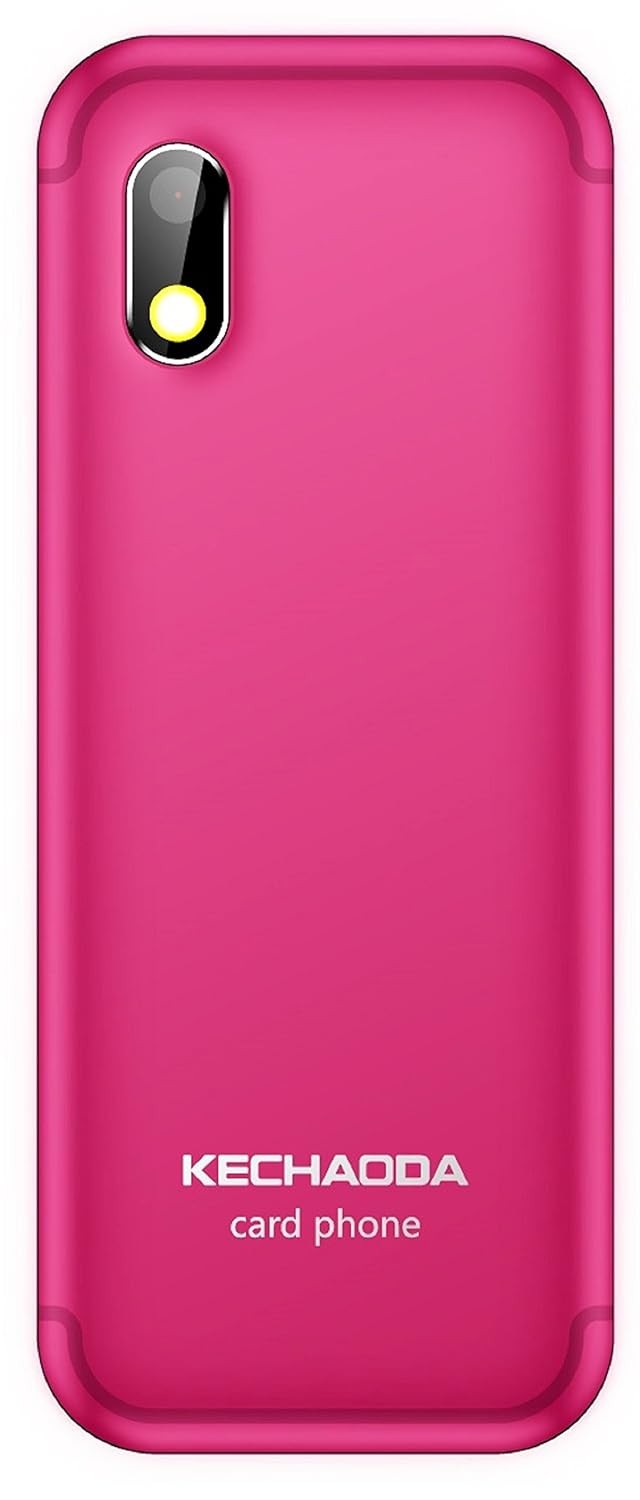
3.2-сүрөт: Артка View. This image shows the rear of the KECHAODA K115, featuring the 0.3MP primary camera lens and the KECHAODA branding.

3.3-сүрөт: Жогорку жана төмөнкү Views. This image illustrates the top and bottom edges of the KECHAODA K115, indicating the location of the 3.5mm audio jack and the USB charging port.
4. Орнотуу
4.1. Батареяны орнотуу
- Телефондун арткы капкагын белгиленген оюктан акырын тартып алып салыңыз.
- Батареянын контакттарын батарея бөлүмүнүн ичиндеги терминалдар менен тегиздеңиз.
- Press the battery down firmly until it is securely in place.
- Арткы капкакты ордуна коюп, чыкылдагандай болгонун текшериңиз.
4.2. SIM картаны орнотуу
The KECHAODA K115 supports dual SIM cards.
- Батареяны алып салып, SIM картанын уячаларын табыңыз.
- Insert your SIM card(s) into the respective slots, ensuring the gold contacts face downwards and the cut corner aligns correctly.
- Gently push the SIM card(s) until they are fully seated.
4.3. Memory Card Installation (MicroSD)
The device supports a microSD card up to 32GB for expanded storage.
- Locate the microSD card slot, usually adjacent to the SIM card slots.
- Insert the microSD card with the gold contacts facing downwards, pushing it gently until it locks into place.
4.4. Баштапкы күйгүзүү жана заряддоо
- After installing the battery and SIM card(s), press and hold the Power/End Call button until the screen illuminates.
- To charge the phone, connect the USB cable to the phone's charging port and the other end to a compatible USB power adapter or computer.
- Экранда заряддоо индикатору пайда болот.
5. Иштөө нускамалары
5.1. Негизги функциялар
- Чалууларды жасоо: Баскычтопту колдонуп телефон номерин терип, Чакыруу баскычын басыңыз.
- Чалууларга жооп берүү: Телефон шыңгыраганда Чакыруу баскычын басыңыз.
- Кабарларды жөнөтүү: Navigate to the 'Messages' menu, select 'Write Message', enter your text, and choose a recipient.
- Тез терүү: Assign frequently called numbers to specific keys for quick dialing. Refer to the phone's menu for speed dial setup.
5.2. Bluetooth байланышы
The KECHAODA K115 supports Bluetooth for connecting to compatible devices, including a BT Dialer function.
- Go to the 'Settings' menu and select 'Bluetooth'.
- Turn Bluetooth 'On' and search for available devices.
- Тизмеден каалаган түзмөктү тандап, жупташтыруу үчүн экрандагы көрсөтмөлөрдү аткарыңыз.
5.3. Медиа ойнотуу
The phone supports various audio (AMR/WAV/MP3) and video (3GP/MP4/AVI) formats.
- Access the 'Multimedia' or 'File Manager' menu to locate and play your media fileэстутум картасында сакталган.
- Use the 3.5mm audio jack to connect headphones for private listening.
5.4. Тил жөндөөлөрү
The device supports English, Hindi, Tamil, and Kannada languages.
- Navigate to 'Settings' and then 'Phone Settings' or 'Language Settings'.
- Жеткиликтүү варианттардан каалаган тилиңизди тандаңыз.
6. Техникалык тейлөө
- Тазалоо: Телефондун экранын жана корпусун тазалоо үчүн жумшак, кургак чүпүрөктү колдонуңуз. Суюк тазалоочу каражаттарды колдонбоңуз.
- Батареяга кам көрүү: Avoid extreme temperatures. Do not overcharge or fully discharge the battery regularly.
- Сактагыч: Телефонду узак убакытка колдонбогондо салкын, кургак жерде сактаңыз.
7. Кыйынчылыктарды
7.1. Phone Does Not Power On
- Батарея туура орнотулганын жана заряддалганын текшериңиз.
- Кубаттагычты туташтырып, кайра күйгүзүүгө аракет кылуудан мурун бир нече мүнөт күтө туруңуз.
7.2. Cannot Make or Receive Calls
- Check if the SIM card(s) are properly inserted and activated.
- Verify that you have network signal.
- Ensure your account balance is sufficient (for prepaid services).
7.3. Начар аудио сапаты
- Чалуу учурунда үн жөндөөлөрүн текшериңиз.
- Ensure the speaker/earpiece is not obstructed.
- If using a headset, ensure it is properly connected.
8. Техникалык шарттар
| Өзгөчөлүк | Спецификация |
|---|---|
| Модель номери | K115 |
| Операция системасы | X жиби |
| RAM | 32 MB |
| Ички эс тутум | 64 MB |
| Expandable Memory | 32 ГБ чейин (MicroSD) |
| Дисплей | 1.44-inch TFT, 128 x 128 pixels resolution |
| Камера | 0.3 МП арткы |
| Батарея | 800 mAh Lithium-ion (Removable) |
| Talk Time | Болжол менен 4 саат |
| Байланыш | GSM (900/1800 MHz), Bluetooth |
| SIM колдоо | Кош SIM |
| Аудио Jack | 3.5 мм |
| Продукциянын өлчөмдөрү | 27.9 x 12.7 x 15.2 см |
| Элемент Салмагы | 100 г |
9. Кепилдик жана колдоо
9.1. Кепилдик маалыматы
Your KECHAODA K115 device comes with a 1 жылдык өндүрүүчү кепилдик from the date of purchase. In-box accessories, including batteries, are covered by a 6 ай өндүрүүчү кепилдик сатып алынган күндөн тартып. Бул кепилдик нормалдуу колдонуу шарттарында өндүрүш кемчиликтерин камтыйт.
9.2. Кардарларды колдоо кызматы
For technical assistance, warranty claims, or further inquiries, please contact KECHAODA customer support through the details provided on your purchase receipt or the official KECHAODA webсайт.