
Introduction
Сатып алганыңыз үчүн рахматasing the Nobsound Little Bear MC403 Mini 4-IN-3-OUT Audio Selector Box. This device is designed to provide flexible audio routing for your home audio system, allowing you to switch between multiple audio sources and outputs. It features 3.5mm AUX, RCA, and Bluetooth inputs, with 3.5mm AUX and RCA outputs. Please read this manual carefully before use to ensure proper operation and to maximize the performance of your device.
Коопсуздук маалыматы
- Бул аппаратты жамгырга, нымдуулукка же экстремалдык температурага тийгизбеңиз.
- Аппаратты жылуулук булактарынын жанына же тике күн нуруна коюудан алыс болуңуз.
- в ачпагылаasing; ичинде колдонуучу тейлей турган бөлүктөр жок.
- Use only the provided power adapter or one with identical specifications (5V DC, 200mA).
- Ensure all connections are secure before powering on any connected audio equipment.
- Балдар жетпеген жерде сактаңыз.
Пакеттин мазмуну
Сураныч, пакетте төмөнкү нерселерди текшериңиз:
- 1 x Nobsound Little Bear MC403 Audio Selector Box
- 1 x Power Adapter (for Bluetooth function)
- 1 x Bluetooth антеннасы
Продукт бүттүview
Front Panel
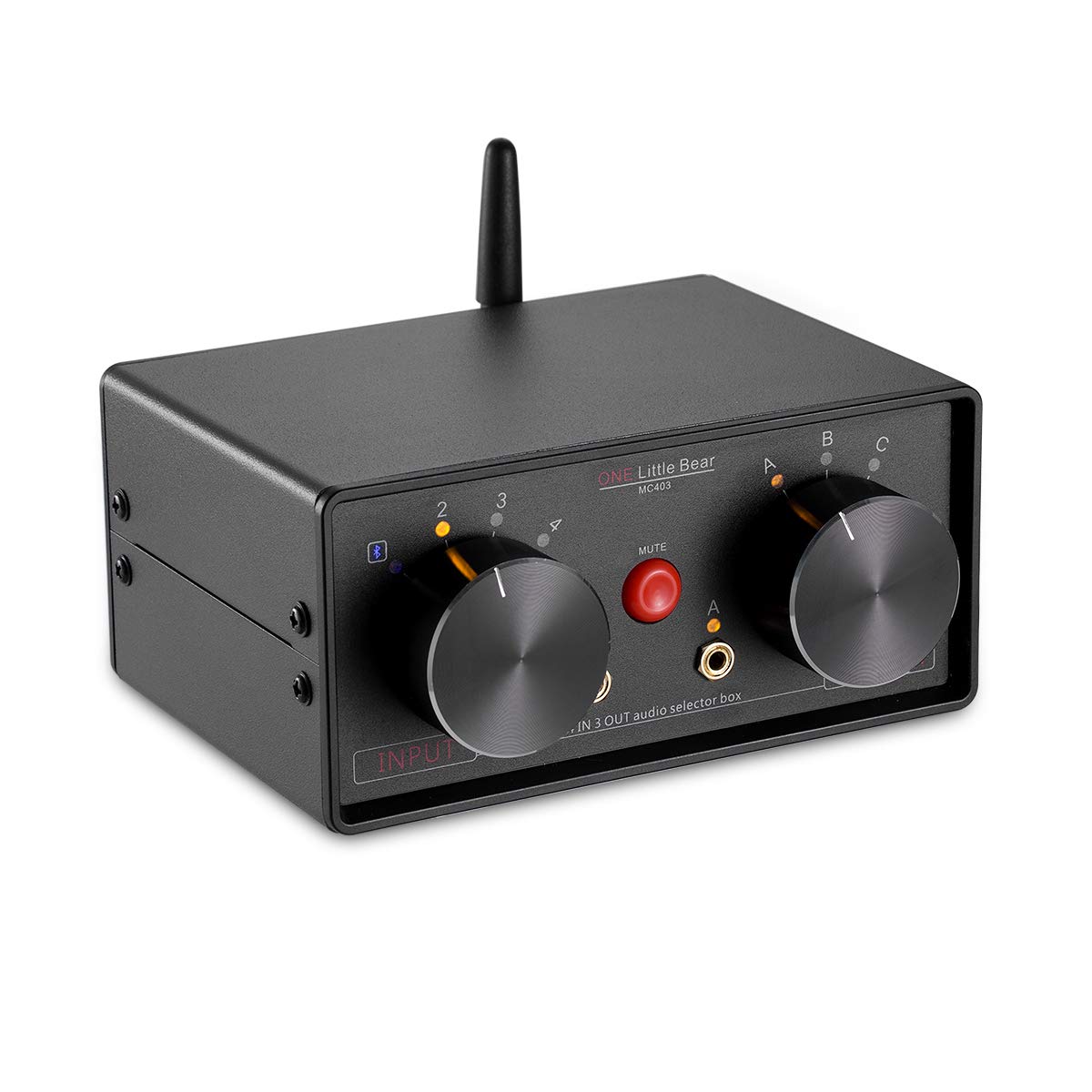
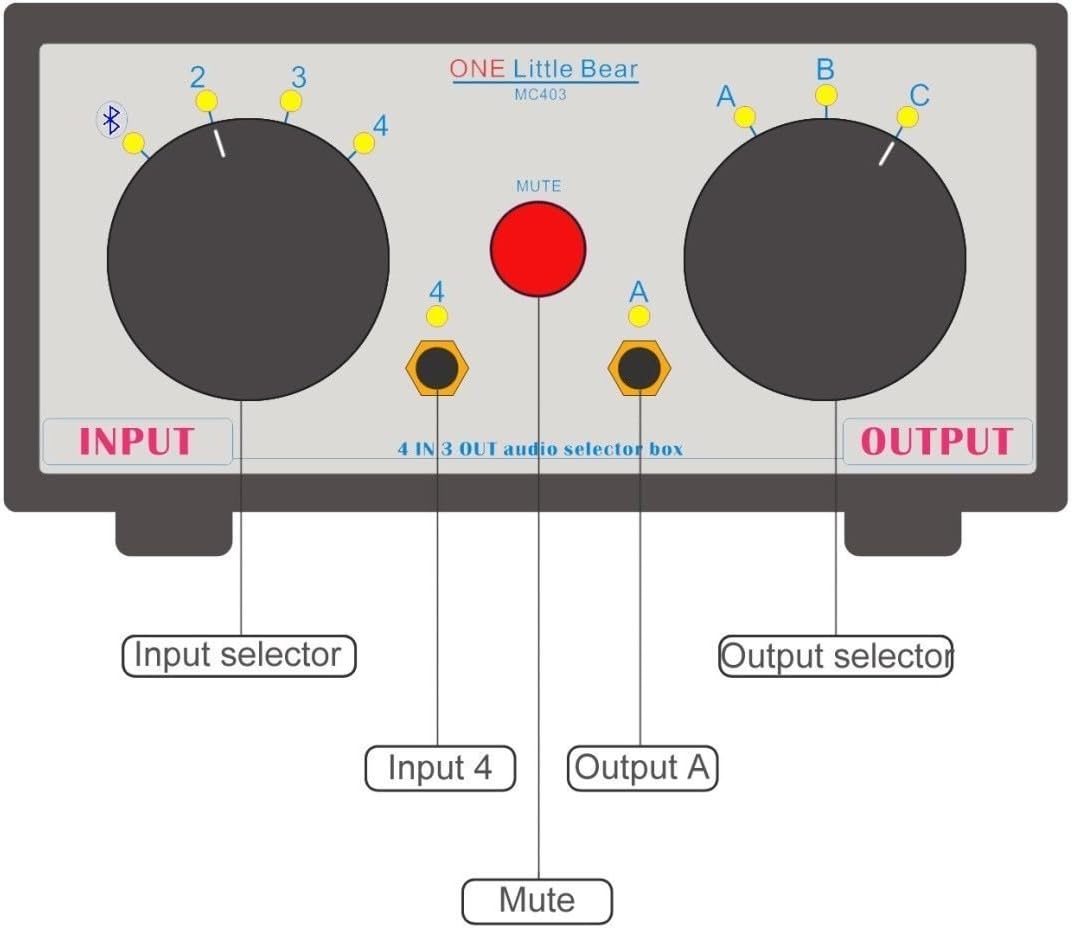
- Киргизүү тандоо баскычы: Selects between 4 audio inputs (1, 2, 3, or 4). Input 4 corresponds to the front 3.5mm jack and Bluetooth.
- Output Selector Knob: Selects between 3 audio outputs (A, B, or C). Output A corresponds to the front 3.5mm jack.
- MUTE баскычы: Press to mute/unmute the audio output.
- 3.5mm Input Jack (Input 4): For connecting 3.5mm audio sources.
- 3.5mm Output Jack (Output A): For connecting 3.5mm audio devices like headphones or speakers.
Арткы панель


- RCA Inputs (2 & 3): For connecting RCA audio sources.
- RCA Outputs (B & C): For connecting RCA audio devices like ampкөтөргүчтөр же активдүү спикерлер.
- DC IN (5Vdc, 200mA): Power input for the Bluetooth function and indicator LED. A standard cellphone charger can be used.
- Bluetooth антеннасынын порту: Кошумча Bluetooth антеннасын туташтыруу үчүн.
- ON/OFF которуу: Activates or deactivates the Bluetooth function.
Жайгашуу
- Bluetooth антеннасын тиркөө: Carefully hold the black part of the antenna upright. Screw the antenna onto the Bluetooth antenna port on the rear panel until it is securely fastened. Do not twist the entire antenna to tighten the screw.
- Connect Power (Optional for Bluetooth): If you intend to use the Bluetooth function, connect the provided 5V DC power adapter to the "DC IN" port on the rear panel. Plug the adapter into a power outlet.

Figure 5: Power Adapter Connection. This image shows the MC403 with its power adapter connected to the DC IN port on the rear. - Аудио булактарын туташтыруу:
- For RCA sources (e.g., CD player, DVD player), connect them to the "INPUT 2" or "INPUT 3" RCA jacks on the rear panel.
- For 3.5mm AUX sources (e.g., smartphone, tablet, laptop), connect them to the "INPUT 4" 3.5mm jack on the front panel.
- Bluetooth is also an input option (Input 4).
- Аудио чыгарууларды туташтыруу:
- For RCA outputs (e.g., amplifier, active speakers), connect them to the "OUTPUT B" or "OUTPUT C" RCA jacks on the rear panel.
- For 3.5mm AUX outputs (e.g., headphones, small active speakers), connect them to the "OUTPUT A" 3.5mm jack on the front panel.

Иштөө нускамалары
- Күйгүзүү: If using Bluetooth, ensure the power adapter is connected and the ON/OFF switch on the rear panel is set to "ON".
- Киргизүүнү тандоо: айлантыңыз Киргизүүнү тандоо баскычы on the front panel to choose your desired audio source (1, 2, 3, or 4).
- Чыгарууну тандаңыз: айлантыңыз Output Selector Knob on the front panel to direct the audio to your desired output device (A, B, or C).
- Үнсүз функция: Кызылды басыңыз БАСУУ button to temporarily silence the audio output. Press it again to unmute.
- Пассивдүү операция: The RCA and 3.5mm AUX inputs/outputs function passively without power. Power is only required for Bluetooth functionality and the indicator LED.
Bluetooth Жупташтыруу
To use the Bluetooth receiver function:
- Ensure the power adapter is connected and the Bluetooth ON/OFF switch on the rear panel is set to "ON".
- Turn on the Bluetooth function on your mobile phone or other Bluetooth-enabled device.
- Издөө жеткиликтүү Bluetooth түзмөктөрү.
- Locate and select the device named "WIN-668". No pairing code is required.
- Once paired, you can play music from your mobile device via Bluetooth through the MC403.
Эскертүү: The Bluetooth receiver output power is 20mW. It can directly drive headphones with an impedance of 12-120 ohms. Ensure your mobile phone's volume is set appropriately.
Техникалык тейлөө
- Аппаратты жумшак, кургак чүпүрөк менен тазалаңыз. Суюк тазалагычтарды же аэрозолдорду колдонбоңуз.
- Аппаратты чаңдан жана таштандыдан алыс кармаңыз.
- Узак убакыт бою колдонулбай турганда, кубат адаптерин сууруп коюңуз.
Проблемаларды чечүү
| Көйгөй | Мүмкүн себеп | Чечим |
|---|---|---|
| Аудио чыгышы жок. |
|
|
| Bluetooth not connecting or "WIN-668" not found. |
|
|
| Ызы-чуу же ызы-чуу. |
|
|
| Bluetooth antenna feels wobbly. | Antenna not properly secured or overtightened. | When installing, hold the black part of the antenna and only twist the base to tighten. Do not force the entire antenna. If it's already wobbly, avoid further twisting to prevent internal damage. |
Техникалык шарттар
| Өзгөчөлүк | Деталь |
|---|---|
| Модел | MC403 |
| Киргизүүлөр | 2 x RCA, 1 x 3.5mm AUX, 1 x Bluetooth |
| Чыгуулар | 2 x RCA, 1 x 3.5mm AUX |
| Bluetooth версиясы | 4.0 (Stereo Audio Receiver) |
| Bluetooth чыгаруу күчү | 20mW (for headphones 12-120 ohms) |
| Электр камсыздоо | DC 5V, 200mA (for Bluetooth and LED) |
| Өлчөмдөрү (W x D x H) | 150 мм x 105 мм x 68 мм (болжол менен) |
| Салмагы | 485 г (болжол менен) |
| Туташтыргыч түрү | 3.5 мм Jack, RCA |
| Шайкеш түзмөктөр | DVD-Player, Television, Laptop, Smartphone, Tablet |

Колдоо
Nobsound is committed to providing the highest level of customer service. If you encounter any issues or have questions regarding your Little Bear MC403 Audio Selector Box, please contact us via email. We aim to respond within 24 hours.
For further assistance, please visit the official Nobsound store: Nobsound Store