
1. Киришүү
Сатып алганыңыз үчүн рахматasing the Subcold Ultra 10 Mini Fridge. This portable thermoelectric appliance is designed to keep your items cool or warm, offering versatility for various environments such as bedrooms, offices, cars, and outdoor activities. With a 10-liter capacity, it can hold up to 10 standard 330ml cans. Please read this manual carefully before use to ensure proper operation and maintenance.
2. Коопсуздук нускамалары
- кубат менен камсыз кылуу Voltage аспапта көрсөтүлгөн.
- Шайманды сууга же башка суюктуктарга батырбаңыз.
- Тазалоодон же оңдоодон мурун блокту розеткадан сууруп алыңыз.
- Keep the appliance away from direct sunlight, heat sources, and open flames.
- Түзмөктүн айланасында жетиштүү желдетүүнү камсыз кылыңыз. Желдетүүчү тешиктерди жаппаңыз.
- Бул шайман физикалык, сенсордук же акыл-эс жөндөмү начар же тажрыйбасы жана билими жок адамдар (анын ичинде балдар) тарабынан колдонууга арналбайт, эгерде алардын коопсуздугуна жооптуу адам тарабынан шайманды колдонуу боюнча көрсөтмө болбосо .
- Do not use the appliance if the power cord or plug is damaged. Contact customer support for assistance.
- Ички жана тышкы бетин тазалоо үчүн абразивдүү тазалоочу каражаттарды же курч буюмдарды колдонбоңуз.
3. Пакеттин мазмуну
- Subcold Ultra 10 Mini Fridge
- AC Power Cable (230V)
- DC 12V Car Power Cable
4. Орнотуу
- Жайгашкан жери: Place the mini fridge on a flat, stable surface. Ensure there is at least 10 cm of space around all sides for proper ventilation.
- Кубат туташуу:
- For home/office use: Connect the AC power cable to the AC input port on the back of the fridge, then plug it into a standard 230V wall outlet.
- For car use: Connect the DC 12V car power cable to the DC input port on the back of the fridge, then plug it into your vehicle's 12V cigarette lighter socket.
- Алгачкы колдонуу: After connecting to power, allow the unit to sit for at least 30 minutes before placing items inside, especially when switching between cooling and warming modes.

1-сүрөт: Арткы view of the Subcold Ultra 10 Mini Fridge with power inputs.
5. Иштөө нускамалары
- Күйгүзүү/өчүрүү: Locate the ON/OFF switch on the back of the unit. Flip it to 'ON' to power the fridge.
- Select Mode (Cooling/Warming): Next to the ON/OFF switch, you will find a switch for 'COLD' and 'WARM'.
- For cooling: Set the switch to 'COLD'. The unit will cool items up to 18°C below the ambient temperature.
- For warming: Set the switch to 'WARM'. The unit will warm items to a temperature between 45-65°C.
- Оптималдуу аткаруу:
- For best cooling results, pre-chill items before placing them in the fridge.
- For best warming results, pre-heat items before placing them in the fridge.
- Avoid frequently opening the door to maintain desired internal temperature.

2-сүрөт: Интерьер view showing typical contents and capacity.
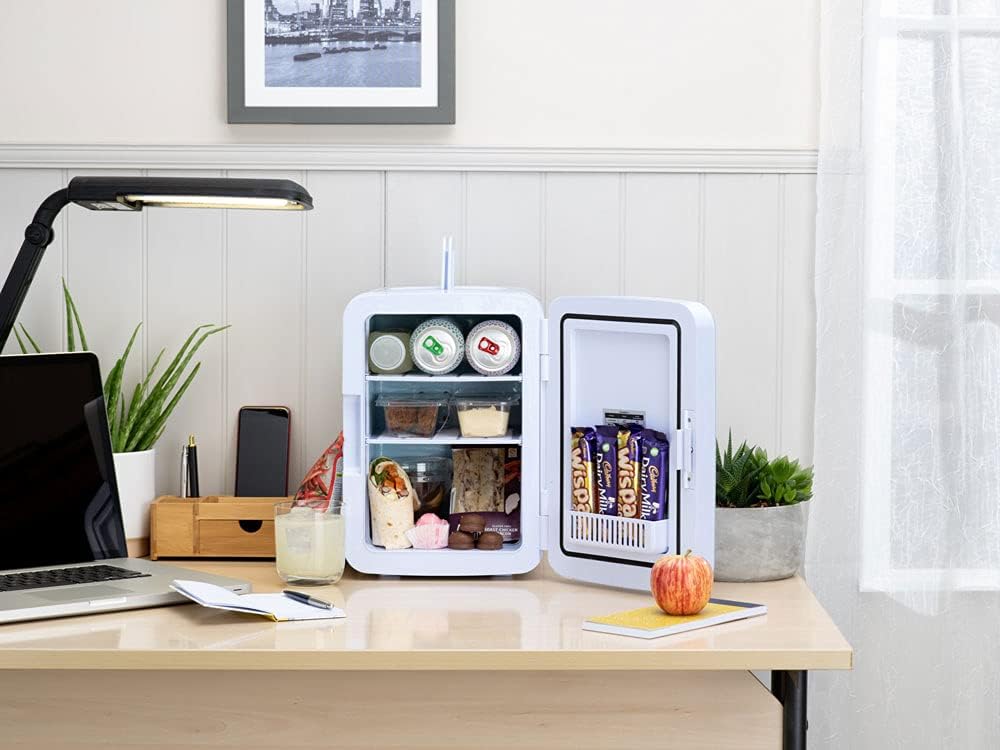
Figure 3: Mini fridge in a typical office or bedroom setting.

Figure 4: Mini fridge used for storing cosmetics.

Figure 5: Mini fridge in a car for portable use.
6. Техникалык тейлөө
- Тазалоо: Disconnect the power before cleaning. Use a soft cloth and mild detergent to clean the interior and exterior surfaces. Do not use abrasive cleaners or solvents.
- Эритүү: As a thermoelectric unit, significant frost buildup is unlikely. If minor frost occurs, simply unplug the unit and wipe it dry with a soft cloth.
- Вентиляция: Regularly check that the ventilation openings on the back of the unit are clear of dust and debris to ensure efficient operation.
- Сактагыч: Эгерде түзмөктү узак убакытка сактап жатсаңыз, анын таза жана кургак экенине ынаныңыз. Аны салкын, кургак жерде, күн нуру түз тийбеген жерде сактаңыз.
7. Кыйынчылыктарды
- Түзмөк күйбөй жатат:
- Электр кабели бирдикке да, розеткага да бекем туташтырылганын текшериңиз.
- КҮЙГҮЗҮҮ/ӨЧҮРҮҮ баскычы "КҮЙГҮЗҮҮ" абалында экенин текшериңиз.
- Test the power outlet with another appliance to confirm it is working.
- Unit not cooling/warming effectively:
- Ensure the 'COLD' or 'WARM' switch is set correctly.
- Желдетүү тешиктери жабылбаганын текшериңиз.
- Verify that the ambient temperature is within the operating range (extreme temperatures can affect performance).
- Эшиктин бат-бат ачылуусунан качыңыз.
- Ensure items placed inside are not blocking the internal fan.
- адаттан тыш ызы-чуу:
- A slight fan noise is normal during operation.
- Ensure the unit is on a stable, flat surface to prevent vibrations.
- Check for any obstructions in the fan area.
8. Техникалык шарттар
| Өзгөчөлүк | Спецификация |
|---|---|
| Бренд | Subcold |
| Модел | ULTRA10 |
| Кубаттуулугу | 10 Liters (approx. 10 x 330ml cans) |
| Өлчөмдөрү (L x W x Y) | 24.45 x 28.9 x 34.2 см |
| Салмагы | 3.5 кг |
| Тtage | AC 230V, DC 12V |
| Күч | 50 Ватт |
| Ызы-чуу деңгээли | 28 децибел |
| Муздатуу Performance | Айлана-чөйрөнүн температурасынан 18°C төмөн муздайт |
| Жылытуу көрсөткүчү | Warms up to 45-65°C |
| Орнотуу түрү | Portable |
| Текчелердин саны | 2 |
| Эритүү системасы | Автоматтык |

Figure 6: Energy Efficiency Label for Subcold Ultra 10.
9. Кепилдик жана колдоо
This product comes with a minimum duration of 12 ай кепилдик offered by the manufacturer.
For further information, support, or to view the full product information sheet, please visit the official Subcold webсайт:

Figure 7: Product Information Sheet.