
1. Киришүү
The Flashpoint Zoom Li-Ion Mini R2 TTL Flash is a compact and powerful flash unit designed for use with select Sony mirrorless cameras, including models such as A7RIII, a7rII, a7R, a58, a99, ILCE6000L, a77II, RX10, and the a9. This flash features an integrated R2 radio transceiver, enabling wireless triggering and control. It can function as a master unit to command other Flashpoint and Godox R2-compatible slave units, offering versatile lighting solutions for various photographic scenarios.
2. Коопсуздук чаралары
- Жаркылдаткычты бөлүктөргө бөлбөңүз же өзгөртпөңүз. Оңдоо иштерин ыйгарым укуктуу тейлөө кызматкерлери гана жүргүзүшү керек.
- Жарк этүүчү аппаратты кургак кармаңыз. Аны жамгырга, нымдуулукка же жогорку нымдуулукка дуушар кылбаңыз.
- Do not touch the flash tube after firing, as it can be hot.
- Балдар жетпеген жерде сактаңыз.
- Use only the specified battery and charger. Improper use can lead to fire, explosion, or electric shock.
- Көзгө түздөн-түз тийүүдөн сактаныңыз, айрыкча жакын аралыкта жарк этиңиз, анткени ал көрүү начарлашы мүмкүн.
3. Продукт бүтүп калдыview
3.1 Пакеттин мазмуну
- Flashpoint Zoom Li-Ion Mini Flash Unit
- Мини стенд
- Коргоо иши
- Diffuser (assumed from 'Dif' in product data)
3.2 Flash Components
Familiarize yourself with the main components of your Flashpoint Zoom Li-Ion Mini R2 TTL Flash.

3.2.1-сүрөт: Фронт view of the Flashpoint Zoom Li-Ion Mini R2 TTL Flash, showing the flash head and main body.
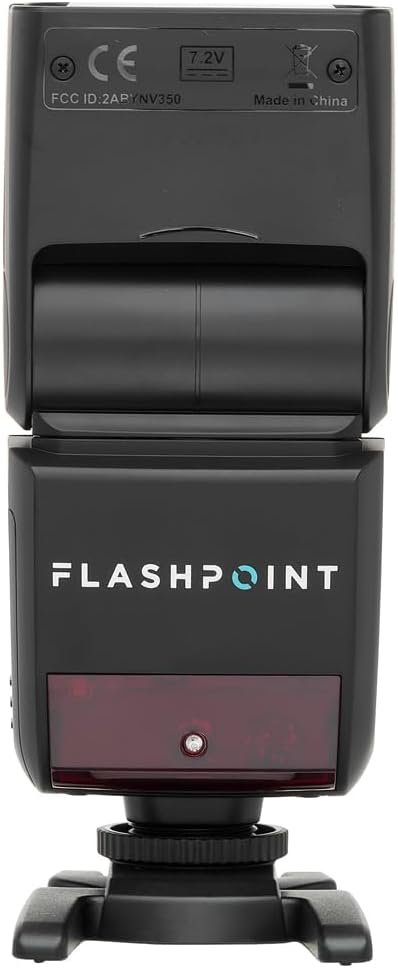
3.2.2-сүрөт: Арткы view of the flash, highlighting the LCD display and control buttons for mode, zoom, sync, and power.

3.2.3-сүрөт: The flash unit with its built-in wide-angle diffuser panel extended from the flash head.
4. Орнотуу
4.1 Батареяны орнотуу
- Жарк этүүчү аппараттын капталындагы батарея отсегин табыңыз.
- Slide the battery cover release latch and open the compartment.
- Insert the Li-Ion battery, ensuring correct polarity as indicated inside the compartment.
- Батарея бөлүкчөсүнүн капкагын тыкылдаганча жабыңыз.

4.1.1-сүрөт: Side view of the flash unit, indicating the battery compartment with a 'BATT.PUSH' label.
4.2 Камерага орнотуу
- Жарк бөлүктүн өчүрүлгөнүн текшериңиз.
- Slide the flash's hot shoe foot into your Sony camera's hot shoe mount.
- Tighten the locking ring on the flash foot to secure it to the camera. Do not overtighten.
4.3 Күйгүзүү/өчүрүү
Press and hold the power button (usually marked with a ⚡ or power symbol) on the rear control panel to turn the flash on or off.
5. Иштөө нускамалары
5.1 Негизги иштөө режимдери
The Flashpoint Zoom Li-Ion Mini R2 TTL Flash supports various operating modes:
- TTL Autoflash режими: Туура экспозиция үчүн жарк чыгарууну автоматтык түрдө орнотот.
- Кол менен (M) режими: Allows manual adjustment of flash power output.
- Көп (Стробоскопиялык) режим: Бир экспозиция учурунда бир катар тез жаркылдоолорду ишке киргизет.
- S1/S2 оптикалык кул режимдери: Triggers the flash optically when another flash fires.
колдонуу РЕЖИМ button on the control panel to cycle through these modes.

5.1.1-сүрөт: Деталдаштырылган view of the flash control panel, showing buttons for MODE, ZOOM, SYNC, SLAVE, GR/CH, and the SET dial.
5.2 R2 Wireless System
The integrated R2 radio transceiver provides wireless control. Set the flash to Master or Slave mode and configure the group (GR) and channel (CH) settings to match your R2-compatible transmitter or other R2 flashes. Refer to your R2 transmitter's manual for detailed wireless setup.
5.3 Flash башын тууралоо
The flash head can be rotated and tilted to bounce light off ceilings or walls for softer illumination.
- Горизонталдык айлануу: 0дан 270 градуска чейин.
- Вертикалдуу кыйшаюу: -7…90 градус жылуу.

5.3.1-сүрөт: Illustration demonstrating the flexible rotation and tilt capabilities of the flash head.
5.4 Чоңойтуу функциясы
The flash features an automatically zooming flashhead from 24-105mm. This adjusts the flash coverage to match the focal length of your lens. In manual mode, you can also adjust the zoom manually using the ZOOM баскычы.
6. Техникалык тейлөө
- Тазалоо: Жарк этүүчү аппаратты тазалоо үчүн жумшак, кургак чүпүрөктү колдонуңуз. өжөр кир үчүн, бир аз d колдонууamp cloth with mild detergent, then wipe dry. Do not use organic solvents like thinner or benzene.
- Сактагыч: When not in use for extended periods, remove the battery and store the flash in a cool, dry place, preferably in its protective case.
- Батареяга кам көрүү: Recharge the Li-Ion battery regularly, even if not in use, to maintain its lifespan. Avoid fully discharging the battery.
7. Кыйынчылыктарды
If you encounter issues with your Flashpoint Zoom Li-Ion Mini R2 TTL Flash, refer to the following common problems and solutions:
| Көйгөй | Мүмкүн болгон себеп / Чечим |
|---|---|
| Flash күйбөйт. | Check if the flash is powered on. Ensure the battery is charged and correctly installed. Verify the flash is securely mounted on the camera hot shoe. Check camera flash settings. |
| Flash чыгаруу шайкеш келбейт же туура эмес. | Ensure TTL mode is selected for automatic exposure, or adjust manual power settings. Check for obstructions between the flash and subject. Verify flash head zoom matches lens focal length. |
| Зымсыз ишке киргизүү ишке ашпай калды. | Confirm that the flash and transmitter are set to the same R2 group and channel. Ensure both units are within range and have fresh batteries. Check for radio interference. |
| Difficulty mounting flash on camera hot shoe. | Ensure the locking ring is fully loosened. Some camera hot shoes may have tighter tolerances; apply firm, even pressure. If persistent, verify compatibility with your specific camera model. |
| Unable to update firmware via micro-USB port. | The micro-USB port may be recessed. Try using a micro-USB cable with a very slim connector housing. If issues persist, contact Flashpoint customer support for guidance on compatible cables or alternative update methods. |
8. Техникалык шарттар
| Өзгөчөлүк | Спецификация |
|---|---|
| Гид саны | 82ft / 25m (at ISO 100) |
| Кайра иштетүү убактысы | 0.1ден 1.7 секундага чейин |
| Масштабды чоңойтуу | 24-105мм (Авто/Кол менен) |
| Bounce Head Rotation | Horizontal: 0 to 270 degrees |
| Bounce Head Tilt | Vertical: -7 to 90 degrees |
| Өлчөмдөрү (L x W x Y) | 8.4 x 7.2 x 2.8 дюйм |
| Элемент Салмагы | 1.87 фунт |
| Шайкеш орнотуулар | Sony Alpha |
| Модель номери | Zoom-Lion Mini |
| ASIN | B07CV42KFV |
9. Кепилдик жана колдоо
9.1 Кепилдик маалыматы
Flashpoint products typically come with a limited manufacturer's warranty. For specific details regarding the warranty period and terms for your Zoom Li-Ion Mini R2 TTL Flash, please refer to the warranty card included with your product or visit the official Flashpoint webсайт.
9.2 Кардарларды колдоо
For technical assistance, troubleshooting beyond this manual, or service inquiries, please contact Flashpoint customer support. Contact information can usually be found on the Flashpoint webсайтында же продукт документациясында.


