
Keyence IV-500MA
KEYENCE IV-500MA Vision Sensor Industrial Camera User Manual
Model: IV-500MA
1. Киришүү
This manual provides essential information for the safe and effective operation of the KEYENCE IV-500MA Vision Sensor. The IV-500MA is designed for industrial applications requiring precise object detection and inspection. Please read this manual thoroughly before using the product to ensure correct installation, operation, and maintenance.
2. Коопсуздук маалыматы
ЭСКЕРТҮҮ:
- Орнотуу, зымдарды туташтыруу же техникалык тейлөө иштерин жүргүзүүдөн мурун ар дайым электр кубатынан ажыратыңыз.
- Do not attempt to disassemble, repair, or modify the unit. This may cause damage or malfunction.
- Электр шоктун алдын алуу үчүн туура жерге туташтырууну камсыз кылыңыз.
- Operate the sensor within its specified environmental conditions (temperature, humidity, vibration).
- Көрсөтүлгөн кубат булагынын көлөмүн гана колдонуңузtage.
Adherence to these safety guidelines is crucial for preventing injury and equipment damage.
3. Продукт бүтүп калдыview
The KEYENCE IV-500MA is a monochrome vision sensor with standard distance capabilities and automatic focus. It is designed for robust performance in industrial environments.
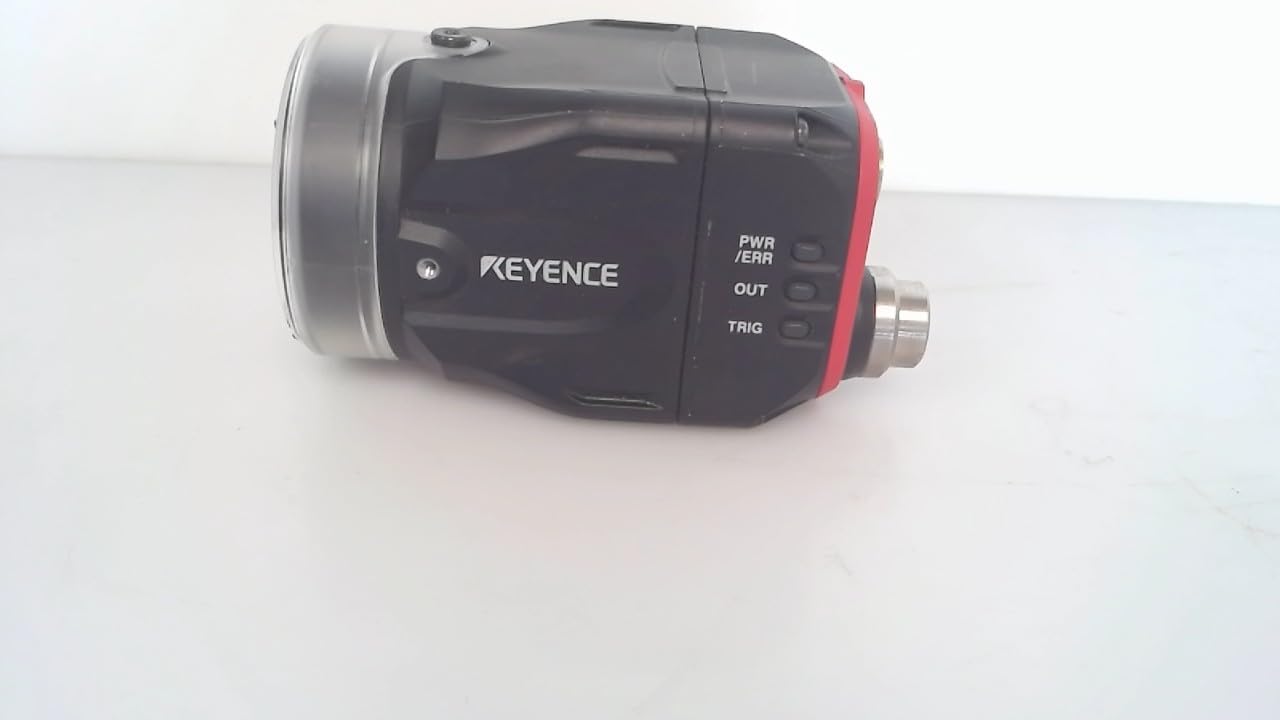
3.1-сүрөт: Каптал view of the KEYENCE IV-500MA Vision Sensor, showing the lens, main body, and connection ports. The Keyence logo is visible on the side.
Негизги өзгөчөлүктөр төмөнкүлөрдү камтыйт:
- Monochrome imaging for high contrast detection.
- Standard distance operation.
- Automatic focus capability.
- Compact and durable design for industrial integration.

3.2-сүрөт: Арткы view of the KEYENCE IV-500MA Vision Sensor, displaying the model number (IV-500MA), serial number, MAC address, and various certification marks. Connection ports are also visible.

Сүрөт 3.3: Жакын пландан view of the product label on the KEYENCE IV-500MA, showing detailed information such as the model number, serial number, MAC address, and electrical specifications (24V DC 1.0A max, Class2 output).
4. Орнотуу жана орнотуу
Proper installation is critical for the performance and longevity of the IV-500MA sensor.
4.1 Монтаждоо
The sensor should be securely mounted using appropriate hardware. Ensure the mounting surface is stable and free from excessive vibration. The sensor's compact dimensions (approximately 0.28 x 0.28 x 0.28 inches) allow for flexible integration into various setups.
4.2 Электр зымдары
Connect the sensor to a stable 24V DC power supply. Refer to the product's wiring diagram for specific pin assignments. Ensure all connections are secure to prevent intermittent operation or damage.
- Электр камсыздоо: 24V DC, 1.0A макс.
- Чыгуу: 24V DC, 50mA.
- Verify correct polarity before applying power.
4.3 Баштапкы конфигурация
After physical installation and wiring, connect the sensor to the appropriate control system or PC for initial configuration. Use the manufacturer's provided software for parameter setup, image acquisition, and inspection program creation. The automatic focus feature simplifies initial setup.
5. Иштөө нускамалары
The IV-500MA operates by capturing images and processing them to perform various inspection tasks. Operation typically involves:
- Күйгүзүү: Apply 24V DC power to the sensor. The power indicator LED should illuminate.
- Программалык камсыздоо туташуусу: Establish communication with the sensor via the dedicated software.
- Image Acquisition: Trigger the sensor to acquire images. This can be done manually through software or via an external trigger signal.
- Program Execution: Run the pre-configured inspection program. The sensor will analyze the acquired image based on the defined parameters.
- Result Output: The sensor provides inspection results (e.g., pass/fail, position data) via its output signals or communication interface.
For detailed programming and advanced operation, refer to the comprehensive software manual provided by Keyence.
6. Техникалык тейлөө
Regular maintenance ensures optimal performance and extends the lifespan of your IV-500MA sensor.
6.1 Тазалоо
- Keep the lens surface clean. Use a soft, lint-free cloth and a non-abrasive lens cleaning solution if necessary.
- Wipe the sensor body with a dry or slightly damp cloth. Avoid using strong solvents or abrasive cleaners.
6.2 Текшерүү
- Бардык кабелдерди жана туташтыргычтарды эскирүүнүн же бузулуунун белгилерин мезгил-мезгили менен текшерип туруңуз.
- Ensure the mounting remains secure and free from looseness.
- Monitor the sensor's performance for any deviations from expected results.
Always disconnect power before performing any cleaning or inspection procedures.
7. Кыйынчылыктарды
This section provides solutions to common issues encountered with the IV-500MA sensor.
| Көйгөй | Мүмкүн себеп | Чечим |
|---|---|---|
| Сенсор иштебей жатат. | Электр энергиясы жок; зымдар туура эмес; кабелдер бузук. | Электр байланышын жана тtage (24V DC). Verify wiring according to the manual. Replace damaged cables. |
| No image acquisition. | Software not connected; incorrect trigger settings; lens cap on. | Ensure software is connected. Check trigger input and settings. Remove lens cap if present. |
| Сүрөттүн сапаты начар. | Dirty lens; improper lighting; incorrect focus. | Clean the lens. Adjust lighting conditions. Re-run auto-focus or manually adjust focus if applicable. |
| Inaccurate inspection results. | Incorrect program parameters; object variation; sensor misalignment. | Review and adjust inspection program parameters. Ensure consistent object presentation. Re-align sensor if necessary. |
If the problem persists after attempting these solutions, contact Keyence technical support.
8. Техникалык шарттар
Detailed technical specifications for the KEYENCE IV-500MA Vision Sensor:
| Параметр | Нарк |
|---|---|
| Модель номери | IV-500MA |
| Продукциянын өлчөмдөрү (L x W x Y) | 0.28 x 0.28 x 0.28 дюйм |
| Салмагы | 1 фунт |
| Материал | Copper (Note: This might refer to internal components or specific parts, not the entire casinж.) |
| Өндүрүүчү | Ачкыч |
| Дата биринчи жеткиликтүү | 11-май, 2018-жыл |
| Монтаж түрү | Weaver Mount (Note: This might be a generic Amazon category tag, actual mounting may vary.) |
| Шарт | Used - Good (Note: This refers to the specific unit's condition as listed, not the product's new specifications.) |
9. Кепилдик жана колдоо
For information regarding product warranty, technical support, and service, please contact Keyence directly through their official website or authorized distributors. Keep your product's model number (IV-500MA) and serial number ready when contacting support.
Official Keyence Webсайт: www.keyence.com
Ask a question about this manual
Ask about setup, troubleshooting, compatibility, parts, safety, or missing instructions. Manuals+ will review the question and use this page’s manual context to help answer it.