
DigiTech XC0225
DigiTech көп функциялуу LCD дубал сааты колдонуучунун колдонмосу
Модели: XC0225
Introduction
The DigiTech Multi-Function LCD Wall Clock (Model XC0225) is a versatile device designed to provide convenient time display along with additional environmental information. This clock features a large LCD screen displaying time, date, day of the week, indoor temperature, and humidity. It also includes alarm and snooze functions, making it suitable for various settings, whether mounted on a wall or placed on a desktop.
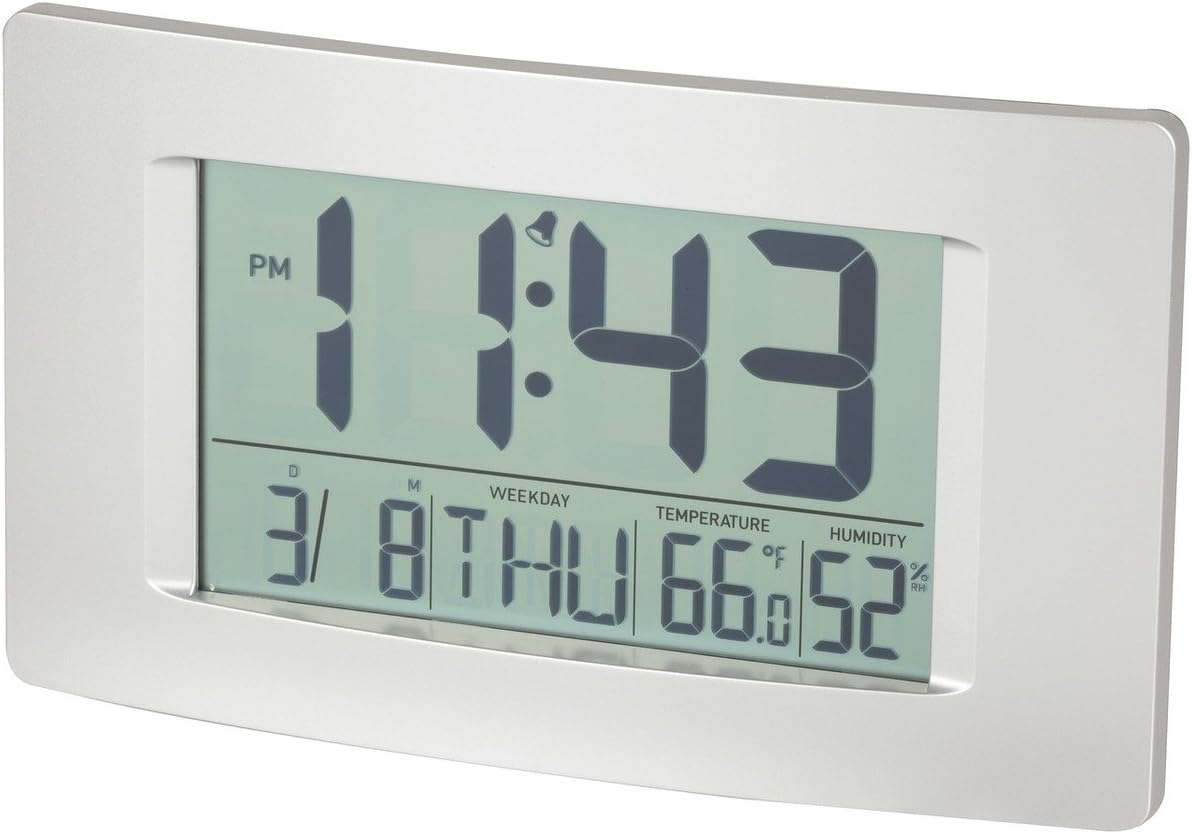
Сүрөт 1: Алдыңкы view of the Multi-Function LCD Wall Clock.
Пакеттин мазмуну
- DigiTech Multi-Function LCD Wall Clock (Model XC0225)
- Колдонуучунун Колдонмосу (бул документ)
Эскертүү: 3 х AA батарейкалары иштөө үчүн талап кылынат жана пакетке кирбейт.

Figure 2: Product packaging illustrating the clock and its features.
Жайгашуу
1. Батареяны орнотуу
- Сааттын артындагы батарея отсегин табыңыз.
- Батарея уясынын капкагын ачыңыз.
- Insert 3 x AA batteries, ensuring correct polarity (+ and -) as indicated inside the compartment.
- Батарея уясынын капкагын бекем жабыңыз.
2. Баштапкы күйгүзүү
Upon battery installation, the clock will power on automatically and display default settings. You may need to adjust the time, date, and other settings as described in the "Operating Instructions" section.
3. Монтаждоо параметрлери
- Иш тактада жайгаштыруу: Utilize the integrated stand on the back of the clock to place it on any flat surface.
- Дубалга орнотуу: Use the integrated hang-hole on the back of the clock to mount it securely on a wall using a suitable screw or hook (not included).
Иштөө нускамалары
The clock features several buttons on the back for setting and adjusting functions. Refer to the labels next to each button for their specific functions (e.g., MODE, UP, DOWN, ALARM, SNOOZE/LIGHT).
1. Убакыт жана дата орнотуу
- басыңыз РЕЖИМ убакыт дисплейи күйүп-өчө баштаганга чейин баскычын кайра-кайра басыңыз.
- колдонуу UP or ылдый саатты тууралоо үчүн баскычтар.
- Басыңыз РЕЖИМ мүнөттөргө жылдыруу үчүн кайрадан колдонуңуз, андан кийин колдонуңуз UP or ылдый тууралоо.
- Басууну улантыңыз РЕЖИМ жыл, ай жана күн жөндөөлөрүн өзгөртүү үчүн, ар бирин тууралоо UP or ылдый.
- Басыңыз РЕЖИМ орнотуу режиминен чыгуу үчүн акыркы жолу.
2. Ойготкуч орнотуу
- басыңыз АЛАРМ Учурдагы ойготкучтун убактысын көрсөтүү үчүн баскычты бир жолу басыңыз.
- басып, кармап туруңуз АЛАРМ ойготкуч сааты өчүп баштаганга чейин баскычты басыңыз.
- колдонуу UP or ылдый ойготкуч саатын тууралоо үчүн баскычтар.
- Басыңыз АЛАРМ again to move to alarm minutes, then use UP or ылдый тууралоо.
- Басыңыз АЛАРМ one last time to confirm and exit alarm setting mode.
- Ойготкучту жандыруу/өчүрүү үчүн басыңыз АЛАРМ button briefly when not in setting mode. An alarm icon will appear/disappear on the display.
3. Тындырма функциясы
Ойготкуч басылганда, басыңыз SNOOZE / LIGHT button to activate the snooze function. The alarm will temporarily stop and sound again after the set snooze interval (1-60 minutes, adjustable in settings).
4. Температура бирдигин тандоо (°C/°F)
баскычын кыскача басыңыз UP button (or a dedicated °C/°F button if present) to toggle between Celsius (°C) and Fahrenheit (°F) temperature display.
5. 12/24 саат форматы
баскычын кыскача басыңыз ылдый button (or a dedicated 12/24H button if present) to switch between 12-hour and 24-hour time formats.
Техникалык тейлөө
1. Тазалоо
- Сааттын бетин жумшак, кургак чүпүрөк менен сүртүңүз.
- Do not use abrasive cleaners, solvents, or chemical sprays, as these may damage the display or casing.
2. Батареяны алмаштыруу
When the display becomes dim or functions become erratic, it is time to replace the batteries. Follow the "Battery Installation" steps in the Setup section to replace the 3 x AA batteries. Always replace all batteries at the same time with new ones.
Проблемаларды чечүү
| Көйгөй | Мүмкүн себеп | Чечим |
|---|---|---|
| Дисплей бош же күңүрт. | Батареялар өлүп калган же туура эмес орнотулган. | Replace batteries with new 3 x AA batteries, ensuring correct polarity. |
| Убакыт/дата туура эмес. | Батарея орнотулгандан же электр энергиясы үзгүлтүккө учурагандан кийин туура коюлган эмес. | Баштапкы абалга келтирүү үчүн "Убакытты жана датаны орнотуу" көрсөтмөлөрүн аткарыңыз. |
| Ойготкуч угулбайт. | Alarm is not activated or alarm time is incorrect. | Ensure the alarm icon is displayed. Verify the alarm time setting. |
| Температура/нымдуулук көрсөткүчтөрү так эмес окшойт. | Clock placed near heat sources, vents, or in direct sunlight. | Relocate the clock to an area with stable ambient temperature and humidity. Allow time for readings to stabilize. |
Техникалык шарттар
| Өзгөчөлүк | Деталь |
|---|---|
| Модел | XC0225 |
| Дисплей түрү | Санарип LCD |
| LCD өлчөмү | 194мм (W) x 110mm (H) |
| Функциялар | Time, Date, Day of Week, Alarm, Snooze, Indoor Temperature, Indoor Humidity |
| Убакыт форматы | 12 Hour / 24 Hour selectable |
| Температура диапазону | -9.9°Cден +50°Cге чейин (14.1°F менен 122.0°F) |
| нымдуулук колому | 20% дан 95% га чейин салыштырмалуу нымдуулук (RH) |
| Тындыруунун узактыгы | 1 - 60 minutes (adjustable) |
| Power Source | 3 x AA батарейкалар (киргизилген эмес) |
| Dimensions (Overall, W x H x D) | 306 мм x 176 мм x 36 мм (болжол менен) |
| Салмагы | 540g (without batteries) / 660g (shipping weight) |
| Монтаждоо параметрлери | Integrated Stand, Wall Hang-hole |

Figure 3: Main display area dimensions of the clock for reference.
Кепилдик жана колдоо
This DigiTech product comes with a 1 жылдык кепилдик сатып алынган күндөн тартып. Бул кепилдик нормалдуу колдонуудагы материалдардагы жана жасалгадагы кемчиликтерди камтыйт.
For technical support, warranty claims, or further assistance, please contact your retailer or the DigiTech customer service department. Please have your model number (XC0225) and proof of purchase ready when contacting support.
Ask a question about this manual
Ask about setup, troubleshooting, compatibility, parts, safety, or missing instructions. Manuals+ will review the question and use this page’s manual context to help answer it.