
1. Киришүү
The COMICA CVM-WS50(H) is a UHF wireless microphone system designed for use with smartphones. It provides clear audio for various applications such as interviews, video recording, vlogging, and live streaming. This manual provides detailed instructions for the proper setup, operation, and maintenance of your device.

Figure 1: COMICA CVM-WS50(H) Wireless Microphone System components.
2. Кутуда эмне бар
- Алуучу (RX)
- Hand-held Transmitter (HTX)
- Мини штатив
- TRS-TRRS Audio Output Cable
- Микро USB заряддоо кабели
- User Manual
- Portable Case
- Карта

Figure 2: Included components in the COMICA CVM-WS50(H) package.
3. Продукциянын өзгөчөлүктөрү
- LCD экран: Displays channels, audio status, and power consumption for real-time monitoring.
- 6 Optional Channels: Flexible channel matching to prevent interference.
- Real-time Audio Monitor: Built-in monitoring function allows listening during recording.
- Иш аралыгы: Up to 197ft (60m) in open areas, and 98ft (30m) with obstacles.
- Adjustable Phone Clamp: High-quality metal clamp with adjustable width (2.5 to 3.5 inches).
- Cardioid Handheld Transmitter: Equipped with a handle grip for stable video recording.
- Stepless Volume Adjustment: Allows precise control over audio levels.
- Кайра заряддалуучу: Built-in rechargeable lithium battery with USB interface.

Figure 3: Receiver with LCD screen and controls.

Figure 4: Handheld Transmitter with LED display and controls.
4. Орнотуу
4.1 Компоненттерди чогултуу
- Attach the receiver to the mini tripod using the screw mount.
- Secure your smartphone into the adjustable phone clamp ресиверде.
- Ensure the handheld transmitter has charged batteries (AA batteries not included).
4.2 Смартфонго туташуу
Use the provided TRS-TRRS audio output cable to connect the receiver to your smartphone.
- Plug the 3.5mm TRS (black end) into the microphone OUTPUT interface of the Receiver.
- Plug the 3.5mm TRRS (grey end) into your smartphone's audio interface.
- Эскертүү: For iPhones 7 or above, you need to use the original Lightning adapter cable (not included). For Android phones with USB-C, you may need a 3.5mm to USB-C adapter (not included).
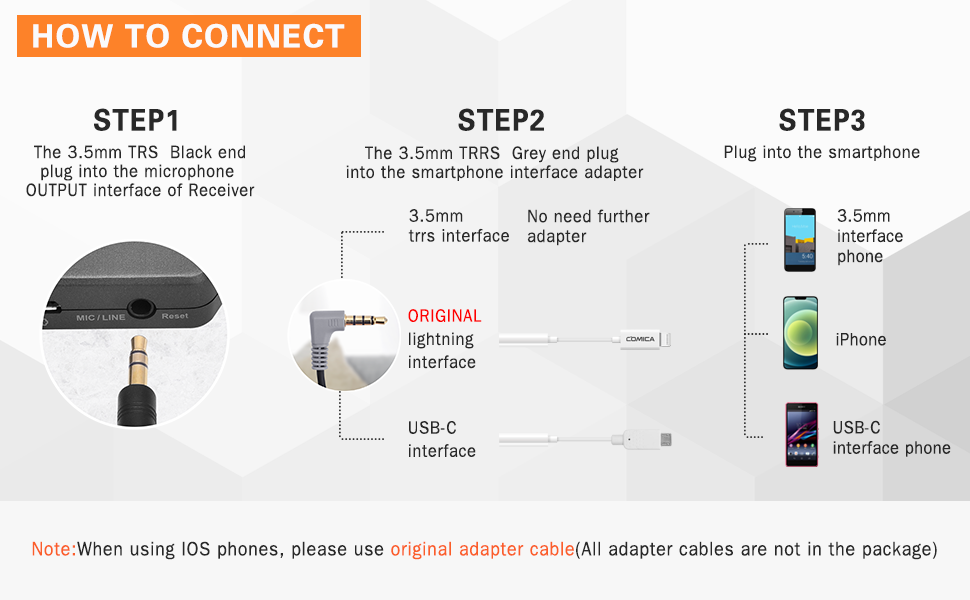
Figure 5: Connection guide for smartphones.
4.3 Күйгүзүү жана жупташтыруу
- Press and hold the power button on both the Hand-held Transmitter (HTX) and the Receiver (RX) until their LCD screens light up.
- The devices should automatically pair. The indicator light on the Receiver will turn solid green when successfully paired.
- If pairing fails, ensure both devices are within range and try restarting them.
5. Иштөө
5.1 Канал тандоо
The CVM-WS50(H) offers 6 channels. To change the channel on the Hand-held Transmitter (HTX), press the 'Power/CH Setting Button' repeatedly until you reach the desired channel (00-05). The Receiver will automatically synchronize to the selected channel.
5.2 Аудио мониторинг
Connect headphones to the 3.5mm headphone jack on the Receiver to monitor audio in real-time during recording. This allows you to verify audio quality and levels.
5.3 Үндү тууралоо
Use the stepless volume adjustment knob on the side of the Receiver to control the output audio level. Adjust as needed for optimal recording.
5.4 Колдонуу сценарийлери
The system is versatile for various applications:
- Интерviews: Use the handheld microphone for clear voice capture.
- Podcasts & Vlogs: Record high-quality audio for your content.
- Түз агым: Enhance audio for Facebook, YouTube, TikTok, etc.
- Online Teaching/Meetings: Ensure clear communication.

Figure 6: Real-time audio monitoring feature.
Видео 1: Продукциянын демонстрациясы showcasing функциялары жана колдонуу сценарийлери.
6. Техникалык тейлөө
To ensure the longevity and optimal performance of your COMICA CVM-WS50(H) system, follow these maintenance guidelines:
- Keep the devices dry and away from moisture.
- Clean the surfaces with a soft, dry cloth. Avoid using harsh chemicals or abrasive materials.
- Store the system in its portable case when not in use to protect it from dust and physical damage.
- Ашыкча температурадан сактаныңыз.
7. Кыйынчылыктарды
- Сигнал интерференциясы: If you experience signal interference, try switching to a different channel on the Hand-held Transmitter. Ensure the operating environment is open and free from other UHF transmitters or radio stations. Setting your smartphone to flight mode during use can also help prevent interference.
- Smartphone Compatibility (Video Mode): For Android smartphones, the microphone works well in audio mode but may not be compatible with some devices in video mode. If this occurs, try using a third-party app such as Filmic Pro or Proshot.
- Үн жок/Аудио начар: Check all cable connections, ensure the microphone and receiver are powered on and paired (solid green indicator on receiver). Verify the volume levels on both the receiver and your smartphone.
- iPhone/Samsung Adapter: Newer iPhone models (7 and above) require an original Lightning to 3.5mm adapter cable. Samsung phones with USB-C ports may require a 3.5mm to USB-C adapter. These adapters are not included in the package.
8. Техникалык шарттар
| Өзгөчөлүк | Нарк |
|---|---|
| Элементтин өлчөмдөрү L x W x H | 2.75 x 9.84 x 8.26 дюйм |
| Power Source | Батарея менен иштейт |
| Батареялардын саны | 1 литий полимер батарейкалары талап кылынат. (камтылган) |
| Материал | Металл, пластик |
| Ызы-чуунун катышы | 80 дБ |
| Аппараттык платформа | Смартфон |
| Каналдардын саны | 6 |
| Байланыш технологиясы | UHF |
| Туташтыргыч түрү | 3.5 мм Джек |
| Полярдык үлгү | Көп багыттуу |
| Элемент Салмагы | 2.08 унция |
| Микрофон форма фактору | Колдук микрофон |
9. Кепилдик жана колдоо
For warranty information or technical support, please refer to the contact details provided in the product packaging or visit the official COMICA webсайт. Кепилдик дооматтары үчүн сатып алуу дүмүрчөгүңүздү сактаңыз.