
Introduction
Сатып алганыңыз үчүн рахматasing the ROCAM 11.5" Large Display Digital Calendar Clock. This versatile clock is designed to provide clear time, date, day of week, and temperature information, along with multiple alarm functions and convenient USB charging ports. Please read this manual carefully to ensure proper setup and operation of your new clock.

Сүрөт: алдыңкы view of the ROCAM Digital Wall Clock, displaying time, date, day, and temperature in blue LED digits.
Пакеттин мазмуну
Пакетте бардык буюмдар бар экенин текшериңиз:
- ROCAM 11.5" Digital Wall Clock (Blue Font)
- AC кубат адаптери
- USB заряддоо кабели
- User Manual
- CR2032 Battery (pre-installed for backup)

Image: The ROCAM Digital Wall Clock and its accessories laid out, including the clock unit, power adapter, USB cable, and instruction manual.
Жайгашуу
- Таңылганын ачуу: Саатты жана бардык аксессуарларды таңгактан этияттык менен алып чыгыңыз.
- Батареянын камдык көчүрмөсү: The clock comes with a pre-installed CR2032 battery for backup. Ensure you remove any plastic pull-tab from the battery compartment before first use to activate the backup function. This battery preserves time and settings during power outages.
- Кубат туташуу: Connect the AC power adapter to the clock's power input port and then plug the adapter into a standard electrical outlet. The clock display will illuminate.
- Жайгашкан жери:
- Иш тактада жайгаштыруу: Attach the included stand bracket to the back of the clock for stable desktop use.
- Дубалга орнотуу: Utilize the wall hanging hole on the back of the clock to mount it securely on a wall using appropriate hardware (not included).

Image: The ROCAM Digital Wall Clock displayed on a wall, illustrating its 11.5-inch screen size and overall dimensions for wall mounting.

Сүрөт: Арткы view of the clock highlighting the stand bracket for desktop use, the wall hanging hole for mounting, and the two USB charging ports.
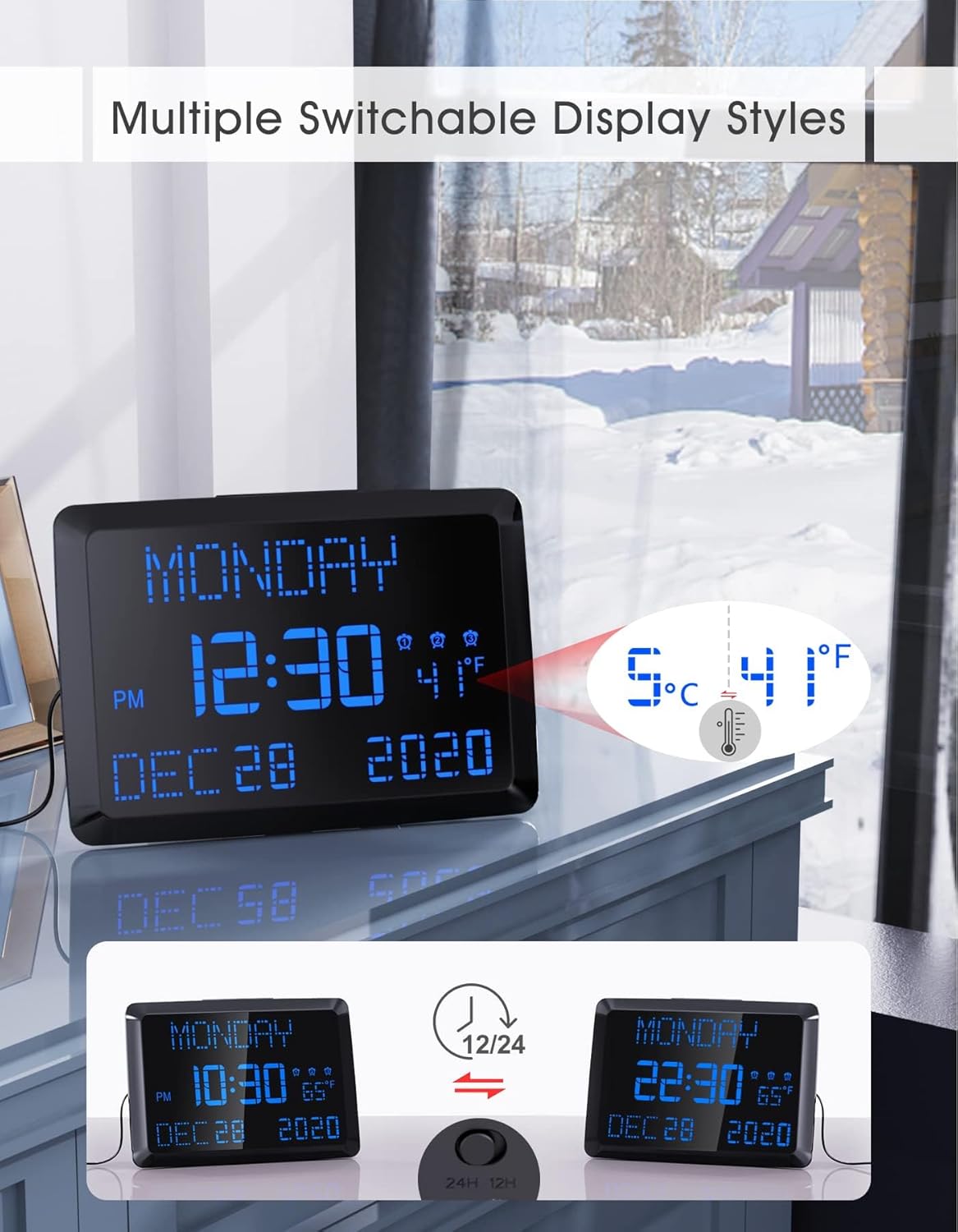
Image: Illustration demonstrating the power failure memory feature, showing the CR2032 battery location and how the clock retains settings after a power interruption.
Иштөө нускамалары
Убакыт жана дата орнотуу
Refer to the user manual for specific button functions (e.g., SET, UP, DOWN buttons). Generally, press the SET button to enter time/date setting mode. Use UP/DOWN buttons to adjust values and SET again to confirm and move to the next setting (Year, Month, Day, Hour, Minute).
Сигнал орнотуулары
The clock supports 3 independent alarms. Each alarm can be set for "Weekdays Only," "Weekends Only," or "Daily Repeat."
- Press the ALARM button to cycle through Alarm 1, Alarm 2, Alarm 3 settings.
- When an alarm is selected, use the SET button to adjust the alarm time and frequency (e.g., Weekdays, Weekends, Daily).
- Use UP/DOWN buttons to change values.
- To activate/deactivate an alarm, press the corresponding alarm button (e.g., ALARM 1) until the alarm icon appears/disappears on the display.
- Чырым Function: When an alarm sounds, press the large SNOOZE/DIMMER button on top to activate a 9-minute snooze.
- Ойготкучту токтотуу: To stop an alarm permanently, press any other button besides SNOOZE.

Image: Visual representation of the three independent alarm settings, showing options for daily, weekday-only, and weekend-only alarms, along with adjustable volume levels.
Brightness Adjustment (5-Level Dimmer)
The clock features 5 adjustable brightness levels to suit your preference, especially useful for light-sensitive sleepers or nighttime use.
- Press the SNOOZE/DIMMER button on the top of the clock to cycle through the 5 brightness levels.
- Select the level that provides optimal visibility without causing discomfort.

Image: The clock display shown at five distinct brightness levels, demonstrating the dimmer function from brightest to dimmest.
Температура дисплей
The clock displays indoor temperature. You can switch between Fahrenheit (℉) and Celsius (℃).
- Locate the ℉/℃ switch or button on the back or side of the clock (refer to the physical unit for exact location) to toggle between temperature units.
12/24-Hour Format & DST Setting
The clock supports both 12-hour (with AM/PM indicator) and 24-hour time formats, and includes a Daylight Saving Time (DST) setting.
- To switch between 12/24-hour format, locate the 12/24H switch or button (often on the back).
- To enable or disable DST, find the dedicated DST button or setting option (refer to the user manual for specific steps).

Image: The clock display transitioning between 12-hour and 24-hour time formats, illustrating the switchable display styles.
USB заряддоо порттору
The clock is equipped with two USB charging ports, allowing you to conveniently charge your mobile devices.
- Connect your device's USB charging cable to one of the USB ports on the clock.
- Ensure the clock is powered on for the charging ports to function.

Image: A smartphone and a tablet connected to and charging from the two USB ports located on the side of the clock.
Техникалык тейлөө
- Тазалоо: Use a soft, dry cloth to wipe the clock's surface. Do not use abrasive cleaners or solvents, as they may damage the finish.
- Батареяны алмаштыруу: The CR2032 backup battery should last for an extended period. If you notice settings are not retained during power outages, it may be time to replace the battery. Open the battery compartment on the back of the clock and replace with a new CR2032 battery.
- Сактагыч: If storing the clock for a long period, disconnect it from power and consider removing the backup battery to prevent leakage.
Проблемаларды чечүү
| Көйгөй | Мүмкүн себеп | Чечим |
|---|---|---|
| Сааттын дисплейи бош. | Эч кандай электр байланышы же кубаты жокtage. | Ensure the AC adapter is securely plugged into the clock and a working power outlet. Check if the power outlet is functional. |
| Жөндөөлөр өчүрүлгөндөн кийин жоголотtage. | CR2032 backup battery is dead or not properly installed. | Ensure the plastic pull-tab is removed from the CR2032 battery. Replace the CR2032 battery if necessary. |
| Ойготкуч угулбайт. | Ойготкуч иштетилген эмес же үн өтө төмөн. | Verify that the alarm icon is displayed for the desired alarm. Increase the alarm volume. Check alarm settings (Weekdays/Weekends/Daily). |
| USB заряддоо порттору иштебей жатат. | Clock is not powered on or cable is faulty. | Ensure the clock is connected to AC power. Try a different USB cable or device to confirm functionality. |
Техникалык шарттар
| Өзгөчөлүк | Деталь |
|---|---|
| Бренд | ROCAM |
| Модель номери | ROCAM CR1005 |
| Дисплей түрү | Digital LED |
| Дисплей өлчөмү | 11.5 дюйм |
| Түс | Blue Font |
| Продукциянын өлчөмдөрү | 9.96"W x 7"H |
| Power Source | AC Adapter Powered |
| Камдык батарея | 1 x CR2032 (кошулган) |
| Ойготкуч сааттар | 3 көз карандысыз ойготкуч |
| Dimmer Levels | 5 деңгээл |
| USB заряддоо порттору | 2 порт |
| Монтаж түрү | Wall Mount & Desktop Placement |
| Элемент Салмагы | 1.48 фунт |
Кепилдик жана колдоо
ROCAM provides an 18-month warranty for this product, along with a 30-day refund policy. Lifetime free user support is also available.
For any questions, issues, or support needs, please contact ROCAM customer service. Your feedback is always welcome.
You can visit the official ROCAM store on Amazon for more information: ROCAM Store