
1. Киришүү
The Canon PowerShot G5 X is a compact digital camera featuring a 1.0-inch, 20.2 Megapixel High-Sensitivity CMOS sensor and a built-in 2.36 million dot electronic viewfinder. This camera is designed for advanced photographers seeking high-quality stills and video with comprehensive control. It includes Wi-Fi and NFC capabilities for easy sharing and remote operation.
Негизги өзгөчөлүктөр төмөнкүлөрдү камтыйт:
- 1.0-inch, 20.2 Megapixel High-Sensitivity CMOS sensor.
- Canon DIGIC 6 Image Processor for enhanced image quality and fast operation.
- Built-in 2.36 million dot electronic viewтапкыч.
- Multi-angle capacitive 3.0-inch touch panel LCD with 1.04 million dots.
- Full HD 1080p video recording at 60p/30p/24p.
- Integrated Wi-Fi and NFC for wireless connectivity.
2. Кутуда эмне бар
Verify that all items are present before initial use:
- Canon PowerShot G5 X Camera Body
- Батарея топтому
- Батарея заряддагыч
- Моюн боосу

Figure 2.1: Included items with the Canon PowerShot G5 X camera.
3. Баштапкы орнотуу
3.1 Батареяны заряддоо
- Батареяны заряддоочу түзүлүшкө салыңыз.
- Заряддагычты розеткага сайыңыз. Заряддоо индикаторунун жарыгы күйөт.
- Once charging is complete, the indicator light will change or turn off. Remove the battery.
3.2 Батареяны жана эстутум картасын салуу
- Камеранын ылдый жагындагы батарея/карта бөлүкчөсүнүн капкагын ачыңыз.
- Заряддалган батареяны туура багытты камсыз кылып, бөлүмгө салыңыз.
- Insert a compatible SD, SDHC, or SDXC memory card into the card slot until it clicks into place.
- Бөлүмдүн капкагын бекем жабыңыз.
3.3 Камераны күйгүзүү
басыңыз КҮЙГҮЗҮҮ/ӨЧҮРҮҮ button located on the top of the camera to power it on. The lens will extend, and the LCD screen will activate.

Сүрөт 3.1: Алдыңкы view of the Canon PowerShot G5 X.
4. Камераны иштетүү
4.1 Негизги атуу режимдери
Камеранын үстүндөгү режимди терүү ар кандай атуу режимдерин тандоого мүмкүндүк берет:
- Авто режим: For automatic settings.
- P (AE программасы): Camera sets aperture and shutter speed, but allows other adjustments.
- Орточо (Апертуранын артыкчылыгы AE): Сиз диафрагманы орнотосуз, камера жабуу ылдамдыгын орнотот.
- ТВ (Жапкычтын артыкчылыгы AE): Сиз жабуунун ылдамдыгын, камера диафрагманы орнотот.
- M (кол): Сиз диафрагманы жана жабуунун ылдамдыгын көзөмөлдөйсүз.
- Custom Modes (C1/C2): Save and recall your preferred settings.
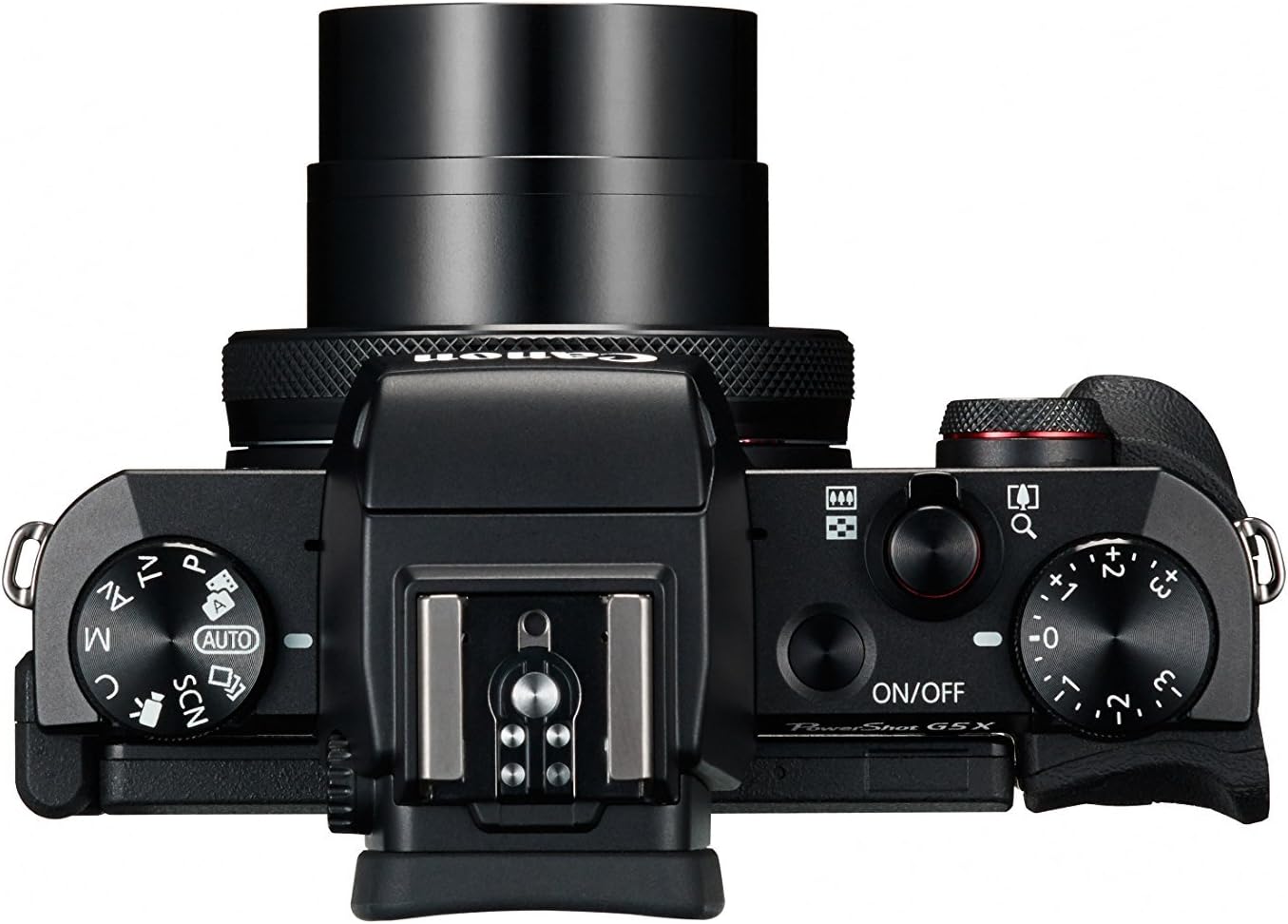
Figure 4.1: Top controls of the Canon PowerShot G5 X.
4.2 колдонуу Viewтапкыч жана LCD экран
The camera features both an electronic viewfinder (EVF) and a multi-angle touch panel LCD. You can switch between them or use the EVF for composing shots in bright conditions. The LCD screen can be articulated for various shooting angles and touch operations.

Figure 4.2: Canon PowerShot G5 X with articulated LCD screen.

4.3-сүрөт: Арткы view of the Canon PowerShot G5 X.
4.3 Видеолорду жаздыруу
To record video, set the mode dial to the movie mode icon. Press the dedicated movie button to start and stop recording. The camera supports 1080p Full HD video at various frame rates (60p/30p/24p).
4.4 Wi-Fi жана NFC байланышы
The camera's built-in Wi-Fi and NFC functions allow for wireless transfer of images and videos to compatible smart devices or computers. Refer to the camera's menu for detailed instructions on setting up these connections.
5. Техникалык тейлөө жана кам көрүү
5.1 Камераны тазалоо
- Объектив: Use a lens brush or blower to remove dust, then gently wipe with a microfiber lens cloth. Avoid touching the lens surface directly.
- LCD экран: Wipe gently with a soft, dry cloth. For stubborn smudges, use a screen cleaner specifically designed for electronics.
- Камеранын корпусу: Жумшак, кургак чүпүрөк менен сүртүңүз. Органикалык эриткичтерди же күчтүү тазалоочу каражаттарды колдонбоңуз.
5.2 Сактоо
Колдонулбаганда камераны күн нурунан жана өтө температурадан алыс салкын, кургак жерде сактаңыз. Камера узак убакыт бою колдонулбаса, батареяны алып салыңыз.
6. Кыйынчылыктарды
This section addresses common issues you might encounter with your Canon PowerShot G5 X camera.
| Көйгөй | Мүмкүн болгон себеп / Чечим |
|---|---|
| Камера күйбөйт. | Battery is depleted. Charge the battery. Ensure battery is inserted correctly. |
| Сүрөттөр бүдөмүк. | Lens is dirty. Clean the lens. Shutter speed is too slow. Increase shutter speed or use image stabilization. Camera shake. Hold the camera steady or use a tripod. |
| Wi-Fi/NFCге туташа албай жатат. | Ensure Wi-Fi/NFC is enabled in camera settings. Check device compatibility and network settings. Refer to the camera's connectivity guide in the menu. |
| Эстутум картасынын катасы. | Эстутум картасы толду. Керексиз жок кылуу files or replace card. Card is corrupted. Format the card (this will erase all data). Card is incompatible. Use a supported SD, SDHC, or SDXC card. |
| Flash күйбөйт. | Flash is set to OFF. Change flash mode to Auto or On. Subject is too far. Check flash range. |
7. Техникалык шарттар
| Өзгөчөлүк | Деталь |
|---|---|
| Сенсор түрү | 1.0-inch High-Sensitivity CMOS |
| Натыйжалуу дагы эле чечим | 20.2 депутат |
| Сүрөт процессору | DIGIC 6 |
| Оптикалык масштаб | 4.2x |
| Объектив диафрагмасы | f/1.8-2.8 |
| Фокустук аралык (35 мм эквиваленттүү) | 24-100мм |
| Image Stabilization | Санарип |
| Viewтапкыч | Built-in Electronic Viewfinder (2.36 million dots) |
| LCD экран | 3.0-inch Multi-angle Capacitive Touch Panel (1.04 million dots) |
| Video Resolution | 1080p Full HD (60p/30p/24p) |
| Байланыш | Wi-Fi, NFC, HDMI, USB |
| Сактагыч медиа | SD, SDHC, SDXC эс тутум карталары |
| Элемент Салмагы | 1.8 фунт |
| Модель номери | 0510C001 |
| UPC | 748926548632 |
8. Кепилдик жана колдоо
8.1 Кепилдик маалыматы
This Canon PowerShot G5 X camera comes with a 90-day limited warranty from the date of purchase. This warranty covers manufacturing defects under normal use. Please retain your proof of purchase for warranty claims.
8.2 Кардарларды колдоо
For technical assistance, service, or further inquiries, please refer to the official Canon support webсайтка же кардарларды тейлөө бөлүмүнө кайрылыңыз. Байланыш маалыматы, адатта, өндүрүүчүнүн сайтынан тапса болот webсайт.