
1. Киришүү
This manual provides instructions for the Easytry123 replacement remote control, model Easytry0337. This remote is designed to operate various LG Smart 3D LED TV models as listed above. Please note that while this remote is a functional replacement, some advanced or specific functions of your original remote may not be fully supported.
2. Орнотуу
2.1 Батареяны орнотуу
Алыстан башкаруу пультун иштеши үчүн эки (2) AAA батарейкасы керек. Батарейкаларды орнотуу үчүн төмөнкү кадамдарды аткарыңыз:
- Пульттун артындагы батарея бөлүкчөсүнүн капкагын табыңыз.
- Press down on the tab and slide the cover off in the direction indicated by the arrow.
- Оң (+) жана терс (-) терминалдары бөлүмдүн ичиндеги белгилер менен туура дал келишин камсыз кылып, эки AAA батарейкасын салыңыз.
- Батарея бөлүкчөсүнүн капкагын бекем чыккыча ордуна жылдырыңыз.

1-сүрөт: Battery compartment with batteries installed. Ensure correct polarity.
2.2 Алгачкы колдонуу
This replacement remote control typically operates via infrared (IR) technology and does not require complex pairing. Once batteries are installed, point the remote directly at your LG TV and press the Күч button to test functionality. Ensure there are no obstructions between the remote and the TV's IR receiver.
3. Иштөө нускамалары
The Easytry123 remote control features a standard layout for common TV functions. Refer to the image below for button identification and their primary functions.
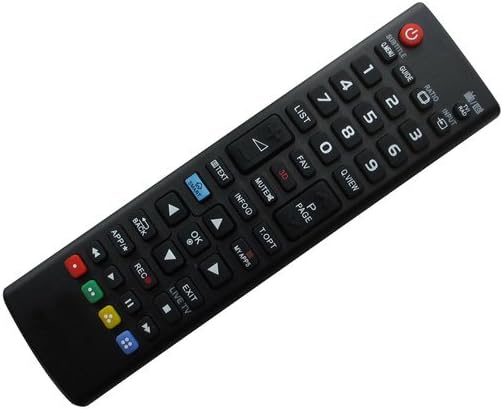
2-сүрөт: Фронт view баскычтардын жайгашуусу менен алыстан башкаруунун.
- Кубат (кызыл баскыч): Телевизорду күйгүзөт же өчүрөт.
- Сандар тактасы (0-9): Түздөн-түз канал тандоо.
- Үндү жогорулатуу/төмөндөтүү (VOL +/-): Телевизордун үнүн тууралайт.
- Канал өйдө/төмөн (CH +/-): Телеканалдарды ырааттуу түрдө алмаштырат.
- Үнсүз: Телевизордун үнүн басат.
- КИРҮҮ: Selects input sources (e.g., HDMI, AV).
- ЖЕТЕКЧЕ: Электрондук программалык колдонмону көрсөтөт.
- ТИЗМЕ: Каналдардын тизмесине кирет.
- FAV: Сүйүктүү каналдарга жетет.
- МААЛЫМАТ: Displays on-screen information about the current program.
- Чабыттоо баскычтары (өйдө, ылдый, солго, оңго, ОК): Менюларда багыттоо жана тандоолорду ырастоо үчүн колдонулат.
- Back: Мурунку менюга же экранга кайтат.
- ЧЫГУУ: Учурдагы менюдан же колдонмодон чыгат.
- APP/* (Smart/Apps): Accesses smart TV applications or features.
- РЕК: Initiates recording if your TV supports it and has a connected recording device.
- ТҮЗ ЭФИРДЕГИ ТЕЛЕКӨӨР: Түз эфирдеги телеберүүгө которулат.
- Түс баскычтары (кызыл, жашыл, сары, көк): Functionality varies by TV model and application. Refer to your TV's on-screen prompts.
For specific functions related to your LG TV's Smart features or 3D capabilities, please consult your television's original user manual.
4. Техникалык тейлөө
4.1 Тазалоо
Алыстан башкаруу пультун тазалоо үчүн жумшак, кургак чүпүрөктү колдонуңуз. Өтө кир болсо, бир азampкездемени суу же жумшак, абразивдүү эмес тазалоочу каражат менен сүртүңүз. Катуу химиялык заттарды, эриткичтерди же абразивдүү материалдарды колдонуудан алыс болуңуз, анткени алар пульттун бетине же ички компоненттерине зыян келтириши мүмкүн.
4.2 Батареяны алмаштыруу
Replace batteries when the remote's response becomes sluggish or stops working. Always replace both AAA batteries at the same time with new ones. Do not mix old and new batteries, or different types of batteries. Dispose of used batteries according to local regulations.
4.3 Сактоо
If the remote control will not be used for an extended period, remove the batteries to prevent leakage, which can damage the remote. Store the remote in a cool, dry place away from direct sunlight and extreme temperatures.
5. Кыйынчылыктарды
- Пульт жооп бербей жатат:
- Батареялар туура полярдуулук менен туура орнотулганын текшериңиз.
- Эски батарейкаларды жаңысына алмаштырыңыз.
- Пульт менен телевизордун инфракызыл кабыл алгычынын ортосунда ачык көрүнүү сызыгы бар экенин текшериңиз. Бардык тоскоолдуктарды алып салыңыз.
- Пультту түз сыналгыга багыттаңыз.
- Айрым функциялар иштебейт:
- As a replacement remote, certain advanced or specific functions of your original TV remote may not be supported. This is a common characteristic of universal or replacement remotes.
- Verify that your TV model is listed as compatible in the product description.
- Баскычтар жабышчаак же жооп бербей жатат:
- Алыстан башкаруу пультун "Техникалык тейлөө" бөлүмүндө сүрөттөлгөндөй тазалаңыз.
6. Техникалык шарттар
| Өзгөчөлүк | Description |
|---|---|
| Модель номери | Easytry0337 |
| Бренд | Easytry123 |
| Power Source | 2 x AAA Батареялар (киргизилген эмес) |
| Байланыш технологиясы | Инфракызыл (IR) |
| Шайкеш түзмөктөр | LG Smart 3D LED Televisions (specific models listed in title) |
| Өзгөчө өзгөчөлүк | Эргономикалык дизайн |
7. Кепилдик жана колдоо
No specific warranty information is provided with this product. For any support inquiries, troubleshooting assistance beyond this manual, or questions regarding returns and replacements, please contact the seller directly through your purchase platform.