
1. Киришүү
This manual provides instructions for the Easytry123 replacement infrared remote control, model Easytry0400. This remote is designed to function as a direct replacement for the original remote controls of Dynex DX-LCD37-09-02 and DX-LCD37-09-2 LCD LED HDTV television models. Please ensure your television model is listed for proper compatibility. This remote operates using infrared technology and requires 2 AAA batteries (not included).
2. Орнотуу: Батареяны орнотуу
To begin using your Easytry123 replacement remote control, you must first install the batteries.
- Пульттун артындагы батарея отсегин табыңыз.
- Батарея бөлүмүнүн капкагын ачуу үчүн ылдый же сыртка жылдырыңыз.
- Insert two (2) AAA batteries, ensuring the positive (+) and negative (-) terminals align correctly with the markings inside the compartment. Incorrect battery orientation can prevent the remote from functioning.
- Батарея бөлүкчөсүнүн капкагын бекем чыккыча ордуна жылдырыңыз.
1-сүрөт: Артка view of the Easytry123 remote control with the battery compartment open, illustrating where to insert the two AAA batteries.
3. Иштөө нускамалары
Point the remote control directly towards the infrared receiver on your Dynex television. Ensure there are no obstructions between the remote and the TV.

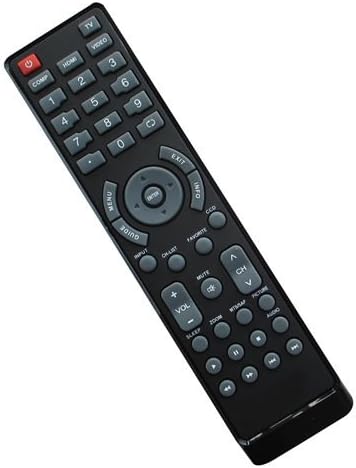
2-сүрөт: Фронт view of the Easytry123 remote control, displaying its button layout.
Баскыч функциялары:
- POWER (Red button): Телевизорду күйгүзөт же өчүрөт.
- COMP, HDMI, VIDEO, 1-9, 0: Number buttons for direct channel selection and input source selection.
- МЕНЮ: Телевизордун негизги менюсуна кирүүгө мүмкүндүк берет.
- ЖЕТЕКЧЕ: Displays the electronic program guide (if supported by your TV and service).
- ARROW buttons (Up, Down, Left, Right): Менюлар жана параметрлер боюнча чабыттайт.
- КИРҮҮ: Менюлардагы тандоолорду ырастайт.
- ЧЫГУУ: Учурдагы менюдан же экрандан чыгат.
- МААЛЫМАТ: Учурдагы программа же киргизүү жөнүндө маалыматты көрсөтөт.
- DCC: Likely for Closed Captioning display.
- КИРҮҮ: Cycles through available input sources (HDMI, Video, etc.).
- CH ТИЗМЕСИ: Канал тизмесин көрсөтөт.
- Үнсүз: Телевизордун үнүн өчүрөт же ачат.
- VOL +/-: Үн деңгээлин тууралайт.
- CH ^/v: Телеканалды өйдө же ылдый өзгөртөт.
- MTMAP, PICTURE, AUDIO: Likely dedicated buttons for picture modes, audio settings, or other TV features.
- ZOOM: Экрандын масштабын тууралайт.
- УЙКУ: Телевизор үчүн уйку таймерин орнотот.
- Playback Controls (Rewind, Play/Pause, Fast Forward, Stop, Record): For controlling connected media devices or TV's built-in media player.
Note: Some advanced functions or specific buttons may require your television to support those features. Refer to your television's original user manual for detailed information on its capabilities.
4. Техникалык тейлөө
Тийиштүү кам көрүү жана техникалык тейлөө пультуңуздун иштөө мөөнөтүн узартат.
- Тазалоо: Use a soft, dry cloth to clean the remote control. For stubborn dirt, lightly dampen the cloth with water or a mild cleaning solution, then wipe dry immediately. Do not use abrasive cleaners or immerse the remote in liquids.
- Батареяны алмаштыруу: Пульттун реакциясы жайлап калса же иштебей калса, батареяларды алмаштырыңыз. Ар дайым эки батареяны тең бир эле учурда жаңы AAA батареялары менен алмаштырыңыз. Эски жана жаңы батареяларды же ар кандай типтеги батареяларды аралаштырбаңыз.
- Сактагыч: If the remote will not be used for an extended period, remove the batteries to prevent leakage, which can damage the remote.
5. Кыйынчылыктарды
Эгерде сиз алыстан башкаруу пультуңузда көйгөйлөргө туш болсоңуз, төмөнкү көйгөйлөрдү чечүү кадамдарын колдонуп көрүңүз:
- Пульт жооп бербей жатат:
- Ensure the remote is pointed directly at the TV's infrared sensor.
- Пульт менен телевизордун ортосунда тоскоолдуктар бар-жогун текшериңиз.
- Батареяларды жаңы AAA батарейкалары менен алмаштырыңыз.
- Verify that the TV is powered on.
- Кээ бир баскычтар иштебейт:
- This replacement remote is designed to replicate the original remote's functions. However, some specific or advanced features of your TV might not be fully supported if they differ significantly from the original remote's design.
- Ensure your TV model is indeed one of the compatible models (Dynex DX-LCD37-09-02 or DX-LCD37-09-2).
- Интерференция:
- Strong light sources, especially fluorescent lights or direct sunlight, can interfere with infrared signals. Try operating the remote in different lighting conditions.
Бул кадамдарды жасагандан кийин көйгөй чечилбесе, кардарларды колдоо менен байланышыңыз.
6. Техникалык шарттар
| Модель номери: | Easytry0400 |
| Бренд: | Easytry123 |
| Байланыш технологиясы: | Инфракызыл (IR) |
| Контроллердин түрү: | Control Button |
| Шайкеш түзмөктөр: | Dynex DX-LCD37-09-02, Dynex DX-LCD37-09-2 LCD LED HDTVs |
| Батареялар талап кылынат: | 2 x AAA (киргизилген эмес) |
| Өзгөчө өзгөчөлүгү: | Ergonomic replacement design |
7. Кардарларды колдоо кызматы
For any questions, concerns, or troubleshooting assistance not covered in this manual, please contact the seller or Easytry123 customer support through the platform where the product was purchased. Please have your product model number (Easytry0400) and purchase details ready when contacting support.