
1. Киришүү
This manual provides instructions for the setup, operation, and maintenance of the Avaya 1616 IP Telephone (Model 700450190). The Avaya 1616 is designed for users who require a robust and feature-rich communication device, supporting 16 line appearances and a high-quality speakerphone. This guide will help you maximize the functionality of your IP telephone.
2. Орнотуу
Follow these steps to properly set up your Avaya 1616 IP Telephone.
2.1 Пакеттен чыгаруу жана компоненттерди идентификациялоо
Carefully remove all components from the packaging. Ensure all parts are present before proceeding with the setup.
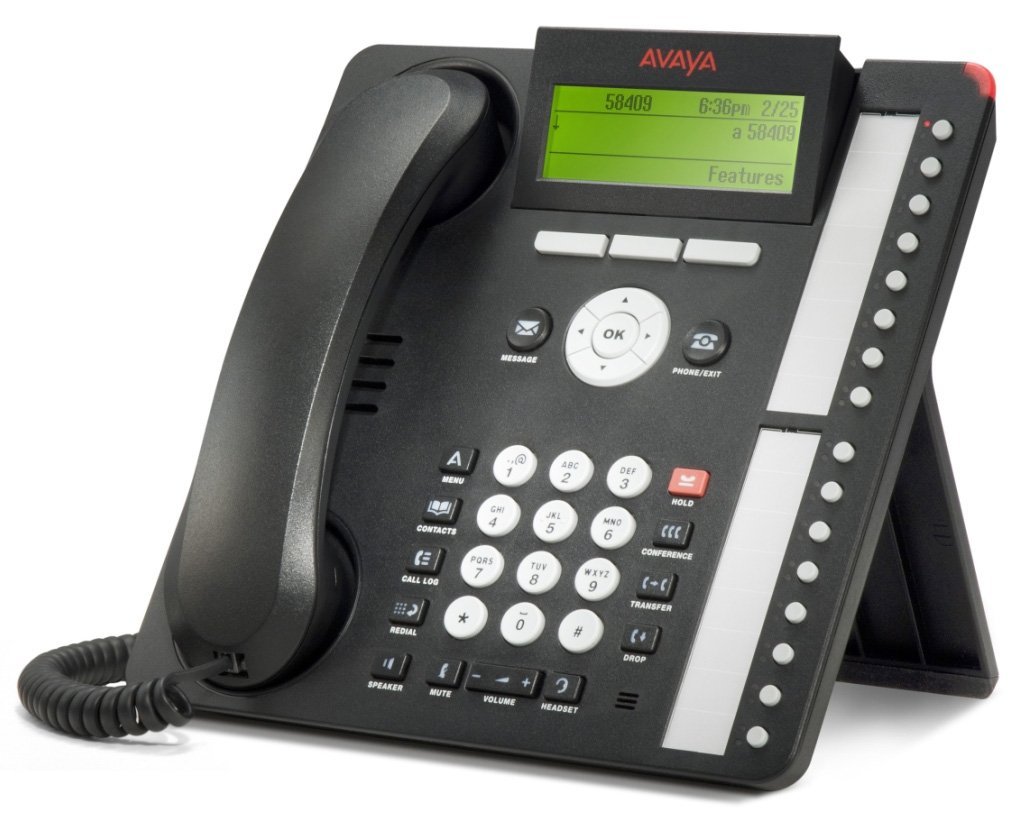
1-сүрөт: Avaya 1616 IP Telephone components. This image displays the main telephone unit, the handset, the coiled handset cord, an Ethernet cable, and the desk stand. The main unit features a display screen, a numeric keypad, and various function buttons. The desk stand is designed to elevate the phone for easier viewиштетүү жана иштетүү.
- Telephone Base Unit: The main body of the phone with keypad, display, and function buttons.
- Телефон: The receiver for voice communication.
- Телефондун шнуру: Coiled cord connecting the handset to the base unit.
- Ethernet кабели: Тармакка туташуу үчүн.
- Стол стенд: For positioning the phone on a desk.
- Power Adapter (Sold Separately): A 5V local power supply may be required if Power over Ethernet (PoE) is not available.
2.2 Физикалык байланыштар
- Үстөл стенди тиркөө: Securely attach the desk stand to the bottom of the telephone base unit.
- Телефонду туташтыруу: Plug one end of the coiled handset cord into the handset and the other end into the designated handset port on the side or back of the telephone base unit.
- Тармакка туташуу: Insert one end of the Ethernet cable into the "LAN" port on the back of the telephone and the other end into a network switch or router. The phone supports dual Ethernet ports for connection of the phone and a collocated PC with VLAN separation.
- Туташуу кубаты:
- Ethernet аркылуу күч (PoE): If your network switch supports 802.3af PoE, the phone will receive power through the Ethernet cable. No separate power adapter is needed.
- Local Power Supply: If PoE is not available, connect a 5V local power supply (sold separately) to the power port on the back of the telephone and then to an electrical outlet.
Once connected, the phone will power on and begin its boot sequence. This may take a few moments.
3. Иштөө нускамалары
This section covers the basic operation of your Avaya 1616 IP Telephone.
3.1 Негизги өзгөчөлүктөрү
- 16 Line Appearances/Feature Keys: Programmable buttons with dual LEDs for line status and feature access.
- High-Quality 2-Way Speakerphone: Handsfree байланыш үчүн.
- Чалуучунун ID: Кирүүчү чалуучу маалыматты көрсөтөт.
- Көп линия операциясы: Supports multiple active lines.
- Конференция чалуу мүмкүнчүлүгү: Basic conferencing features.
3.2 Чакыруунун негизги функциялары
- Чакыруу:
- Телефонду көтөрүңүз же Speaker баскычын басыңыз.
- Ариптакта аркылуу каалаган номерди териңиз.
- Press the "Call" or "Dial" softkey, or wait for automatic dialing.
- Чалууга жооп берүү:
- Lift the handset, or press the Speaker button, or press the flashing line appearance button.
- Чалууну аяктоо:
- Replace the handset, or press the Speaker button again if using speakerphone, or press the "End Call" softkey.
- Чалууну күтүү режимине коюу:
- During an active call, press the "Hold" button. The line appearance LED will flash.
- To retrieve the call, press the flashing line appearance button.
- Чалууну өткөрүп берүү:
- During an active call, press the "Transfer" button. The current call is put on hold.
- Dial the number of the party to whom you wish to transfer the call.
- Wait for the party to answer (consulted transfer) or press "Transfer" again to complete the transfer (blind transfer).
- Конференц-чалууну баштоо:
- During an active call, press the "Conference" button. The current call is put on hold.
- Үчүнчү тараптын номерин териңиз.
- Once the third party answers, press the "Conference" button again to join all parties.
4. Техникалык тейлөө
Proper maintenance ensures the longevity and optimal performance of your Avaya 1616 IP Telephone.
4.1 Тазалоо
- жумшак, бир аз колдонуу damp cloth to clean the exterior surfaces of the phone.
- Avoid using abrasive cleaners, solvents, or strong chemicals, as these can damage the finish and electronic components.
- Do not spray cleaning liquids directly onto the phone. Apply to the cloth first.
- Телефонду тазалоодон мурун, аны электр кубатынан ажыратып коюңуз.
4.2 Жалпы кам көрүү
- Телефонду ашыкча ысыктан, тике күн нурунан жана нымдан алыс кармаңыз.
- Телефонду түшүрүп алуудан же катуу соккуга кабылтуудан алыс болуңуз.
- Ensure cables are not pinched or strained.
5. Кыйынчылыктарды
This section provides solutions to common issues you might encounter with your Avaya 1616 IP Telephone.
| Көйгөй | Мүмкүн себеп | Чечим |
|---|---|---|
| Телефон күйбөйт. | Электр менен камсыздоо жок же туташуу бузук. |
|
| Терүү үнү жок. | Network connectivity issue or service problem. |
|
| Чалууларды кабыл алуу же жасоо мүмкүн эмес. | Network configuration, service issue, or phone registration problem. |
|
| Аудио сапаты начар. | Network congestion, faulty cable, or handset issue. |
|
If the problem persists after attempting these solutions, please contact your IT department or Avaya support for further assistance.
6. Техникалык шарттар
Key technical specifications for the Avaya 1616 IP Telephone (700450190).
| Өзгөчөлүк | Деталь |
|---|---|
| Модель номери | 700450190 |
| Line Appearances | 16 with dual LEDs |
| Динамик | High-quality 2-way |
| Монтаждоо параметрлери | Desk or wall mountable (with optional adapter) |
| Ethernet порттору | Dual (for phone and collocated PC w/VLAN separation) |
| Power Source | 802.3af Power over Ethernet (PoE) or optional 5V local power supply |
| Терүүчү түрү | Жалгыз баскычтоп |
| Жооп берүү системасынын түрү | Санарип |
| Шайкеш түзмөктөр | Computers, Telephone Networks, VoIP Services |
| Конференция чалуу мүмкүнчүлүгү | Негизги |
| Көп линия операциясы | Көп линиялуу операция |
| Чалуучунун ID | Ооба |
| Түс | Кара |
| Продукциянын өлчөмдөрү | 9.8 x 7.9 x 2.8 дюйм (болжол менен) |
| Пакеттин өлчөмдөрү | 16.8 x 10 x 3.3 дюйм |
| Салмагы | 2.9 Pounds (Package Weight) |
7. Кепилдик маалыматы
This Avaya 1616 IP Telephone (700450190) is typically offered with a 90 күндүк чектелген кепилдик. This warranty covers defects in materials and workmanship under normal use. For specific terms and conditions, please refer to the warranty documentation provided at the time of purchase or contact your vendor.
Note: As a renewed product, warranty terms may vary from new products. Always confirm warranty details with your supplier.
8. Колдоо
For technical assistance, further troubleshooting, or inquiries regarding your Avaya 1616 IP Telephone, please contact your system administrator or the vendor from whom you purchased the device. Avaya's official support channels can also provide resources and documentation for their products.
For general information about Avaya products, you may visit the official Avaya webсайт.