
Introduction
The Teesa Hypercare T300 rotary shaver (model TSA0520) is designed for efficient and comfortable facial hair removal. Its three flexible blades adapt to facial contours, and the integrated pop-up trimmer allows for precise styling of sideburns and moustaches. This manual provides essential information for safe operation, maintenance, and optimal performance of your device.
Коопсуздук маалыматы
Please read these safety instructions carefully before using the appliance and keep them for future reference.
- Бул шайман тиричиликте гана колдонууга арналган.
- Do not immerse the shaver in water or other liquids. Keep it dry.
- Электр зымы же сайы бузулган болсо, шайманды колдонбоңуз.
- Always disconnect the shaver from the power supply before cleaning.
- Шайманды балдар жетпеген жерде сактаңыз.
- Use only the power cable supplied with the device.
- Do not use the shaver if the shaving heads are damaged, as this may cause injury.
Пакеттин мазмуну
Пакетиңиздин мазмунун текшериңиз. Эгерде кандайдыр бир буюмдар жок же бузулуп калса, сатуучуга кайрылыңыз.
- Teesa Hypercare T300 Rotary Shaver
- Электр кабели
- Коргоочу капкак
- Тазалоочу щетка
- Майлоочу май
- Instruction Manual
Продукт бүттүview
Familiarize yourself with the components of your Teesa Hypercare T300 Rotary Shaver.
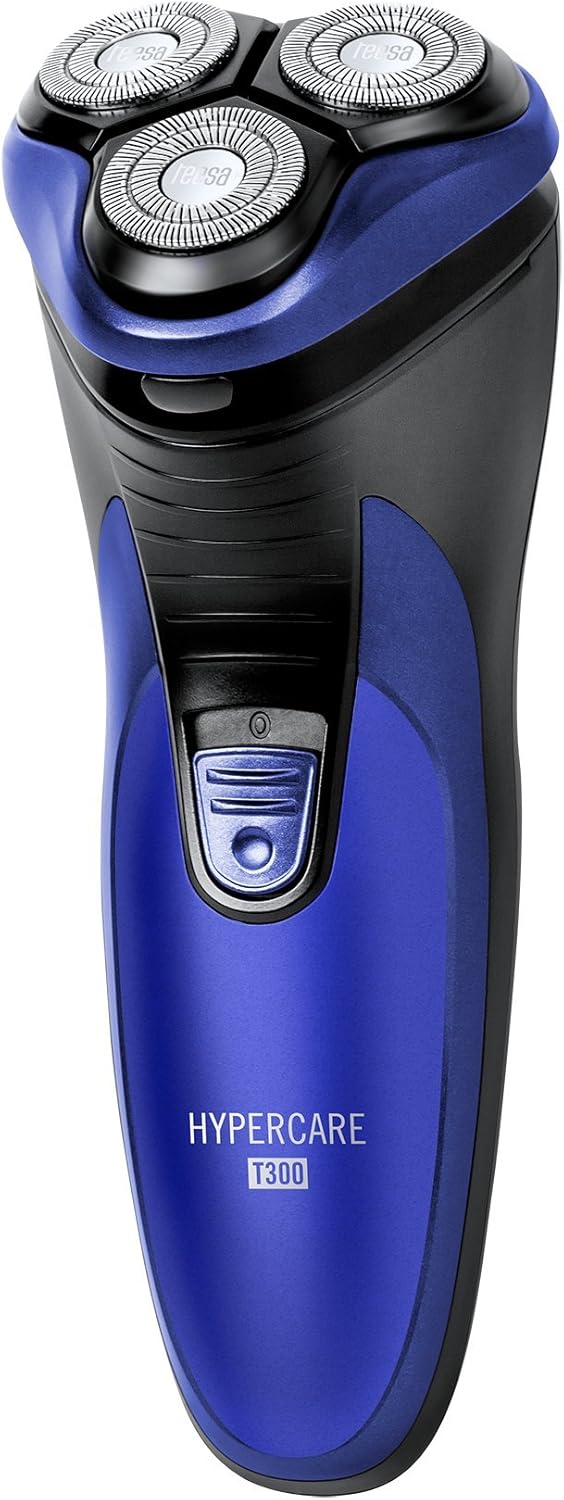


Жайгашуу
Устаны заряддоо
- Заряддоодон мурун устара өчүрүлгөнүн текшериңиз.
- Connect the power cable to the charging port on the shaver.
- Plug the other end of the power cable into a standard electrical outlet (220-240V; 50/60Hz).
- Устара заряддалып жатканын көрсөткөн кубаттоо индикатору күйөт.

A full charge takes approximately 8 hours and provides up to 45 minutes of cordless operation. Do not leave the shaver connected to the charger for extended periods after it is fully charged.
Иштеп жатат
Сакал алуу
- Устанын толук заряддалганын текшериңиз.
- Электр устараны иштетүү үчүн кубат баскычын басыңыз.
- Устаны териңизге туура бурчта кармаңыз.
- Move the shaver in small, circular motions over your face and neck. For optimal results, shave against the direction of hair growth.
- The flexible shaving heads will adapt to the contours of your face for a close shave.
- Сакал алгандан кийин, устараны өчүрүү үчүн кубат баскычын басыңыз.
Калкыма триммерди колдонуу
- Устаны күйгүзүңүз.
- Locate the pop-up trimmer release button on the side of the shaver.
- Slide the release button upwards to extend the pop-up trimmer.

- Use the trimmer to precisely shape sideburns, moustaches, or beard lines.
- After use, push the trimmer back down until it clicks into its closed position.
Техникалык тейлөө
Устаны тазалоо
Үзгүлтүксүз тазалоо оптималдуу иштөөнү жана гигиенаны камсыз кылат.
- Устаны өчүрүп, аны электр кубатынан ажыратыңыз.
- Press the release button on the front of the shaver to open the shaving head unit.
- Use the provided cleaning brush to remove any accumulated hair clippings from the shaving heads and the hair chamber.
- For a more thorough cleaning, you may rinse the shaving heads under running water. Ensure the main body of the shaver does not get wet.
- Allow all parts to air dry completely before reassembling the shaving head unit.
- Periodically apply a small drop of the provided lubricating oil to the shaving foils and cutters to maintain smooth operation and prolong blade life.
- Always replace the protective cap over the shaving heads after each use to prevent damage.
Проблемаларды чечүү
Эгерде сиз устара менен кандайдыр бир көйгөйлөргө туш болсоңуз, төмөнкү кеңири таралган көйгөйлөрдү жана чечимдерди караңыз:
- Устара күйгүзбөй жатат:
- Устанын толук заряддалганын текшериңиз.
- Кубат баскычын бекем басыңыз.
- Сакалдын начар иштеши:
- The blades may be clogged with hair. Clean the shaver thoroughly as described in the Maintenance section.
- Ensure the shaver is fully charged. Performance may decrease with low battery.
- Blades may be dull. Consider replacing the shaving heads after extended use (replacement parts sold separately).
- Устра заряддалбай жатат:
- Check that the power cable is securely connected to both the shaver and the electrical outlet.
- Электр розеткасынын туура иштеп жатканын текшериңиз.
- Ensure the charging indicator light illuminates when connected.
Бул чечимдерди колдонуу аракетинен кийин көйгөй чечилбесе, кардарларды колдоо кызматына кайрылыңыз.
Техникалык шарттар
| Өзгөчөлүк | Спецификация |
|---|---|
| Модель номери | TSA0520 |
| Күч | 3 Вт |
| Айлануу ылдамдыгы | 6000 RPM |
| Run Time | 45 мүнөткө чейин |
| Заряддоо убактысы | 8 саатка чейин |
| Батарея | 2.4 V; 2/3 AA 600 mAh x2 (Rechargeable) |
| Электр камсыздоо | 220 – 240 В; 50/60 Гц |
| Салмагы | 165 г |
| Өлчөмдөрү (L x W x Y) | 58.2 x 46.8 x 150.9 мм |
| Бычактын материалы | Эритме болот |
| Blades саны | 3 (Rotary Type) |
| Өзгөчө өзгөчөлүк | Эргономикалык дизайн |
Кепилдик жана колдоо
For warranty information, technical assistance, or to inquire about replacement parts, please refer to the documentation included with your purchase or visit the official Teesa webсайт. Кепилдик дооматтар үчүн сатып алганыңыздын далилин сактаңыз.