
Easytry123 Easytry0487
User Manual for Easytry123 Replacement Remote Control
Модель: Easytry0487
Compatible with Samsung AH59-02131D HT-TZ322 HT-TZ325 HT-TZ422 HT-TZ425 HT-Z320 HT-Z420 HT-TZ122 HT-TZ122T DVD Home Theater Systems
Introduction
This manual provides instructions for the Easytry123 replacement remote control, designed for use with various Samsung DVD Home Theater Systems, including models AH59-02131D, HT-TZ322, HT-TZ325, HT-TZ422, HT-TZ425, HT-Z320, HT-Z420, HT-TZ122, and HT-TZ122T. This remote offers an easy-to-use solution for controlling your home theater system's primary functions. Please note that as a replacement unit, it may not support all functions of your original remote control.
Коопсуздук маалыматы
- Эски жана жаңы батарейкаларды аралаштырбаңыз.
- щелочтуу, стандарттуу (көмүртек-цинк) же кайра заряддалуучу (никель-кадмий) батареяларды аралаштырбаңыз.
- Батареялар туура полярдуулукта (+ жана -) салынганын текшериңиз.
- Эгерде алыстан башкаруу пульту көпкө чейин колдонулбаса, агып кетүүнүн алдын алуу үчүн батарейкаларды алып салыңыз.
- Батареяларды балдар жетпеген жерде сактаңыз.
Жайгашуу
Батарея орнотуу
Алыстан башкаруу пульту эки (2) AAA батарейкасын талап кылат (кошулмага кирбейт). Аларды орнотуу үчүн төмөнкү кадамдарды аткарыңыз:
- Пульттун артындагы батарея отсегин табыңыз.
- Өтмөктү ылдый басып, аны ачуу үчүн батареянын капкагын ылдый жылдырыңыз.
- Эки AAA батарейканы салып, оң (+) жана терс (-) учтары бөлүмдүн ичиндеги белгилер менен дал келгенин текшериңиз.
- Батареянын капкагын бекем чыккыча ордуна жылдырыңыз.

1-сүрөт: Арткы view of the remote control with the battery compartment open, ready for battery insertion.
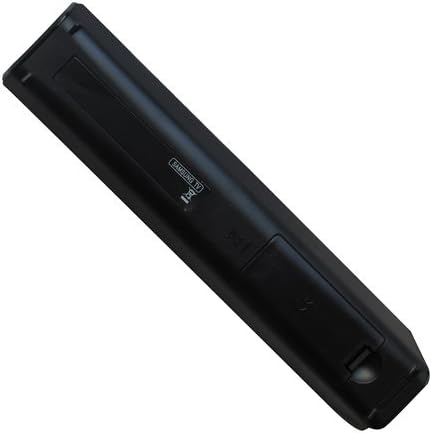
2-сүрөт: Арткы view of the remote control with the battery cover securely closed after installation.
Иштөө нускамалары
Once batteries are installed, the remote control is ready for use. Point the remote directly at your Samsung DVD Home Theater System's infrared receiver.
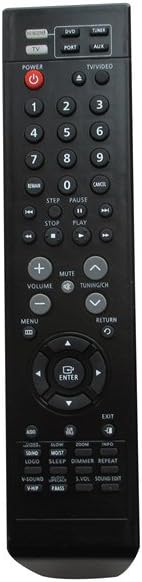
Сүрөт 3: Алдыңкы view of the Easytry123 replacement remote control, displaying its button layout.
Негизги функциялар бүттүview
The remote control features a standard layout for common home theater functions:
- Кубат баскычы: Located at the top left, typically red, to turn the system on or off.
- Булак/киргизүүнү тандоо: Buttons like "DVD", "PORT", "TV/VIDEO" to switch between different audio/video sources.
- Сандык такта: Digits 0-9 for direct track selection or input.
- Ойнотуу башкаруулары: Buttons such as Play, Pause, Stop, Fast Forward, Rewind, Skip (Next/Previous).
- Үндү көзөмөлдөө: Dedicated buttons for increasing (+) жана decreasing (-) volume, and a Mute button.
- Навигация аянтчасы: Arrow buttons (Up, Down, Left, Right) and an "ENTER" button for menu navigation and selection.
- Меню/кайтаруу: Buttons to access system menus and go back to previous screens.
- Функция баскычтары: Additional buttons for specific features like Sound Mode, V-Sound, Logo, Sleep, Dimmer, Repeat, etc., depending on your system's capabilities.
For detailed functionality of each button, refer to your Samsung Home Theater System's original user manual, as this replacement remote aims to replicate those functions.
Техникалык тейлөө
Алыстан башкарууну тазалоо
Пульттун көрүнүшүн жана функционалдуулугун сактоо үчүн:
- Бетти жумшак, кургак чүпүрөк менен сүртүңүз.
- өжөр кир үчүн, бир аз гampчүпүрөктү суу же жумшак, абразивдүү тазалагыч менен жууп салыңыз. Тазалоочу каражатты түздөн-түз пультка чачпаңыз.
- Avoid using harsh chemicals, solvents, or abrasive cleaning pads.
Батареяны алмаштыруу
Replace the batteries when the remote control's range decreases significantly or if it stops responding. Follow the battery installation steps outlined in the "Setup" section.
Проблемаларды чечүү
| Көйгөй | Мүмкүн себеп | Чечим |
|---|---|---|
| Пульт иштебей жатат. |
|
|
| Кээ бир функциялар иштебейт. |
|
|
| Remote has short operating range. |
|
|
Техникалык шарттар
- Модель номери: Easytry0487
- Бренд: Easytry123
- Шайкеш түзмөктөр: Samsung HT-TZ322, HT-TZ325, HT-TZ422, HT-TZ425, HT-Z320, HT-Z420, HT-TZ122, HT-TZ122T DVD Home Theater Systems (and others compatible with AH59-02131D)
- Байланыш технологиясы: Инфракызыл
- Контроллердин түрү: Control Button
- Батареялар талап кылынат: 2 x AAA (киргизилген эмес)
- Өзгөчө өзгөчөлүгү: Эргономикалык дизайн
- Өндүрүүчү: Easytry123
- Келип чыккан өлкө: Кытай
Колдоо жана кайтаруу
For any questions or issues regarding your Easytry123 replacement remote control, please contact the seller directly through the platform where you made your purchase. The seller for this product is Easytry123.
This product typically comes with a 30-day return policy for refund or replacement. Please refer to the specific return policy details provided at the time of purchase or on the product listing page for the most accurate information.
Ensure your home theater system model is listed as compatible before purchasing to avoid functionality issues.
Ask a question about this manual
Ask about setup, troubleshooting, compatibility, parts, safety, or missing instructions. Manuals+ will review the question and use this page’s manual context to help answer it.