
Easytry123 Easytry0609
Instruction Manual
Easytry123 Replacement Remote Control for FRIGILUX R51I9/BGCE Air Conditioner
Модель: Easytry0609
1. Киришүү жана шайкештик
This document provides instructions for the Easytry123 replacement remote control, designed for use with FRIGILUX R51I9/BGCE Air Conditioner units. This remote is an infrared (IR) replacement and is intended to function similarly to your original remote control.
Маанилүү шайкештик эскертүүсү: Before use, please ensure your current remote control is visually identical to the remote shown in this manual. This replacement remote is designed to mimic the functions of the original. While it aims to provide full functionality, some advanced or rarely used features present on your original remote may not be fully supported by this replacement. If your air conditioner model number is not explicitly listed in the product title, or if your original remote differs in appearance, please contact the seller for compatibility verification before attempting to use this remote.
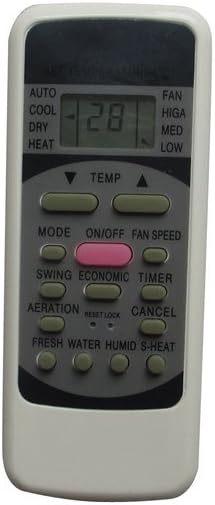
Сүрөт 1: Алдыңкы view of the Easytry123 replacement remote control. This image shows the display screen, power button, mode selection, temperature controls, fan speed, swing, timer, and other function buttons.
2. Орнотуу
2.1 Батареяны орнотуу
Алыстан башкаруу пульту талап кылат 2 AAA батарейка (кошулбайт) иштетүү үчүн. Батареяларды орнотуу үчүн төмөнкү кадамдарды аткарыңыз:
- Пульттун артындагы батарея отсегин табыңыз.
- Батарея бөлүмүнүн капкагын ачуу үчүн ылдый же жебе менен көрсөтүлгөн багытта жылдырыңыз.
- Эки AAA батарейкасын салып, оң (+) жана терс (-) терминалдары бөлүмдүн ичиндеги белгилер менен туура дал келгенин текшериңиз. Батареянын туура эмес багыты пульттун иштешине тоскоол болушу мүмкүн.
- Батарея бөлүкчөсүнүн капкагын бекем чыккыча ордуна жылдырыңыз.

2-сүрөт: Артка view of the remote control, showing the open battery compartment ready for AAA battery insertion.
3. Негизги операция
Once batteries are installed, the remote is ready for use. Point the remote directly at the infrared receiver on your air conditioner unit. Ensure there are no obstructions between the remote and the unit.
- ON/OFF баскычы: басыңыз КҮЙГҮЗҮҮ/ӨЧҮРҮҮ button (often red or distinctively colored) to power the air conditioner on or off.
- MODE баскычы: басыңыз РЕЖИМ button to cycle through available operating modes such as AUTO, COOL, DRY, HEAT, and FAN. The current mode will typically be displayed on the remote's screen.
- TEMP Buttons (▼ / ▲): колдонуу ТЕМП up (▲) and down (▼) buttons to adjust the desired temperature setting.
- FAN SPEED баскычы: басыңыз Күйөрмандардын ылдамдыгы button to adjust the fan's intensity (e.g., HIGH, MED, LOW, AUTO).
- SWING баскычы: Кондиционердин жалюзилерин автоматтык түрдө буралуу функциясын иштетет же өчүрөт.
- TIMER баскычы: Used to set a timer for the air conditioner to turn on or off automatically. Refer to your air conditioner's original manual for detailed timer programming.
- Башка баскычтар: Buttons such as ECONOMIC, AERATION, FRESH WATER, HUMID, S-HEAT, RESET, and CANCEL are present for specific functions. Their exact operation may vary slightly depending on your air conditioner model.
4. Техникалык тейлөө
4.1 Батареяны алмаштыруу
Replace the batteries when the remote's display becomes dim, or if the remote stops responding to button presses. Always replace both batteries at the same time with new AAA batteries. Do not mix old and new batteries, or different types of batteries.
4.2 Тазалоо
Пультту тазалоо үчүн, анын бетин жумшак, кургак чүпүрөк менен акырын сүртүңүз. Суюк тазалоочу каражаттарды, абразивдүү материалдарды же химиялык эриткичтерди колдонбоңуз, анткени алар пульттун сырткы көрүнүшүнө же ички компоненттерине зыян келтириши мүмкүн.
4.3 Сактоо
If the remote control will not be used for an extended period, it is recommended to remove the batteries to prevent leakage and potential damage to the remote.
5. Кыйынчылыктарды
- Алыстан жооп бербейт:
- Батареялардын туура полярдуулукта (+/-) орнотулганын текшериңиз.
- Эски батарейкаларды жаңысына алмаштырыңыз.
- Пульттун инфракызыл эмиттери менен кондиционердин кабыл алгычынын ортосунда так көрүнүү сызыгы бар экенин текшериңиз. Бардык тоскоолдуктарды алып салыңыз.
- Confirm that the remote's IR signal is being emitted (can sometimes be seen with a smartphone camera pointing at the remote's front when a button is pressed).
- Айрым функциялар иштебей жатат:
- As a replacement remote, not all functions may be fully compatible with every air conditioner model, even if the remote looks identical. This is particularly true for very specific or advanced features.
- Refer to your air conditioner's original manual to confirm the expected behavior of specific functions.
6. Техникалык шарттар
| Өзгөчөлүк | Деталь |
|---|---|
| Модель номери | Easytry0609 |
| Бренд | Easytry123 |
| Байланыш технологиясы | Инфракызыл (IR) |
| Controller Type | Control Button |
| Түс | Боз |
| Батареялар талап кылынат | 2 AAA батарейка |
| Өндүрүүчү | Easytry123 |
| Биринчи жеткиликтүү күн | 22-июнь, 2018-жыл |
7. Колдоо
For any doubts, compatibility questions, or issues not covered in this manual, please contact the seller directly through the platform where the product was purchased. Provide your order details and a clear description of the issue for prompt assistance.
Ask a question about this manual
Ask about setup, troubleshooting, compatibility, parts, safety, or missing instructions. Manuals+ will review the question and use this page’s manual context to help answer it.