
Introduction
This manual provides instructions for the Easytry123 replacement remote control, model Easytry0884. This remote is designed to operate various Hitachi AC Air Conditioner models, including SPX-RCKA, RAR-24Z, RAR-35Z, RAR-3V2, RAS-DX10HDK, RAS-S10CY, RAS-5115CY, and RAS-S13CY. Please read this manual carefully before use to ensure proper operation.
Маанилүү эскертүүлөр
- This is a replacement remote control. While designed for compatibility, some advanced functions present on your original remote may not be supported or may operate differently.
- Verify that your air conditioner model is listed as compatible to ensure full functionality.
- Batteries are not included with this remote control. Two AAA batteries are required for operation.
- The remote control is designed for ease of use with common air conditioner functions.
Жайгашуу
1. Батареяны орнотуу
- Пульттун артындагы батарея отсегин табыңыз.
- Батарея бөлүмүнүн капкагын ачуу үчүн ылдый же сыртка жылдырыңыз.
- Эки жаңы AAA батарейкасын салып, оң (+) жана терс (-) терминалдары бөлүмдүн ичиндеги диаграммаларга дал келгенин текшериңиз.
- Батарея бөлүкчөсүнүн капкагын бекем чыккыча ордуна жылдырыңыз.

Image: Back of the remote control with the battery compartment visible. This is where you will insert the AAA batteries.
2. Алгачкы колдонуу
This replacement remote control typically does not require pairing or complex setup. Once batteries are installed, it should be ready to operate your compatible Hitachi AC unit. Point the remote directly at the air conditioner's receiver when operating.
Иштөө нускамалары
The Easytry123 remote control features standard buttons for common air conditioner functions. Refer to the image below for a visual guide to the remote's layout.
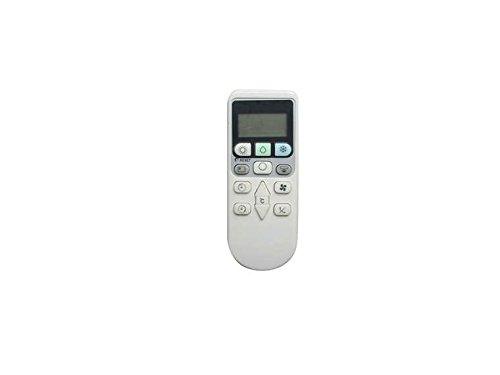
Сүрөт: алдыңкы view of the Easytry123 remote control, displaying its buttons for various functions.
- Кубат баскычы: Кондиционерди КҮЙГҮЗӨТ же ӨЧҮРөт.
- Режим баскычы: Муздатуу, Жылуулук, Вентилятор, Кургатуу, Автоматтык сыяктуу иштөө режимдери аркылуу циклдерди иштетет.
- Температураны жогорулатуу/төмөндөө баскычтары: Керектүү температура жөндөөсүн тууралайт.
- Желдетүүчү ылдамдык баскычы: Желдеткичтин ылдамдыгын тууралайт (мисалы, Төмөн, Орто, Жогорку, Авто).
- Селкинчек баскычы: Аба багытын аныктоо үчүн жалюзи ийри функциясын башкарат.
- Таймер баскычы: Sets the ON/OFF timer for the air conditioner. (Functionality may vary by AC unit.)
- Башка баскычтар: Depending on your specific AC model, other buttons may control functions like Sleep mode, Eco mode, or display settings. Test these buttons to determine their functionality with your unit.
Техникалык тейлөө
Батареяны алмаштыруу
Replace batteries when the remote control's range decreases or if it stops responding. Always replace both AAA batteries at the same time with new ones. Do not mix old and new batteries or different types of batteries.
Тазалоо
Пультту жумшак, кургак чүпүрөк менен сүртүңүз. Суюк тазалоочу каражаттарды, чачыраткычтарды же абразивдүү материалдарды колдонбоңуз, анткени алар пульттун бетине же ички компоненттерине зыян келтириши мүмкүн.
Проблемаларды чечүү
- Пульт жооп бербей жатат:
- Батареялар туура полярдуулук менен туура салынганын текшериңиз.
- Эски батареяларды жаңы AAA батареялары менен алмаштырыңыз.
- Пульт менен кондиционердин ресиверинин ортосунда эч кандай тоскоолдуктар жок экенин текшериңиз.
- Кондиционердин эффективдүү иштөө диапазонунда экениңизди текшериңиз.
- Чектелген функциялар:
- As a replacement remote, some specific or advanced functions of your original air conditioner remote may not be supported. This is normal for universal or replacement remotes.
- Verify that your air conditioner model is explicitly listed as compatible with this remote.
Техникалык шарттар
| Өзгөчөлүк | Деталь |
|---|---|
| Бренд | Easytry123 |
| Модель номери | Easytry0884 |
| Шайкеш түзмөктөр | Hitachi AC Air Conditioners (SPX-RCKA, RAR-24Z, RAR-35Z, RAR-3V2, RAS-DX10HDK, RAS-S10CY, RAS-5115CY, RAS-S13CY) |
| Батареялар талап кылынат | 2 x AAA (киргизилген эмес) |
| Элемент Салмагы | Болжол менен 0.01 унция |
| Түс | Ак |
| Өзгөчө өзгөчөлүк | Эргономикалык дизайн |
Монтаждоо опциясы
The remote control features a design that allows for wall mounting. This can help keep your remote control in a convenient and accessible location.
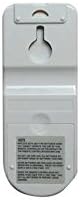
Image: Back of the remote control, highlighting the integrated wall mount hole for convenient storage.
Кепилдик жана колдоо
Specific warranty information for this replacement remote control is not provided in this manual. For warranty claims, technical support, or further assistance, please contact the seller or manufacturer directly through your purchase platform.