
1. Киришүү жана Продукт бүттүview
This manual provides essential information for the proper use and maintenance of your Easytry123 replacement remote control. This remote is designed as an infrared replacement for specific AlpicAir AC Air Conditioner models. Please ensure your original remote control closely matches the appearance of this replacement unit for optimal compatibility.
While this replacement remote aims to replicate the core functions of your original unit, it may not possess every single advanced feature or programming capability found on some original equipment manufacturer (OEM) remotes. Its primary purpose is to provide reliable control over essential air conditioner functions.
2. Орнотуу жана Батареяны орнотуу
2.1 Батареяга талаптар
Алыстан башкаруу пульту талап кылат эки (2) AAA батарейкасы (not included) for operation. Use new, high-quality alkaline batteries for best performance and longevity.
2.2 Батареяларды орнотуу
- Пульттун артындагы батарея отсегин табыңыз.
- Батарея бөлүмүнүн капкагын ачуу үчүн ылдый же жебе менен көрсөтүлгөн багытта жылдырыңыз.
- Insert two AAA batteries, ensuring the positive (+) and negative (-) terminals align correctly with the markings inside the compartment. Incorrect insertion can prevent the remote from functioning.
- Батарея бөлүкчөсүнүн капкагын бекем чыккыча ордуна жылдырыңыз.
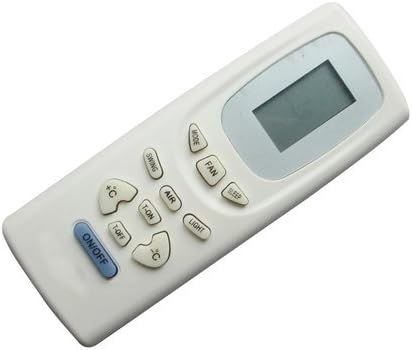
Сүрөт 1: Алдыңкы view of the remote control, showing the display and various function buttons.

2-сүрөт: Артка view of the remote control, illustrating the battery compartment cover.
2.3 Биринчи колдонуу
Once batteries are installed, the remote is ready for use. Point the remote directly at the infrared receiver on your AlpicAir AC unit. There is typically no pairing or programming required for this type of infrared replacement remote.
3. Иштөө нускамалары
Familiarize yourself with the buttons on your remote control. The layout and functions are designed to be intuitive and similar to standard AC remote controls.
- ON/OFF баскычы: Кондиционерди күйгүзүү же өчүрүү үчүн басыңыз.
- MODE баскычы: Автоматтык, Муздатуу, Кургатуу, Вентилятор жана Жылытуу сыяктуу иштөө режимдери аркылуу циклдерди өткөрөт (эгер сиздин кондиционериңиз колдосо).
- FAN баскычы: Желдеткичтин ылдамдыгын жөнгө салат (мисалы, Авто, Төмөн, Орто, Жогорку).
- TEMP +/- Buttons (↑C / ↓C): Керектүү температура жөндөөсүн жогорулатат же азайтат.
- SWING баскычы: Controls the vertical swing of the air deflector blades.
- AIR Button: May activate or deactivate specific air purification or circulation features.
- ЖАРЫК баскычы: Toggles the display light on the indoor unit.
- SLEEP баскычы: Activates the sleep mode, which typically adjusts temperature and fan speed for comfortable sleep.
- T-ON / T-OFF Buttons: Used to set timer functions for automatic power on (T-ON) or power off (T-OFF) of the AC unit. Refer to your AC unit's manual for detailed timer programming.
Note: Not all buttons or functions may be applicable to every AlpicAir AC model. Functionality depends on the features present in your specific air conditioner unit.
4. Техникалык тейлөө
4.1 Пультту тазалоо
Пультту тазалоо үчүн анын бетин жумшак, кургак чүпүрөк менен акырын сүртүңүз. өжөр кир үчүн, бир аз гamp cloth with mild soap can be used, followed by a dry wipe. Do not use abrasive cleaners, solvents, or immerse the remote in water.
4.2 Батареяны алмаштыруу
Replace batteries when the remote's response becomes sluggish, the display fades, or the AC unit no longer responds reliably. Always replace both batteries at the same time with new ones. Remove batteries if the remote will not be used for an extended period to prevent leakage.
4.3 Сактоо
Store the remote control in a cool, dry place, away from direct sunlight, extreme temperatures, and high humidity. Avoid dropping the remote or exposing it to strong impacts.
5. Кыйынчылыктарды
If you experience issues with your remote control, please refer to the following common troubleshooting steps:
| Көйгөй | Мүмкүн себеп | Чечим |
|---|---|---|
| Пульт кондиционердин иштөөсүнө жооп бербей жатат. | Өлгөн же аз батареялар. Алыстан жана AC бирдигинин ортосундагы тоскоолдук. Пульт кондиционер менен шайкеш келбейт. | Батареяларды жаңысына алмаштырыңыз. Ensure clear line of sight to AC unit's infrared receiver. Кондиционериңиздин модели шайкеш деп көрсөтүлгөнүн текшериңиз. |
| Кээ бир функциялар иштебейт. | Feature not present on your specific AC model. Replacement remote may not support all original functions. | Consult your AC unit's original manual for supported features. Understand that this is a replacement remote and may have limited functionality compared to OEM. |
| Remote display is dim or blank. | Батареялары аз. | Батареяларды алмаштырыңыз. |
6. Техникалык шарттар
| Өзгөчөлүк | Деталь |
|---|---|
| Модель номери | Easytry0893 |
| Бренд | Easytry123 |
| Байланыш технологиясы | Инфракызыл (IR) |
| Controller Type | Control Button |
| Power Source | 2 x AAA Батареялар (киргизилген эмес) |
| Түс | Ак |
| ASIN | B07F2FMK7L |
7. Кепилдик жана колдоо
This product is a replacement remote control. For any issues or questions regarding its functionality or compatibility, please contact the seller directly through the platform where the purchase was made. Please have your order details and the product model number (Easytry0893) ready when contacting support.
As this is a replacement part, specific warranty terms may vary. Refer to the seller's return and warranty policy at the time of purchase for detailed information.