
1. Киришүү
Thank you for choosing the Easytry123 Replacement Remote Control. This manual provides essential information for the proper setup, operation, and maintenance of your new remote control. This remote is designed as a direct replacement for specific Daikin air conditioner models. Please ensure your original remote matches the appearance of this replacement for optimal compatibility.
Important Note: This is a replacement remote. While it replicates the primary functions of the original, some advanced or specific features of your air conditioner unit may require the original manual for full understanding or may not be fully supported by this replacement. Always refer to your air conditioner's original manual for detailed operational instructions of the AC unit itself.
2. Продукт бүтүп калдыview
The Easytry123 replacement remote control is an infrared (IR) device designed for ease of use. It features a clear LCD display and tactile buttons for controlling various functions of your compatible Daikin air conditioner.
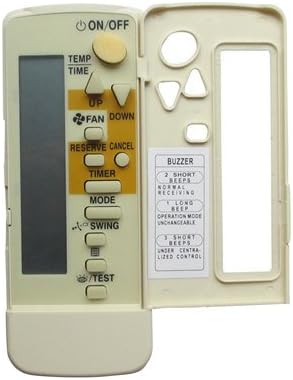
Сүрөт 2.1: Алдыңкы view of the remote control with the hinged cover open.
This image displays the front of the remote control. The top section features an LCD screen and primary function buttons such as ON/OFF, TEMP, TIME, FAN, RESERVE/CANCEL, TIMER, MODE, SWING, and TEST. A hinged cover on the right side opens to reveal additional control buttons and a label detailing buzzer indications.

2.2-сүрөт: Бурчтуу view of the remote control with the hinged cover open.
An angled perspective of the remote control, showing the LCD screen and main buttons on the left, and the open compartment on the right with secondary buttons and a buzzer guide.
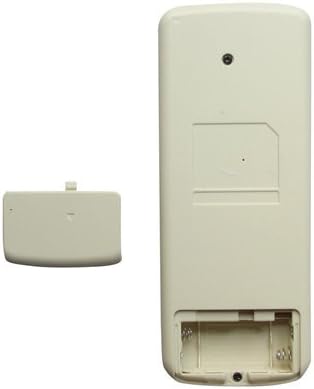
2.3-сүрөт: Артка view батарея бөлүмү ачык турганда алыстан башкаруу пультун
арткы view of the remote control, illustrating the battery compartment designed for two AAA batteries. The battery cover is shown detached next to the remote.
3. Орнотуу
3.1 Батареяны орнотуу
Your remote control requires two (2) AAA batteries (not included) for operation. Follow these steps to install the batteries:
- Пульттун артындагы батарея отсегин табыңыз.
- Өтмөктү ылдый басып, аны ачуу үчүн батареянын капкагын ылдый жылдырыңыз.
- Оң (+) жана терс (-) терминалдары бөлүмдүн ичиндеги белгилер менен туура дал келишин камсыз кылып, эки AAA батарейкасын салыңыз.
- Батареянын капкагын бекем чыккыча ордуна жылдырыңыз.
Эскертүү: Эгерде алыстан башкаруу пульту көпкө чейин колдонулбаса, агып кетүүнүн алдын алуу үчүн батарейкаларды алып салыңыз.
4. Иштөө нускамалары
To operate your air conditioner, point the remote control directly at the indoor unit's receiver. Ensure there are no obstructions between the remote and the unit.
4.1 Негизги функциялар
- КҮЙГҮЗҮҮ/ӨЧҮРҮҮ: Press this button to turn the air conditioner unit on or off.
- TEMP (Up/Down Arrows): Use these buttons to adjust the desired temperature setting.
- FAN (Up/Down Arrows): Controls the fan speed. Press to cycle through available fan speed settings (e.g., Low, Medium, High, Auto).
- РЕЖИМ: Selects the operating mode of the air conditioner (e.g., Cool, Heat, Fan, Dry, Auto).
- САЛКУУ: Activates or deactivates the automatic swing function of the air deflector.
- ТАЙМЕР: Used to set the on/off timer for the air conditioner. Refer to your AC unit's manual for detailed timer programming.
- RESERVE/CANCEL: Typically used in conjunction with the timer function to confirm or cancel settings.
- СЫНОО: This button is usually for service or diagnostic purposes. Avoid pressing it during normal operation unless instructed by a qualified technician.
- TIME (Up/Down Arrows): Adjusts the time displayed on the remote or used for timer settings.
4.2 Buzzer Indications
The remote control provides audible feedback through a buzzer. The indications are as follows:
| Бип | Көрсөтмө |
|---|---|
| 2 Кыска сигнал | Normal Receiving |
| 1 Узун бип | Operation Mode Unchangeable |
| 3 Кыска сигнал | Under Centralized Control |
5. Техникалык тейлөө
- Тазалоо: Пультту жумшак, кургак чүпүрөк менен сүртүңүз. Суюк тазалагычтарды же абразивдүү материалдарды колдонбоңуз.
- Батареяны алмаштыруу: Replace batteries when the display becomes dim or the remote's range decreases. Always replace both batteries at the same time with new ones of the same type.
- Сактагыч: If not using the remote for an extended period, remove the batteries to prevent corrosion and store it in a cool, dry place.
- Таасиринен качуу: Пультту түз күн нуруна, жогорку температурага же жогорку нымдуулукка дуушар кылбаңыз.
6. Кыйынчылыктарды
If you experience issues with your remote control, please refer to the following common problems and solutions:
- Пульт жооп бербей жатат же түзмөк буйруктарды албай жатат:
- Батареялардын туура полярдуулукта жана туура орнотулганын текшериңиз.
- Эски батареяларды жаңы AAA батареялары менен алмаштырыңыз.
- Ensure there is a clear line of sight between the remote control and the air conditioner's indoor unit. Remove any obstructions.
- Алыстан башкаруу пульту түз эле кондиционердин кабыл алгычына багытталганын текшериңиз.
- Алыстан көрсөтүү күңүрт же бош:
- Батареялар аз калды. Аларды жаңы AAA батареялары менен алмаштырыңыз.
- Айрым функциялар иштебейт:
- This is a replacement remote. Not all functions of your specific AC unit may be fully supported or mapped identically. Refer to your original AC unit manual.
- Ensure the remote is compatible with your exact Daikin model number.
7. Техникалык шарттар
- Модель номери: Easytry1112
- Бренд: Easytry123
- Байланыш технологиясы: Инфракызыл (IR)
- Контроллердин түрү: Control Button
- Түсү: Боз
- Батареялар талап кылынат: 2 x AAA (киргизилген эмес)
- Келип чыккан өлкө: Кытай
- Compatible Daikin Models: BRC4C82, FXDQ15P7VEB, BRC7E, BRC7F, BRC7C, BRC4C155, BRC4C156, BRC4C158, FHYC125BJV1
8. Кепилдик жана колдоо
For any questions regarding the operation, compatibility, or potential warranty claims for your Easytry123 Replacement Remote Control, please contact the seller directly through the platform where you purchased the product. They will be able to provide the most accurate and up-to-date support information.
Please have your purchase details and the remote control's model number (Easytry1112) ready when contacting support.