
1. Киришүү
The UNI-T UT251A is a high-accuracy, high-sensitivity leakage current clamp meter designed for precise testing of AC leakage current. This high-resolution meter is suitable for various applications, including checking leakage current in motors, home appliances, and other electrical equipment up to 600A. It features a 4-digit LCD digital display with 10000 display count, auto-ranging capabilities, a 2/s sampling rate, peak hold function, and the ability to store 99 sets of data. The device also includes an RS-232 interface for data transmission, data hold, auto power-off, overload indication, and low battery indication.
2. Коопсуздук маалыматы
Сураныч, аппаратты иштетүүдөн мурун бардык коопсуздук нускамаларын окуп, түшүнүңүз. Бул нускамаларды аткарбоо электр шокуна, өрткө же олуттуу жаракатка алып келиши мүмкүн.
- Электр системалары менен иштегенде ар дайым тиешелүү жеке коргонуу каражаттарын (ЖКК) кийиңиз.
- Do not use the meter if it appears damaged or is operating abnormally.
- Колдонуудан мурун батарея бөлүмүнүн бекем жабылганын текшериңиз.
- Эч кандай функция үчүн максималдуу киргизүү рейтингинен ашпаңыз.
- Avoid touching live circuits with bare hands or conductive materials.
- Аппаратты кургак жана таза кармаңыз.
- Refer to local and national safety codes for proper electrical work procedures.
3. Продукт бүтүп калдыview
The UNI-T UT251A is a compact and robust leakage current clamp meter. Key features include:
- 4-digit LCD Digital Display: Provides clear readings with a 10000 display count.
- Авто диапазон: Тиешелүү өлчөө диапазонун автоматтык түрдө тандайт.
- 2/s Sampлинг чен: Ensures quick and responsive measurements.
- Peak Hold: Captures and displays the maximum measured value.
- Маалыматтарды каттоо: Stores up to 99 sets of data for later analysis.
- RS-232 интерфейси: Allows connection to a PC for data transfer and analysis.
- Дайындарды кармоо: Дисплейдеги учурдагы окууну токтотот.
- Авто өчүрүү: Кыймылсыз турган убакыттан кийин автоматтык түрдө өчүп, батареянын иштөө мөөнөтүн үнөмдөйт.
- Ашыкча жүктөө көрсөткүчү: Alerts the user when the measurement exceeds the range.
- Батареянын төмөн көрсөткүчү: Notifies the user when the battery needs replacement.

Сүрөт 3.1: Алдыңкы view of the UNI-T UT251A Leakage Current Clamp Meter, showing the display, clamp жаак жана башкаруу баскычтары.
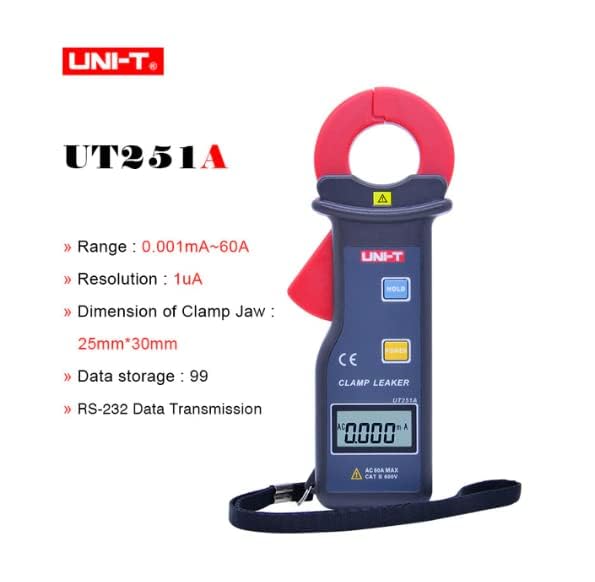
Figure 3.2: The UNI-T UT251A Clamp Meter highlighting its range, resolution, clamp jaw dimension, data storage, and RS-232 data transmission capabilities.
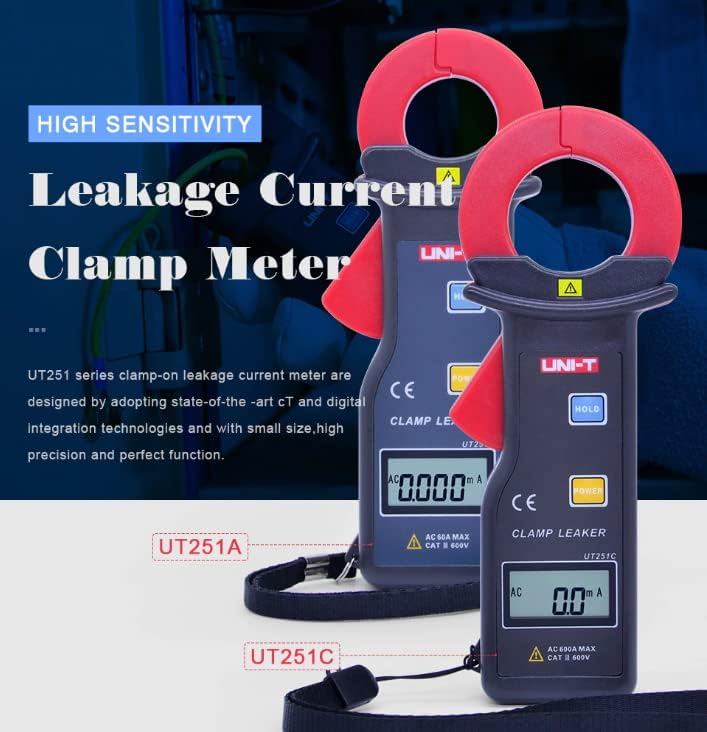
Figure 3.3: Comparison of UT251A and UT251C models, emphasizing their high sensitivity for leakage current measurement.
4. Орнотуу
4.1 Батареяны орнотуу
- Батарея уясынын капкагын эсептегичтин арткы жагында табыңыз.
- Бурагычты колдонуп, бурама(лар)ды бошотуп, капкакты алып салыңыз.
- Insert the 9V battery (6F22) into the compartment, observing correct polarity.
- Батарея бөлүмүнүн капкагын кайра ордуна коюп, бурамалар(дар)ды бекемдеңиз.
4.2 Алгачкы текшерүү
- Press the POWER button to turn on the meter.
- Verify that the LCD display shows "0.000mA" or a similar low reading in a stable environment.
- If a low battery indicator appears, replace the battery before use.
5. Иштөө нускамалары
5.1 Measuring AC Leakage Current
- баскычын басып, эсептегичти күйгүзүңүз КҮЧ баскычы.
- cl ачыңызamp триггерди басуу менен жаакты.
- Кылдаттык менен clamp the meter around a single conductor (live, neutral, or ground wire) of the circuit you wish to measure. Ensure the jaw is completely closed.
- Read the leakage current value displayed on the LCD. The meter will automatically select the appropriate range.
- For accurate readings, ensure no other conductors are within the clamp жаак.
5.2 Маалыматты кармоо функциясы
- Өлчөө учурунда баскычты басыңыз БЕРҮҮ дисплейдеги учурдагы окууну тоңдоого баскыч.
- басыңыз БЕРҮҮ button again to release the data hold and resume live measurement.
5.3 Чоку кармоо функциясы
- The meter automatically captures peak values. Refer to the specific manual for detailed instructions on accessing and clearing peak hold readings.

Figure 5.1: The UNI-T UT251A Clamp Meter in use, measuring current on an electrical wire.

Figure 5.2: A user wearing protective gloves operating the UNI-T UT251A Clamp Meter within an electrical panel, demonstrating a typical application.
6. Data Logging and RS-232 Interface
The UT251A can store up to 99 sets of measurement data. This data can be retrieved and analyzed using the RS-232 interface and the provided PC software.
6.1 Маалыматтарды сактоо
- During a measurement, press the appropriate button (refer to the specific manual for button identification, often labeled "MEM" or similar) to save the current reading.
- The meter will indicate successful data storage, often by displaying a memory location number.
6.2 Connecting to PC via RS-232
- Install the PC software from the provided CD onto your computer.
- Connect the RS-232 interface cable to the meter's RS-232 port and to your computer's serial port (or a USB-to-serial adapter).
- Launch the PC software.
- Follow the software's instructions to establish communication with the meter and download the stored data.
Video 6.1: An official product video demonstrating the features and usage of the UNI-T UT251A/UT251C clamp meters, including a comparison of the two models and their accessories.
7. Техникалык тейлөө
7.1 Тазалоо
- Счетчиктин сasing жарнама мененamp кездеме жана жумшак жуугуч. Абразивдерди же эриткичтерди колдонбоңуз.
- cl сактаңызamp jaw clean and free of debris to ensure accurate measurements.
7.2 Батареяны алмаштыруу
- When the low battery indicator appears, replace the 9V battery as described in the "Battery Installation" section.
- Эгерде эсептегич көпкө чейин колдонулбаса, агып кетүүнүн алдын алуу үчүн батарейканы алып салыңыз.
7.3 Сактоо
- Эсептегичти салкын, кургак жерде, күндүн түз нурунан жана өтө жогорку температурадан алыс сактаңыз.
- Use the provided carrying bag for protection during storage and transport.
8. Кыйынчылыктарды
| Көйгөй | Мүмкүн себеп | Чечим |
|---|---|---|
| Эсептегич күйбөйт. | Өлүк же туура эмес орнотулган батарея. | Батареянын полярдуулугун текшериңиз же 9V батареяны алмаштырыңыз. |
| Туура эмес окуулар. | Dirty clamp jaw; external magnetic fields; multiple conductors in jaw. | cl тазалаңызamp jaw; move away from strong magnetic fields; ensure only one conductor is clampред. |
| "OL" (Ашыкча жүктөө) көрсөтүлөт. | Measured current exceeds the meter's range. | Ensure the current is within the meter's specified range (up to 60A for UT251A). |
| Компьютерге туташуу мүмкүн эмес. | Incorrect cable connection; software not installed or configured properly. | Verify RS-232 cable connection; reinstall PC software; check software communication settings. |
9. Техникалык шарттар
| Мүнөздүү | Деталь |
|---|---|
| Модел | UT251A |
| Range (Leakage Current) | 0.001мА ~ 60А |
| Резолюция | 1μA |
| Дисплейдин саны | 10000 |
| Sampling Rate | 2 жолу / экинчи |
| Clamp Jaw Dimension | 25мм x 30мм |
| Маалыматтарды сактоо | 99 комплект |
| Интерфейс | RS-232 |
| Күч | 9V батарейка (6F22) |
| Дисплей өлчөмү | 32мм x 15мм |
| Продукттун таза салмагы | 120г |
| Продукт өлчөмү | 175мм x 70мм x 38мм |
| Коопсуздук рейтинги | CAT III 600V |
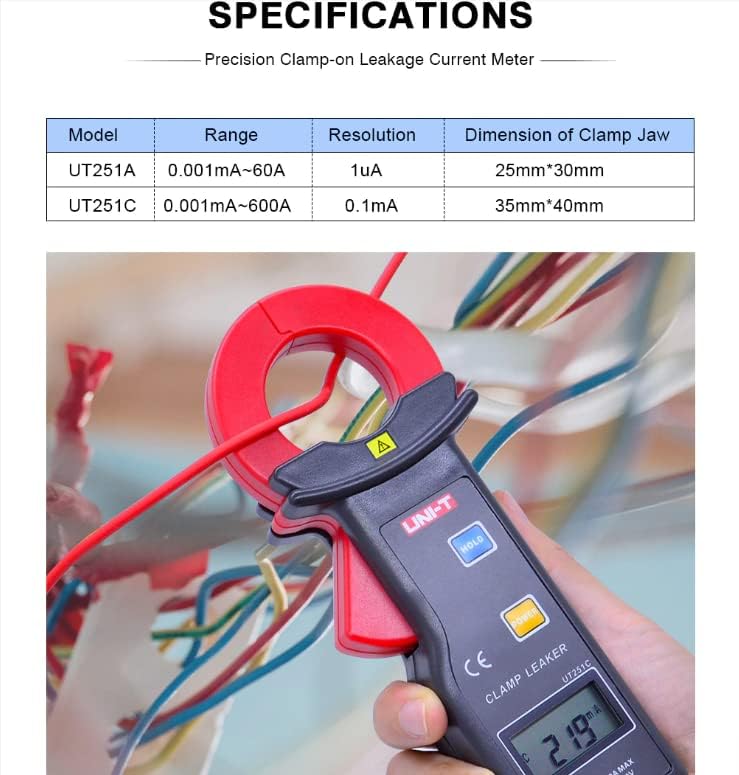
Figure 9.1: Detailed specifications table comparing the UT251A and UT251C models, including range, resolution, and clamp өлчөмү.
10. Кутуда эмне бар
The standard package for the UNI-T UT251A includes:
- UNI-T UT251A Leakage Current Clamp Метр
- 9V батарея (6F22)
- RS-232 интерфейс кабели
- Компьютердик программалык камсыздоо CDси
- Белек куту
- Ташуу сумкасы
- English Manual
- Tool Box

Figure 10.1: The UNI-T UT251A Clamp Meter shown with its packaging and included accessories, such as the RS-232 cable and software CD.
11. Кепилдик жана колдоо
For warranty information and technical support, please refer to the documentation included with your product or contact UNI-T customer service directly. Details can typically be found on the official UNI-T webсайт же сатып алуу пункту аркылуу.