
1. Киришүү
Thank you for choosing the Eurolite FD-32+1 DMX Dimmer Panel. This manual provides essential information for the safe and efficient operation of your device. Please read these instructions carefully before initial use and keep them for future reference. This device is designed for professional stage and show applications, offering precise DMX control over lighting fixtures.
2. Коопсуздук нускамалары
Электр тогуна урунууну, өрттү же шайманга зыян келтирүүнү алдын алуу үчүн ар дайым төмөнкү коопсуздук чараларын сактаңыз.
- Электр коопсуздугу: Ensure the power supply matches the device's requirements (9V - 12V / 300 mA DC). Disconnect power before cleaning or servicing.
- Курчап турган чөйрө: Do not expose the device to rain, moisture, or extreme temperatures. Operate in a dry, well-ventilated area.
- Колдонуу: Avoid strong impacts or dropping the device. Do not open the housing or attempt repairs yourself; refer servicing to qualified personnel.
- Вентиляция: Ensure proper airflow around the unit to prevent overheating. Do not block ventilation openings.
3. Продукт бүтүп калдыview
The Eurolite FD-32+1 DMX Dimmer Panel is a compact DMX controller designed for precise control of lighting effects. It features multiple faders for individual channel control and a master fader for overall intensity adjustment.
3.1 Алдыңкы панелдин башкаруу элементтери
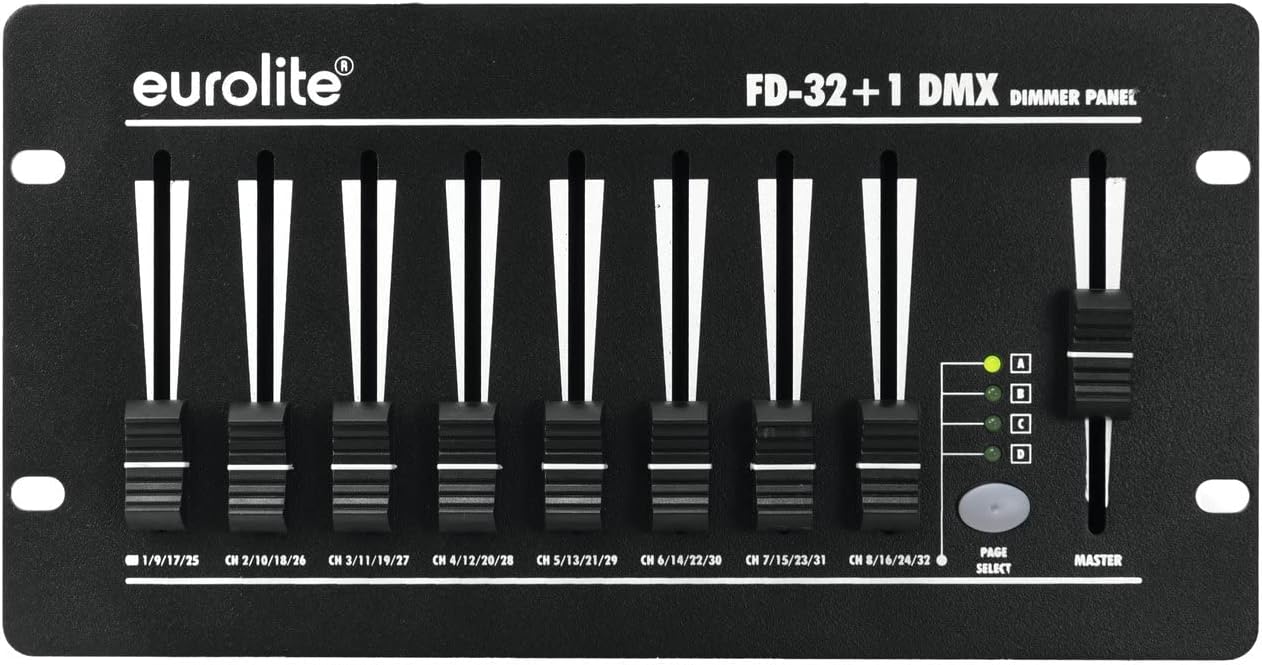
Сүрөт 1: Фронт view of the Eurolite FD-32+1 DMX Dimmer Panel. This image displays the eight individual channel faders, the master fader on the right, and the 'PAGE SELECT' button with its corresponding indicator LEDs (A, B, C, D).
алдыңкы панели камтыйт:
- Channel Faders (1-8): Control the intensity of individual DMX channels. Each fader is labeled with its corresponding channel range (e.g., CH 1/9/17/25).
- Master Fader: Controls the overall output intensity of all active channels.
- PAGE SELECT Button: Cycles through four pages (A, B, C, D) to access a total of 32 DMX channels (8 channels x 4 pages).
- Page Indicator LEDs (A, B, C, D): Indicate the currently selected page.
3.2 Арткы панелдин туташуулары

Сүрөт 2: Арткы view of the Eurolite FD-32+1 DMX Dimmer Panel. This image shows the power input (DC INPUT), DMX OUT connector, and the main power switch.
The rear panel provides the necessary connections:
- DC INPUT (9V - 12V / 300 mA DC): Power input connector for the external power adapter.
- DMX OUT: 3-pin XLR connector for sending DMX signals to compatible lighting fixtures.
- POWER которуштуруу: Main power ON/OFF switch for the unit.
4. Орнотуу
Follow these steps to set up your DMX Dimmer Panel:
- Пакеттен чыгаруу: Carefully remove the device from its packaging. Inspect for any signs of damage during transit.
- Жайгашкан жери: Place the dimmer panel on a stable, flat surface, such as a table (Bordsmontering). Ensure adequate ventilation around the unit.
- Кубат туташуу: Берилген кубат адаптерин туташтырыңыз DC INPUT on the rear panel. Plug the adapter into a suitable power outlet.
- DMX туташуу: Connect a 3-pin DMX cable from the DMX OUT connector on the dimmer panel to the DMX IN of your first DMX-compatible lighting fixture. Daisy-chain additional fixtures as required.
- Күйгүзүү: Flip the КҮЧ switch on the rear panel to the 'ON' position. The unit should power up.
5. Иштөө нускамалары
This section details how to operate your Eurolite FD-32+1 DMX Dimmer Panel.
5.1 Негизги операция
- Күйгүзүү: Ensure the unit is powered on using the switch on the rear panel.
- Барак тандоо: басыңыз БЕТ ТАНДОО button to cycle through pages A, B, C, and D. The corresponding LED will illuminate to indicate the active page. Each page controls a different set of 8 DMX channels. For exampле:
- Page A: Channels 1-8
- Page B: Channels 9-16
- Page C: Channels 17-24
- Page D: Channels 25-32
- Adjust Channel Intensity: Move the individual channel faders (1-8) up or down to control the intensity of the assigned DMX channels on the selected page. Moving a fader up increases intensity, while moving it down decreases intensity.
- Adjust Master Intensity: колдонуу МАСТЕР fader to control the overall output intensity of all active channels on the currently selected page. This acts as a global dimmer for the page.
5.2 DMX даректөө
The FD-32+1 sends DMX signals starting from channel 1. Ensure your DMX lighting fixtures are addressed correctly to respond to the channels controlled by the dimmer panel. For example, if a fixture is set to DMX address 1, it will respond to fader 1 on Page A. If a fixture is set to DMX address 9, it will respond to fader 1 on Page B.
6. Техникалык тейлөө
Regular maintenance ensures the longevity and optimal performance of your device.
- Тазалоо: Агрегаттын сыртын тазалоо үчүн жумшак, кургак чүпүрөктү колдонуңуз. Суюк тазалагычтарды же эриткичтерди колдонбоңуз.
- Сактагычты алмаштыруу: If the unit does not power on, check the fuse located near the power input on the rear panel. Replace it with a fuse of the exact same type and rating. Refer to the specifications for fuse details.
- Сактагыч: When not in use for extended periods, store the device in a dry, dust-free environment, preferably in its original packaging.
7. Кыйынчылыктарды
Көйгөйгө туш болсоңуз, көйгөйлөрдү чечүү боюнча төмөнкү колдонмону караңыз:
| Көйгөй | Мүмкүн себеп | Чечим |
|---|---|---|
| Түзмөк күйбөйт. | No power from outlet; faulty power adapter; blown fuse. | Check power outlet; test power adapter; replace fuse (see Maintenance). |
| No DMX output to fixtures. | Incorrect DMX cable connection; fixture DMX address mismatch; faulty DMX cable. | Ensure DMX cable is securely connected; verify fixture DMX addresses; try a different DMX cable. |
| Individual channels not responding. | Incorrect page selected; fixture DMX address mismatch. | Press PAGE SELECT to ensure the correct page is active; verify fixture DMX addresses correspond to the active page's channels. |
8. Техникалык шарттар
- Бренд: Eurolite
- Модел: 70063830 (FD-32+1 DMX Dimmer Panel)
- Монтаж түрү: Стол монтаждоо
- Элемент Салмагы: 1250 грамм
- Кубат киргизүү: 9V - 12V DC, 300 mA
- DMX каналдары: 32 (8 faders x 4 pages)
- DMX чыгаруу: 3-пин XLR
9. Кепилдик жана колдоо
For warranty information and technical support, please refer to the documentation provided with your purchase or contact your authorized Eurolite dealer. Keep your proof of purchase for any warranty claims.