
1. Киришүү
The Victron Energy SmartSolar MPPT 100/20 is an advanced solar charge controller designed to maximize energy harvest from solar panels and efficiently charge batteries. It features Maximum Power Point Tracking (MPPT) technology to ensure optimal power output, even under varying light conditions. Integrated Bluetooth allows for convenient monitoring and configuration via the VictronConnect app.
Негизги өзгөчөлүктөрү:
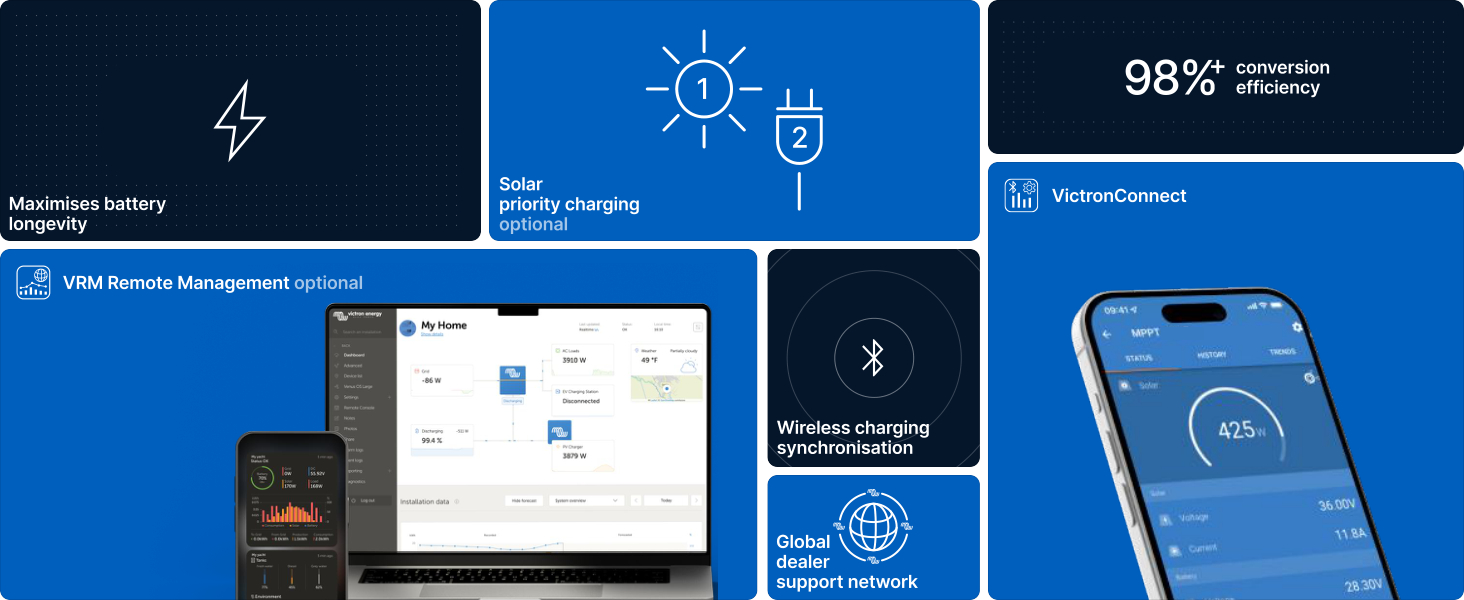
- Акылдуу күн энергиясы менен кубаттоо: Optimizes battery longevity by converting available sunlight into usable energy.
- Максималдуу кубаттуулугу: Lightning-fast MPPT ensures maximum power, even with partial shading.
- Синхрондоштурулган кубаттоо: Multiple SmartSolar MPPT controllers can synchronize for system-wide energy optimization.
- Bluetooth байланышы: Use the VictronConnect app for real-time data, 30-day performance history, configuration, and firmware updates.
- Акылдуу жүктөө чыгышы: Конфигурациялануучу үнүн аныктоочу түзмөктөрдү түздөн-түз кубаттооtage disconnects to protect batteries.
2. Коопсуздук маалыматы
Please read all safety instructions before installing or operating the device. Failure to follow these instructions may result in electric shock, fire, or serious injury.
- Электр коопсуздугу: Installation must be performed by qualified personnel. Ensure all power sources are disconnected before making any connections.
- Батареянын коопсуздугу: Work in a well-ventilated area. Wear eye protection and protective clothing. Avoid short-circuiting battery terminals.
- Ашыкча ток коргоо: Ensure proper fusing is in place for both solar and battery circuits as specified in the installation guide.
- Вентиляция: Ашыкча ысып кетүүнүн алдын алуу үчүн, түзмөктүн айланасында жетиштүү аба айланышын камсыз кылыңыз.
- Экологиялык шарттар: Do not expose the device to water, excessive humidity, or extreme temperatures outside its operating range.
3. Пакеттин мазмуну
Пакетте бардык буюмдар бар экенин текшериңиз:
- Victron Energy SmartSolar MPPT 100/20 Solar Charge Controller
- Колдонуучунун Колдонмосу (бул документ)
4. Орнотуу жана байланыштар
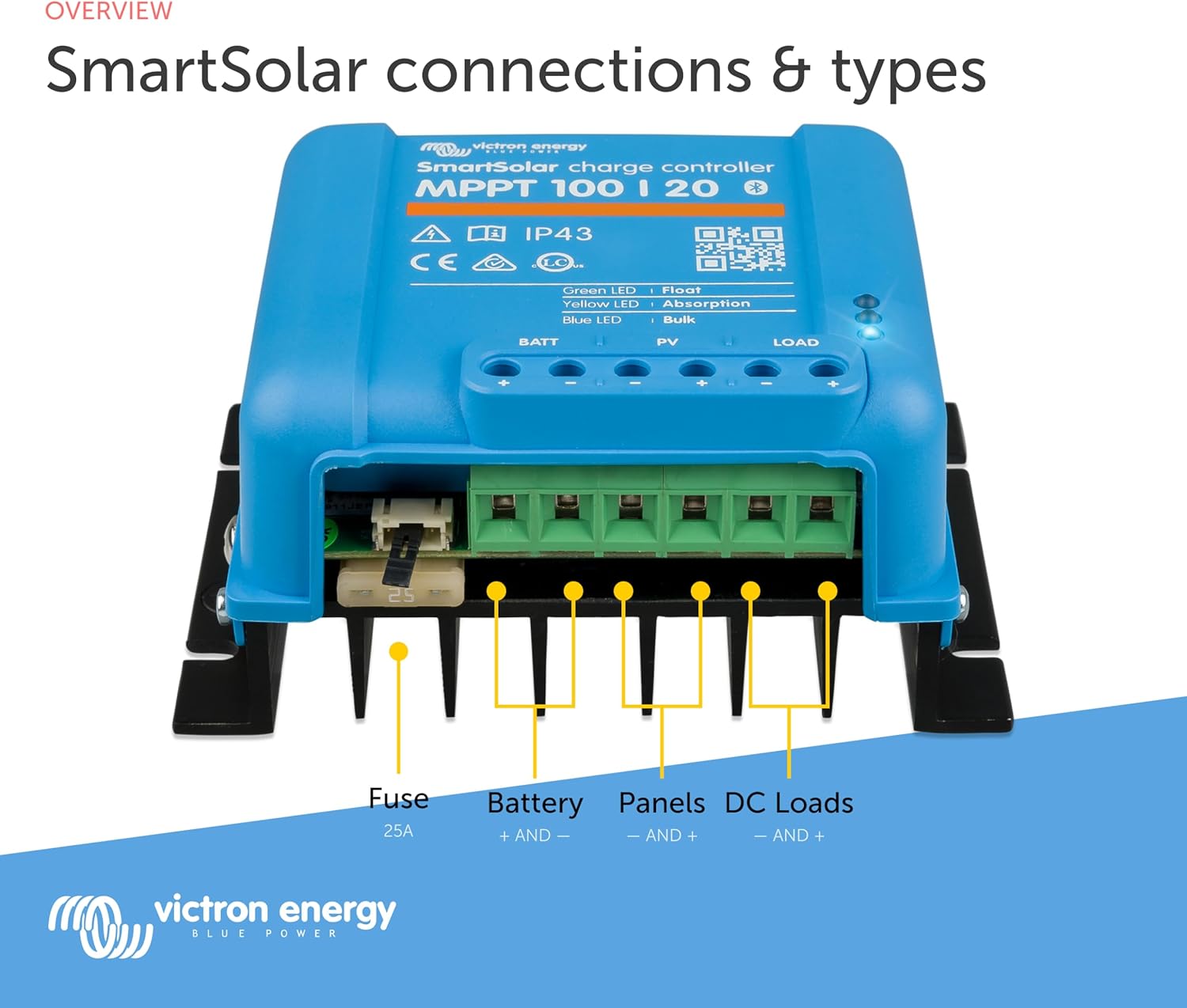
Proper installation is crucial for the safe and efficient operation of your SmartSolar MPPT controller. Refer to the detailed wiring diagram below for connection points.
Монтаждоо:
Mount the controller vertically on a non-flammable surface, ensuring sufficient clearance for ventilation. Avoid direct sunlight exposure to prevent overheating.
Зымдарды тартуу ырааттуулугу:
- Connect the battery to the BATT terminals. Ensure correct polarity.
- Connect the solar panels to the PV terminals. Ensure correct polarity.
- Connect DC loads to the LOAD terminals (optional). Ensure correct polarity.
Always connect the battery first and disconnect the solar panels first when disassembling.
5. Иштөө нускамалары
The SmartSolar MPPT controller operates automatically once correctly installed. For monitoring and advanced configuration, use the VictronConnect app.
Bluetooth Connectivity and VictronConnect App:
The integrated Bluetooth module allows wireless connection to your smartphone or tablet via the VictronConnect app. This app provides access to real-time data, historical performance, and settings.
- Түзмөгүңүздүн колдонмолор дүкөнүнөн VictronConnect колдонмосун жүктөп алыңыз.
- Смартфонуңузда/планшетиңизде Bluetooth иштетилгенин текшериңиз.
- Open the VictronConnect app and select your SmartSolar MPPT device from the list.
- If prompted, enter the default PIN (usually 000000).
Колдонмо аркылуу сиз:
- Монитор батареянын көлөмүtage, solar power, charge current, and load status.
- View 30-day historical data.
- Configure battery presets (e.g., Lithium, Lead-acid, AGM, Gel, Flooded).
- Adjust charge settings and set alarms.
- Микропрограмманы жаңыртуу.

Заряддоо режимдери:
The controller automatically manages the charging process through several stagБатареянын иштөө мөөнөтүн жана ден соолугун оптималдаштыруу үчүн төмөнкүлөр керек:
- Жапырт: Батареяны тез заряддоо үчүн максималдуу ток берилет.
- Соруу: Тtage is held constant to fully charge the battery and balance cells.
- Float: Тtage is reduced to a lower level to maintain the battery at full charge.
- Сактагыч: A slightly lower float voltage to minimize gassing and corrosion for batteries in storage.
6. Техникалык тейлөө
The SmartSolar MPPT controller is designed for minimal maintenance. Regular checks can help ensure optimal performance and longevity.
- Визуалдык текшерүү: Periodically inspect the unit for any signs of damage, loose connections, or corrosion.
- Тазалык: Keep the unit clean and free from dust and debris. Use a dry cloth for cleaning. Do not use solvents or abrasive cleaners.
- Вентиляция: Ensure that the cooling fins are not obstructed to allow for proper heat dissipation.
- Программалык камсыздоонун жаңыртуулары: Regularly check for and install firmware updates via the VictronConnect app to benefit from improvements and new features.
7. Кыйынчылыктарды
If you encounter issues with your SmartSolar MPPT controller, refer to the following common troubleshooting steps:
- Кубат жок/дисплей жок: Check all wiring connections, especially the battery connection and fuse. Ensure the battery voltage иштөө диапазонунда.
- Күн энергиясынын аз кубаттуулугу: Verify solar panel connections and ensure panels are clean and not shaded. Check for proper panel voltage using the VictronConnect app.
- Батарея заряддалбай жатат: Confirm battery type settings in the VictronConnect app match your battery. Check battery health and connections.
- Bluetooth туташуу маселелери: Контроллер күйүп турганын жана анын иштөө аймагынын ичинде экенин текшериңиз. VictronConnect колдонмосун жана түзмөгүңүздүн Bluetooth'ун өчүрүп күйгүзүңүз.
- Ашыкча ысып кетүү: Ensure adequate ventilation around the unit. Reduce load if necessary.
Кыйынчылыктарды жоюу же туруктуу көйгөйлөр үчүн, Victron Energy компаниясында жеткиликтүү болгон комплекстүү колдонмону караңыз. webсайтка же кардарларды колдоо менен байланышыңыз.
8. Техникалык шарттар
Technical specifications for the Victron Energy SmartSolar MPPT 100/20 Solar Charge Controller:
| Спецификация | Нарк |
|---|---|
| Бренд | VictronEnergy |
| Модел | SmartSolar MPPT 100/20 |
| Тtage | 100 Volts (Max PV open circuit voltage) |
| Максималдуу заряд агымы | 20 Amps |
| Батарея Voltage | 12/24/48 Volts (Auto-select) |
| Элемент Салмагы | 1.6 фунт (болжол менен 0.73 кг) |
| Дисплей түрү | None (Bluetooth for app display) |
| UPC | 859042007061 |
| ASIN | B07FCSTM43 |

9. Кепилдик жана колдоо
Victron Energy products are manufactured to high standards and come with a standard warranty. For specific warranty terms and conditions, please refer to the documentation included with your product or visit the official Victron Energy webсайт.
For technical support, product information, or service inquiries, please visit the Amazonдагы Victron Energy дүкөнү же алардын кызмат адамы webсайт.
10. Продукт видеолору
Watch these official videos for additional information on the Victron Energy SmartSolar MPPT controller and related systems.
VRM: Victron Remote Management Portal
Video: This video demonstrates the Victron Remote Management (VRM) portal, showcasing how users can monitor and manage their Victron Energy systems remotely from various devices, including smartphones and laptops. It highlights features like system performance tracking, device management, and programmable alerts and alarms.
VictronConnect App for Monitoring Performance
Видео: Бул видеодо толук маалымат берилетview of the VictronConnect app, detailing its capabilities for instant monitoring of key data, viewing device performance, easy configuration, and firmware updating for Victron Energy products.