
Introduction
This manual provides essential instructions for the setup, operation, and maintenance of your Easytry123 replacement remote control. This remote is designed to be compatible with various Mitsubishi air conditioner models, including MSZ-GC25VA, MSZ-GA25VA-A1, MSZ-GA35VA-A1, MSZ-FA35VA-E3, MSZ-FA35VA-A2, MSZ-FA35VA-E2, MSZ-FA25VA-A2, KM09D, KM09E, and KM09F. It functions as a direct replacement without requiring any programming.
Негизги өзгөчөлүктөрү:
- Infrared (IR) replacement remote.
- No setup or programming required.
- Easy to use with familiar button layout.
Жайгашуу
Your Easytry123 replacement remote control requires two AAA batteries (not included) for operation. No programming or pairing is necessary; simply insert the batteries, and the remote will be ready to use with compatible Mitsubishi air conditioner units.
Батарея орнотуу
- Пульттун артындагы батарея отсегин табыңыз.
- Батарея уясынын капкагын ылдый жылдырыңыз жана аны алып салыңыз.
- Оң (+) жана терс (-) терминалдары бөлүмдүн ичиндеги белгилер менен туура дал келишин камсыз кылып, эки жаңы AAA батарейкасын салыңыз.
- Батарея бөлүкчөсүнүн капкагын бекем чыккыча ордуна жылдырыңыз.
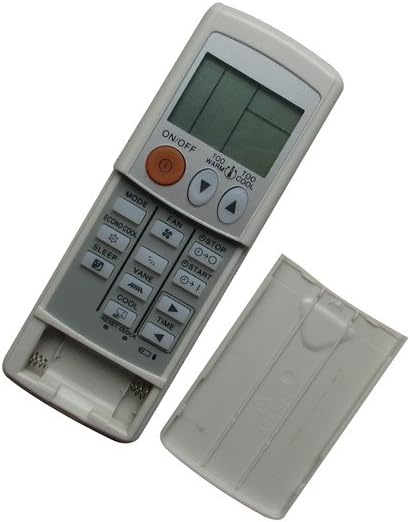
Image: The remote control with its battery cover removed, revealing the two AAA battery slots. This illustrates where to insert the batteries.
Иштөө нускамалары
To operate your air conditioner, point the remote control directly at the indoor unit's receiver. Ensure there are no obstructions between the remote and the air conditioner.

Image: The remote control with its battery cover securely in place, ready for normal operation. This shows the remote's complete appearance.
Жалпы функциялар:
- ON/OFF баскычы: Кондиционерди күйгүзүү же өчүрүү үчүн басыңыз.
- MODE баскычы: Муздак, Жылытуу, Желдетүүчү, Кургак жана Авто сыяктуу иштөө режимдери аркылуу айланышат.
- FAN баскычы: Желдеткичтин ылдамдыгын тууралайт (мисалы, Төмөн, Орто, Жогорку, Авто).
- Температураны жөндөө баскычтары (▲ / ▼): Керектүү температура жөндөөсүн жогорулатат же азайтат.
- SLEEP баскычы: Activates or deactivates the sleep mode for comfortable nighttime operation.
- VANE баскычы: Аба агымынын канатчаларынын багытын жөнгө салат.
- TIME Buttons: Used for setting timer functions (e.g., ON/OFF timer).
- ECONO COOL баскычы: Энергияны үнөмдөөчү муздатуу режимин иштетет.
- TOO WARM / TOO COOL Buttons: Provides quick adjustments to temperature.
Техникалык тейлөө
Proper care ensures the longevity and reliable performance of your remote control.
Тазалоо:
- Пультту жумшак, кургак чүпүрөк менен сүртүңүз.
- өжөр кир үчүн, жеңил гampчүпүрөктү суу же жумшак, абразивдүү тазалагыч менен жууп салыңыз.
- Катуу химиялык заттарды, эриткичтерди же абразивдүү тазалоочу губкаларды колдонбоңуз, анткени алар пульттун бетине же ички компоненттерине зыян келтириши мүмкүн.
Батареяны алмаштыруу:
- Replace batteries when the remote's range decreases or if the air conditioner does not respond consistently.
- Ар дайым эки батарейканы тең бир эле учурда жаңы AAA батарейкалары менен алмаштырыңыз.
- Эгерде пульт көпкө чейин колдонулбаса, агып кетүүнүн алдын алуу үчүн батарейкаларды алып салыңыз.
Проблемаларды чечүү
Эгерде сиз алыстан башкаруу пульту менен көйгөйлөргө туш болсоңуз, төмөнкү кеңири таралган чечимдерди караңыз:
- Пульт жооп бербей жатат:
- Батареялар туура полярдуулук менен туура салынганын текшериңиз.
- Эски батареяларды жаңы AAA батареялары менен алмаштырыңыз.
- Ensure there is a clear line of sight between the remote and the air conditioner's receiver.
- Пульттун кондиционерге түз багытталганын текшериңиз.
- Кондиционер буйруктарга жооп бербей жатат:
- Confirm that your air conditioner model is listed as compatible with this remote.
- Try operating the air conditioner manually from its control panel to ensure the unit itself is functioning correctly.
- Баскычтар иштебейт:
- Пульттун таза экенин жана баскычтарды басууга тоскоол болушу мүмкүн болгон таштандылардан таза экенин текшериңиз.
- Эгерде белгилүү бир баскычтар гана иштебесе, пульт бузулуп калышы мүмкүн жана аны алмаштыруу керек болот.
This remote control does not require programming. If the air conditioner does not respond after following these steps, the remote may be incompatible with your specific unit or faulty.
Техникалык шарттар
| Бренд | Easytry123 |
| Модел | Easytry1642 |
| Байланыш технологиясы | Инфракызыл (IR) |
| Controller Type | Control Button |
| Өзгөчөлүктөр | No Programming Required, Not Universal |
| Батареялар талап кылынат | 2 x AAA (киргизилген эмес) |
| Материал | ABS пластик |
Кепилдик жана колдоо
This product is a replacement remote control. For any issues or support inquiries, please contact the seller, Easytry123, directly through your purchase platform. Refer to your purchase details for information regarding return policies, which typically include a 30-day refund or replacement period.