
Martin Jerry A206
Martin Jerry Smart Dimmer Switch User Manual
Модел: A206
Бренд: Мартин Джерри
1. Киришүү
The Martin Jerry Smart Dimmer Switch is designed to provide convenient and intelligent control over your lighting. This switch supports dimmable LED/CFL bulbs (Max 150W) and INC bulbs (Max 400W). It integrates seamlessly with smart home ecosystems, offering voice control via Amazon Alexa and Google Assistant, as well as remote control through your smartphone. Enjoy features like brightness memory, soft on/off visual effects, and home automation capabilities.

Image 1.1: Martin Jerry Smart Dimmer Switch with its packaging, highlighting compatibility with Amazon Alexa and Google Assistant.
2. Коопсуздук боюнча маанилүү маалымат
Орнотуудан жана колдонуудан мурун бардык коопсуздук көрсөтмөлөрүн окуп чыгып, түшүнүп алыңыз. Бул көрсөтмөлөрдү аткарбоо электр тогуна урунууга, өрткө же олуттуу жаракат алууга алып келиши мүмкүн.
- Indoor and Dry Condition Only: This device is intended for indoor use in dry locations only. Do not install in wet or damp аймактар.
- Электр коопсуздугу: Always turn off power at the circuit breaker before installing or servicing the switch. If you are unsure about any part of the installation process, consult a qualified electrician.
- Туура зымдар: Бардык зымдарды туташтыруу коопсуз жана жергиликтүү электр коддоруна ылайык экенин текшериңиз.
- Жүктөө шайкештиги: Максималдуу ваттан ашпаңызtage ratings for LED/CFL (150W) or INC (400W) bulbs.
- Температурадан ашыкча коргоо: The switch includes over-temperature protection for enhanced safety.

Image 2.1: Illustration highlighting the use of fire-rated PC&ABS materials for durability and fire resistance.
3. Орнотуу жана орнотуу
The Martin Jerry Smart Dimmer Switch is designed for straightforward installation, similar to a standard toggle switch. However, specific wiring requirements must be met.
3.1 Зымдарга талаптар
- Нейтралдуу зым талап кылынат: A neutral wire is essential for the proper operation of this smart dimmer switch. Ensure your electrical box has a neutral wire available.
- Single-Pole Use Only: This switch is designed for single-pole applications only. It is not compatible with 3-way switch configurations.
3.2 Wi-Fi туташуусу
- 2.4G Wi-Fi ONLY: The switch requires a 2.4GHz Wi-Fi network for connectivity. It is not compatible with 5GHz Wi-Fi networks.
- Эч кандай хаб талап кылынбайт: This Wi-Fi dimmer switch does not require a separate smart home hub for operation.
3.3 Орнотуу кадамдары (Жалпы)
- Кубатты өчүрүү: Before beginning, turn off the power to the switch location at the circuit breaker.
- Нейтралдуу зымды текшерүү: Confirm the presence of a neutral wire in your electrical box.
- Зым байланыштары: Connect the wires from the smart dimmer switch to your home's electrical wiring according to the provided wiring diagram. Ensure all connections are secure.
- Которгучту орнотуу: Carefully push the wired switch into the electrical box and secure it with screws.
- Дубал плитасын бекитүү: Install the decorative wall plate.
- Күчтү калыбына келтирүү: Электрди өчүргүчтөн кайра күйгүзүңүз.
- Колдонмо менен жупташтыруу: Follow the instructions in the SmartLife app (or compatible app) to pair the switch with your 2.4GHz Wi-Fi network.

Image 3.1: Detailed wiring diagram illustrating the necessary neutral wire connection for the smart dimmer switch.
4. Иштөө нускамалары
The Martin Jerry Smart Dimmer Switch offers multiple ways to control your lighting.
4.1 Кол менен башкаруу
- Күйгүзүү/өчүрүү: Press the main button on the switch to turn the lights on or off.
- алсыздатуу: Use the dimmer bar or buttons on the switch to adjust the brightness level.
4.2 Акылдуу башкаруу (Колдонмо жана үн)
- Смартфондук колдонмо: Download and use the SmartLife app (or a compatible application) to remotely control your lights from anywhere. You can turn lights on/off, adjust brightness, and set schedules.
- Үн менен башкаруу: The switch is compatible with Amazon Alexa and Google Assistant. Once connected, you can use voice commands to control your lights. For example, "Alexa, turn on the living room light" or "Hey Google, dim the kitchen lights to 50%".
- Үйдү автоматташтыруу: Utilize the app to set up home automation routines based on schedules, sunset/sunrise, or other conditions.

Image 4.1: An elderly man demonstrating the convenience of voice control with a smart speaker, highlighting accessibility for all users.
5. Техникалык тейлөө
To ensure the longevity and optimal performance of your Martin Jerry Smart Dimmer Switch, follow these simple maintenance guidelines:
- Тазалоо: Use a soft, dry cloth to clean the surface of the switch. Do not use abrasive cleaners, solvents, or harsh chemicals, as these may damage the finish or internal components.
- Курчап турган чөйрө: Ensure the switch remains in an indoor, dry environment. Avoid exposure to moisture, extreme temperatures, or direct sunlight.
- Үзгүлтүксүз текшерүүлөр: Periodically check the switch for any signs of damage or loose connections. If any issues are observed, turn off power at the circuit breaker and contact customer support.
6. Кыйынчылыктарды
If you encounter issues with your Martin Jerry Smart Dimmer Switch, please refer to the following common solutions:
| Көйгөй | Мүмкүн болгон себеп / Чечим |
|---|---|
| Которуу күйгүзүлбөйт. | Ensure power is on at the circuit breaker. Verify the neutral wire is correctly connected. Check all wiring connections. |
| Wi-Fi'га туташпай жатат. | Confirm your Wi-Fi network is 2.4GHz (not 5GHz). Ensure the switch is within range of your Wi-Fi router. Re-attempt the pairing process in the app. |
| Жарыктар жымыңдап же жакшы күңүрттөнбөйт. | Ensure your bulbs are dimmable and compatible with the switch's wattage ratings. Some LED bulbs may require calibration within the app if available. |
| Үн башкаруу иштебейт. | Ensure the switch is properly linked to your Alexa or Google Home account through the SmartLife app. Check your internet connection. |
For complex installation issues or persistent problems, it is recommended to take clear photos of your wiring and contact Martin Jerry customer support for assistance.
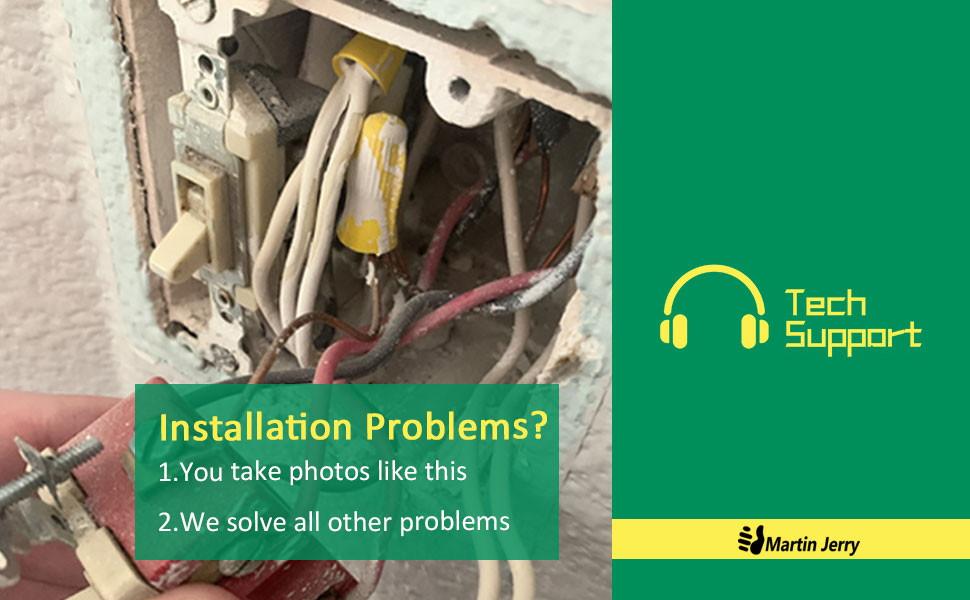
Сүрөт 6.1: Мисample of how to photograph wiring for technical support when encountering installation problems.
7. Техникалык шарттар
| Өзгөчөлүк | Деталь |
|---|---|
| Модель номери | A206 |
| Продукциянын өлчөмдөрү | 5.04 x 3.31 x 1.3 дюйм; 5.93 унция |
| Иштөө режими | Off, Smart Switch, Toggle |
| Учурдагы рейтинг | 4 Amps |
| Operating Voltage | 100 вольт (AC) |
| Байланыш түрү | Адатта жабык |
| Туташтыргыч түрү | Плагин |
| Терминал | Spst |
| Circuit Type | 1-жол |
| Актуатор түрү | Которуу |
| Wi-Fi шайкештиги | 2.4G Wi-Fi ONLY |
| Max Load (LED/CFL) | 150 Вт |
| Max Load (INC) | 400 Вт |
8. Кепилдик жана колдоо
Martin Jerry is committed to providing reliable products and excellent customer service.
8.1 Кепилдик маалыматы
Биз сунуштайбыз 90 күндүк 100% кайтарып берүү саясат жана Сапатына 1 жылдык кепилдик бул продукт үчүн. Кепилдик талаптары үчүн сатып алганыңызды тастыктаган документти сактап коюңуз.
8.2 Техникалык колдоо
Martin Jerry has a professional support team available to assist you with any questions or issues. Emails are typically replied to within 12 hours.
- For support, please refer to the contact information provided with your product or visit the official Martin Jerry webсайт.
- You can also find additional resources, including PDF versions of the installation manual, safety information, and user manual, on the product's Amazon page under the 'Product guides and documents' section.

Image 8.1: Martin Jerry's commitment to 24/7 technical support for customer queries.
Ask a question about this manual
Ask about setup, troubleshooting, compatibility, parts, safety, or missing instructions. Manuals+ will review the question and use this page’s manual context to help answer it.