
Introduction
The Aputure 120D Mark II is a high-performance 180W daylight-balanced LED video light designed for professional film and photography applications. It features enhanced brightness, improved color accuracy (CRI 96+, TLCI 97+), and a redesigned integrated controller-power unit for a streamlined setup. This manual provides essential information for the safe and effective use of your Aputure 120D Mark II.
Коопсуздук маалыматы
- Do not look directly into the light source when operating.
- Ensure proper ventilation to prevent overheating. The unit features an ultra-silent fan for cooling.
- Көрсөтүлгөн кубат адаптерин жана кабелдерди гана колдонуңуз.
- Аппаратты суудан жана башка суюктуктардан алыс кармаңыз.
- Агрегатты ажыратууга же өзгөртүүгө аракет кылбаңыз. Бардык тейлөөлөрдү квалификациялуу кызматкерлерге тапшырыңыз.
- Always secure the light head properly on a stand or mounting point.
Пакеттин мазмуну
Пакетиңизде бардык буюмдар бар экенин текшериңиз:
- Aputure 120D Mark II LED Light Head
- Integrated Controller-Power Unit
- Стандарттык рефлектор
- Алыстан башкаруу
- Электр кабели
- Кабельдерди туташтыруу
- Ташуу сумкасы
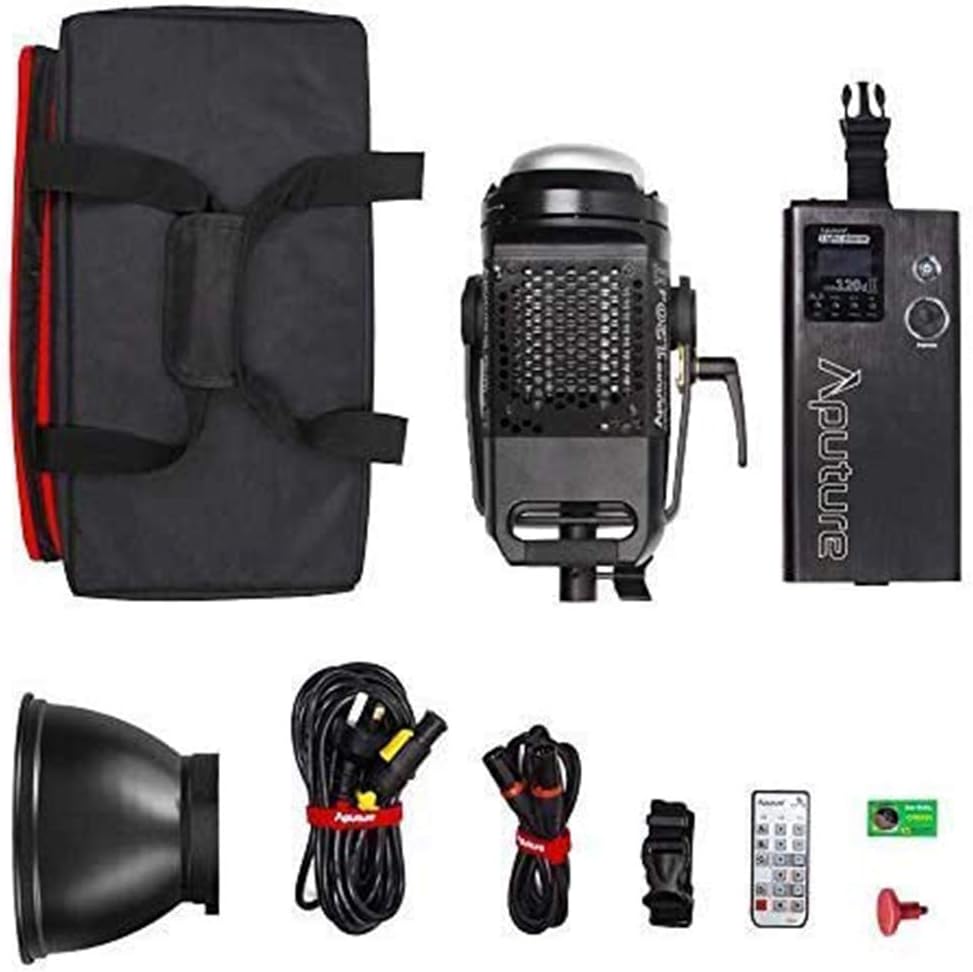
Image: All components included in the Aputure 120D Mark II package, neatly arranged.
Жайгашуу
- Жарык башын орнотуу: Attach the Aputure 120D Mark II light head to a compatible light stand using its handbrake locking yoke. Ensure it is securely fastened.
- Connecting the Controller-Power Unit: Connect the light head to the integrated controller-power unit using the provided Neutrik locking cables. The unified design simplifies cabling.
- Аксессуарларды тиркөө: The light features a universal Bowens mount. To attach the standard reflector or other Bowens-mount modifiers (like a softbox or Fresnel lens), align the accessory with the mount on the light head and twist until it locks into place. Press the release switch to detach.
- Кубат туташуу: Connect the power cable from the controller-power unit to a suitable power outlet.

Image: The Aputure 120D Mark II light head, showcasing its compact design and handle, alongside its dedicated carrying bag.

Image: Close-up of the Aputure 120D Mark II light head with a standard reflector, emphasizing its robust aircraft-grade aluminum construction and the versatile Bowens mount.
Видео: тааныштыруу аяктадыview of the Aputure 120D Mark II LED Video Light, demonstrating its features and basic setup.
Иштеп жатат
- Күйгүзүү/өчүрүү: Press the power button on the controller-power unit to turn the light on or off.
- Жарыктыкты жөндөө: Use the control knob on the unit to adjust the brightness from 0% to 100%. The C120D II allows for fine adjustments even below 10%.
- DMX башкаруу: The C120D II supports DMX lighting functions, allowing integration into professional lighting setups for precise control.
- Pre-Programmed Lighting Effects: Access and select from 5 pre-programmed lighting effects (e.g., thunder, fireworks) via the controller.
- Зымсыз башкаруу: The light can be controlled wirelessly using the included remote control or a compatible mobile application.

Image: The integrated controller-power unit of the Aputure 120D Mark II, showing its display and intuitive control knobs for brightness and settings.

Image: The Aputure 120D Mark II in an outdoor environment, illustrating its powerful and adjustable brightness output.

Image: A visual representation of the Aputure 120D Mark II's accurate color rendition, featuring a color chart and the light illuminating a scene.
Техникалык тейлөө
- Тазалоо: Use a soft, dry cloth to clean the exterior of the light head and controller. Avoid using harsh chemicals or abrasive materials.
- Желдеткичти тейлөө: The ultra-silent fan is designed for longevity. Ensure the fan vents are clear of dust and obstructions to maintain optimal cooling performance.
- Сактагыч: When not in use, store the Aputure 120D Mark II in its dedicated carrying bag in a cool, dry place, away from direct sunlight and extreme temperatures.

Сүрөт: деталдуу view of the Aputure 120D Mark II light head, highlighting its ultra-silent fan system designed for efficient temperature control.
Проблемаларды чечүү
- Жарык күйбөйт: Check all cable connections, especially the Neutrik locking cables between the light head and controller. Ensure the power cable is securely plugged into a working outlet.
- Желдетүүчү ызы-чуу: The 120D Mark II features an ultra-silent fan. If unusual noise occurs, check for obstructions in the fan vents. If the issue persists, contact customer support.
- Алыстан башкаруу маселелери: Ensure the remote control has fresh batteries and is within range. Verify that the light and remote are set to the same channel and group.
- Туура эмес жарыктык: Check for loose cable connections. If using DMX, verify DMX settings.
Техникалык шарттар
| Өзгөчөлүк | Спецификация |
|---|---|
| Бренд | Aputure |
| Модель номери | LS C120d II |
| Энергияны керектөө | максималдуу 180 Вт |
| Түс температурасы | 5500K (Daylight Balanced) |
| CRI | ≥96 |
| TLCI | ≥97 |
| Жарыктандыруу | 30,000 lux@0.5m (with Reflector) |
| Байланыш технологиясы | DMX, 2.4GHz Wireless |
| Элемент Салмагы | 16.53 фунт |
Кепилдик жана колдоо
The Aputure 120D Mark II LED Video Light comes with a manufacturer's warranty. Please refer to the warranty card included in your product packaging for specific terms and conditions. For technical support, troubleshooting assistance, or warranty claims, please contact Aputure customer service through their official webсайт же ыйгарым укуктуу дистрибьюторлор.
Кошумча ресурстар жана продукт маалыматы үчүн, баш багыңыз Aputure Store on Amazon.