
Introduction
This manual provides essential instructions for setting up, operating, and maintaining your Optoma W335 WXGA DLP Professional Projector. Designed for business presentations, classrooms, and home use, this projector delivers bright, clear images with a long lamp life. Please read this manual thoroughly before use to ensure optimal performance and safety.
Жайгашуу
Таңгактан чыгаруу жана алгачкы текшерүү
Carefully remove the projector and all accessories from the packaging. Verify that all components listed in the 'What's in the Box' section are present and undamaged.
- W335 projector
- Электр кабели
- Алыстан
- Батарея
Жайгаштыруу
The Optoma W335 is portable, weighing less than 7 pounds, making it easy to move between rooms. For optimal viewing, place the projector on a stable, flat surface. Ensure adequate ventilation around the unit to prevent overheating.

Image: The Optoma W335 projector showing its compact size and dimensions (12.44" width, 9.2" depth, 4.27" height).
The projector features adjustable legs for easy height and angle adjustments, allowing you to find the perfect screen area for projection. This helps in achieving a level and properly aligned image.
Байланыш
The W335 offers a variety of input options for connecting to different devices:
- HDMI: Жогорку сапаттагы санариптик видео жана аудио үчүн.
- VGA: For analog video connections, commonly used with computers.
- Композиттик видео: Стандарттык сапаттагы видео үчүн.
- Аудио кириш/чыгыш: Тышкы аудио булактарын же динамиктерди туташтыруу үчүн.
- USB Power Out (5V/1.0A): Агымдуу таякчалар сыяктуу тышкы түзмөктөрдү кубаттоо үчүн.
- 232: Башкаруу системасын интеграциялоо үчүн.
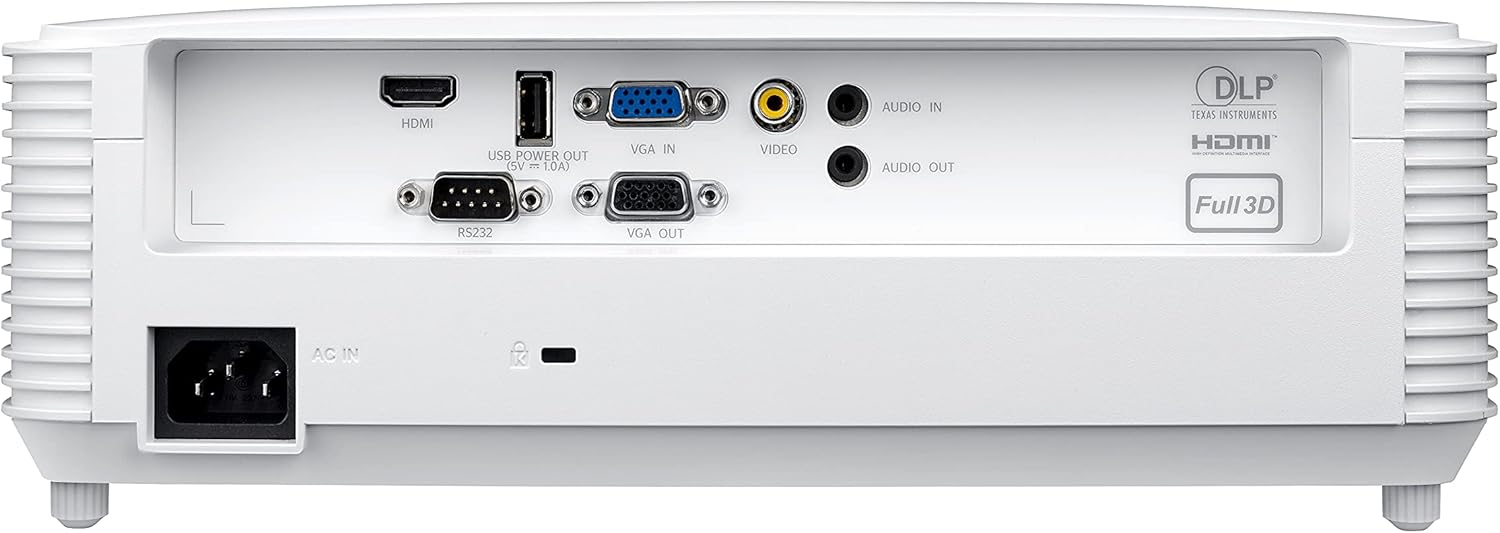
Image: Rear panel of the Optoma W335 projector, clearly showing the HDMI, VGA In, VGA Out, Video, Audio In, Audio Out, RS232, and USB Service Only ports.
Connect your source device (e.g., laptop, Blu-ray player) to the appropriate input port on the projector. Ensure the power cord is securely connected to the projector and a power outlet.
Иштөө нускамалары
Күйгүзүү/өчүрүү
Press the power button on the projector's control panel or the remote control to turn the unit on or off. Allow a few moments for the projector to warm up or cool down.

Сүрөт: Жогорку view of the Optoma W335 projector, highlighting the control panel with power, menu, and navigation buttons, along with focus and zoom rings.
Сүрөттү тууралоо
- Фокус: Сүрөттү курчутуу үчүн линзадагы фокус шакекчесин айландырыңыз.
- Чоңойтуу: Use the zoom ring to adjust the image size without moving the projector.
- Негизги ташты оңдоо: The W335 supports vertical keystone correction to square the image if the projector is not perfectly perpendicular to the screen. This can be adjusted via the on-screen menu.
The projector delivers vibrant and sharp WXGA resolution (1280 x 800) images with a 22,000:1 contrast ratio, suitable for various environments including well-lit rooms due to its 3,800 lumens brightness.
Аудио
An integrated 10-watt speaker provides room-filling audio. For enhanced sound, connect external speakers to the Audio Out port.
Техникалык тейлөө
Lamp Жашоо
Проектор лamp has a life of up to 15,000 hours, providing many years of use with minimal maintenance. When the lamp reaches the end of its life, a warning indicator will appear, and the lamp will need to be replaced. Refer to the full user manual for detailed lamp алмаштыруу көрсөтмөлөрү.
Тазалоо
- Объектив: Use a soft, lint-free cloth and lens cleaning solution to gently clean the projector lens.
- Сырткы: Сыртын сүртүңүз casinжумшак, кургак чүпүрөк менен сүртүңүз. Абразивдүү тазалоочу каражаттардан же эриткичтерден алыс болуңуз.
- Аба желдеткичтери: Аба агымынын туура болушун камсыз кылуу жана ысып кетүүнүн алдын алуу үчүн аба желдеткичтерин үзгүлтүксүз текшерип жана тазалап туруңуз. Чаңды кетирүү үчүн жумшак щетканы же кысылган абаны колдонуңуз.
Проблемаларды чечүү
- Сүрөт жок:
- Ensure the projector is powered on and the source device is connected and active.
- Check the input source selection on the projector.
- Бардык кабелдердин бекем туташтырылганын текшериңиз.
- бүдөмүк сүрөт:
- Линзанын фокус шакегин тууралаңыз.
- Проектордун экрандан туура аралыкта жайгашканын текшериңиз.
- Use keystone correction if the image is distorted.
- Үн жок:
- Проектордогу жана булак түзмөгүндөгү үн жөндөөлөрүн текшериңиз.
- Ensure external speakers (if used) are properly connected and powered.
- Verify the audio cable connection.
- Проектордун ысып кетиши:
- Аба желдеткич тешиктери ачык жана тыгылып калбаганын текшериңиз.
- Проекторду жакшы желдетилген жерде иштетиңиз.
- If the issue persists, power off the projector and allow it to cool down before restarting.
Техникалык шарттар
| Өзгөчөлүк | Деталь |
|---|---|
| Продукциянын өлчөмдөрү | 9.6 x 12.4 x 3.9 дюйм |
| Элемент Салмагы | 6.61 фунт |
| Элемент моделинин номери | W335 |
| Бренд | Optoma |
| Сунушталган Колдонуулар | Бизнес, билим берүү |
| Өзгөчө өзгөчөлүк | Кыска ыргытуу |
| Байланыш технологиясы | Сапаттуу, VGA |
| Display Resolution | 1280 x 800 (WXGA) |
| Жарыктык | 3800 Lumens |
| Контраст катышы | 22,000:1 |
| Lamp Жашоо | 15,000 саатка чейин |
| Integrated Speaker | 10 ватт |
| Ыргытуу катышы | 1.55 – 1.73:1 |
Кепилдик жана колдоо
Кепилдик жана техникалык колдоо боюнча толук маалымат алуу үчүн, расмий Optoma компаниясына кайрылыңыз website or the documentation included with your product. You can also contact Optoma customer service directly for assistance.
зыярат кылыңыз Amazon'догу Optoma дүкөнү көбүрөөк продукт маалымат алуу үчүн.