
Introduction
This manual provides instructions for the installation, operation, and maintenance of your Audiovox ELEAUDAX80EXT Wireless Extension. This device is designed to expand the functionality of compatible Audiovox phone models, specifically the AX8001, AX8001E, and AX8101AM, by providing an additional wireless handset.
Пакеттин мазмуну
Орнотууну улантуудан мурун, таңгактагы бардык буюмдардын бар экенин текшериңиз.
- Audiovox ELEAUDAX80EXT Wireless Extension Unit
- Кубат адаптери (эгер бар болсо)
- Кайра заряддалуучу батарея (алдын ала орнотулган же өзүнчө)
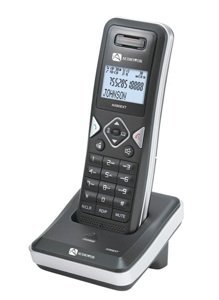
Image: The Audiovox ELEAUDAX80EXT Wireless Extension Unit. This image displays the compact design of the extension handset.
Жайгашуу
- Батареяны заряддоо: If the battery is not pre-installed, insert it into the extension unit according to the markings. Place the extension unit on its charging cradle (if included) or connect the power adapter directly to the unit and a power outlet. Allow the unit to charge for at least 12-16 hours before initial use.
- Register the Extension:
- Ensure your main Audiovox phone base (AX8001, AX8001E, or AX8101AM) is powered on.
- On the main phone base, locate and press the "Register" or "Page" button. Hold it until the indicator light on the base begins to flash (refer to your main phone's manual for exact instructions).
- While the base is in registration mode, on the ELEAUDAX80EXT extension unit, navigate to the "Menu" and select "Register Handset" or a similar option. Follow the on-screen prompts.
- Once registration is successful, the extension unit will display a confirmation message, and the indicator light on the base will stop flashing.
- Сыноо байланышы: Make a test call from the extension unit to ensure proper functionality.
Иштөө нускамалары
Чакыруу
- Телефонду алыңыз же баскычты басыңыз СҮЙЛӨШҮҮ баскычы.
- Каалаган телефон номерин териңиз.
- басыңыз СҮЙЛӨШҮҮ button again or place the handset back on the cradle to end the call.
Чалууга жооп берүү
- Телефон шыңгыраганда, телефонду алыңыз же басыңыз СҮЙЛӨШҮҮ баскычы.
- Чакырууну аяктоо үчүн басыңыз END баскычын басыңыз же трубканы кайра рычагга коюңуз.
Intercom Function (if supported by base unit)
- басыңыз ИНТЕРКОМ баскычы.
- Dial the number of the extension you wish to call (e.g., "2" for the second handset).
- Басыңыз СҮЙЛӨШҮҮ to initiate the intercom call.
Техникалык тейлөө
- Тазалоо: Аппаратты жумшак менен сүртүңүз, гamp кездеме. Катуу химиялык заттарды же абразивдүү тазалагычтарды колдонбоңуз.
- Батареяга кам көрүү: For optimal battery life, avoid fully discharging the battery frequently. Keep the unit on its charger when not in use.
- Сактагыч: Эгерде түзмөктү көпкө сактасаңыз, батарейканы чыгарып, салкын, кургак жерде сактаңыз.
Проблемаларды чечүү
| Көйгөй | Чечим |
|---|---|
| Чалуу сигналы жок / Чалууларды жасай албай жатам |
|
| Телефон заряддалбай жатат |
|
| Чалуу сапаты начар / Статикалык |
|
Техникалык шарттар
- Модель номери: ELEAUDAX80EXT
- Compatible Base Units: Audiovox AX8001, AX8001E, AX8101AM
- Өлчөмдөрү (L x W x Y): 20 x 40 x 30 миллиметр
- Салмагы: 20 грамм
- UPC: 044476082719
Кепилдик жана колдоо
For specific warranty information and technical support, please refer to the documentation included with your original Audiovox phone system or visit the official Audiovox webсайт. Сатып алуу квитанциясын кепилдик дооматтары үчүн сатып алуунун далили катары сактаңыз.
For further assistance, please contact Audiovox customer service.