
1. Киришүү
This manual provides detailed instructions for the setup, operation, and maintenance of your OWLENZ SD60 Wi-Fi Mini Projector. Please read this manual thoroughly before using the product to ensure proper functionality and safety. The SD60 features advanced LED light technology with 1500 lumens brightness, Wi-Fi screen sharing capabilities (Miracast/Airplay), and multiple media playback options for a versatile home theater experience. Its portable and compact design allows for easy installation and use.
2. Коопсуздук боюнча маанилүү маалымат
- l болгондо проектордун объективине тике карабаamp күйүк.
- Ашыкча ысып кетүүнүн алдын алуу үчүн проектордун айланасында туура желдетүүнү камсыз кылыңыз.
- Проекторду суудан же башка суюктуктардан алыс кармаңыз.
- Проектор менен келген кубат адаптерин гана колдонуңуз.
- Проекторду туруксуз беттерге коюудан алыс болуңуз.
- The LED light technology is designed to be gentle on the eyes and has no radiation.
3. Пакеттин мазмуну
Төмөндө тизмеленген нерселердин баары пакетиңизге камтылганын текшериңиз. Эгерде кандайдыр бир нерселер жок болсо же бузулса, кардарларды колдоо менен байланышыңыз.
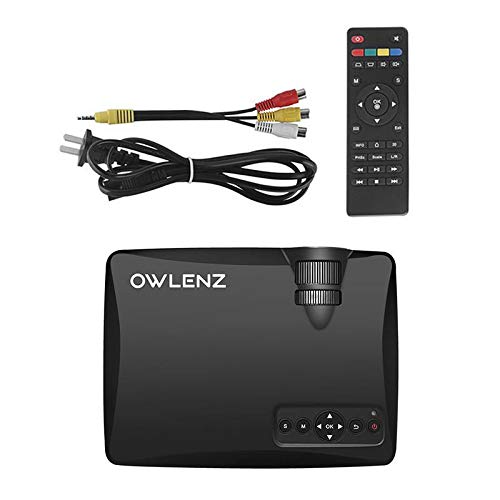
Image: OWLENZ SD60 Projector, remote control, power cable, and AV cables.
- OWLENZ SD60 Mini Projector
- Алыстан башкаруу
- Электр кабели
- AV Cable
- Колдонуучунун Колдонмосу (бул документ)
4. Продукт бүтүп калдыview
Familiarize yourself with the various parts and controls of your OWLENZ SD60 projector.
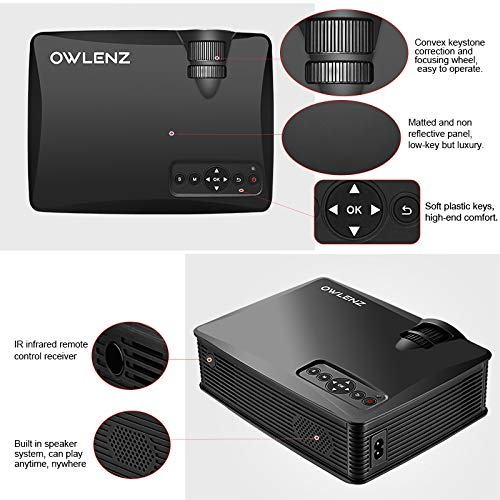
Image: Key features of the OWLENZ SD60 projector, including the focusing wheel, keystone correction, control panel, IR receiver, and built-in speaker.
- Convex Keystone Correction and Focusing Wheel: Located on the top, these allow for easy image adjustment.
- Matted and Non-Reflective Panel: Provides a sleek, low-key appearance.
- Soft Plastic Keys: For comfortable and responsive control.
- IR Infrared Remote Control Receiver: For remote operation.
- Built-in Speaker System: A 3W speaker for integrated audio playback.
- Киргизүү порттору: HDMI, USB, AV, SD Card slot (located on the side/rear).
5. Орнотуу
5.1 Кубат туташтыруу
- Электр кабелин проектордун кубат киргизүү портуна туташтырыңыз.
- Электр кабелинин экинчи учун ылайыктуу электр розеткасына сайыңыз.
- Аны күйгүзүү үчүн проектордун же пульттун кубат баскычын басыңыз.
5.2 Киргизүү булактарын туташтыруу
The projector supports various input options:
- HDMI: Connect an HDMI cable from your device (laptop, gaming console, etc.) to the projector's HDMI port.
- USB: Insert a USB drive into the USB port for direct media playback.
- OF: AV чыгышы бар түзмөктөргө туташуу үчүн берилген AV кабелин колдонуңуз.
- SD карта: Insert an SD card into the SD card slot for media playback.
After connecting, select the appropriate input source from the projector's menu using the remote or control panel.
5.3 Wi-Fi Screen Sharing (Miracast / Airplay)
The SD60 supports wireless screen sharing from compatible smartphones and tablets.
- Мобилдик түзмөгүңүз менен проектор бир Wi-Fi тармагына туташкандыгын текшериңиз.
- On the projector, navigate to the "Screen Share" or "Miracast/Airplay" option in the main menu.
- On your mobile device, activate the screen mirroring function (e.g., "Smart View" on Android, "Screen Mirroring" on iOS).
- Select the projector's name from the list of available devices to establish the connection.
5.4 Фокусту жана Keystone жөндөөсүн
- Фокус: Rotate the focusing wheel near the lens until the projected image is clear and sharp.
- Негизги ташты оңдоо: Use the keystone correction wheel to adjust the image shape if it appears trapezoidal (wider at the top or bottom).
6. Операция
6.1 Негизги башкаруу каражаттары
Use the control panel on the projector or the remote control to navigate menus and adjust settings.
- Кубат баскычы: Проекторду күйгүзөт/өчүрөт.
- Чабыттоо баскычтары (жебелер/ОК): Менюда навигация жана тандоо үчүн.
- Булак баскычы: Switches between input sources (HDMI, USB, AV, SD Card, Wi-Fi).
- Меню баскычы: Проектордун орнотуулар менюсуна кирет.
6.2 Медиа ойнотуу
Once an input source is selected, the projector will display content. For USB/SD card playback, navigate through the file browser to select your desired media.
6.3 Аудио чыгаруу
- Камтылган динамик: The projector has a built-in 3W speaker suitable for small viewаймактар.
- Тышкы баяндамачы: For a better listening experience, connect external speakers or headphones to the 3.5mm audio port.
6.4 Проекциянын өлчөмү
The projector supports projection sizes ranging from 40 to 150 inches, offering a large screen experience.
7. Техникалык тейлөө
7.1 Тазалоо
- Проектордун сыртын тазалоо үчүн жумшак, кургак чүпүрөктү колдонуңуз.
- For the lens, use a lens cleaning cloth and specialized lens cleaning solution. Do not use abrasive materials.
- Аба агымынын жакшы болушун камсыз кылуу жана чаңдын топтолушуна жол бербөө үчүн желдетүү тешиктерин үзгүлтүксүз тазалап туруңуз.
7.2 LED Bulb Lifespan
The OWLENZ SD60 features an LED bulb with a lifespan of up to 30,000+ hours, significantly longer than traditional projector lamps. No regular bulb replacement is typically required under normal usage conditions.
8. Use Cases
The OWLENZ SD60 Mini Projector is versatile and suitable for various applications:
- Үй кинотеатры: Чоң экранда кинолордон, телешоулордон жана спорттук иш-чаралардан ырахат алыңыз.
- Оюн: Connect gaming consoles for an immersive gaming experience.
- Билим берүү максаттары: Project educational content, videos, and presentations.
- Children's Entertainment: Ideal for playing videos and cartoons for children.
- Small Viewing Areas: Its compact design and built-in speaker make it perfect for use in smaller rooms or spaces.
9. Кыйынчылыктарды
| Көйгөй | Мүмкүн себеп | Чечим |
|---|---|---|
| Сүрөт көрсөтүлгөн жок | Incorrect input source selected; loose cable connection; source device not powered on. | Туура киргизүү булагын тандаңыз. Бардык кабелдик туташууларды текшериңиз. Булак түзмөгү күйүп турганын текшериңиз. |
| Сүрөт бүдөмүк | Фокус туура туураланган эмес. | Adjust the focusing wheel until the image is clear. |
| Сүрөт трапеция түрүндө | Keystone not adjusted correctly. | Keystone оңдоо дөңгөлөгүн тууралаңыз. |
| Үн жок | Volume too low; external speakers not connected properly; audio format not supported. | Increase volume. Check external speaker connection or use built-in speaker. Ensure audio format is compatible. |
| Wi-Fi screen sharing not working | Devices not on the same Wi-Fi network; screen mirroring function not activated on mobile device. | Ensure both devices are on the same Wi-Fi. Activate screen mirroring on your mobile device and select the projector. |
10. Техникалык шарттар
| Өзгөчөлүк | Деталь |
|---|---|
| Бренд | OWLENZ |
| Модел | SD60 |
| Продукциянын өлчөмдөрү (LxWxH) | 20.8 x 16.5 x 8 см |
| Элемент Салмагы | 949 г |
| Аппараттык интерфейс | HDMI, USB |
| Байланыш технологиясы | HDMI, USB, Wi-Fi |
| Шайкеш түзмөктөр | Смартфондор, планшеттер, ноутбуктар |
| Өзгөчөлүктөр | Камтылган динамик, көчмө |
| Дисплей технологиясы | LCD |
| Жарыктык | 1500 Lumens |
| LED Bulb Lifespan | 30,000+ саатка чейин |
| Проекциянын өлчөмү | 40ден 150 дюймга чейин |
| Камтылган динамик күчү | 3W |
| Форма фактору | Portable |
| Монтаж түрү | Столдун үстү |
| Ватtage | 24 Ватт |
| Батареялар талап кылынат | Yes (for remote control, not included) |
11. Продукт видеосу бүттүview
Кыскача маалымат алуу үчүн бул кыска видеону көрүңүзview of the OWLENZ SD60 Mini Projector's features and capabilities.
Видео: Кыскачаview highlighting the OWLENZ SD60 projector's display, sound, smart features, other features, portability, and use cases.
12. Кепилдик жана колдоо
The OWLENZ SD60 Mini Projector comes with a standard brand warranty. For detailed warranty information, technical support, or service inquiries, please refer to the product detail page on Amazon.in or contact OWLENZ customer service directly.
For further information, visit the product detail page: Amazon продукт бети