
1. Продукт бүтүп калдыview
The SmartGen HGM6320T automatic control module is specifically engineered for mobile communication base stations. This controller offers configurable functions to suit various station requirements, enabling automatic control of different generator types. It monitors engine room temperature and battery voltage, and manages mains/load and mains/double Automatic Transfer Switch (ATS) operations. In the event of an alarm, the system can notify servicing personnel via short message.
The HGM6320T features a large Liquid Crystal Display (LCD) with a back-lit screen, offering selectable Chinese and English interfaces. Its design incorporates a compact structure, advanced circuitry, simplified connections, and high reliability, all controlled by a microprocessor and operated via touch buttons.
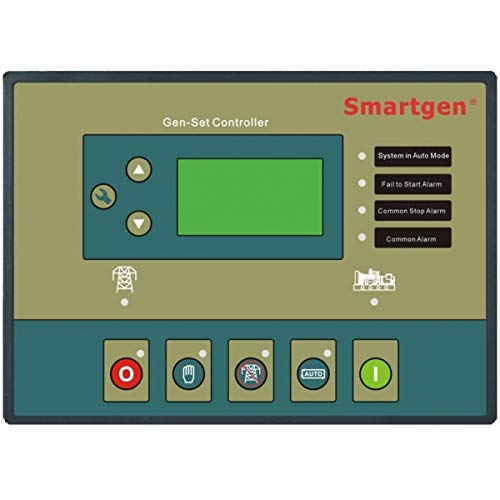
Сүрөт 1.1: Алдыңкы view of the HGM6320T Generator Controller, showing the large LCD screen and touch button interface.
2. Коопсуздук маалыматы
- Орнотуудан жана иштетүүдөн мурун бардык нускамаларды кылдат окуп чыгыңыз.
- Ensure all power sources are disconnected before performing any wiring or maintenance.
- Орнотуу жана тейлөө квалификациялуу кызматкерлер тарабынан гана аткарылышы керек.
- Verify all connections are secure and correctly polarized to prevent damage to the unit or connected equipment.
- Protect the controller from moisture, extreme temperatures, and direct sunlight.
3. Орнотуу
3.1 Пакеттен чыгаруу
- Carefully remove the HGM6320T controller from its packaging.
- Inspect the unit for any signs of physical damage. If damage is found, contact your supplier immediately.
- Таңгактоочу материалдарды келечекте ташуу же сактоо үчүн сактаңыз.
3.2 Орнотуу
The HGM6320T controller is designed for panel mounting. Ensure adequate space for ventilation and wiring connections at the rear of the unit.
- Электр камсыздоо: Connect the controller to a stable DC power source as specified in the technical data.
- Generator Connections: Wire the generator's start/stop, fuel, and other control signals to the designated terminals.
- Mains/Load Connections: Connect the mains and load sensing inputs, and the ATS control outputs. The controller can manage two ATS units with mains priority.
- Сенсор байланыштары: Connect engine water temperature, oil pressure, and fuel level sensors. An external temperature sensor can be connected to monitor room temperature, enabling automatic air conditioning control.
- Байланыш интерфейстери: Utilize the RS232/RS485 communication interface for remote control, measurement, and communication via the international standard MODBUS protocol.
- SMS Module: If using the SMS function, ensure the SMS module is correctly connected and configured.
4. Иштөө нускамалары
4.1 Башкаруу панелинин үстүнөview
The front panel features a large LCD for displaying operational parameters and status, along with touch buttons for navigation and control. The LCD provides precise measurement and display of almost all related electricity parameters, water temperature, oil pressure, and fuel level.
4.2 Негизги операция
- Күйгүзүү: Apply power to the controller. The LCD will illuminate, displaying the initial status or main menu.
- Меню навигациясы: Use the touch buttons to navigate through menus and adjust settings. Refer to the on-screen prompts for specific actions.
- Generator Start/Stop: The controller can automatically start and stop the generator based on configured conditions (e.g., mains failure, remote start signal). Manual start/stop options are also available.
4.3 Өркүндөтүлгөн функциялар
- SMS Function: Configure up to 5 cell phone numbers to receive SMS messages regarding mains status (normal/abnormal), genset start/stop, power failure, and ATS transfer timer events.
- Crank Disconnect Conditions: The controller supports four configurable conditions for crank disconnect: mains abnormal signal, remote start signal, room temperature, and battery voltage. These conditions can be combined as needed.
- Бөлмөнүн температурасын көзөмөлдөө: When an external temperature sensor is connected, the controller can monitor room temperature and automatically activate air conditioning if the temperature exceeds a set threshold.
- ATS Control: The HGM6320T can control two ATS units, with mains having priority for power transfer.
- Пландалган операциялар: Set a regular time in each month or week for automatic generator startup or shutdown.
- Night Start Prohibition: A function is available to prohibit generator starts during nighttime hours.
- Алыстан башкаруу жана мониторинг: Through the RS232/RS485 interface and MODBUS protocol, remote control, measurement, and communication of the genset can be achieved.
- Room Fan Control: The controller can automatically manage room fans.
- Access Detection: Features access detection to enhance the security of the engine room.
- Time & Energy Tracking: Includes a real calendar, clock, accumulation of running time, and accumulated output electric energy display.
5. Техникалык тейлөө
- үзгүлтүксүз тазалоо: Жумшак, кургак чүпүрөк менен башкаруу панелинин дисплейин жана баскычтарын таза кармаңыз. Абразивдүү тазалоочу каражаттарды же эриткичтерди колдонбоңуз.
- Туташуу текшерүүлөрү: Мезгил-мезгили менен бардык зымдарды туташтыргычтын бекемдигин жана коррозия белгилерин текшерип туруңуз.
- Программалык камсыздоонун жаңыртуулары: Өндүрүүчүнү текшериңиз webоптималдуу иштешин жана жаңы функцияларга жетүүнү камсыз кылуу үчүн бардык жеткиликтүү микропрограммаларды жаңыртуу үчүн сайт.
- Батареяны текшерүү: If the controller has an internal battery for real-time clock or memory backup, ensure it is functioning correctly and replace if necessary according to manufacturer guidelines.
6. Кыйынчылыктарды
| Көйгөй | Мүмкүн себеп | Чечим |
|---|---|---|
| Контроллер күйбөй жатат | No power supply; Incorrect wiring; Blown fuse | Check power input; Verify wiring connections; Replace fuse if necessary |
| Generator fails to start | Low fuel; Low battery voltage; Engine fault; Incorrect start parameters | Check fuel level; Check battery and charging system; Inspect engine for faults; Verify controller start settings |
| Communication error (RS232/RS485) | Incorrect wiring; Wrong communication settings; Damaged cable | Check communication wiring; Verify baud rate and protocol settings; Replace cable if damaged |
| SMS messages not sent | SMS module not connected; Incorrect phone numbers; Network issues | Ensure SMS module is connected and powered; Verify configured phone numbers; Check cellular network signal |
7. Техникалык шарттар
| Өзгөчөлүк | Деталь |
|---|---|
| Бренд | SmartGen |
| Модел | HGM6320T |
| Элемент Салмагы | 0.9 килограмм |
| Өндүрүүчү | АКЫЛДУУ ЖАНА |
| Дисплей | Large LCD with back-light |
| Интерфейс тили | Chinese, English (selectable) |
| Башкаруу түрү | Microprocessor, Touch Button |
| Байланыш | RS232/RS485, MODBUS protocol |
| ATS Control | 2 ATS units, mains priority |
| Өзгөчөлүктөр | SMS function, Room temperature monitoring, Scheduled start/stop, Night start prohibition, Room fan control, Access detection, Real calendar/clock, Running time/energy accumulation |
8. Кепилдик жана колдоо
SmartGen products are typically covered by a manufacturer's warranty against defects in materials and workmanship. The specific duration and terms of the warranty may vary by region and purchase date. Please refer to the warranty card included with your product or contact your local SmartGen distributor for detailed information.
For technical support, troubleshooting assistance, or inquiries regarding spare parts, please contact SmartGen-America or your authorized SmartGen dealer. When contacting support, please have your product model (HGM6320T) and serial number available.
Онлайн ресурстар: Visit the official SmartGen website for product documentation, FAQs, and software updates.