
1. Киришүү
This user manual provides detailed instructions for the installation, configuration, and operation of the Tenda TEG1124P-24-250W Unmanaged Gigabit PoE Ethernet Switch. Please read this manual thoroughly before using the device to ensure proper setup and optimal performance. Keep this manual for future reference.
2. Продукт бүтүп калдыview
2.1 Негизги өзгөчөлүктөрү
- 24 Гигабиттик Ethernet порттору (10/100/1000 Мбит/сек)
- Power over Ethernet (PoE) support on all 24 ports
- Unmanaged switch for plug-and-play simplicity
- Total PoE power budget of 250 Watts
- Узак металл casing for robust performance
- Compatible with various PoE-powered devices such as IP cameras
2.2 Пакеттин мазмуну
- Tenda TEG1124P-24-250W Unmanaged Gigabit PoE Ethernet Switch
- Rack Mount Kit
- 4 Бут жаздыкчалары
- Электр кабели
- Ыкчам орнотуу колдонмосу
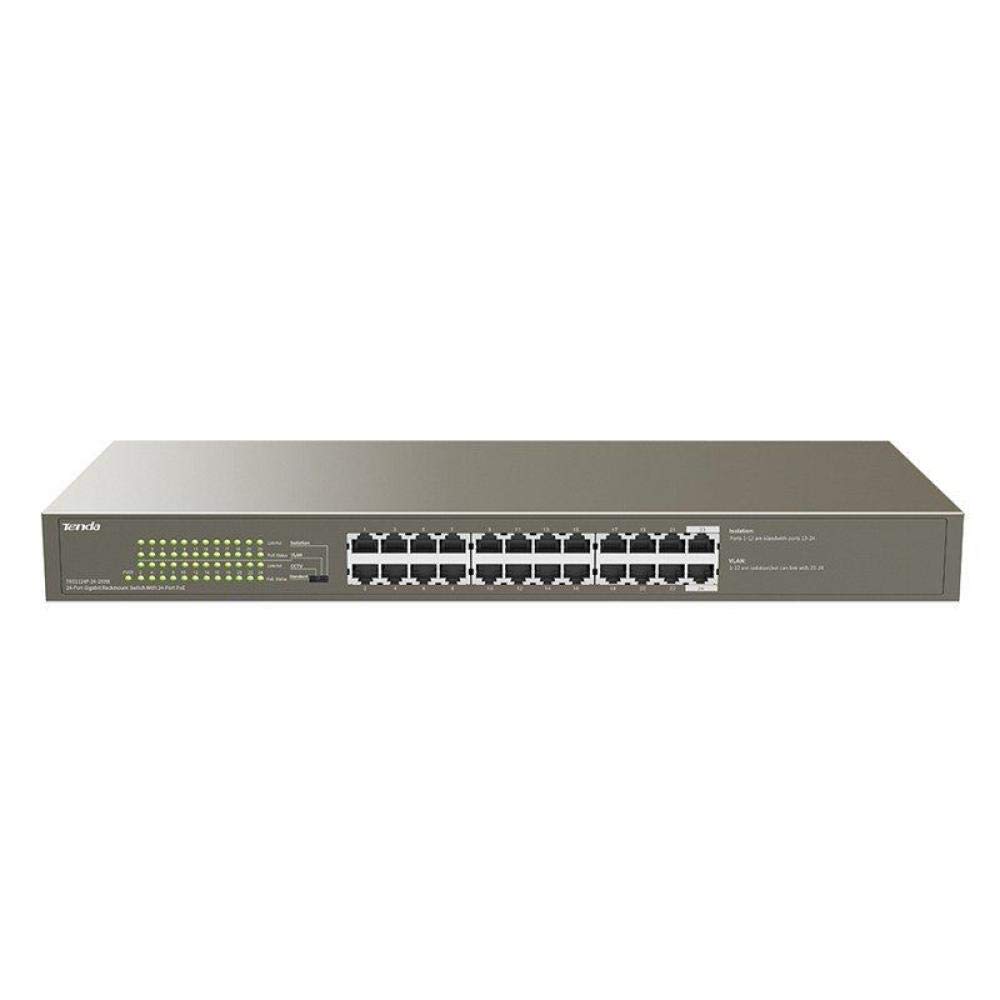
Сүрөт 1: Алдыңкы view of the Tenda TEG1124P-24-250W Unmanaged Gigabit PoE Ethernet Switch, showing 24 RJ45 ports and LED indicators.
3. Орнотуу
3.1 Физикалык орнотуу
The Tenda TEG1124P-24-250W switch can be installed on a desktop or mounted in a standard 19-inch equipment rack.
- Иш тактада жайгаштыруу: Attach the included rubber foot pads to the bottom of the switch. Place the switch on a flat, stable surface with adequate ventilation.
- Стойкага орнотуу: Use the provided rack mount brackets and screws to secure the switch into a standard 19-inch equipment rack. Ensure proper airflow around the device.

Figure 2: Diagram illustrating the dimensions of the Tenda TEG1124P-24-250W switch: approximately 24.64 cm length, 16.51 cm width, and 2.79 cm height.
3.2 Түзмөктөрдү туташтыруу
- Кубат туташуу: Connect the provided power cord to the power inlet on the rear panel of the switch and then to a suitable power outlet.
- Тармак түзмөктөрү: Connect your network devices (e.g., computers, servers, NVRs) to any of the 24 RJ45 ports using standard Ethernet cables.
- PoE түзмөктөрү: For Power over Ethernet (PoE) compatible devices (e.g., IP cameras, VoIP phones, wireless access points), connect them to any of the 24 RJ45 ports. The switch will automatically detect and provide power to these devices if they are PoE compliant and within the switch's power budget.
4. Иштөө нускамалары
4.1 Күйгүзүү
After connecting the power cord, the switch will automatically power on. The Power LED indicator on the front panel should illuminate, indicating that the device is receiving power.
4.2 LED көрсөткүчтөрү
The front panel of the switch features LED indicators to provide status information:
- Power LED: Ажыраткыч күйгүзүлгөндө күйөт.
- Шилтеме/Акт LED'лери (ар бир порт үчүн):
- Катуу жашыл: A stable network link is established.
- Жаркылдаган жашыл: Маалыматтар порт аркылуу берилет же кабыл алынат.
- Өчүк: Эч кандай тармактык шилтеме табылган жок.
- PoE Status LEDs (per port):
- Катуу сары: Туташкан түзмөккө PoE кубаты берилип жатат.
- Жаркылдаган сары: PoE power fault or overload detected.
- Өчүк: No PoE device connected or no power being supplied.
4.3 PoE функциясы
The TEG1124P-24-250W switch automatically detects and supplies power to IEEE 802.3af/at compliant Powered Devices (PDs) connected to its ports. It is an unmanaged switch, meaning no configuration is required for basic network and PoE operation. The total power budget for PoE is 250W. Ensure that the total power consumption of all connected PoE devices does not exceed this limit.
5. Техникалык тейлөө
To ensure the longevity and reliable operation of your Tenda switch, follow these maintenance guidelines:
- Тазалоо: Которгучтун сыртын жумшак, кургак чүпүрөк менен дайыма тазалап туруңуз. Суюктук же аэрозолдук тазалоочу каражаттарды колдонбоңуз. Вентиляция тешиктери чаңдан жана тоскоолдуктардан таза болушун камсыз кылыңыз.
- Вентиляция: Ашыкча ысып кетпеши үчүн өчүргүч жакшы желдетилген жерге коюлганын текшериңиз. Желдетүүчү тешиктерди жаппаңыз.
- Экологиялык шарттар: Operate the switch within the recommended temperature and humidity ranges specified in the product specifications.
- Кабелдик башкаруу: Keep network cables organized and properly secured to prevent accidental disconnections or damage.
6. Кыйынчылыктарды
If you encounter issues with your Tenda TEG1124P-24-250W switch, refer to the following common problems and solutions:
- Кубат жок:
- Кубат шнуру өчүргүчкө жана иштеп жаткан розеткага бекем туташтырылганын текшериңиз.
- Башка аспапка сайып, розетка иштеп жатканын текшериңиз.
- Check the Power LED on the front panel. If it is off, contact technical support.
- Тармакка туташуу жок:
- Check the Link/Act LED for the connected port. If it is off, ensure the Ethernet cable is properly connected at both ends.
- Башка Ethernet кабелин же портту колдонуп көрүңүз.
- Verify that the connected device (e.g., computer, router) is powered on and functioning correctly.
- PoE түзмөгү күйбөй жатат:
- Check the PoE Status LED for the connected port. If it is off, ensure the device is PoE compliant (IEEE 802.3af/at).
- If the PoE LED is flashing yellow, there might be a power fault or overload. Disconnect other PoE devices to reduce the total power load.
- Ensure the connected PoE device is not drawing more power than the switch can provide per port or exceeding the total 250W budget.
- Try connecting the PoE device to a different port.
7. Техникалык шарттар
| Өзгөчөлүк | Description |
|---|---|
| Бренд аты | Tenda |
| Модель номери | TEG1124P-24-250W |
| Продукт түрү аты | Network Switch |
| Порттардын саны | 24 |
| Которуу түрү | Unmanaged PoE |
| Маалыматтарды өткөрүү ылдамдыгы | 1000 Мбит/с (Гигабит) |
| Колдонуучу интерфейси | RJ45, PoE |
| Maximum PoE Power | 250 Ватт |
| Иштин материалдык түрү | Металл |
| Түс | Боз |
| Шайкеш түзмөктөр | Камера |
| Продукциянын өлчөмдөрү (L x W x Y) | 24.6 см х 16.5 см х 2.8 см |
| Элемент Салмагы | 3434 грамм |
8. Кепилдик жана колдоо
Кепилдик жөнүндө маалымат жана техникалык колдоо алуу үчүн, өнүмүңүз менен кошо берилген кепилдик картасын караңыз же расмий Tenda веб-сайтына кириңиз. website. You may also contact your local distributor or reseller for assistance.