
1. Киришүү
This manual provides instructions for the proper setup, operation, and maintenance of your Acer B247Y 23.8-inch LED LCD Monitor. Please read this manual thoroughly before using your monitor to ensure optimal performance and to prevent damage.
The Acer B247Y is a 23.8-inch Full HD (1920 x 1080) monitor featuring an IPS panel for wide viewing angles, an anti-glare display, and a frameless design on three sides. It includes multiple connectivity options and an ergonomic stand for comfortable viewing.
2. Пакеттин мазмуну
Таңгагыңызда бардык буюмдар бар экенин текшериңиз. Эгерде кандайдыр бир буюмдар жок болсо же бузулуп калса, сатуучуга кайрылыңыз.
- Acer B247Y 23.8-inch LED LCD Monitor
- Монитор стенд (негизги жана моюн)
- Power Adapter (Internal) and Power Cable
- VGA кабели
- DisplayPort 1.2 кабели
- HDMI кабели
- Audio-in Cable (if included)
- Audio-out Cable (if included)
- Колдонуучунун Колдонмосу (бул документ)
3. Орнотуу
3.1 Монитордун стендди чогултуу
The monitor comes with a detachable foot stand. Follow these steps to assemble:
- Мониторду жана стенд компоненттерин таңгактан этияттык менен алып салыңыз.
- Монитор панелине стенд мойнуна бекитиңиз. Анын ордуна коопсуз чыкылдатуусун камсыз кылыңыз.
- Attach the stand base to the stand neck. Tighten any screws if provided, usually located on the underside of the base.
- Чогулган мониторду туруктуу, жалпак бетке коюңуз.
Эскертүү: The monitor also supports VESA mount (100 x 100 mm) for wall or arm mounting. Refer to your VESA mount kit instructions for installation.
3.2 Мониторду туташтыруу
Мониторду компьютериңизге же башка түзмөктөргө тиешелүү кабелдерди колдонуп туташтырыңыз.
- Видео туташуу:
- Connect one end of the DisplayPort cable to the DisplayPort output on your computer and the other end to the DisplayPort input on the monitor.
- Alternatively, connect an HDMI cable from your computer's HDMI output to the monitor's HDMI input.
- For older systems, connect a VGA cable from your computer's VGA output to the monitor's VGA input.
- Аудио туташуусу:
- If using VGA or DisplayPort without audio, connect an audio cable from your computer's audio output to the monitor's audio-in port for integrated speakers.
- To connect external speakers or headphones, use the monitor's audio-out port.
- Кубат туташуу:
- Кубат кабелин монитордун кубат кирүүчүсүнө туташтырыңыз, андан кийин экинчи учун жерге туташтырылган электр розеткасына сайыңыз.

Figure 3.2.1: Acer B247Y Monitor with Stand. This image illustrates the overall appearance of the monitor when fully assembled on its stand.
4. Иштөө нускамалары
4.1 Күйгүзүү/өчүрүү
Press the power button, usually located on the bottom right or rear of the monitor, to turn the monitor on or off. The power indicator light will illuminate when the monitor is on.
4.2 Adjusting Monitor Settings (OSD)
The monitor features an On-Screen Display (OSD) menu for adjusting various settings. Use the control buttons (typically located near the power button) to navigate and select options within the OSD menu.
OSDдин жалпы жөндөөлөрү төмөнкүлөрдү камтыйт:
- Сүрөт: Brightness, Contrast, Color Temperature, Gamma, Acer eColor Management modes (e.g., Dark Room, Eco).
- Аудио: Volume control for integrated speakers or audio-out.
- Киргизүү: Select the active video input source (VGA, DisplayPort, HDMI).
- OSD: OSD таймауту, тил.
- Башкаруу: Заводдун демейки шарттарына кайтаруу.
4.3 Эргономикалык жөндөөлөр
The Acer B247Y monitor stand offers several ergonomic adjustments to optimize your viewтажрыйбасы:
- Россия: Adjust the screen angle from -5 degrees to 25 degrees (forward/backward).
- Айлануучу: Rotate the monitor horizontally up to +/- 45 degrees.
- Бийиктигин тууралоо: Экрандын бийиктигин 120 ммге чейин тууралаңыз.
- Пивот: Портрет үчүн экранды 90 градуска буруңуз viewing.
5. Техникалык тейлөө
Туура тейлөө мониторуңуздун узак мөөнөттүү жана оптималдуу иштешин камсыз кылат.
- Экранды тазалоо: Экранды жумшак, түксүз чүпүрөк менен акырын сүртүңүз. өжөр белгилер үчүн, гampen the cloth with a small amount of water or a non-abrasive screen cleaner. Do not spray liquid directly onto the screen.
- Тазалоо Casing: Мониторду тазалоо үчүн жумшак, кургак чүпүрөктү колдонуңуз casinг. Күчтүү жуугучтарды же абразивдүү тазалагычтарды колдонуудан алыс болуңуз.
- Вентиляция: Ашыкча ысып кетүүнүн алдын алуу үчүн монитордогу желдетүү тешиктери жабылбаганын текшериңиз.
- Өчүрүү: Тазалоодон мурун же узак убакыт бою колдонбогондо, мониторду өчүрүп, розеткадан сууруп алыңыз.
6. Кыйынчылыктарды
Эгерде сиз мониторуңузда көйгөйлөргө туш болсоңуз, төмөнкү жалпы көйгөйлөрдү чечүү кадамдарын караңыз:
- No Power / Monitor Does Not Turn On:
- Ensure the power cable is securely connected to both the monitor and a working electrical outlet.
- Башка аспапка сайып, розетка иштеп жатканын текшериңиз.
- Кубат баскычын бекем басыңыз.
- No Image / "No Signal" Message:
- Check that the video cable (DisplayPort, HDMI, or VGA) is securely connected to both the monitor and your computer.
- Компьютериңиз күйгүзүлүп, уйку режиминде эмес экенин текшериңиз.
- Туура киргизүү булагын кол менен тандоо үчүн OSD менюсун колдонуңуз.
- Башка видео кабелин же мүмкүн болсо, портту колдонуп көрүңүз.
- Image is Distorted or Unclear:
- Компьютериңиздеги дисплейдин чечилиши монитордун жергиликтүү резолюциясына (1920 x 1080) коюлганын текшериңиз.
- Adjust brightness, contrast, and other picture settings via the OSD menu.
- Экранга же кабелдерге кандайдыр бир физикалык зыян келтирилгенин текшериңиз.
- Динамиктерден үн жок:
- Increase the volume using the OSD menu or your computer's sound settings.
- Ensure the audio cable (if used) is properly connected.
- Компьютериңиздин үн жөндөөлөрүндө туура аудио чыгаруу түзмөгү тандалганын текшериңиз.
7. Техникалык шарттар
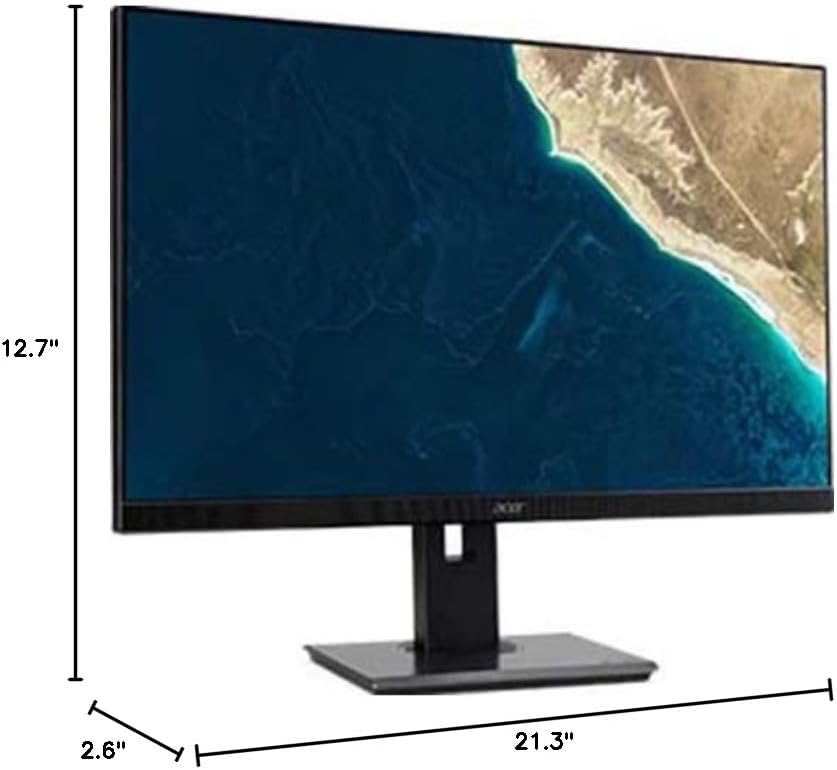
Figure 7.1.1: Acer B247Y Monitor Dimensions. This image shows the approximate height (12.7"), width (21.3"), and depth (2.6") of the monitor without the stand.
| Өзгөчөлүк | Спецификация |
|---|---|
| Модель номери | B247Y |
| Screen Size | 23.8 дюйм (60.5 см) |
| Дисплей түрү | LED LCD, IPS Panel, Anti-glare (AG) |
| Maximum Resolution | 1920 x 1080 (Full HD) |
| Аспект катышы | 16:9 |
| Жаңыртуу ылдамдыгы | 75 Гц |
| Жооп убактысы | 4ms (gray-to-gray) |
| Жарыктык (типтүү) | 250 кд/м² |
| Native Contrast Ratio | 1,000:1 |
| Динамикалык контраст катышы | 100,000,000:1 |
| Viewбурчтар (H/V) | 178° / 178° |
| Байланыш | VGA, DisplayPort 1.2, HDMI, Audio-in, Audio-out |
| Integrated Speakers | 2 x 2.0W |
| Эргономикалык тууралоо | Tilt (-5° to 25°), Swivel (+/- 45°), Height Adjustment (120mm), Pivot (90°) |
| VESA тоосун колдоо | 100 x 100 мм |
| Станды менен өлчөмдөрү (W x Y x D) | 21.3" x 14.9"~19.6" x 7.6" (54.0cm x 37.9cm~49.9cm x 19.3cm) |
| Стенд менен салмак | 12.3 фунт (5.6 кг) |
| Кубаттуу адаптер | Ички |
| Түс | Кара |
8. Кепилдик жана колдоо
Your Acer B247Y monitor comes with a Limited Three-Year Warranty. Please retain your proof of purchase for warranty claims.
For technical support, service, or warranty inquiries, please refer to the official Acer support website or contact their customer service department. Contact information can typically be found on the Acer webсайтында же продуктуңузга кошулган кепилдик картасында.
Кенсингтон кулпусу: The monitor supports a Kensington lock for security. Attach a compatible Kensington lock (sold separately) to the security slot on the monitor to deter theft.