
1. Киришүү
This manual provides essential instructions for the setup, operation, and maintenance of your Easytry123 replacement remote control. This remote is designed to function with specific Sony KDL series LCD HDTV models, including KDL-50R450A, KDL-40R475B, KDL-40R477B, and KDL-40R471A. Please read this manual thoroughly to ensure proper use and to understand the capabilities and limitations of this replacement device.
Маанилүү эскертүү: As a replacement unit, this remote control may not support all advanced or unique functions present on your original television remote. Its primary purpose is to provide core television control functionalities.
2. Продукт бүтүп калдыview
The Easytry123 replacement remote control is an ergonomic, button-controlled device utilizing infrared (IR) technology for communication with your television. It is designed for ease of use and provides access to common television functions.
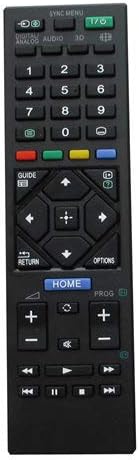
Сүрөт 1: Алдыңкы view of the remote control, displaying its button layout for various functions.

2-сүрөт: Арткы view алыстан башкаруу пультунун эргономикалык дизайнын баса белгилейт.
3. Орнотуу
3.1 Батареяны орнотуу
Алыстан башкаруу пульту эки AAA батарейкасын талап кылат (кошулмага кирбейт). Аларды орнотуу үчүн төмөнкү кадамдарды аткарыңыз:
- Пульттун артындагы батарея бөлүкчөсүнүн капкагын табыңыз.
- Бөлүмдү ачуу үчүн капкакты ылдый жылдырыңыз же кулпуну (эгер бар болсо) басыңыз.
- Оң (+) жана терс (-) терминалдары бөлүмдүн ичиндеги белгилер менен туура дал келишин камсыз кылып, эки AAA батарейкасын салыңыз.
- Батарея бөлүкчөсүнүн капкагын бекем чыккыча ордуна жылдырыңыз.
Эскертүү: Ар дайым жаңы батарейкаларды колдонуңуз жана эки батарейканы бир убакта алмаштырыңыз. Эски жана жаңы батареяларды же батарейкалардын ар кандай түрлөрүн аралаштырбаңыз.
4. Иштөө нускамалары
Once batteries are installed, the remote control is ready for use. Point the remote directly at your Sony LCD HDTV and press the desired function button.
4.1 Негизги функциялар
- Кубаттуулук (киргизүү/чыгаруу): Телевизорду күйгүзөт же өчүрөт.
- Сан баскычтары (0-9): Телеканалдарды түз тандаңыз.
- Каналды өйдө/ылдый кылуу (PROG +/-): Каналдарды ырааттуу түрдө өзгөртөт.
- Үндү жогорулатуу/төмөндөтүү (+/-): Үндүн үнүн тууралайт.
- Үнсүз: Телевизордун үнүн басат.
- Киргизүү/Булак: Жеткиликтүү киргизүү булактары (HDMI, AV ж.б.) аркылуу циклдерди жүргүзөт.
- Navigation Buttons (Arrows, Enter): Менюларда багыттоо жана тандоолорду ырастоо үчүн колдонулат.
- Үй: Телевизордун негизги менюсуна же акылдуу функцияларына кирет.
- Кайтуу/Артка: Мурунку экранга же менюга кайтат.
For specific button functions, refer to your television's original user manual, as button labels and their corresponding actions can vary slightly between TV models.
5. Техникалык тейлөө
5.1 Тазалоо
Пультту тазалоо үчүн анын бетин жумшак, кургак чүпүрөк менен акырын сүртүңүз. өжөр кир үчүн, бир аз гampчүпүрөктү суу менен. Катуу химиялык заттарды, абразивдүү тазалагычтарды же ашыкча нымдуулукту колдонуудан качыңыз, анткени алар пульттун электроникасына зыян келтириши мүмкүн.
5.2 Сактоо
When not in use for extended periods, remove the batteries from the remote control to prevent leakage and potential damage. Store the remote in a cool, dry place away from direct sunlight and extreme temperatures.
6. Кыйынчылыктарды
If you encounter issues with your remote control, please refer to the following troubleshooting steps:
- Алыстан жооп бербейт:
- Батареялар туура полярдуулук менен туура орнотулганын текшериңиз.
- Эски батарейкаларды жаңысына алмаштырыңыз.
- Пульт менен телевизордун инфракызыл кабыл алгычынын ортосундагы тоскоолдуктарды текшериңиз.
- Ensure you are within a reasonable range and pointing the remote directly at the TV.
- Айрым функциялар иштебей жатат:
- Verify that your TV model is listed as compatible with this replacement remote.
- Remember that replacement remotes may not support all original TV functions. If a specific advanced function is not working, it may not be supported by this replacement unit.
- Consult your TV's original manual to confirm if the function requires a specific button sequence or is unique to the original remote.
7. Техникалык шарттар
| Өзгөчөлүк | Деталь |
|---|---|
| Бренд | Easytry123 |
| Шайкеш түзмөктөр | Sony KDL-50R450A, KDL-40R475B, KDL-40R477B, KDL-40R471A LCD HDTVs |
| Байланыш технологиясы | Инфракызыл (IR) |
| Controller Type | Control Button |
| Өзгөчө өзгөчөлүк | Эргономикалык дизайн |
| Power Source | 2 x AAA Батареялар (киргизилген эмес) |
8. Кепилдик жана колдоо
Specific warranty information for this Easytry123 replacement remote control is not provided within the product details. For any support inquiries or issues not covered in this manual, please refer to the retailer or point of purchase for assistance.