
Easytry123 Easytry2094
Easytry123 Replacement Remote Control User Manual
For Samsung HW-J450/ZA, PS-WJ651, PS-WJ470/ZA, HW-J6502, HW-J650 Audio Soundbar Systems
1. Киришүү
This manual provides instructions for the Easytry123 replacement remote control, designed for use with various Samsung audio soundbar systems. This remote control offers basic functionality for compatible models. Please note that as a replacement unit, it may not support all advanced functions of the original remote control.
Шайкеш моделдер:
- Samsung HW-J450/ZA
- Samsung PS-WJ651
- Samsung PS-WJ651/ZA
- Samsung PS-WJ470/ZA
- Samsung HW-J6502
- Samsung HW-J650
2. Орнотуу
2.1 Батареяны орнотуу
The remote control requires batteries for operation. Batteries are not included with the remote control and must be purchased separately. This remote typically uses standard Lithium batteries.
- Пульттун артындагы батарея отсегин табыңыз.
- Remove the battery compartment cover by sliding or gently prying it open.
- Insert the new batteries, ensuring the correct polarity (+ and -) as indicated inside the compartment.
- Батарея бөлүкчөсүнүн капкагын бекем чыккыча ордуна коюңуз.

Figure 1: Remote control with battery compartment open.
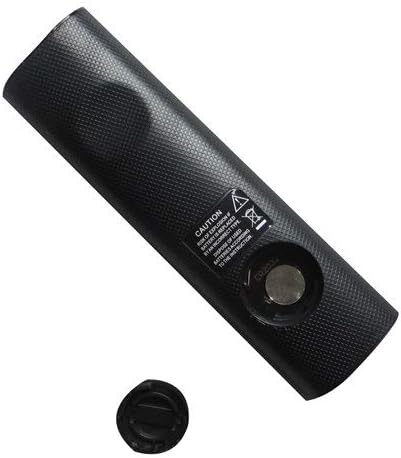
Figure 2: Remote control showing the battery cap detached.
2.2 Алгачкы колдонуу
This remote control utilizes infrared (IR) technology. No complex pairing or programming is typically required. Once batteries are installed, point the remote directly at your Samsung soundbar system and begin operation.
3. Иштөө нускамалары
The remote control features 15 buttons for various functions. While specific button labels may vary, common functions include:
- Күч: Саундбар системасын күйгүзөт же өчүрөт.
- Үнүн жогорулатуу/төмөндөтүү: Аудио чыгаруу деңгээлин тууралайт.
- Үнсүз: Аудио чыгыштын үнүн басат.
- Киргизүү/Булак: Жеткиликтүү аудио киргизүү булактары (мисалы, HDMI, оптикалык, Bluetooth) аркылуу циклдерди иштетет.
- Чабыттоо баскычтары: Used for menu navigation (if supported by the soundbar and remote).
- Ойнотуу башкаруулары: Play, Pause, Skip (if controlling a connected media device).
For optimal performance, ensure a clear line of sight between the remote control and the soundbar's IR receiver. The maximum effective range is approximately 10 meters (33 feet).
4. Техникалык тейлөө
4.1 Батареяны алмаштыруу
Replace batteries when the remote control's response becomes inconsistent or stops working. Always replace all batteries at the same time with new ones of the same type. Do not mix old and new batteries, or different types of batteries.
4.2 Тазалоо
To clean the remote control, wipe it with a soft, dry cloth. Do not use liquid cleaners, abrasive pads, or chemical solvents, as these can damage the remote's surface or internal components.
4.3 Сактоо
Пультту салкын, кургак, күндүн түз тийген нурунан жана өтө жогорку температурадан алыс жерде сактаңыз. Эгерде пульт көпкө колдонулбаса, агып кетүүнүн алдын алуу үчүн батарейкаларды алып салуу сунушталат.
5. Кыйынчылыктарды
- Пульт жооп бербей жатат:
- Батареялар туура полярдуулук менен туура салынганын текшериңиз.
- Батареяларды жаңыларына алмаштырыңыз.
- Ensure there is a clear line of sight between the remote and the soundbar's IR receiver. Remove any obstructions.
- Make sure you are within the effective operating range (approximately 10 meters).
- Айрым функциялар иштебейт:
- As a replacement remote, it may not support all advanced or specific functions of the original equipment. This is normal for universal or replacement remotes.
- Verify that your soundbar model is listed as compatible in the Introduction section.
6. Техникалык шарттар
| Өзгөчөлүк | Спецификация |
|---|---|
| Бренд | Easytry123 |
| Модель аты | Easytry2094 |
| Байланыш технологиясы | Инфракызыл (IR) |
| Button Quantity | 15 |
| Controller Type | Control Button |
| Максималдуу диапазон | 10 метр |
| Батарея түрү | Литий (кошулбайт) |
| Түс | Кара |
| Шайкеш түзмөктөр | Samsung Audio Soundbar Systems (specific models listed) |
7. Кепилдик жана колдоо
For warranty information and customer support, please refer to the seller or retailer from whom you purchased this product. Specific warranty terms and support channels are typically provided at the point of sale.
Ask a question about this manual
Ask about setup, troubleshooting, compatibility, parts, safety, or missing instructions. Manuals+ will review the question and use this page’s manual context to help answer it.