
1. Киришүү
This manual provides detailed instructions for setting up and operating your NETVIP 300Mbps WiFi Extender. This device is designed to extend the coverage of your existing wireless network, eliminating Wi-Fi dead zones and improving signal strength in areas with weak reception. It supports both Repeater and Access Point (AP) modes, offering flexible solutions for your networking needs.
2. Продукт бүтүп калдыview
Familiarize yourself with the components of your NETVIP WiFi Extender:
- LED көрсөткүчтөрү: Display the device's status, including power, Wi-Fi signal, and WPS activity.
- WPS баскычы: For quick and secure connection to your router using Wi-Fi Protected Setup.
- LAN порту: Used for connecting wired devices or for setting up the device in Access Point mode.
- Электр сайгычы: For connecting the device to an electrical outlet.
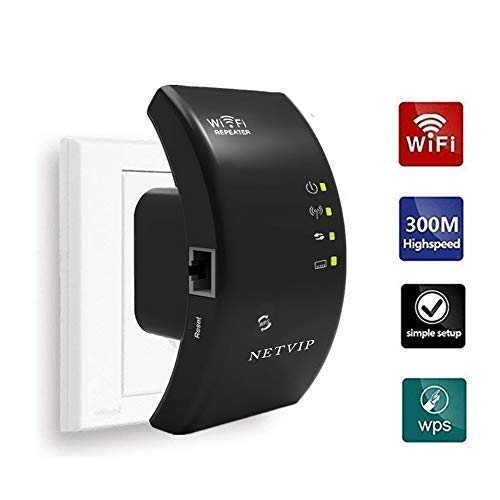
Сүрөт 2.1: Алдыңкы view of the NETVIP 300Mbps WiFi Extender, showing its compact design and key indicators.
3. Орнотуу нускамалары
The NETVIP WiFi Extender can be configured in two main modes: Repeater Mode and Access Point (AP) Mode.
3.1. Repeater Mode (Extending Existing Wi-Fi)
Repeater mode extends the coverage of your existing wireless network.
- Күйгүзүү: Plug the extender into an electrical outlet near your main router. Wait for the Power LED to light up.
- Extender менен туташуу: On your computer or mobile device, connect to the Wi-Fi network named "Wireless-N" (or similar, check the label on your device). No password is required initially.
- Орнотуу барагына кирүү: ачуу а web браузерди жана демейки IP даректи киргизиңиз (мисалы, 192.168.10.1) же домендик аталыш (мисалы, repeater.net) provided in the quick start guide.
- Кирүү: Enter the default username and password (usually "admin" for both, check device label).
- Кайталоочу режимин тандаңыз: On the setup page, choose "Repeater Mode".
- Тармактарды издөө: The extender will scan for available Wi-Fi networks. Select your home Wi-Fi network from the list.
- Сырсөздү киргизиңиз: Enter the Wi-Fi password for your home network. You can also set a new SSID (network name) for the extended network or keep it the same.
- Орнотууларды колдонуу: "Колдонуу" же "Сактоо" баскычын чыкылдатыңыз. Кеңейткич кайра жүктөлөт.
- Кеңейтүүчүнү көчүрүү: Once restarted, unplug the extender and move it to a location halfway between your router and the Wi-Fi dead zone. Ensure the signal strength LED indicates a good connection to your main router.
- Түзмөктөрдү туташтыруу: Connect your devices to the new extended Wi-Fi network.
WPS Setup (Alternative for Repeater Mode)
- Күйгүзүү: Узарткычты негизги роутериңиздин жанындагы электр розеткасына сайыңыз.
- Роутерде WPS баскычын басыңыз: Негизги роутериңиздеги WPS баскычын басыңыз.
- Extenderдеги WPSти басыңыз: Within two minutes, press the WPS button on the NETVIP WiFi Extender.
- Байланышты күтүңүз: The WPS LED on both devices should blink and then become solid, indicating a successful connection.
- Кеңейтүүчүнү көчүрүү: Move the extender to an optimal location.
3.2. Access Point (AP) Mode (Creating a New Wi-Fi Network)
AP режими зымдуу интернет байланышын зымсыз тармакка айландырат.
- Күйгүзүү: Тарткычты электр розеткасына сайыңыз.
- Ethernet аркылуу туташуу: Connect an Ethernet cable from your main router's LAN port to the LAN port on the NETVIP WiFi Extender.
- Extender менен туташуу: On your computer or mobile device, connect to the Wi-Fi network named "Wireless-N" (or similar).
- Орнотуу барагына кирүү: ачуу а web браузерге кирип, демейки IP дарегин же домен атын киргизиңиз.
- Кирүү: Демейки колдонуучу атын жана паролду киргизиңиз.
- AP режимин тандоо: On the setup page, choose "AP Mode".
- Wi-Fi жөндөөлөрүн конфигурациялоо: Set a new SSID (network name) and a strong Wi-Fi password for your new wireless network.
- Орнотууларды колдонуу: "Колдонуу" же "Сактоо" баскычын чыкылдатыңыз. Кеңейткич кайра жүктөлөт.
- Түзмөктөрдү туташтыруу: Connect your devices to the newly created Wi-Fi network.
4. Иштөө нускамалары
Once configured, the NETVIP WiFi Extender operates automatically. Ensure it is plugged into a power outlet and the LED indicators show normal operation.
- Оптималдуу жайгаштыруу: For best performance in Repeater Mode, place the extender where it receives a strong signal from your main router (indicated by the signal LED) and can still provide coverage to the desired area. Avoid placing it near large metal objects, microwaves, or other sources of interference.
- LED абалы:
- Power LED: Катуу көрсөткүч кубат күйүп турганын билдирет.
- Wi-Fi LED: Solid indicates Wi-Fi is active. Blinking indicates data transfer.
- WPS LED: Solid indicates a successful WPS connection. Blinking indicates WPS pairing in progress.
- Зымдуу туташуу: In either mode, the LAN port can be used to connect a single wired device (e.g., a desktop computer, gaming console, or smart TV) to the network, providing a stable wired connection.
5. Техникалык тейлөө
Regular maintenance helps ensure optimal performance and longevity of your device.
- Тазалоо: Түзмөктү жумшак, кургак чүпүрөк менен акырын сүртүңүз. Суюк тазалоочу каражаттарды же аэрозольдорду колдонбоңуз.
- Программалык камсыздоонун жаңыртуулары: Periodically check the NETVIP official website for any available firmware updates. Updating firmware can improve performance, add new features, or fix bugs. Follow the instructions provided with the firmware update carefully.
- Аппаратты баштапкы абалга келтирүү: If you encounter persistent issues or wish to reconfigure the device from scratch, you can perform a factory reset. Locate the reset button (usually a small pinhole) on the device, press and hold it for 5-10 seconds with a paperclip until the LEDs flash. This will restore the device to its factory default settings.
6. Кыйынчылыктарды
If you experience issues with your NETVIP WiFi Extender, refer to the following common problems and solutions:
- Cannot access the setup page (192.168.10.1 or repeater.net):
- Ensure your device is connected to the extender's default Wi-Fi network (e.g., "Wireless-N").
- Башкасын байкап көрүңүз web браузер.
- Браузериңиздин кэшин жана кукилерин тазалаңыз.
- Restart the extender and your computer/mobile device.
- Perform a factory reset on the extender.
- Орнотуудан кийин интернетке кирүү мүмкүн эмес:
- In Repeater Mode, ensure the extender is receiving a strong signal from your main router. Relocate it closer if necessary.
- Verify that the Wi-Fi password entered during setup for your main router is correct.
- In AP Mode, ensure the Ethernet cable is securely connected between the extender and your main router, and that your main router has internet access.
- Негизги роутериңизди да, кеңейтүүчүнү да өчүрүп-күйгүзүңүз.
- Интернеттин ылдамдыгы жай:
- Optimal placement is crucial. The extender should be positioned where it can receive a good signal from the router and transmit effectively to your devices.
- Avoid interference from other electronic devices (microwaves, cordless phones).
- Негизги роутериңиз жетиштүү ылдамдыкты камсыз кылып жатканын текшериңиз.
- Check for firmware updates for the extender.
- Байланыш тез-тез үзүлөт:
- Check for signal interference or obstacles.
- Кеңейткичтин ысып кетпегенин текшериңиз.
- Try changing the Wi-Fi channel on your main router to avoid congestion.
- Perform a factory reset and reconfigure the extender.
7. Техникалык шарттар
| Бренд | NETVIP |
| Зымсыз байланыш стандарты | 802.11b, 802.11g, 802.11n |
| Маалыматтарды өткөрүү ылдамдыгы | 300 Мбит/сек чейин |
| Иштөө режимдери | Кайталагыч, Кирүү чекити (AP) |
| Шайкеш түзмөктөр | Router, Alexa Devices |
| Өзгөчө өзгөчөлүк | WPS Function, LAN Port |
| Продукциянын өлчөмдөрү | 4.33 x 2.36 x 2.76 дюйм |
| Элемент Салмагы | 5.6 унция |
8. Кепилдик жана колдоо
NETVIP products are designed for reliability and performance. For specific warranty information, please refer to the warranty card included with your product or visit the official NETVIP webсайт.
If you require technical assistance or have questions not covered in this manual, please contact NETVIP customer support through their official webсайт же сатып алуу менен камсыз болгон байланыш маалыматы. Колдоо кызматына кайрылганда продуктуңуздун үлгүсүн жана сатып алуу чоо-жайын даяр болуңуз.