
Introduction
Thank you for choosing the LENRUE A38S Computer Speakers. This manual provides essential information for setting up, operating, and maintaining your speakers to ensure optimal performance. The A38S speakers are designed to deliver clear audio for your desktop, laptop, and tablet, featuring a plug-and-play design with USB power and 3.5mm auxiliary audio input, complemented by dynamic RGB lighting.
Жайгашуу
Follow these steps to connect your LENRUE A38S speakers to your device.
- Туташуу кубаты: Insert the USB-A plug into an available USB port on your computer or a USB power adapter. If your device has a USB-C port, use the provided USB-A to Type-C adapter. The speakers are powered via USB and contain an internal battery for portable use.
- Аудио туташтыруу: Plug the 3.5mm audio jack into the headphone or audio output port of your computer, laptop, or tablet.
- Күйгүзүү: Rotate the main knob on the speaker clockwise to turn it on. The RGB lights will illuminate.
- Select Playback Device: On your computer, navigate to your sound settings and select "Speaker (4-USB Audio 2.0)" or a similar option as the output device. Adjust the volume to approximately 90% on your computer for optimal control via the speaker knob.
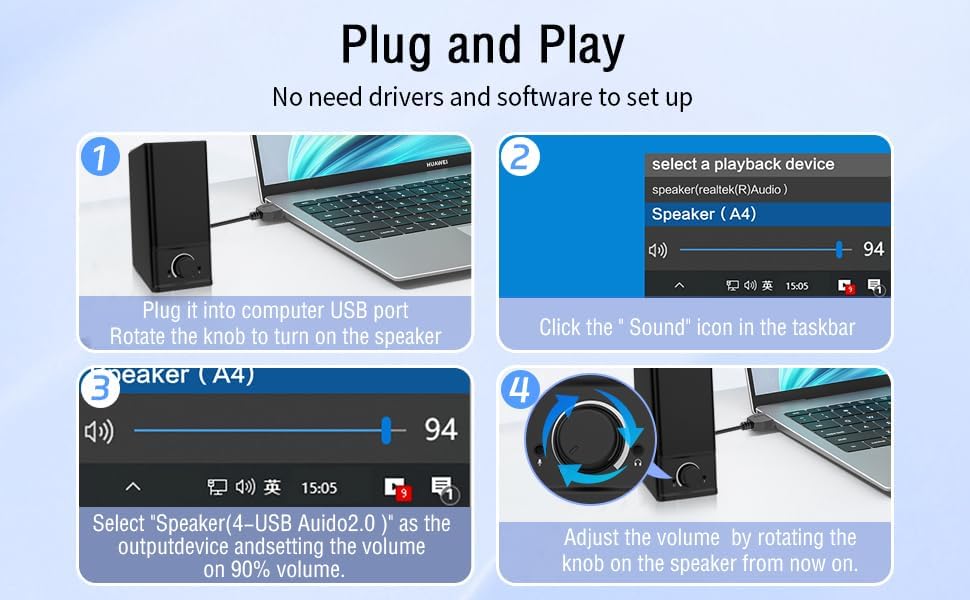
Операция
The LENRUE A38S speakers feature a multi-function knob for easy control.
- Күйгүзүү/өчүрүү: Rotate the knob clockwise to turn on the speakers. Rotate counter-clockwise until it clicks to turn off.
- Үндү көзөмөлдөө: Үнүн жогорулатуу үчүн баскычты сааттын жебеси боюнча, үнүн азайтуу үчүн сааттын жебесине каршы буруңуз.
- RGB жарык режимдери: Double-click the knob to cycle through the three dynamic RGB lighting modes.
- Turn Off RGB Lights: Triple-click the knob to turn off all RGB lighting.

Техникалык тейлөө
Тийиштүү кам көрүү сиздин динамиктериңиздин узак мөөнөттүү иштешин камсыздайт.
- Тазалоо: Use a soft, dry cloth to wipe the speaker's surface. Do not use liquid cleaners or abrasive materials.
- Сактагыч: Динамиктерди күндүн тике тийген нурунан жана экстремалдык температурадан алыс салкын, кургак жерде сактаңыз.
- Суу каршылык: The speakers are waterproof. However, avoid prolonged submersion or exposure to high-pressure water jets to prevent damage. Ensure all ports are dry before connecting cables.
Проблемаларды чечүү
Эгер көйгөйлөргө туш болсоңуз, төмөнкү жалпы чечимдерди караңыз:
| Көйгөй | Чечим |
|---|---|
| Динамиктерден үн жок |
|
| RGB жарыктары иштебейт |
|
| Бузулган аудио |
|
Техникалык шарттар
Detailed technical specifications for the LENRUE A38S Computer Speakers.
- Модель аты: A38S
- Динамик түрү: Коаксиалдуу
- Аудио чыгаруу: Dual 5W drivers (10W RMS total), 18W Max Output
- Көлөмдүү үн каналынын конфигурациясы: 2.0 Стерео
- Байланыш: USB (for power), 3.5mm Aux-in (for audio)
- Кубат булагы: USB Powered with internal Lithium Ion Battery
- Шайкеш түзмөктөр: Desktops, PCs, Laptops, Mac, Tablets, Phones, Projectors, PS4, MP3 players
- Өзгөчөлүктөрү: Dynamic RGB Lighting, Plug-n-Play, Waterproof
- Продукциянын өлчөмдөрү: 2.1" (Т) x 16" (Т) x 2.5" (Бийиктиги)
- Элемент Салмагы: 286 грамм (10.1 унция)
- Кабелдин узундугу: Approximately 47.3 inches (USB and 3.5mm audio)
- Камтылган компоненттер: LENRUE A38S Speaker Unit, USB-A to Type-C Adapter, USB Power Cable, 3.5mm Audio Cable


Кепилдик жана колдоо
LENRUE is committed to providing quality products and customer satisfaction.
- Кепилдик: Your LENRUE A38S speakers come with a 12-month worry-free replacement service from the date of purchase. This limited warranty covers manufacturing defects.
- Кардарларды тейлөө: We offer lifetime customer service for any questions or issues you may encounter. For support, please refer to the contact information provided with your purchase or visit the official LENRUE webсайт.