
Walfront UM34/UM34C
Walfront UM34C USB Meter Tester User Manual
Model: UM34/UM34C
1. Продукт бүтүп калдыview
The Walfront UM34C USB Meter Tester is a versatile device designed for real-time monitoring and measurement of various parameters related to USB power supply and charging. It provides detailed insights into voltage, current, power, internal resistance, temperature, and timing, making it an essential tool for evaluating charger performance, battery quality, and data cable integrity.

Сүрөт 1: Алдыңкы view of the Walfront UM34C USB Meter Tester displaying voltage жана учурдагы окуулар.
Негизги өзгөчөлүктөр төмөнкүлөрдү камтыйт:
- Convenient Connection: Seamlessly connects via Bluetooth to a mobile application for real-time monitoring of charging status, voltage, current, capacity, and other indicators.
- Data Cable Detection: Utilizes a voltage difference method to assess data cable quality by measuring voltage variations, helping to identify advantages жана disadvantages of different cables (requires a special load).
- Жогорку сапаттагы дисплей: Features a clear screen that displays multi-function data such as voltage, current, power, internal resistance, and temperature in real-time.
- Quick Identification: Capable of identifying QC2.0 and QC3.0 fast charging protocols.
- Quality Detection: Enables identification of charger and battery quality through capacity and energy detection.
2. Physical Components and Dimensions

Figure 2: Dimensions of the UM34C tester, approximately 7cm (2.75 inches) in length and 3cm (1.18 inches) in width.
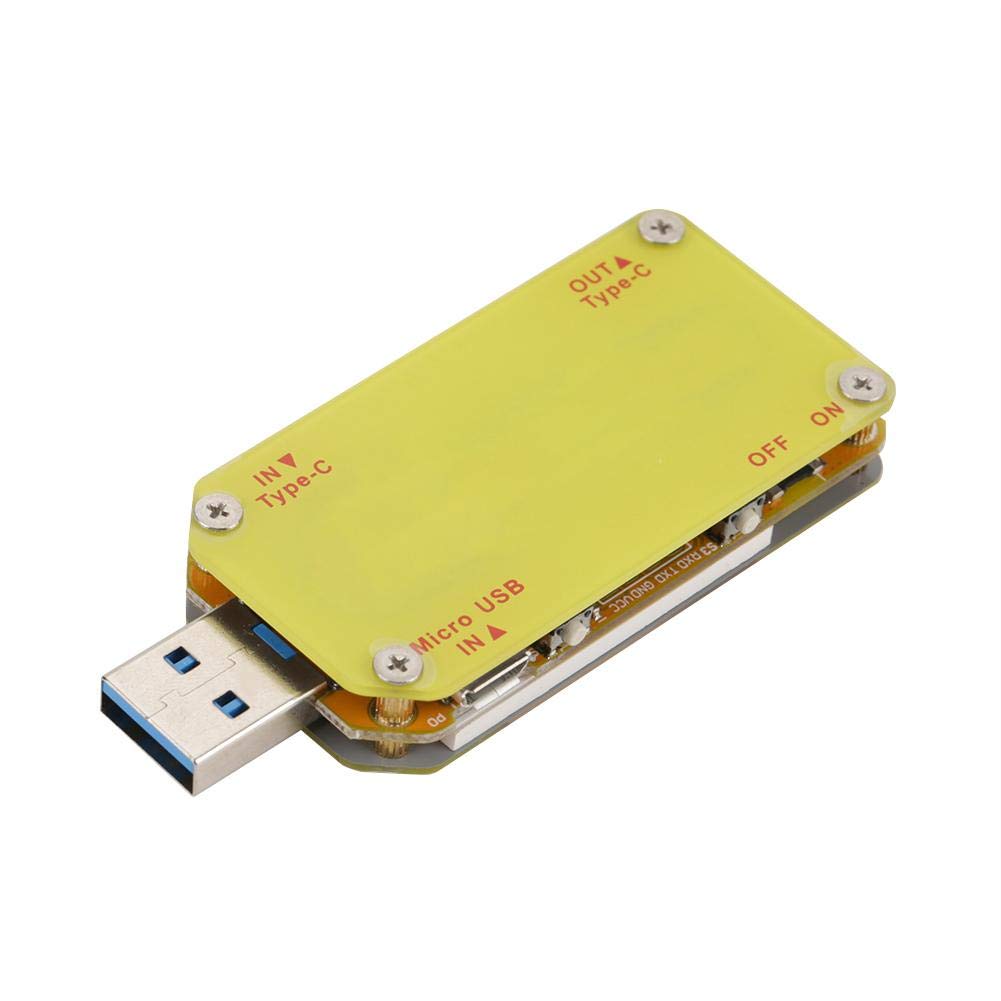
3-сүрөт: Арткы view of the UM34C tester, highlighting the input (IN Type-C, Micro USB IN A) and output (OUT Type-C) ports, along with the ON/OFF switch.
3. Орнотуу
To begin using your Walfront UM34C USB Meter Tester, follow these steps:
- Кубат туташуу: Insert the USB-A male connector of the UM34C into a USB power source (e.g., wall charger, power bank, computer USB port).
- Түзмөк туташуу: Connect the device you wish to test (e.g., smartphone, tablet, USB fan) to the appropriate output port on the UM34C (USB-A female, Type-C OUT).
- Баштапкы күйгүзүү: The device should power on automatically and display readings. If not, ensure the power source is active.
- App Download (for UM34C model): For advanced features and Bluetooth connectivity, download the official application to your mobile phone. Refer to the product packaging or manufacturer's website for QR codes or direct links to the app.
- Bluetooth жупташууда: Once the app is installed, open it and follow the in-app instructions to pair with your UM34C device via Bluetooth. Ensure Bluetooth is enabled on your mobile phone.

Figure 4: The UM34C tester in operation, monitoring a device connected to a power outlet.
4. Иштөө нускамалары
The UM34C provides various measurement modes and display screens. Use the physical buttons on the device to navigate through different screens and functions.
4.1. On-Screen Display Navigation
The device features "PREV" and "NEXT" buttons (or similar navigation controls) to cycle through different display screens. Each screen presents specific data:
- Негизги экран: Чыныгы убактагы томду көрсөтөтtage (V) жана ток (A).
- Capacity/Energy Screen: Shows accumulated charge capacity (mAh) and energy (mWh).
- Internal Resistance/Temperature Screen: Provides readings for internal resistance and device temperature.
- Data Cable Detection Screen: Used in conjunction with a special load to measure voltage drop across data lines (D+ and D-).
- Quick Charge Protocol Detection: Indicates detected fast charging protocols (e.g., QC2.0, QC3.0).
4.2. Using the Mobile Application (UM34C only)
The mobile application offers an enhanced user experience with graphical data representation, data logging, and remote control capabilities.
- Реалдуу убакыттагы маалыматтар: View all measured parameters simultaneously on your phone screen.
- Data Graphing: Observe trends in voltage, current, and power over time.
- Маалыматтарды экспорттоо: Export logged data for further analysis.
- Программалык камсыздоонун жаңыртуулары: Check for and apply firmware updates for the device via the app.
Refer to the in-app help section for detailed instructions on specific app features.
5. Техникалык тейлөө
Proper maintenance ensures the longevity and accuracy of your UM34C USB Meter Tester.
- Тазалоо: Аппаратты тазалоо үчүн жумшак, кургак чүпүрөктү колдонуңуз. Абразивдүү тазалагычтарды же эриткичтерди колдонбоңуз.
- Сактагыч: Store the device in a cool, dry place, away from direct sunlight and extreme temperatures. The included tin case (if applicable) provides excellent protection.
- Колдонуу: Avoid dropping the device or subjecting it to strong impacts, as this can damage internal components or the display.
- Нымдуулук: Keep the device away from water and high humidity. It is not waterproof.

Figure 5: The UM34C tester neatly stored in its protective tin case, ideal for safe keeping.
6. Кыйынчылыктарды
If you encounter issues with your UM34C USB Meter Tester, refer to the following common problems and solutions:
| Көйгөй | Мүмкүн себеп | Чечим |
|---|---|---|
| Device does not power on / Display is blank. | No power supply; Faulty USB port; Device malfunction. | Ensure the USB power source is active. Try a different USB port or charger. If problem persists, contact support. |
| Incorrect or fluctuating readings. | Loose connection; Faulty cable; Overload; Environmental interference. | Ensure all connections are secure. Try a different USB cable or device. Avoid using in environments with strong electromagnetic interference. |
| Bluetooth connection fails (UM34C). | Bluetooth off on phone; App not installed; Device not in pairing mode; Interference. | Ensure Bluetooth is enabled on your phone. Reinstall the app. Restart both the tester and your phone. Try pairing in a different location. |
| Display shows "Unknown" for D+/D- voltage. | No data cable connected; Cable not supporting data transfer; Special load not used. | Connect a data-enabled USB cable. Ensure the cable is fully functional. Use a special load as required for data cable detection. |
7. Техникалык шарттар
The following table outlines the technical specifications for the Walfront UM34C USB Meter Tester:
| Параметр | Нарк |
|---|---|
| Модель номери | UM34/UM34C |
| Продукциянын өлчөмдөрү (L x W x Y) | 2.8 x 1.2 x 0.49 дюйм (7 x 3 x 1.24 см) |
| Элемент Салмагы | 0.05 килограмм (1.76 унция) |
| Минималдуу иштетүү көлөмүtage | 4 вольт |
| Power Source | Battery Powered (internal, charged via USB) |
| Өндүрүүчү | Walfront |
| ASIN | B07HKBQML9 |
8. Кепилдик жана колдоо
Information regarding the specific warranty period and detailed support procedures for the Walfront UM34C USB Meter Tester is not available in the provided product data. For warranty claims, technical assistance, or further inquiries, please refer to the contact information provided with your product packaging or visit the official Walfront webсайт.
You may also contact the seller directly through the platform where the product was purchased for support.
Ask a question about this manual
Ask about setup, troubleshooting, compatibility, parts, safety, or missing instructions. Manuals+ will review the question and use this page’s manual context to help answer it.