
1. Introduction and Overview
The Xiaomi Mi Air Purifier 2S AC-M4-AA is designed to improve indoor air quality by efficiently filtering out pollutants. This intelligent air purifier is suitable for rooms up to 37m² and features a Clean Air Delivery Rate (CADR) of 310m³ per hour. It offers smart connectivity for app control and integrates with voice assistants for convenient operation, providing real-time air quality monitoring via its OLED display.
2. Продукциянын өзгөчөлүктөрү
- European Version for compliance with regional standards.
- Smart air purifier with Wi-Fi connectivity and mobile app control (Mi Home app).
- Effective for rooms up to 37m² (approximately 398 sq ft).
- High air purification capacity of 310m³/h CADR.
- Integrated OLED display for real-time air quality (PM2.5), temperature, humidity, and filter status.
- Equipped with a high-efficiency HEPA filter for comprehensive air purification.
- Low noise operation, especially in Night Mode (as low as 32 dB).
- Voice control compatibility with supported smart home platforms.
3. Пакеттин мазмуну
Пакетте бардык буюмдар бар экенин текшериңиз:
- Xiaomi Mi Air Purifier 2S (AC-M4-AA)
- Электр кабели
- User Manual
- HEPA Filter (pre-installed or separately packaged)
4. Коопсуздук нускамалары
To ensure safe operation and prevent damage, please read and follow these safety guidelines:
- Always unplug the air purifier before cleaning, maintenance, or moving it.
- Do not block the air inlet or outlet vents. Maintain at least 20 cm (8 inches) clearance from walls and other objects.
- Use only the power adapter provided with the device. Ensure the voltage сиздин жергиликтүү электр камсыздооңузга дал келет.
- Do not operate the air purifier in wet or humid environments, such as bathrooms. Keep it away from water and other liquids.
- Бул шайман физикалык, сезүү же акыл-эс жөндөмү начар же тажрыйбасы жана билими жок адамдар (анын ичинде балдар) үчүн, эгерде алардын коопсуздугуна жооптуу адам тарабынан көзөмөлсүз же шайманды колдонуу боюнча көрсөтмө болбосо, колдонууга арналбайт.
- Манжаларды же бөтөн нерселерди аба кирүүчү же чыгуучу жайга киргизбеңиз.
- Do not use the air purifier near heat sources, flammable gases, or volatile substances.
- Электр зымы бузулган болсо, коркунучту болтурбоо үчүн аны өндүрүүчү, анын тейлөө агенти же ушуга окшогон квалификациялуу адамдар алмаштырышы керек.
5. Орнотуу
Follow these steps to set up your Xiaomi Mi Air Purifier 2S:
- Аппаратты таңгактан чыгаруу: Carefully remove the air purifier from its packaging. Remove any protective films or tapes.
- Чыпканы орнотуу/текшерүү: Open the filter compartment cover, usually located at the back or bottom of the unit. Ensure the HEPA filter is correctly seated and any plastic packaging around the filter is removed. Close the cover securely.
- Тазалагычты жайгаштырыңыз: Place the air purifier on a flat, stable surface. Ensure there is at least 20 cm (8 inches) of clear space around all sides and above the unit for optimal air circulation.
- Туташуу кубаты: Plug the power cable into the power port on the back of the purifier, then plug the other end into a suitable electrical outlet.
- Mi Home колдонмосун жүктөп алыңыз: Scan the QR code in the manual or search for "Mi Home" in your smartphone's app store (Google Play Store or Apple App Store). Download and install the app.
- Колдонмого туташуу: Open the Mi Home app, create an account or log in. Follow the in-app instructions to add your Xiaomi Mi Air Purifier 2S. This typically involves selecting the device, connecting to its temporary Wi-Fi hotspot, and then connecting it to your home Wi-Fi network (2.4GHz only).

Сүрөт: алдыңкы view of the Xiaomi Mi Air Purifier 2S, showing the main body and the circular OLED display.

Сүрөт: жогорудан төмөнгө view of the Xiaomi Mi Air Purifier 2S, highlighting the fan grille and control buttons on the top surface.
6. Иштөө нускамалары
Your air purifier can be operated via the physical buttons on the unit or through the Mi Home app.
6.1. Using Physical Buttons
- Кубат баскычы: Press the power button on the top of the unit to turn the air purifier on or off.
- Режим баскычы: Press the mode button (often integrated with the power button or a separate button) to cycle through operating modes: Automatic, Night, and Manual.
6.2. Using the Mi Home App
The Mi Home app provides comprehensive control and monitoring features:
- Алыстан башкаруу: Turn the purifier on/off, change modes, and adjust fan speed from anywhere.
- реалдуу убакыт мониторинг: View current PM2.5 levels, temperature, and humidity in your room.
- Пландаштыруу: Set schedules for the purifier to turn on/off or change modes automatically.
- Чыпка абалы: Monitor the remaining lifespan of your filter and receive notifications when it's time for replacement.
- Орнотуулар: Adjust display brightness, enable/disable sounds, and other device-specific settings.
6.3. Иштөө режимдери
- Автоматтык режим: The purifier intelligently adjusts its fan speed based on the real-time air quality detected by its sensors.
- Түнкү режим: Operates at the lowest fan speed with minimal noise and a dimmed OLED display to ensure undisturbed sleep.
- Кол режими: Allows you to manually select a desired fan speed or purification intensity.
6.4. OLED Display Information
The circular OLED display provides key information at a glance:
- PM2.5 Концентрация: Shows the current particulate matter level in µg/m³.
- Температура: Displays the ambient room temperature.
- Нымдуулук: Shows the relative humidity level.
- Wi-Fi абалы: Indicates connection status to your home network.
- Иштөө режими: Shows the currently active purification mode.
- Чыпкалоо мөөнөтү: Displays the remaining percentage of the filter's life.

Image: The Xiaomi Mi Air Purifier 2S positioned in a modern living room, demonstrating its compact design and how it blends with home decor.
7. Техникалык тейлөө
Үзгүлтүксүз тейлөө оптималдуу иштешин камсыз кылат жана аба тазалагычыңыздын иштөө мөөнөтүн узартат.
7.1. Фильтрди алмаштыруу
The HEPA filter has a limited lifespan, typically 6-12 months, depending on usage and air quality. The Mi Home app and the OLED display will indicate when the filter needs replacement.
- Unplug the Purifier: Always disconnect the power before replacing the filter.
- Open Filter Compartment: Locate and open the filter compartment cover (usually at the back or bottom).
- Эски чыпканы алып салуу: Колдонулган чыпканы этияттык менен сууруп алыңыз. Аны жергиликтүү эрежелерге ылайык жок кылыңыз.
- Жаңы чыпка киргизүү: Place a new, genuine Xiaomi HEPA filter into the compartment, ensuring it is correctly oriented and seated.
- Мукабаны жабуу: Чыпка бөлүкчөсүнүн капкагын бекем жабыңыз.
- Reset Filter Lifespan: After replacement, open the Mi Home app and follow the prompts to reset the filter lifespan counter. This ensures accurate tracking of the new filter's usage.

Сүрөт: Арткы view of the Xiaomi Mi Air Purifier 2S, illustrating the location of the filter compartment cover for maintenance.
7.2. Cleaning the Purifier
- Тышкы тазалоо: Wipe the exterior surfaces of the air purifier with a soft, dry cloth. Do not use abrasive cleaners, solvents, or harsh chemicals, as these can damage the finish.
- Аба киргизүү/чыгаруу торлору: Use a soft brush or a vacuum cleaner with a brush attachment to gently clean dust and debris from the air inlet and outlet grilles.
- Лазердик бөлүкчөлөр сенсору: Periodically clean the laser particle sensor, usually located on the back of the unit. Refer to the detailed manual or Mi Home app for specific instructions on how to access and clean this sensor, as it is crucial for accurate air quality readings.
8. Кыйынчылыктарды
Аба тазалагычыңызда көйгөйлөргө туш болсоңуз, төмөнкү жалпы көйгөйлөрдү жана чечимдерди караңыз:
| Көйгөй | Мүмкүн себеп | Чечим |
|---|---|---|
| Түзмөк күйбөйт | Power cable not connected; Filter compartment not closed properly; Power outlet issue. | Ensure power cable is securely plugged in. Close the filter compartment cover completely. Test the power outlet with another device. |
| No Wi-Fi connection / App control not working | Incorrect Wi-Fi password; Router too far; 5GHz Wi-Fi network; App pairing issue. | Ensure your Wi-Fi network is 2.4GHz. Move the purifier closer to the router. Restart the purifier and your router. Follow the Mi Home app's re-pairing instructions. |
| Начар тазалоо көрсөткүчтөрү | Filter lifespan expired; Air inlets/outlets blocked; Dirty laser particle sensor. | Check filter lifespan in the app and replace if necessary. Ensure no obstructions around the air inlets/outlets. Clean the laser particle sensor as per maintenance instructions. |
| Иш учурунда адаттан тыш ызы-чуу | Foreign object inside; Filter not seated correctly. | Unplug the device and check for any foreign objects. Ensure the filter is properly installed and secured. |
| OLED display not working or showing incorrect information | Temporary glitch; Sensor malfunction. | Try restarting the device by unplugging and plugging it back in. If the issue persists, contact customer support. |
9. Техникалык шарттар
Detailed technical specifications for the Xiaomi Mi Air Purifier 2S AC-M4-AA:
| Спецификация | Нарк |
|---|---|
| Модель номери | AC-M4-AA |
| Өлчөмдөрү (L x W x Y) | 24 x 24 x 52 см (9.4 x 9.4 x 20.5 дюйм) |
| Салмагы | 4.5 кг (9.9 фунт) |
| Power Source | Электр кабели |
| Номиналдуу кубаттуулук | 29 Ватт |
| Чыпка түрү | HEPA |
| Колдонулуучу аймак | 37 м² (398 чарчы фут) чейин |
| Ызы-чуу деңгээли | 32 Decibels (in Night Mode) |
| Башкаруу түрү | Application and Physical Buttons |
| Өзгөчөлүктөр | Wi-Fi Connectivity, OLED Display |
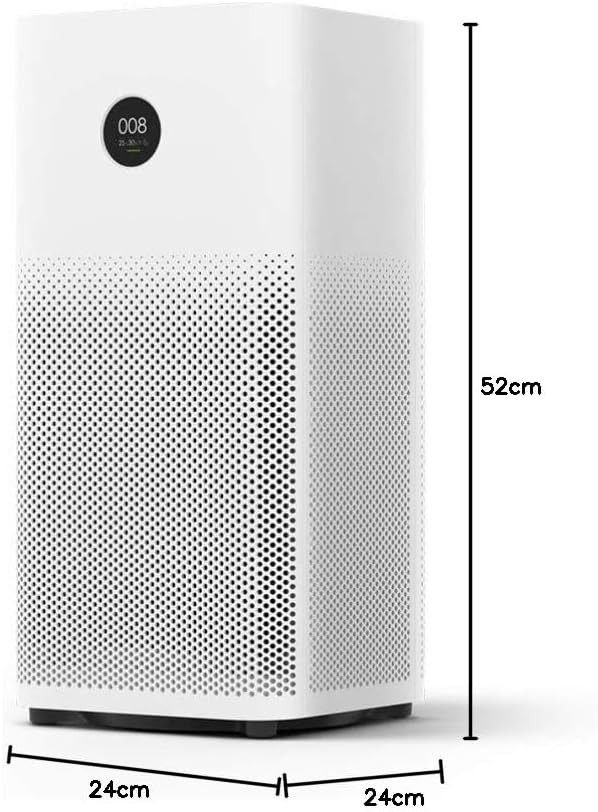
Image: Diagram illustrating the dimensions (height, width, depth) of the Xiaomi Mi Air Purifier 2S.
10. Кепилдик жана колдоо
For detailed warranty information, terms, and conditions, please refer to the warranty card included with your product or visit the official XIAOMI webсайт. Сатып алуу квитанциясын кепилдик дооматтары үчүн сатып алуунун далили катары сактаңыз.
For technical support, service, or inquiries regarding your Xiaomi Mi Air Purifier 2S, please contact XIAOMI customer service or your local authorized retailer. Contact information can typically be found on the official XIAOMI webсайтында же продукт документациясында.