
Introduction
This manual provides essential instructions for the safe and efficient use of your Maxcom MM134 2G Senior Mobile Phone. Please read this manual thoroughly before operating the device and keep it for future reference.
1. Орнотуу
1.1 Пакеттин мазмуну
Бардык буюмдар кутуда бар экенин текшериңиз:
- Maxcom MM134 Mobile Phone
- Батарея (литий-ион)
- Заряддагыч
- USB кабели
- Гарнитура
- User Manual
1.2 SIM картаны жана батарейканы салуу
- Телефондун арткы капкагын алып салыңыз.
- Insert your SIM card into the designated slot. The MM134 supports a single SIM card.
- If using, insert a Micro SD card (up to 32GB) into its slot.
- Insert the Lithium-ion battery, ensuring the contacts align correctly.
- Арткы капкакты ордуна чыкылдаган үн чыкканга чейин кайра жабыңыз.
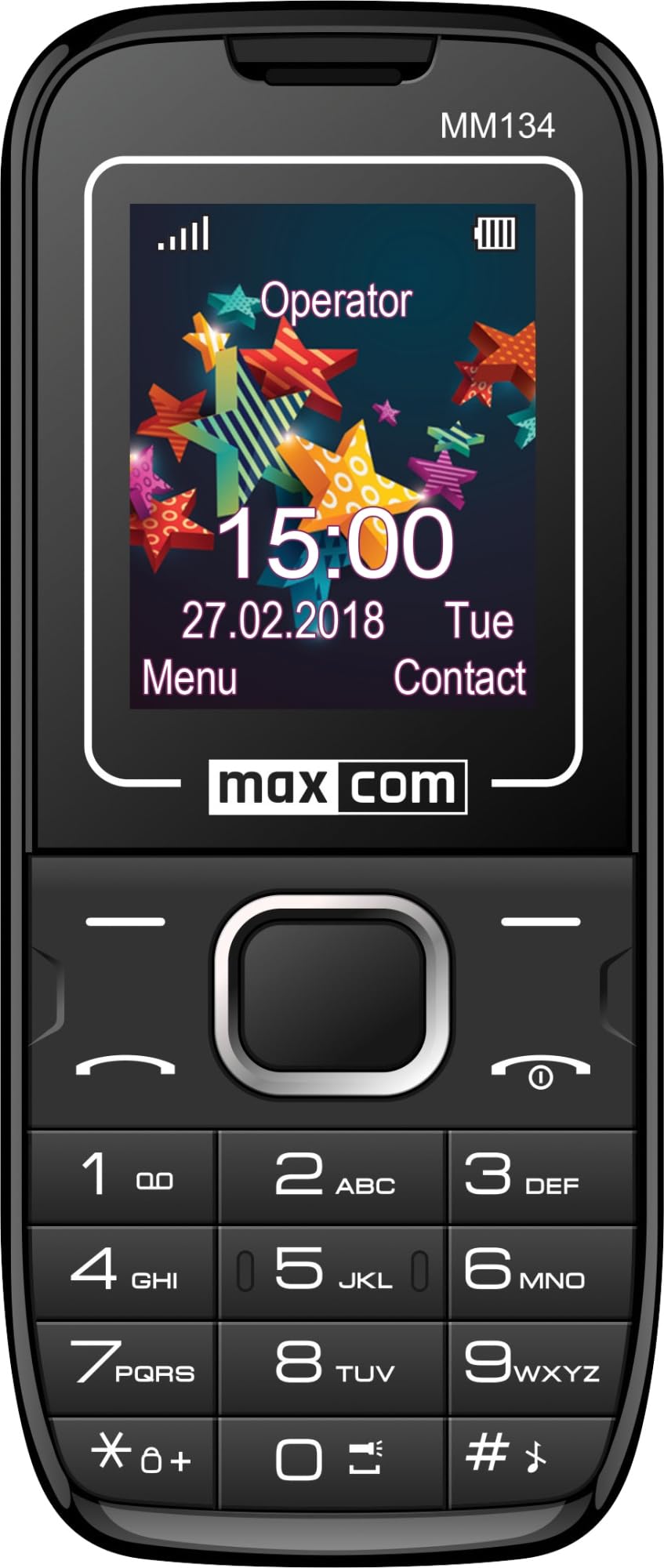
Image 1: Maxcom MM134 2G Senior Mobile Phone. This image shows the front of the phone, highlighting its compact design, screen, and large, easy-to-use buttons.
1.3 Телефонду кубаттоо
Connect the charger to the phone's charging port and plug it into a power outlet. The battery indicator on the screen will show charging status. Fully charge the phone before first use. The battery capacity is 800 mAh.
1.4 Күйгүзүү/өчүрүү
- Күйгүзүү үчүн: басып, кармап туруңуз Чакырууну өчүрүү/аяктоо экран күйгүчө баскычын басыңыз.
- Өчүрүү үчүн: басып, кармап туруңуз Чакырууну өчүрүү/аяктоо button, then confirm shutdown.
2. Иштөө нускамалары
2.1 Чалууларды кабыл алуу жана кабыл алуу
- To make a call: Enter the phone number using the keypad and press the Чалуу баскычы.
- To answer a call: Press the Чалуу телефон шыңгырганда баскычын басыңыз.
- Чакырууну бүтүрүү үчүн: басыңыз Чакырууну өчүрүү/аяктоо баскычы.
2.2 Contacts (Phonebook)
The phonebook can store up to 500 entries. Navigate to the "Contacts" menu to add, edit, or delete entries.
2.3 SMS билдирүүлөрдү жөнөтүү жана алуу
The phone can store up to 200 SMS messages. Access the "Messages" menu to compose new messages or view received ones.
2.4 Bluetooth байланышы
To enable Bluetooth, go to the "Settings" menu, then "Connectivity" or "Bluetooth". You can pair with other Bluetooth-enabled devices for hands-free communication or file өткөрүп берүү.
2.5 FM радиосу
Plug in the headset (which acts as an antenna) to use the FM Radio function. Navigate to the "FM Radio" application in the menu to scan for stations.
2.6 Фонар
The phone features a built-in flashlight. Typically, this can be activated by a dedicated button or through a quick access menu option.
2.7 Камера
The phone is equipped with a rear camera (0.08 MP). Access the "Camera" application from the main menu to take photos. Photos will be saved to the phone's memory or the inserted Micro SD card.
3. Техникалык тейлөө
3.1 Батареяга кам көрүү
- Батареяны экстремалдуу температурага тийгизүүдөн сактаңыз.
- Батареяны тешип же зыян келтирбеңиз.
- Телефон менен кошо берилген оригиналдуу кубаттагычты гана колдонуңуз.
- If the phone will not be used for an extended period, charge it partially before storage and recharge every few months.
3.2 Тазалоо
Wipe the phone with a soft, dry cloth. Do not use liquid cleaners or aerosols. The phone is not water-resistant.
4. Кыйынчылыктарды
| Көйгөй | Чечим |
|---|---|
| Телефон күйбөйт | Батарея туура салынганын жана заряддалганын текшериңиз. Кубаттоочу түзүлүштү туташтырып, кайра аракет кылыңыз. |
| Тармак сигналы жок | SIM карта туура салынганын текшериңиз. Тармактын камтуусу жакшыраак аймакка көчүңүз. Эгерде көйгөй чечилбесе, кызмат көрсөтүүчүңүзгө кайрылыңыз. |
| Чалууларды кабыл алуу же жасоо мүмкүн эмес | Verify that your SIM card is active and has sufficient credit/plan. Check network signal strength. |
| Батарея бат эле түгөнөт | Reduce screen brightness. Close unused applications. Limit background data usage. Ensure the battery is not old or damaged. The phone has a talk time of approximately 6 hours. |
5. Техникалык шарттар
| Модель аты | Classic MM134 |
| Бренд | Maxcom |
| Операция системасы | Symbian |
| Уюлдук технология | 2G (GSM 900/1800 MHz) |
| Байланыш технологиясы | Bluetooth, USB |
| Screen Size | 1.77 дюйм (LCD) |
| CPU модели | Cortex (1.8 GHz) |
| Камера сүрөттөмөсү | Rear (0.08 MP) |
| Батарея түрү | Литий-ион |
| Батарея сыйымдуулугу | 800 мАч |
| Talk Time | 6 саатка чейин |
| SMS Memory | 200ге чейин билдирүүлөр |
| Телефон китепчесинин сыйымдуулугу | 500гө чейин жазуу |
| Микро SD картаны колдоо | 32 ГБ чейин |
| SIM карта уячалары | Жалгыз SIM |
| Өлчөмдөр | 13 x 52 x 111 мм |
| Наушник уясы | 3.5 мм Джек |
| Суу каршылык | Жок |
6. Кепилдик жана колдоо
For warranty information and technical support, please refer to the warranty card included in your product package or visit the official Maxcom webсайт. Кепилдик дооматтар үчүн сатып алганыңыздын далилин сактаңыз.